Solved Missing XML Editor

qwertymikey

New member
Member
Local time
3:58 PM
Messages
45
Hi,

I noticed that when I right click on xml files > open with, "XML Editor" is missing... I dont know why. I have Office 2013 Professional Plus. On my dads laptop with Office 2007 Home Edition (or something like that) it shows the xml editor.

i was reading this and it said that x64 versions of office dont come with the xml editor, but i have the x32 version or how can i check?

No XML Editor to associate with .xml files - Microsoft Community

thanks
 

My Computer

OS
Windows 7 Home Premium x64
CPU
Intel Core i7 3770
Hi,

I noticed that when I right click on xml files > open with, "XML Editor" is missing... I dont know why. I have Office 2013 Professional Plus. On my dads laptop with Office 2007 Home Edition (or something like that) it shows the xml editor.

i was reading this and it said that x64 versions of office dont come with the xml editor, but i have the x32 version or how can i check?

No XML Editor to associate with .xml files - Microsoft Community

thanks

Hello qwertymikey,

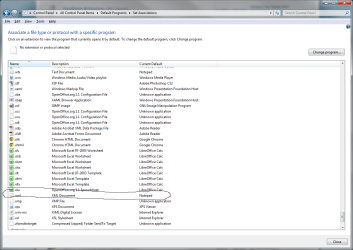
Go into control panel>default programs. associate a file type or protocol with a program use notepad


xml.png


Look here, it provides info on file types
 

My Computer

Computer type
PC/Desktop
Computer Manufacturer/Model Number
Dude Build
OS
Windows 10 Pro X64
CPU
Intel(R) Core(TM) i5-3570K CPU OC@ 4.5GHZ Turbo
Motherboard
MSI Z77A-G45 Gaming
Memory
8.00 GB DDR3 1600Mhz
Graphics Card(s)
MSI Gaming X GTX 1070
Sound Card
Realtek High Definition
Monitor(s) Displays
Dell S23O9W, HP L1710
Screen Resolution
DELL-1920 x 1080 HP-1280 x1024
Hard Drives
Crucial m4 256 SSD, WD 7200RPM 500GB WD 1TB
PSU
Seasonic X650 GOLD
Case
Zalman Z12
Cooling
Antec Kuhler 920
Keyboard
Logitech
Mouse
MSI DS100 Interceptor
Internet Speed
50 down and 5 up
Antivirus
MSE
Browser
Chrome, IE 11
Other Info
Logitech X-620 Speakers
Hi,

I noticed that when I right click on xml files > open with, "XML Editor" is missing... I dont know why. I have Office 2013 Professional Plus. On my dads laptop with Office 2007 Home Edition (or something like that) it shows the xml editor.

i was reading this and it said that x64 versions of office dont come with the xml editor, but i have the x32 version or how can i check?

No XML Editor to associate with .xml files - Microsoft Community

thanks

Hello qwertymikey,

Go into control panel>default programs. associate a file type or protocol with a program use notepad


View attachment 265086


Look here, it provides info on file types

hi,

thanks for your answer

what I am asking is why "xml editor" is not appearing as an option there.... it is installed with office right? since it has the office icon

these are not my pictures

210460d1336289976-ie9-no-longer-able-open-xml-xml.jpg


5460.image_5F00_7.png
 

My Computer

OS
Windows 7 Home Premium x64
CPU
Intel Core i7 3770
ok i think i got it.

i got instead a program called Microsoft Application Virtualization Virtual Process Launcher

i chose it and now all the programs got the default xml icon and open with ie (as i wanted)

i think this program is installed with office 2013 and past versions got the xml editor instead
 

My Computer

OS
Windows 7 Home Premium x64
CPU
Intel Core i7 3770
Okay, glad you got it sorted.
 

My Computer

Computer type
PC/Desktop
Computer Manufacturer/Model Number
Dude Build
OS
Windows 10 Pro X64
CPU
Intel(R) Core(TM) i5-3570K CPU OC@ 4.5GHZ Turbo
Motherboard
MSI Z77A-G45 Gaming
Memory
8.00 GB DDR3 1600Mhz
Graphics Card(s)
MSI Gaming X GTX 1070
Sound Card
Realtek High Definition
Monitor(s) Displays
Dell S23O9W, HP L1710
Screen Resolution
DELL-1920 x 1080 HP-1280 x1024
Hard Drives
Crucial m4 256 SSD, WD 7200RPM 500GB WD 1TB
PSU
Seasonic X650 GOLD
Case
Zalman Z12
Cooling
Antec Kuhler 920
Keyboard
Logitech
Mouse
MSI DS100 Interceptor
Internet Speed
50 down and 5 up
Antivirus
MSE
Browser
Chrome, IE 11
Other Info
Logitech X-620 Speakers
I am having the same problem. I too have Office 2013 x86. However, I have neither of these programs mentioned in this thread. Not the one the OP was looking for, nor do I have the one that the OP said that he got it working with.
 

My Computer

Computer type
PC/Desktop
Computer Manufacturer/Model Number
Dell Optiplex 780
OS
Windows 7 Ultimate 64-bit SP1
CPU
Intel Core 2 Duo E8400 @ 3.00GHz
Motherboard
Dell Inc. 03NVJ6 (CPU)
Memory
8.00GB Single-Channel DDR3 @ 531MHz (7-7-7-20)
Graphics Card(s)
Intel Q45/Q43 Express Chipset (Dell)
Sound Card
SoundMAX Integrated Digital High Definition Audio
Monitor(s) Displays
Viore
Screen Resolution
1920x1080
Hard Drives
149GB Seagate ST3160318AS (SATA)
Keyboard
Dell
Mouse
Dell
Internet Speed
up to 7 Mbps (average 3.2 Mbps)
Antivirus
AVG IS
Browser
Firefox, Chrome
Back
Top