Solved Mistake when reinstalling Win 7 - seem to have set 2 drive to System?

essbase

New member
Local time
2:15 PM
Messages
4
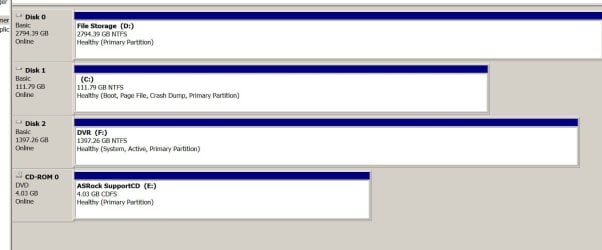
I reinstalled window 7 on a computer that was having issues. I deleted the existing Windows partition/drive and ran the install to that Drive (c). After getting everything reinstalled I was going to image the C Drive. It appears to be linked to another large drive (3tb). That drive didnt show up post win7 install. I went into Drive Management and added a letter thinking it was because it was larger then 2Tb. I am not sure how to proceed to convert the large drive back to a "regular" partition. Any help is appreciated. See snip of drives attached.
 

Attachments

  • Drives.JPG
    Drives.JPG
    65.9 KB · Views: 3

My Computer My Computer

At a glance

Home prem 64i5-6400
Computer type
PC/Desktop
Computer Manufacturer/Model Number
custom build
OS
Home prem 64
CPU
i5-6400
Motherboard
AS Rock 110HD
Hi essbase, welcome to the Forum.

This is what happens when you do a fresh install of Windows with other drives connected to the motherboard. Sometimes part of the install gets placed on another drive, which is what's happened in your case.

The best thing to do would be, firstly disconnect all the other drives from the motherboard, then reinstall Windows to the C drive, reformatting it during the process. This will give you a properly installed Operating System.

It looks like part of the original Windows 7 install went to Disk 2 DVR (F:) as the System is showing there which should be on the C drive, but you cannot move it to the C drive. If you don't have other software & files on Drive 2 it would be best to reformat that as well.

After you have reinstalled Windows to the C drive, make sure you go into the BIOS & have the C Drive as the first boot option.
 

My Computer My Computer

At a glance

Windows 7 Home Premium 64 bit sp1Intel i5 3570 3.4Ghz Ivy Bridge SKT 1155 quad...G-Skill Rip Jaws 16Gb (8x2) DDR3 -1600 PC3 12...Gigabyte NVIDIA GT610 1Gb DDR3 810/1200 PCI-E...
Computer type
PC/Desktop
Computer Manufacturer/Model Number
Self built using existing case
OS
Windows 7 Home Premium 64 bit sp1
CPU
Intel i5 3570 3.4Ghz Ivy Bridge SKT 1155 quad core
Motherboard
Gigabyte Z77-HD3 SKT 1155 2xSata 3, 4x USB 3.0
Memory
G-Skill Rip Jaws 16Gb (8x2) DDR3 -1600 PC3 12800 CL 10 red
Graphics Card(s)
Gigabyte NVIDIA GT610 1Gb DDR3 810/1200 PCI-E 2.0 Silent
Sound Card
NVIDIA High Definition & Realtech High Definition Audio
Monitor(s) Displays
2 x Philips 226V4L 16:9 aspect ratio
Screen Resolution
1920 x 1080 HD
Hard Drives
Samsung 840 Pro 256gb SSD, SATA 3.
Hitachi Touro Portable 1tb, USB 3.0 HDD used for image b/ups.
PSU
Corsair VS450
Case
Codeng
Cooling
PSU fan & CPU fan
Keyboard
Logitech
Mouse
Logitech Wireless trackball M570
Internet Speed
Wireless 3G. 3mg down & 550kb up.
Antivirus
Bitdefender Internet Security 2020
Browser
Opera (Current Version) & Firefox
Other Info
MS Office 2013 Pro. Davis weather station software. MGE Nova 600 avr UPS.
Open an adminstrator command prompt and type: (press enter after each command)

diskpart
sel vol C
act
sel vol F
inact
exi

bcdboot c:\windows /s c:


It will only take a few seconds. Then reboot your pc.
 

My Computers My Computers

  • At a glance

    7 X64i5 84002x8gb 3200mhz
    Computer type
    PC/Desktop
    OS
    7 X64
    CPU
    i5 8400
    Motherboard
    gigabyte b365m ds3h
    Memory
    2x8gb 3200mhz
    Hard Drives
    various
    PSU
    pure power 11 400w cm
    Case
    Coolermaster
    Cooling
    cryorig m9i
  • At a glance

    7x64g54008gb ddr4 2400
    Computer type
    PC/Desktop
    OS
    7x64
    CPU
    g5400
    Motherboard
    ga b365m ds3h
    Memory
    8gb ddr4 2400
    PSU
    xfx pro 450w
SIW2 - Thanks!

Followed your steps and everything seems normal. One question. I had downloaded minitool Disk Part and within that I can see the "extra" System Part on Disc 1 (128MB Part) should I delete this? THANKS!!!
 

My Computer My Computer

At a glance

Home prem 64i5-6400
Computer type
PC/Desktop
Computer Manufacturer/Model Number
custom build
OS
Home prem 64
CPU
i5-6400
Motherboard
AS Rock 110HD
SIW2 - One more...

I thought I woudl be able to set boot priority in the Bios to start with Disc 1 (SSD we added the system to). However it doesn't show as an option. Thoughts or Concerns? Thanks again for you help!

 

My Computer My Computer

At a glance

Home prem 64i5-6400
Computer type
PC/Desktop
Computer Manufacturer/Model Number
custom build
OS
Home prem 64
CPU
i5-6400
Motherboard
AS Rock 110HD
Fixed it

Thanks for the help. When I moved it to SATA 0 and rebooted it appeared. Thanks for the HELP!!!
 

My Computer My Computer

At a glance

Home prem 64i5-6400
Computer type
PC/Desktop
Computer Manufacturer/Model Number
custom build
OS
Home prem 64
CPU
i5-6400
Motherboard
AS Rock 110HD
Back
Top