Misterious "No sound device installed"

nayab

New member
Local time
4:03 AM
Messages
2
Hi, Please help me to solve a big mystery that even the laptop technician failed to. I have Compaq Presario 3614 AU with WIn 7 Ultimate. As it show in low right corner "No Audio Output Device is installed" Many times I brought it for reparation and the technician fixed it claiming that the cable connection melted due to high temperature. He also put a new sound chip. But after reparation it can't stand more than 2 or 3 days. Each time I have to use a USB sound card. In fact, I'm little sceptic regarding the technician's explanation because right now it failed while the laptop is not hot at all. (i'm also using a cooling pad). Of course I can't install any driver since there's no sound device installed. I got the same mysterious issue when I was using XP previously. Please any help/suggestion? Thanks AMD Turion 64 x2 2Gb HDD 120Gb Win 7 Audio device Connexant.
 

My Computer My Computer

Computer Manufacturer/Model Number
Compaq Presario 3614 AU
OS
Windows Ultimate 32 bit
CPU
Amd Turion 64 x2
Memory
2Gb
Monitor(s) Displays
Nvdia
Hi, Please help me to solve a big mystery that even the laptop technician failed to. I have Compaq Presario 3614 AU with WIn 7 Ultimate. As it show in low right corner "No Audio Output Device is installed" Many times I brought it for reparation and the technician fixed it claiming that the cable connection melted due to high temperature. He also put a new sound chip. But after reparation it can't stand more than 2 or 3 days. Each time I have to use a USB sound card. In fact, I'm little sceptic regarding the technician's explanation because right now it failed while the laptop is not hot at all. (i'm also using a cooling pad). Of course I can't install any driver since there's no sound device installed. I got the same mysterious issue when I was using XP previously. Please any help/suggestion? Thanks AMD Turion 64 x2 2Gb HDD 120Gb Win 7 Audio device Connexant.

Hey nayab,
Open device manager (by r-clicking the computer properties then on left top side) and search for sound and video devices then click on "search automatically for updated driver software" or u can alwys try the windows update, if this doesn't work then click "browse my computer for driver software" then browse the folder of your driver (I prefer, u copy the driver folder from driver cd rather than browsing the cd itself)
Then it will install the driver IF... there's no hardware prob.
And may I know the manufacturer name of your sound device?
 

My Computer My Computer

OS
Windows 7 Ultimate x86
Thanks for your quick reply.
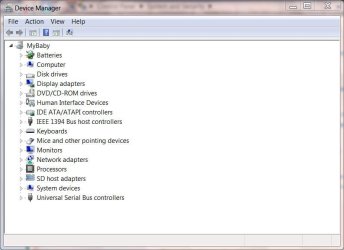
Unfortunately there's no sound device that appears in device manager. I sent you the screen shot. Of course it appeared before the sound device was signaled as not installed.
Do you have more suggestion please?

Sorry, I have Connexant sound device
 

Attachments

  • Device manager.JPG
    Device manager.JPG
    46.2 KB · Views: 18
Last edited:

My Computer My Computer

Computer Manufacturer/Model Number
Compaq Presario 3614 AU
OS
Windows Ultimate 32 bit
CPU
Amd Turion 64 x2
Memory
2Gb
Monitor(s) Displays
Nvdia
Back
Top