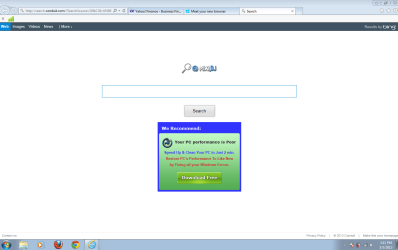
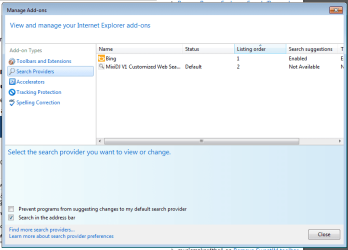
Solved MIXDJ ???? installed IE10 in win7 and suddenly it shows up as search

sdowney717

New member
Power User
VIP
Local time
2:40 PM
Messages
705
page for every new tab in IE10?

what is it and how to ged rid of it?
How did it get there? I installed ie10 from the ms windows site
 

My Computer My Computer

At a glance

Windows 7 Ultimate x64
OS
Windows 7 Ultimate x64
woe for this thing

I uninstalled it as the default search for ie10, restarted and it came right back again

this is what I see.
so far it has not slowed it down?
 

Attachments

  • ie10 adds.PNG
    ie10 adds.PNG
    31.6 KB · Views: 3
  • mixidj.PNG
    mixidj.PNG
    22.8 KB · Views: 4

My Computer My Computer

At a glance

Windows 7 Ultimate x64
OS
Windows 7 Ultimate x64
I think I solved it. the toolbar was not installed. just ie had it set as main default search engine and also as home page. it did slow things down as everytime it was 'waiting for search conduit ...... in message at bottom of browser. I imagine it was doing tracking. I had to remove as search engine and also reset home page.

malware bytes found zero items
Malwarebytes Anti-Malware (Trial) 1.75.0.1300
www.malwarebytes.org
Database version: v2013.05.04.05
Windows 7 Service Pack 1 x64 NTFS
Internet Explorer 10.0.9200.16540
dv9000 :: DV9000-PC [administrator]
Protection: Enabled
5/4/2013 8:04:02 AM
mbam-log-2013-05-04 (08-04-02).txt
Scan type: Quick scan
Scan options enabled: Memory | Startup | Registry | File System | Heuristics/Extra | Heuristics/Shuriken | PUP | PUM
Scan options disabled: P2P
Objects scanned: 210279
Time elapsed: 10 minute(s), 42 second(s)
Memory Processes Detected: 0
(No malicious items detected)
Memory Modules Detected: 0
(No malicious items detected)
Registry Keys Detected: 0
(No malicious items detected)
Registry Values Detected: 0
(No malicious items detected)
Registry Data Items Detected: 0
(No malicious items detected)
Folders Detected: 0
(No malicious items detected)
Files Detected: 0
(No malicious items detected)
(end)

 

My Computer My Computer

At a glance

Windows 7 Ultimate x64
OS
Windows 7 Ultimate x64
sdowney717,

Please download AdwCleaner:
http://general-changelog-team.fr/fr/downloads/finish/20-outils-de-xplode/2-adwcleaner
Save to the desktop.

Close all open programs.
To run the program, right-click AdwCleaner.exe and select: Run as Administrator

Click on Delete and confirm the prompt.


After it finishes, the computer is restarted.
A text file report opens after the restart.

Please post the content of the AdwCleaner report to your reply.
(A copy of the log is also saved at C:\AdwCleaner[S1].txt)


Also go to the Junkware Removal Tool Download
Save to the Desktop.


Make sure you temporarily disable your AntiVirus, Firewall, and any other AntiSpyware applications.
These programs may interfere with the running of JRT.
For information on how to disable protective programs, refer to this info:
How To Temporarily Disable Your Anti-virus, Firewall And Anti-malware Programs - Security Mini-Guides


Right-click JRT.exe and select: Run as Administrator

The tool opens and starts scanning the system. Please be patient as this can take a while...


When done, a report (JRT.txt) is saved on the Desktop.

Please post the contents of JRT.txt in your reply.
 

My Computer My Computer

At a glance

Windows 7 Home Premium
Computer type
PC/Desktop
Computer Manufacturer/Model Number
An ol' eMachines
OS
Windows 7 Home Premium
Internet Speed
Fine for me...I'm retired!
Back
Top