Mixed Win7 / WinXP network issues (again)

kriemer

New member
Local time
3:52 PM
Messages
28
For all the apparent attention to backward compatibility that MS says they put into Win7 I find that a Mixed Win7 / WinXp network is really problematic.

I am able to network Win7 MyDocuments without too much problem, though not as easily as a Win7 / Win7 or a WinXP / WinXP network. I am finding it impossible to connect to a second disk on my Win7 computer from an XP machine on my network. I can "see" the 2nd drive but am prevented from connecting ("blah, blah is not accessible, contact network administrator..."). One thing I have noticed from perusing this forum is that some people are having problems connecting from XP to 7, while others can not connect from 7 to XP. No consistency that I can see, which is cause for pause in my books.

The sharing permissions are set on the drive.

I hope the problem is mine and not systemic, because if anything is a Win7 deal-breaker would be it. Multi-computer organizations are not going to migrate their computer to Win7 en-mass, rather one computer at a time.

Any illumination on this problem will be greatly appreciated.
 
Last edited:

My Computer

OS
Win 7
Well i'm sure the principle of file sharing interns of permissions a secuity settings hasn't changed. Once the machine are network connected (in the original sense, no adding to HomeGroup or WORKGROUP) all there is left is the shares creation, and permission and security of them to deal with.

I've written up a tut on cable networking between 7 and xp...works flawlessly for me.
 

My Computer

Computer Manufacturer/Model Number
Lenovo ThinkPad T60
OS
Windows 7 Ultimate 64Bit
CPU
GenuineIntel Intel(R) Core(TM) DuoCore T2400 @ 1.83GHz
Motherboard
Intel(R) 82801G (ICH7 Family)
Memory
2.00 GB
Graphics Card(s)
Mobile Intel(R) 945 Express Chipset
Sound Card
SoundMAX Integrated Digital HD Audio
Monitor(s) Displays
ThinkPad Display
Screen Resolution
1400x1050
Hard Drives
100Gb SATA
Keyboard
Standard Keyboard
Mouse
HID-compliant Mouse
Internet Speed
Cable Broadband - 54Mbps
Other Info
Intel(R) PRO/1000 PL Network Connection
11a/b/g Wireless LAN Mini PCI Express Adapter
Thanks for the quick reply; where is your tut (does not appear to be a sticky or have I missed that too?)

Regards

k
 

My Computer

OS
Win 7
It's somewhere under I, here found it.

http://www.sevenforums.com/tutorials/49569-internet-sharing-using-cross-over-cable.html

checklist:

1) Do you have a working internet access connection? Is yes, Good. If no, Bad for internet sharing.
2) Do you want to connection Pc to Pc with cable? If yes, Good. If no, also Good cos you will still need to go through the steps for internet sharing.
3) Do you want your second internetless Pc to have internet through the means of bridging? If yes, Good. If no and if no also for point 2. Then don't use the tutorial. :D
 

My Computer

Computer Manufacturer/Model Number
Lenovo ThinkPad T60
OS
Windows 7 Ultimate 64Bit
CPU
GenuineIntel Intel(R) Core(TM) DuoCore T2400 @ 1.83GHz
Motherboard
Intel(R) 82801G (ICH7 Family)
Memory
2.00 GB
Graphics Card(s)
Mobile Intel(R) 945 Express Chipset
Sound Card
SoundMAX Integrated Digital HD Audio
Monitor(s) Displays
ThinkPad Display
Screen Resolution
1400x1050
Hard Drives
100Gb SATA
Keyboard
Standard Keyboard
Mouse
HID-compliant Mouse
Internet Speed
Cable Broadband - 54Mbps
Other Info
Intel(R) PRO/1000 PL Network Connection
11a/b/g Wireless LAN Mini PCI Express Adapter
Not sure I understand how your tut helps me (it should be a sticky!!!) ???

I have my network wired through the router. There are more than 2 computers involved, some of the computers are virtual (should have mentioned that). With an XP network, all I have had to do was set share permissions on each computer for the drives or folders I wanted to share.

I maintain my original statement; MS missed the boat in terms of mixed (XP/7) OS networking. Clearly, configuring a mixed Win7 / WinXp network is problematic; just look at all the requests for help on this topic. Win7 networks alone though are just great aside from the inability to set drive roots as shared. While this break several cardinal laws regarding system security it is after all my network we are talking about.

Thanks again for the helpful reply.

Regards
 

My Computer

OS
Win 7
Not sure I understand how your tut helps me (it should be a sticky!!!) ???

I have my network wired through the router. There are more than 2 computers involved, some of the computers are virtual (should have mentioned that). With an XP network, all I have had to do was set share permissions on each computer for the drives or folders I wanted to share.

I maintain my original statement; MS missed the boat in terms of mixed (XP/7) OS networking. Clearly, configuring a mixed Win7 / WinXp network is problematic; just look at all the requests for help on this topic. Win7 networks alone though are just great aside from the inability to set drive roots as shared. While this break several cardinal laws regarding system security it is after all my network we are talking about.

Thanks again for the helpful reply.

Regards

are you using homegroup for networking? If so you should change it to the workgroup model as it is designed for mixed environments


Ken J+
 

My Computer

Computer Manufacturer/Model Number
HP Pavillion dv-7 1005 Tx
OS
Win 8 Release candidate 8400
CPU
[email protected]
Memory
4 gigs
Graphics Card(s)
Nvidia 9600M
Sound Card
HD built-in
Monitor(s) Displays
17" Wxga
Screen Resolution
1440x900
Cooling
none
Internet Speed
45Mb down 5Mb up
Nope, found that curious mixed network security gem already.

Again I can connect the 2 OS types, just not the second drive on the Win7 machine (at this point in testing it is virtual, later to be real).

regards

k
 

My Computer

OS
Win 7
Not sure I understand how your tut helps me (it should be a sticky!!!) ???

I have my network wired through the router. There are more than 2 computers involved, some of the computers are virtual (should have mentioned that). With an XP network, all I have had to do was set share permissions on each computer for the drives or folders I wanted to share.

I maintain my original statement; MS missed the boat in terms of mixed (XP/7) OS networking. Clearly, configuring a mixed Win7 / WinXp network is problematic; just look at all the requests for help on this topic. Win7 networks alone though are just great aside from the inability to set drive roots as shared. While this break several cardinal laws regarding system security it is after all my network we are talking about.

Thanks again for the helpful reply.

Regards

Just think of W7 Homegroup as a "folder/location" automatically shared between those machines also running w7. It's like an On/Off switch if you can understand i'm trying to say. Homegroup + ipv6 enabled = On. Homegroup + ipv6 disabled = Off.
 

My Computer

Computer Manufacturer/Model Number
Lenovo ThinkPad T60
OS
Windows 7 Ultimate 64Bit
CPU
GenuineIntel Intel(R) Core(TM) DuoCore T2400 @ 1.83GHz
Motherboard
Intel(R) 82801G (ICH7 Family)
Memory
2.00 GB
Graphics Card(s)
Mobile Intel(R) 945 Express Chipset
Sound Card
SoundMAX Integrated Digital HD Audio
Monitor(s) Displays
ThinkPad Display
Screen Resolution
1400x1050
Hard Drives
100Gb SATA
Keyboard
Standard Keyboard
Mouse
HID-compliant Mouse
Internet Speed
Cable Broadband - 54Mbps
Other Info
Intel(R) PRO/1000 PL Network Connection
11a/b/g Wireless LAN Mini PCI Express Adapter
OK, it is possible (not easy, not intuitive, not similar to WinXP; but possible) to connect WinXP to Win7 on a network.

  1. I am still finding it impossible to connect to any drive other than the C:\ drive.
  2. I can not include any personal folder in my users group. The root folder "C:\Users\MyName" is marked with a lock that I can not turn off.
Any solutions to these issues?

Thanks in advance.

k
 

My Computer

OS
Win 7
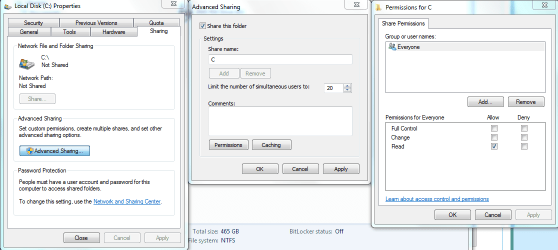
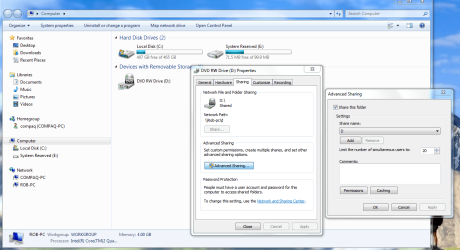
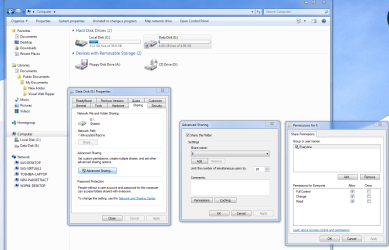
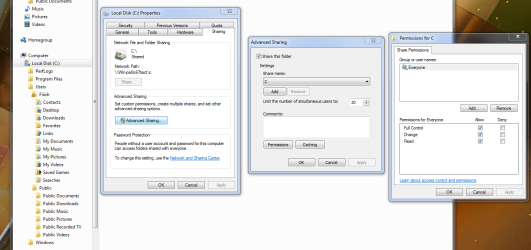
Going into the drive on the Win7 machine should allow it to be shared. You may need to specify who the drive is shared with by going into permissions like in the first picture.

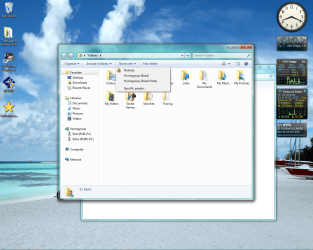
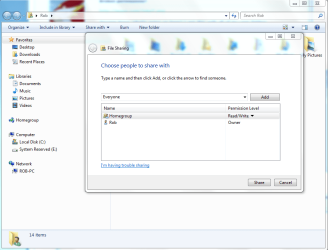
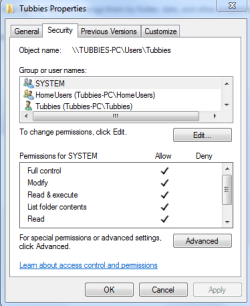
As for sharing of the user files. Just go into the user file you want to share, it should work when you set the permissions up accordingly. You may need to give full control in the properties window, last picture.
 

Attachments

  • Advanced sharing C drive permissions.PNG
    Advanced sharing C drive permissions.PNG
    32.8 KB · Views: 141
  • Tubbies share with Homegroup.png
    Tubbies share with Homegroup.png
    353.3 KB · Views: 157
  • Share with Everyone.PNG
    Share with Everyone.PNG
    47.4 KB · Views: 99
  • Tubbies access full control.PNG
    Tubbies access full control.PNG
    13.2 KB · Views: 91

My Computer

Computer type
PC/Desktop
Computer Manufacturer/Model Number
Home built
OS
Windows 7 Ult, Windows 8.1 Pro,
CPU
Q9650-4.275GHz, E8600 4.5GHz, E6750-3.8GHz
Motherboard
Evga 780i FTW
Memory
G.Skill PC2 9600 1200Mhz 5 5 5 15 2T
Graphics Card(s)
GTX480
Sound Card
Asus Xonar D2
Monitor(s) Displays
HannsG
Screen Resolution
1680X1050
Hard Drives
GSkill Phoenix Pro 120GB SSD
PSU
ThermalTake Toughpower 1000Watt modular
Case
ThermalTake XaserV
Cooling
Xigmatek S1283
Keyboard
Logitech G15
Mouse
Logitech G9
Internet Speed
T1
Kriemer:
I have found that in a lot of instances the problems, issues, and confusion often stems from users, coming from and OS installed on a fat32 volume and moving to an OS that uses NTFS. In fat32, there was no security tab to fool with and no ntfs permissions to cause problems, however; now, it's a different story and understanding this, is often the first step in resolving such issues. First, share permission, they impact users coming at you from across the network and the setting here decide how much success they will or will not have. Second, ntfs permissions, these are for local file and folder access and can be adjusted, often very specifically to impact a particular user or group of users. Third and maybe most important, when ever you have sharing on an ntfs volume both share permissions and ntfs permissions come into play and for lack of a better explaination are more or less combined. And always, always, always the most restrictive permissions prevails. This has resulted in a lot of people just throwing the everyone group in both places and giving that group full control. Not generally accepted as a best practice for networking security, but it seems to get most over the hump. You need to understand that users are not exactly stand alone entities, they always belong to groups, and since permissions are applied to groups as well as users and again the most restrictive applies, then a user can often be denied access based on his membership in multiple groups, one group being more restricted than the other. I explained that so you understand that it becomes even more confusing when you realize that there is not only one group called users, but another group called authenticated users, and for the sake of sanity I advise you to handle them exactly the same granting the same permissions so as not to confound a user who may be a member of both groups. I hope this helps, at least a little bit, and I haven't confused you even further. You may try looking at this and see if it makes sense to you Combining Shared Folder and NTFS Permissions
 

My Computer

Computer Manufacturer/Model Number
PartsIsParts
OS
Windows 7 Ultimate 64bit
CPU
Intel Pentium D 3Ghz
Motherboard
ASRock G31M-S
Memory
4 Gigs PC 6400
Graphics Card(s)
Nvidia GeForce 8500 GT
Sound Card
Realtek High Definition Audio Integrated
Monitor(s) Displays
AOC 19inch X2
Screen Resolution
1024 X 768 (I'm Old)
Hard Drives
Segate ST3160815AS Serial ATAII
Western Digital WD1600AAJA-75PSA0 Serial ATAII
PSU
500 watt..don't know mfg.
Case
Giant Black 4u rackmount I've had for years
Cooling
Stock CPU extra 120s in case
Keyboard
Generic Made in China
Mouse
Logitech USB Optical Scroll
Internet Speed
What ever comcast decides to give me usually 21Mbps up/5mbps
My position is unchanged, it shouldn't be this difficult. A mixed network should not be more difficult to configure than a WinXP or Win7 network. Clearly there is something missing given the number of question on this subject. MS must recognize that their general audience are not interested in the technical detail of configuration as they have evidently invested significant effort in simplifying Win7 / Win7 networking.

That said, I am now able to network MyDocuments from Win7 to the WinXP machines and vice verse. I still can't connect to a secondary NTFS formatted drive on my Win7 machine from other WinXP computers on my network. I can see the drive, but I continue to fail on a permissions warning. Everything I can see is set to allow.

This is a Virtual Win7 installation, but I am confident this is not the issue.

Doh!!.

Thanks

k
 
Last edited:

My Computer

OS
Win 7
kriemer;487402[B said:
]My position is unchanged, it shouldn't be this difficult. A mixed network should not be more difficult to configure than a WinXP or Win7 network.[/B] Clearly there is something missing given the number of question on this subject. MS must recognize that their general audience are not interested in the technical detail of configuration as they have evidently invested significant effort in simplifying Win7 / Win7 networking.

That said, I am now able to network MyDocuments from Win7 to the WinXP machines and vice verse. I still can't connect to a secondary NTFS formatted drive on my Win7 machine from other WinXP computers on my network.

This is a Virtual Win7 installation, but I am confident this is not the issue.

Doh!!.

Thanks

k
Couldn't agree more, but yet to many it does seem to be more difficult. That's what keeps us all so busy. In so far as the secondary NTFS formatted drive goes.
Is the whole drive shared at the root, or just multiple folders. Carefull inspect the permissions on each share both share permissions and ntfs under the security tab for each share or at the root and make sure that where ever you actually set the share that it cascades down to child objects and is not inheriting more restrictive permissions from the parent object
 

My Computer

Computer Manufacturer/Model Number
PartsIsParts
OS
Windows 7 Ultimate 64bit
CPU
Intel Pentium D 3Ghz
Motherboard
ASRock G31M-S
Memory
4 Gigs PC 6400
Graphics Card(s)
Nvidia GeForce 8500 GT
Sound Card
Realtek High Definition Audio Integrated
Monitor(s) Displays
AOC 19inch X2
Screen Resolution
1024 X 768 (I'm Old)
Hard Drives
Segate ST3160815AS Serial ATAII
Western Digital WD1600AAJA-75PSA0 Serial ATAII
PSU
500 watt..don't know mfg.
Case
Giant Black 4u rackmount I've had for years
Cooling
Stock CPU extra 120s in case
Keyboard
Generic Made in China
Mouse
Logitech USB Optical Scroll
Internet Speed
What ever comcast decides to give me usually 21Mbps up/5mbps
A bit of information that I have left out.

In order to share the Win7 MyDoc folder I had to "move" it to Libraries/Documents/Public Documents. I haven't seen this step anywhere but it is required (by me) to get the share. I am not able to similarly move the secondary drive.

One of the benefits of testing VMware machines is that I am working and reworking with completely new and clean virtual computers installations. Except for test .txt files my computer and secondary drive are essentially empty. I can restart and not worry about having junked up the OS configuration.

Thanks

k
 

My Computer

OS
Win 7
A bit more info that's been left out:

  1. 2nd drive setup is SATA
  2. The drive shows up in My Computer.
  3. I can add it to Libraries, in which case it shows as a new line item.
  4. The drive shows as a shared network item.
  5. I can "see" the drive on my WinXP machine, just can not access it.
  6. Drive letter is E:\
  7. 2nd drive is mostly empty
I'm sure the answer is staring me in the face.
 

My Computer

OS
Win 7
Yes your right and it's right here looking back at you. At least that is how I did it.
 

Attachments

  • Sharing D drive.PNG
    Sharing D drive.PNG
    85.7 KB · Views: 63

My Computer

Computer type
PC/Desktop
Computer Manufacturer/Model Number
Home built
OS
Windows 7 Ult, Windows 8.1 Pro,
CPU
Q9650-4.275GHz, E8600 4.5GHz, E6750-3.8GHz
Motherboard
Evga 780i FTW
Memory
G.Skill PC2 9600 1200Mhz 5 5 5 15 2T
Graphics Card(s)
GTX480
Sound Card
Asus Xonar D2
Monitor(s) Displays
HannsG
Screen Resolution
1680X1050
Hard Drives
GSkill Phoenix Pro 120GB SSD
PSU
ThermalTake Toughpower 1000Watt modular
Case
ThermalTake XaserV
Cooling
Xigmatek S1283
Keyboard
Logitech G15
Mouse
Logitech G9
Internet Speed
T1
Been there, tried that (I think)

I've tried that, many times, from many starting points.

I hate to think that it is VMware, but I am running out of buttons to push.

k
 

Attachments

  • Permissions.PNG
    Permissions.PNG
    135.2 KB · Views: 20

My Computer

OS
Win 7
But what confuses me is that you metioned adding Docs to a Library.

If you are using a mixed Op system network then Library's should not be an option for you because it uses the Homegroup which is simply not made to work in a mixed Op system network.

For mixed Op systems on your LAN you need to be using either the Work or Public file sharing options. I've been trying to figure out why everyone keeps attempting to do it that way because it's just not meant to be.

I think that is Msoft's way of getting everyone to install Win 7 all all machines, just so they can use the Homegroup.
 

My Computer

Computer type
PC/Desktop
Computer Manufacturer/Model Number
Home built
OS
Windows 7 Ult, Windows 8.1 Pro,
CPU
Q9650-4.275GHz, E8600 4.5GHz, E6750-3.8GHz
Motherboard
Evga 780i FTW
Memory
G.Skill PC2 9600 1200Mhz 5 5 5 15 2T
Graphics Card(s)
GTX480
Sound Card
Asus Xonar D2
Monitor(s) Displays
HannsG
Screen Resolution
1680X1050
Hard Drives
GSkill Phoenix Pro 120GB SSD
PSU
ThermalTake Toughpower 1000Watt modular
Case
ThermalTake XaserV
Cooling
Xigmatek S1283
Keyboard
Logitech G15
Mouse
Logitech G9
Internet Speed
T1
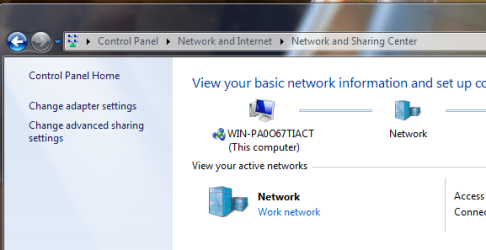
Now I'm even more confused; there does not appear to be a difference in the sidebar "Library" regardless of what Network setting I am using... and I can not connect unless MyDocs is in the Public Documents part of the Library.

I have removed the secondary drive to simplify this illustration.

Setting are as shown, I can see the c:\ drive, & MyDocs on the WinXP network, I just can't make any changes

k
 

Attachments

  • network.PNG
    network.PNG
    25.8 KB · Views: 18
  • Settings.PNG
    Settings.PNG
    69.8 KB · Views: 22

My Computer

OS
Win 7
That is because you are attempting to share using the Homegroup in a mixed Op system network, it's been tried a thousand time's and I have never seen it work correctly even once.

It Usually ends up with some stuff working and a bunch of stuff that doesn't work. Been there done that. Just trying to save you some grief because everyone keeps trying to do this and it never works. :(

When you said this> In order to share the Windows 7 MyDoc folder I had to "move" it to Libraries/Documents/Public Documents.

As long as your XPpro machine is in the network then Homegroup sharing is out the window. Won't work right no matter what you do.

All attempts to get that particular network working correctly will be futile. You absolutley need to use either the Work or Public file sharing options if you want everything to work correctly. No Library's can be involve in the equation.
 

My Computer

Computer type
PC/Desktop
Computer Manufacturer/Model Number
Home built
OS
Windows 7 Ult, Windows 8.1 Pro,
CPU
Q9650-4.275GHz, E8600 4.5GHz, E6750-3.8GHz
Motherboard
Evga 780i FTW
Memory
G.Skill PC2 9600 1200Mhz 5 5 5 15 2T
Graphics Card(s)
GTX480
Sound Card
Asus Xonar D2
Monitor(s) Displays
HannsG
Screen Resolution
1680X1050
Hard Drives
GSkill Phoenix Pro 120GB SSD
PSU
ThermalTake Toughpower 1000Watt modular
Case
ThermalTake XaserV
Cooling
Xigmatek S1283
Keyboard
Logitech G15
Mouse
Logitech G9
Internet Speed
T1
Back
Top