Mixer behavior

7hbg

New member
Local time
11:13 PM
Messages
3
Location
Fort McMurray
Some will probably out right disagree with me, but I can’t stand how the new audio mixer works in windows 7. What bothers me is how Master Volume effects (moves) other sliders. In theory it makes sense, but in practice is almost unusable. Why adjusting master, moves other sliders? Here is a screen capture of a particular situation, where moving two sliders, affects a third one to a point that no sound comes out of that input: http://zabcia.ca/pics/VolumeMixer.wmv. I made the individual adjustments relatively small to show the problem, but you can unintentionally eliminate an input in just two moves. There are more examples that boil my blood, but let me just ask one question: Is there ways to make it behave like a normal mixer; each input is independent, master does not affect any inputs, etc…?
Thanks
Rob
 

My Computer

OS
Win7 64b
Some will probably out right disagree with me, but I can’t stand how the new audio mixer works in windows 7. What bothers me is how Master Volume effects (moves) other sliders. In theory it makes sense, but in practice is almost unusable. Why adjusting master, moves other sliders? Here is a screen capture of a particular situation, where moving two sliders, affects a third one to a point that no sound comes out of that input: http://zabcia.ca/pics/VolumeMixer.wmv. I made the individual adjustments relatively small to show the problem, but you can unintentionally eliminate an input in just two moves. There are more examples that boil my blood, but let me just ask one question: Is there ways to make it behave like a normal mixer; each input is independent, master does not affect any inputs, etc…?
Thanks
Rob

Not that I know of. From my limited audio experience it does seem like the the sub volumes are independent just limited by master. That is how I remember it from ages ago.
 

My Computer

Computer Manufacturer/Model Number
HP Pavillion dv-7 1005 Tx
OS
Win 8 Release candidate 8400
CPU
[email protected]
Memory
4 gigs
Graphics Card(s)
Nvidia 9600M
Sound Card
HD built-in
Monitor(s) Displays
17" Wxga
Screen Resolution
1440x900
Cooling
none
Internet Speed
45Mb down 5Mb up
I know !! Since MS's Audio division engineer thought that it'd be cool to move everything in unison... Looks cool that way... I think...

And yes, I feel your pain. That behavior is stupid and useless, not to mention if one of the apps's volume is boosted above the "master" slider, the "master"slider goes up as well, that is just plain stupid. I guess the programmer is a computer programmer and have ZERO idea what to do around Audio Mixers...:mad:

zzz2496
 

My Computer

Computer Manufacturer/Model Number
Self Built
OS
Windows7 Ultimate 64bit
CPU
Intel Core 2 Quad Q6600
Motherboard
Abit IN9-32X-MMAX
Memory
DDR2 Adata 4GB
Graphics Card(s)
Nvidia GeForce GTX 285 1024 and Nvidia GeForce 8800GT 512
Sound Card
Asus Xonar HDAV 1.3
Monitor(s) Displays
Dell 2407WFP and BenQ 2400v and Philips 150v3
Screen Resolution
3840x1200 and 1024x768
Hard Drives
2 WDC 1TB
1 WDC 1.5TB
1 WDC 640GB
1 WDC 320GB
1 Seagate 200GB
PSU
Corsair TX 850W
Case
Cooler Master HAF932
Cooling
Arctic Cooling Freezer Extreme and plenty of fans...
Keyboard
MicrosoftNaturalKeyboard 4000/Apple Alu keyboard/Dinovo mini
Mouse
Logitech G5/MarbleMouseTrackball/PerformanceMX/SpacePilotPRO
Internet Speed
1.5Mbps down/384Kbps up
Other Info
APC SURT 1000XL
Logitech Z-560
Wiimote
Mikrotik Router
Linksys (now Cisco) SD2008 8 port Gigabit switch
Linksys WRT54G (acting as AP)
Apple wireless Aluminium keyboard
Apple Magic Mouse
Xbox360 wired controller
I work with audio a lot, that’s why I’m having difficult time with it.
Here is how an XP mixer worked (and every mixer before it, as well as it’s analog counterpart): VolumeMixerXP, simply each slider is independent.
Rob
 

My Computer

OS
Win7 64b
in short other app like winamp volume are limit by master volume. DUhh
 

My Computer

OS
window's 7
CPU
core 2 quad
Motherboard
gigabyte
Memory
2gb corsair
Graphics Card(s)
ati hd4850
Monitor(s) Displays
lg
Screen Resolution
1600 X 900
Case
power logic
Other Info
none of the spec above is accurate
My SoundBlaster volume control works the same way in Win 7. But, it's not a problem for my audio work as I use Sonar for my DAW and an external firewire connected audio I/O device and it's not affected by what Windows does.
 

My Computer

Computer type
PC/Desktop
Computer Manufacturer/Model Number
My Own Build
OS
Windows 10 64 bit
CPU
Intel i7 6700K
Motherboard
ASUS ROG Maximus VIII Hero
Memory
16GB Corsair Dominator
Graphics Card(s)
Intel CPU Graphics
Sound Card
RealTek
Monitor(s) Displays
27" Dell S2719dgf
Screen Resolution
2560X1440
Hard Drives
1 TB Samsung 850 EVO SSD for Win 10 Pro
500GB Samsung 850 EVO SSD for Win 10 Insider
2 TB drive for backup
PSU
EVGA Supernova 750G2
Case
BeQuiet Silent Base 600
Cooling
Deepcool Captain 120EX
Keyboard
Microsoft Wireless 2000
Mouse
Microsoft wireless
Internet Speed
100 MB/sec (Cable)
Antivirus
Microsoft Defender and Malwarebytes
Browser
Edge/Firefox
Other Info
Cakewalk (Sonar) by BandLab and Studio One 4.1 Pro recording studio software. MOTU 896Mk3 Hybrid recording interface, Frontier Tranzport wireless control unit, Behringer X-Touch Control Surface.
Five USB connected optical drives for CD Audio production using Nero BurningROM
Hi
Zzz2496, your are on the same page as I am.
Fireberd, is not affected because he does everything within one application (at least that’s how I understand your workflow).
All others are saying:

…limited by master…

Yes OK, WinXP’s master volume control also limited the inputs, but it didn’t affect inputs I was not controlling. Look at the first video again, I never touch the middle control (System Sounds) yet the output is reduced to nothing when I’m done… :confused:

I edit video. Here are elements to my workflow: I have one application for video/audio editing (Edius). Second application, for audio processing (Audition). Another application, for generating background music (Sonicfire). And on occasion I need to view/hear something using Media Player or other players like QT, etc. So I may have 4 or more audio sources. Adjusting any one of them will affect the others as demonstrated in the first video. Every time I switch application, I have to “visit” the mixer to make sure I can hear it. This is the pain I’m talking about. I do understand the “limiting” concept of the Master Volume Control, I have been working with audio since ’83. Nothing out there in audio world works like that. :mad:

Anyway, this was supposed to be a thread: Is there a way to get rid of this undesirable behavior? :cry:

Thanks
Rob
 

My Computer

OS
Win7 64b
I don't know about that mate but I came across this software, Power Mixer
 

My Computer

OS
window's 7
CPU
core 2 quad
Motherboard
gigabyte
Memory
2gb corsair
Graphics Card(s)
ati hd4850
Monitor(s) Displays
lg
Screen Resolution
1600 X 900
Case
power logic
Other Info
none of the spec above is accurate
The problem lies on Windows Media Foundation layer... As far as I know, there's no cure for that behavior...
Here's what I do, I put the Master to max, adjust individual applications volume levels to my desired level, then after that I turn the master down, and never touch the Windows Mixer ever.

zzz2496
 

My Computer

Computer Manufacturer/Model Number
Self Built
OS
Windows7 Ultimate 64bit
CPU
Intel Core 2 Quad Q6600
Motherboard
Abit IN9-32X-MMAX
Memory
DDR2 Adata 4GB
Graphics Card(s)
Nvidia GeForce GTX 285 1024 and Nvidia GeForce 8800GT 512
Sound Card
Asus Xonar HDAV 1.3
Monitor(s) Displays
Dell 2407WFP and BenQ 2400v and Philips 150v3
Screen Resolution
3840x1200 and 1024x768
Hard Drives
2 WDC 1TB
1 WDC 1.5TB
1 WDC 640GB
1 WDC 320GB
1 Seagate 200GB
PSU
Corsair TX 850W
Case
Cooler Master HAF932
Cooling
Arctic Cooling Freezer Extreme and plenty of fans...
Keyboard
MicrosoftNaturalKeyboard 4000/Apple Alu keyboard/Dinovo mini
Mouse
Logitech G5/MarbleMouseTrackball/PerformanceMX/SpacePilotPRO
Internet Speed
1.5Mbps down/384Kbps up
Other Info
APC SURT 1000XL
Logitech Z-560
Wiimote
Mikrotik Router
Linksys (now Cisco) SD2008 8 port Gigabit switch
Linksys WRT54G (acting as AP)
Apple wireless Aluminium keyboard
Apple Magic Mouse
Xbox360 wired controller
Hi
Zzz2496, your are on the same page as I am.
Fireberd, is not affected because he does everything within one application (at least that’s how I understand your workflow).


Hi Rob,

Fireberd, and myself don't suffer the same mixer problems because some 3rd party audio cards have their own mixer applications and the drivers do not attach themselves so deeply into the Windows audio subsystem. The M-Audio will show a volume control in the Windows mixer but it's always on full. My RME audio card doesn't even show up in Window's audio system.

Also, you mentioned:
>Here is how an XP mixer worked (and every mixer before it, as well as it’s analog
>counterpart): simply, each slider is independent.

This may be another example of dumbing down? To avoid distortion, accepted rules of gain staging almost always has the Master Volume as higher or equal to the highest individual channel volume. Same behavior as amplifiers with a master volume, turn the channel volume full and the Master to 2, a strong input signal will overdrive amp.

Ap
 

My Computer

Computer Manufacturer/Model Number
Assembled in my workshop
OS
Windows 7 Home Premium
CPU
Intel Core 2 Duo @ 3.00gHz
Motherboard
Gigabyte GA-P35-S3G
Memory
4 GB
Graphics Card(s)
ATI Radeon HD 2600 XT
Sound Card
RME 24/96 Card, Realtek Internal Audio PreSonus FireStudio
Monitor(s) Displays
Acer 1917 (x2)
Screen Resolution
1280 x 1024 on both monitors
Hard Drives
Three 250GB Seagate SATA Barracuda 7200rpm
PSU
Rosewill 500-watt
Case
Rosewill mid-tower
Cooling
Noctua NH-U9B (CPU), PwrSupply fan + single large case Fan
Keyboard
Macally w/2/USB ports.
Mouse
Trackman Wheel
Other Info
Event 20/20 bas studio monitors, Yamaha sub.
Rackmount Korg/Roland/Yamaha synthesizers,
Cubase MIDI/audio recording. Sony Soundforge audio/mastering software. CD Architect Mastering. RME & Presonus audio interfaces.
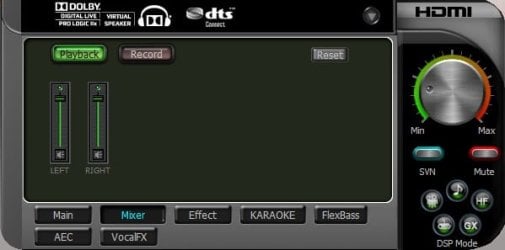
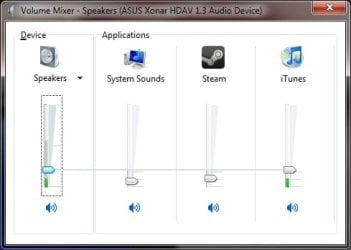
Aphelion, if you read my specs, I have Asus Xonar HDAV 1.3. That soundcard have it's own dashboard application which controls effects, channel output, volume, and many others. I have many other soundcards that I don't use right now. Every one of them have their own dashboard app, but every single one of them "fails" at the same point, the dashboard app can't control per-application sound level, which Windows Mixer can, here's what I mean:
xonar_mixer.jpgwindows_mixer.jpg
As you can see, my Xonar's mixer doesn't contain applications slider, but Windows Mixer does. In my soundcard's dashboard, I can only control master volume and that's it. There's no "Wave", or whatever there was in there. I hope this clears things up. I have M-Audio Revo 7.1, same behavior, Terratec DMX6Fire 2496, same behavior, and many others.

zzz2496
 

My Computer

Computer Manufacturer/Model Number
Self Built
OS
Windows7 Ultimate 64bit
CPU
Intel Core 2 Quad Q6600
Motherboard
Abit IN9-32X-MMAX
Memory
DDR2 Adata 4GB
Graphics Card(s)
Nvidia GeForce GTX 285 1024 and Nvidia GeForce 8800GT 512
Sound Card
Asus Xonar HDAV 1.3
Monitor(s) Displays
Dell 2407WFP and BenQ 2400v and Philips 150v3
Screen Resolution
3840x1200 and 1024x768
Hard Drives
2 WDC 1TB
1 WDC 1.5TB
1 WDC 640GB
1 WDC 320GB
1 Seagate 200GB
PSU
Corsair TX 850W
Case
Cooler Master HAF932
Cooling
Arctic Cooling Freezer Extreme and plenty of fans...
Keyboard
MicrosoftNaturalKeyboard 4000/Apple Alu keyboard/Dinovo mini
Mouse
Logitech G5/MarbleMouseTrackball/PerformanceMX/SpacePilotPRO
Internet Speed
1.5Mbps down/384Kbps up
Other Info
APC SURT 1000XL
Logitech Z-560
Wiimote
Mikrotik Router
Linksys (now Cisco) SD2008 8 port Gigabit switch
Linksys WRT54G (acting as AP)
Apple wireless Aluminium keyboard
Apple Magic Mouse
Xbox360 wired controller
I tend to let the volume mixer alone and adjust the volume through my speaker or the program itself especially when listening to music in winamp /foobar :)
 

My Computer

OS
window's 7
CPU
core 2 quad
Motherboard
gigabyte
Memory
2gb corsair
Graphics Card(s)
ati hd4850
Monitor(s) Displays
lg
Screen Resolution
1600 X 900
Case
power logic
Other Info
none of the spec above is accurate
Back
Top