.MKV conversion

Devilz

New member
Power User
Local time
4:25 PM
Messages
324
Location
England
As per topic, I got few movies in .MKV extension and video quality is like full HD 1080p. I want to burn them on DVD's so I can play them on my home theater system but it won't let me. I've to convert them into .avi or .wmv to burn DVD's which loses video quality.

Is there anyway to burn these .MKV without converting/losing video quality?

Thanks
 

My Computer

Computer type
PC/Desktop
Computer Manufacturer/Model Number
Self Built
OS
Windows 8.1 - 64 Bit
CPU
Intel Core i5-4670K (Haswell)
Motherboard
Gigabyte GA-Z87X-D3H
Memory
8GB DDR3-RAM PC1600 CL9 ADATA XPG V1.0 black
Graphics Card(s)
Gigabyte NVIDIA GTX 770 Graphics Card (2GB, DDR5, PCI-E)
Sound Card
ASUS Xonar DX 7.1 | Turtle Beach HPA 2
Monitor(s) Displays
Samsung SyncMaster P2270HD
Screen Resolution
1080p
Hard Drives
Samsung 840 Evo 250 GB (OS only)
Seagate Barracuda 1TB S-ATA
Seagate Barracuda 250GB S-ATA
Maxtor 250GB S-ATA (Backup only)
WD Elements 500Gb/Go
PSU
750 watts
Case
Zalman GS-1000 Special Edition
Cooling
Zalman CNPS10X Performa
Keyboard
Logitech K350
Mouse
Logitech M705 | Razer Vespula Mouse Pad
Internet Speed
Virgin Media - 60Mbps
Antivirus
Microsoft Security Essentials
Other Info
120mm fans x 4
(2 on top, 1 at rear, 1 at bottom)
Hello there. There is no software can do that. :) You'll always will lose the quality.
 

My Computer

Computer type
PC/Desktop
Computer Manufacturer/Model Number
Custom Build
OS
Windows 10 Pro x64
CPU
Intel Core i5 4440 @Stock
Motherboard
Gigabyte Z97 D3H
Memory
4 x 4GB HyperX Fury DDR3
Graphics Card(s)
Gigabyte GTX 1050Ti O4G
Sound Card
Integrated
Monitor(s) Displays
Dell P2417H
Screen Resolution
1920 x 1080
Hard Drives
Samsung EVO 850 120GB / Toshiba DT01ACA050 1TB 7200prm 32MB
PSU
Riotoro Onyx 750W
Case
NZXT H500 Black-Red
Cooling
Stock CPU + NZXT 120mm + 2x120mm red fans
Keyboard
Modecom Volcano Lanparty
Mouse
Asus ROG Gladius / DeepCool E-Pad Plus
Internet Speed
DOCSIS 50/3 Mbit
Browser
Google Chrome
Other Info
Asus K55VJ(i5 3210M, GT635M / 2GB, 8GB DDR3, 500GB HDD)
thats a shame really
 

My Computer

Computer type
PC/Desktop
Computer Manufacturer/Model Number
Self Built
OS
Windows 8.1 - 64 Bit
CPU
Intel Core i5-4670K (Haswell)
Motherboard
Gigabyte GA-Z87X-D3H
Memory
8GB DDR3-RAM PC1600 CL9 ADATA XPG V1.0 black
Graphics Card(s)
Gigabyte NVIDIA GTX 770 Graphics Card (2GB, DDR5, PCI-E)
Sound Card
ASUS Xonar DX 7.1 | Turtle Beach HPA 2
Monitor(s) Displays
Samsung SyncMaster P2270HD
Screen Resolution
1080p
Hard Drives
Samsung 840 Evo 250 GB (OS only)
Seagate Barracuda 1TB S-ATA
Seagate Barracuda 250GB S-ATA
Maxtor 250GB S-ATA (Backup only)
WD Elements 500Gb/Go
PSU
750 watts
Case
Zalman GS-1000 Special Edition
Cooling
Zalman CNPS10X Performa
Keyboard
Logitech K350
Mouse
Logitech M705 | Razer Vespula Mouse Pad
Internet Speed
Virgin Media - 60Mbps
Antivirus
Microsoft Security Essentials
Other Info
120mm fans x 4
(2 on top, 1 at rear, 1 at bottom)
If you do have a HDTV and want to view your HD movies, then I would suggest you to buy a Sony PS3 for its Bluray BD Player. ( I do not work for Sony :))

Then an easy way to play your HD MKV files will be to stream it to your PS3 through WMP.

If you are content with viewing it in DVD quality, then try Freemake Video Converter to burn it to a DVD. See my post here .
 

My Computer

Computer Manufacturer/Model Number
self-assembled
OS
Windows 7 Ultimate 32bit
CPU
AMD Phenom II X3 720 Processor
Motherboard
Gigabyte GA-MA78GM-S2H Revision 1.0
Memory
Transcend DDR2 (PC2 6400) 4 X 1GB
Graphics Card(s)
Integrated + ATI Radeon 4550
Sound Card
Integrated Realtek ALC 889A
Monitor(s) Displays
DELL 1704 FPT
Screen Resolution
1280 x 1024
Hard Drives
Western Digital Caviar SE16 250 GB x2 in RAID 0
PSU
Coolermaster 400 W
Case
Zebronics Cube
Cooling
stock
Keyboard
Microsoft - wired
Mouse
Microsoft - wired
Internet Speed
ADSL 256-512Kbps
You can also look at Western Digital's WDTVLive or WDTVLive plus.
It supports a number of containers and codec standards. (eg. MKV + H.264).
 

My Computer

Computer type
PC/Desktop
Computer Manufacturer/Model Number
Own build
OS
Windows 7x64 Home Premium SP1
CPU
Intel i7 2600k
Motherboard
ASUS P8Z68 Deluxe
Memory
G.Skill Ripjaws (DDR3-1600) 2x4GB
Graphics Card(s)
Nvidia GeForce GTS 450; Intel HD Graphics 3000(GT2+)
Monitor(s) Displays
Dell Ultrasharp IPS panel U2311H, Samsung SyncMaster P2350
Screen Resolution
1920x1080
Hard Drives
Samsung 850 Pro SSD 256GB, Samsung SSD 840 120GB, Seagates 1TB Barracuda ST31000528AS x2
PSU
Seasonic M12II 520W
Case
Lian Li Lancool PC-K60
Cooling
Case: 1x120mm, 3x140mm CPU: Hyper 212+
Keyboard
Logitech MK520 (wireless)
Mouse
Logitech MK520
Internet Speed
6-7 Mbps
Antivirus
Norton Security Premium, Malwarebytes on 2 (MSE on 3rd PC)
Browser
FireFox
Other Info
Audio: Logitech Z523 2.1
If you do have a HDTV and want to view your HD movies, then I would suggest you to buy a Sony PS3 for its Bluray BD Player. ( I do not work for Sony :))

Then an easy way to play your HD MKV files will be to stream it to your PS3 through WMP.

If you are content with viewing it in DVD quality, then try Freemake Video Converter to burn it to a DVD. See my post here .


Actually I wouldn't buy a Ps3, you may get hacked or have your personal information stolen. :)
 

My Computer

Computer Manufacturer/Model Number
SMN-Productions
OS
Windows 7 x86/x64, Server 2008r2, Web Server 2008
CPU
i7 v2 3930K Steping stone 2
Motherboard
ASUS Rampage IV Extreme
Memory
G.SKILL Ripjaws Z Series 32GB
Graphics Card(s)
AMD HD 5770
Monitor(s) Displays
Acer 21" and Samsung 20"
Hard Drives
Patriot Pyro 80GB
PSU
1000 Watt
Case
HAF-X
Cooling
4 Fans
Keyboard
Black Widow Ultimate
.......Actually I wouldn't buy a Ps3, you may get hacked or have your personal information stolen. :)

I don't have a PlayStationNetwork account. I bought it only for playing BDs and it is another Media Center. So no worries :) .
 

My Computer

Computer Manufacturer/Model Number
self-assembled
OS
Windows 7 Ultimate 32bit
CPU
AMD Phenom II X3 720 Processor
Motherboard
Gigabyte GA-MA78GM-S2H Revision 1.0
Memory
Transcend DDR2 (PC2 6400) 4 X 1GB
Graphics Card(s)
Integrated + ATI Radeon 4550
Sound Card
Integrated Realtek ALC 889A
Monitor(s) Displays
DELL 1704 FPT
Screen Resolution
1280 x 1024
Hard Drives
Western Digital Caviar SE16 250 GB x2 in RAID 0
PSU
Coolermaster 400 W
Case
Zebronics Cube
Cooling
stock
Keyboard
Microsoft - wired
Mouse
Microsoft - wired
Internet Speed
ADSL 256-512Kbps
If you do have a HDTV and want to view your HD movies, then I would suggest you to buy a Sony PS3 for its Bluray BD Player. ( I do not work for Sony :))

Then an easy way to play your HD MKV files will be to stream it to your PS3 through WMP.

If you are content with viewing it in DVD quality, then try Freemake Video Converter to burn it to a DVD. See my post here .

I already got PS3 :p

I guess I'll stick with .mkv for the moment and forget converting these to DVD
 

My Computer

Computer type
PC/Desktop
Computer Manufacturer/Model Number
Self Built
OS
Windows 8.1 - 64 Bit
CPU
Intel Core i5-4670K (Haswell)
Motherboard
Gigabyte GA-Z87X-D3H
Memory
8GB DDR3-RAM PC1600 CL9 ADATA XPG V1.0 black
Graphics Card(s)
Gigabyte NVIDIA GTX 770 Graphics Card (2GB, DDR5, PCI-E)
Sound Card
ASUS Xonar DX 7.1 | Turtle Beach HPA 2
Monitor(s) Displays
Samsung SyncMaster P2270HD
Screen Resolution
1080p
Hard Drives
Samsung 840 Evo 250 GB (OS only)
Seagate Barracuda 1TB S-ATA
Seagate Barracuda 250GB S-ATA
Maxtor 250GB S-ATA (Backup only)
WD Elements 500Gb/Go
PSU
750 watts
Case
Zalman GS-1000 Special Edition
Cooling
Zalman CNPS10X Performa
Keyboard
Logitech K350
Mouse
Logitech M705 | Razer Vespula Mouse Pad
Internet Speed
Virgin Media - 60Mbps
Antivirus
Microsoft Security Essentials
Other Info
120mm fans x 4
(2 on top, 1 at rear, 1 at bottom)
If you do have a HDTV and want to view your HD movies, then I would suggest you to buy a Sony PS3 for its Bluray BD Player. ( I do not work for Sony :))

Then an easy way to play your HD MKV files will be to stream it to your PS3 through WMP.

If you are content with viewing it in DVD quality, then try Freemake Video Converter to burn it to a DVD. See my post here .

You are still going to lose quality streaming it. It'll end up about DVD quality streaming it through the PS3. Only way to watch it in HD is to plug it in HDMI or DVI from a laptop to the TV.
 

My Computer

Computer Manufacturer/Model Number
HP Pavilion DV7-3074ca Notebook
OS
Windows 7 Professional x64
CPU
Intel Core i7-720QM Quad Core
Memory
8GB RAM
Graphics Card(s)
nVidia GeForce 230M, 4GB/1GB dedicated
Sound Card
nVidia HD Audio, IDT Integrated HD Audio/Codecs
Monitor(s) Displays
17.3" Notebook/24" BenQ 2420HD
Screen Resolution
1600x900/1920x1080
Hard Drives
Dual Seagate 500GBx7200, Ext. WD 750GB
Case
Gloss Black
Cooling
Manual Fold out style fan, J/K
Mouse
R.A.T. 9
Internet Speed
DSL/Cable Ultra High Speed
Other Info
Blu-ray, Lightscribe, Shark's Codec Pack
^Not necessarily, if you go through the intermediate step of remuxing to vob, using mkv2vob and then stream it through WMP12. Of course your network capability to sustain high data transfer rate comes into play - but can be achieved.

I also understand that you can stream copy these higher than 4GB vob files into the FAT32 PS3 drive. Have not tried to find the veracity though.

That said, there is nothing like a direct play and direct plugin without any intermediate processing and transmission of data. That is why I am averse to streaming and/or converting to other formats.:)

Have a look at this article How To Play MKV Files On Playstation 3

And for anyone interested in setting up a WMP12-PS3 stream-machine a few more

AVForums.com - View Single Post - Windows 7 to PS3 Streaming - Help? and

http://www.hack7mc.com/2009/02/mkvs-for-minimalists-on-windows-7.html ( I go with Shark 007 codecs)

And there are many more to confuse you if you search google. :)
 

My Computer

Computer Manufacturer/Model Number
self-assembled
OS
Windows 7 Ultimate 32bit
CPU
AMD Phenom II X3 720 Processor
Motherboard
Gigabyte GA-MA78GM-S2H Revision 1.0
Memory
Transcend DDR2 (PC2 6400) 4 X 1GB
Graphics Card(s)
Integrated + ATI Radeon 4550
Sound Card
Integrated Realtek ALC 889A
Monitor(s) Displays
DELL 1704 FPT
Screen Resolution
1280 x 1024
Hard Drives
Western Digital Caviar SE16 250 GB x2 in RAID 0
PSU
Coolermaster 400 W
Case
Zebronics Cube
Cooling
stock
Keyboard
Microsoft - wired
Mouse
Microsoft - wired
Internet Speed
ADSL 256-512Kbps
You are still going to lose quality streaming it. It'll end up about DVD quality streaming it through the PS3. Only way to watch it in HD is to plug it in HDMI or DVI from a laptop to the TV.
m2ts HD files are typically coded using VC 1 from my observation.
When dealing with lossy re-encoding you can only decrease the theoretical information content.

But video and audio coding capitalizes on human perception.
Assume you use pass through with audio so it stays the same.
Using Handbrake you can re-encode video using AVC/H.264 with at least a 4:1 reduction in size and get perceptually near identical HD video quality. Then place video and audio in an MKV container.

Using an Intel Core 2 Quad @2.5GHz the process may take ~ 7 hours!
 
Last edited:

My Computer

Computer type
PC/Desktop
Computer Manufacturer/Model Number
Own build
OS
Windows 7x64 Home Premium SP1
CPU
Intel i7 2600k
Motherboard
ASUS P8Z68 Deluxe
Memory
G.Skill Ripjaws (DDR3-1600) 2x4GB
Graphics Card(s)
Nvidia GeForce GTS 450; Intel HD Graphics 3000(GT2+)
Monitor(s) Displays
Dell Ultrasharp IPS panel U2311H, Samsung SyncMaster P2350
Screen Resolution
1920x1080
Hard Drives
Samsung 850 Pro SSD 256GB, Samsung SSD 840 120GB, Seagates 1TB Barracuda ST31000528AS x2
PSU
Seasonic M12II 520W
Case
Lian Li Lancool PC-K60
Cooling
Case: 1x120mm, 3x140mm CPU: Hyper 212+
Keyboard
Logitech MK520 (wireless)
Mouse
Logitech MK520
Internet Speed
6-7 Mbps
Antivirus
Norton Security Premium, Malwarebytes on 2 (MSE on 3rd PC)
Browser
FireFox
Other Info
Audio: Logitech Z523 2.1
All you need is TsMuxer.

Use it to create a AVCHD format.

Youll have a folder thats a Bluray type structure. Just add the the 2 folders to the disc and burn to DVD or DL-DVD with ImgBurn.


So long as the encode itself follows Bluray/AVCHD specification, it will work.


Have a look here:
http://www.sevenforums.com/tutorials/107100-avchd-disc-how-create.html?ltr=A


The source file can be MKV or even a MP4. All that matters is that the streams are compliant.
Typically, H264 video stream with AC3 or DTS audio stream.
 

My Computer

Computer Manufacturer/Model Number
Custom (Self Build)
OS
Windows 7 Home Premium 64bit
CPU
Intel Core i7 2700k
Motherboard
eVGA P67 SLI
Memory
8GB Mushkin Redline Ridgebacks @1866
Graphics Card(s)
EVGA GTX570 SC
Sound Card
XiFi Titanium HD
Monitor(s) Displays
LG W2453V
Screen Resolution
1920x1080
Hard Drives
Intel 320 80GB -- Intel X25-V 40GB --WD Black 1TB x2 -- WD Blue 640GB
PSU
Seasonic x750
Case
Corsair 600T SE White
Cooling
eVGA Superclocked CPU Cooler
Keyboard
Saitek Cyborg
Antivirus
Kaspersky
Browser
IE
Other Info
LG BD/DVD
+1 for the above AVCHD option.

Initially the OP said that he wants to play the HD content with a standard DVD Player.

When a PS2 was suggested he came out that he already has a PS3.

In the circumstances, burning AVCHD to the DVD media and playing it on his PS3 seems to be a viable option but burning a AVCHD DVD will require a BD writer. Right????

Given that the OP has indicated that he does not want to lose the HD quality one has to assume that he wouldn't be willing for a lower bitrate.

This brings the next point how much HD video he can put on into the DVD. At a bitrate of11500 Kbps and 1080i it may be 45 minutes while at 30000 Kbps it may only be 15 minutes.

Obviously the OP cannot have the cake and eat it too.:)

Personally I would prefer writing to a BD-R disk straight away than trying to touch my nose from behind my head. :) BD Media is becoming cheaper by the day.
 

My Computer

Computer Manufacturer/Model Number
self-assembled
OS
Windows 7 Ultimate 32bit
CPU
AMD Phenom II X3 720 Processor
Motherboard
Gigabyte GA-MA78GM-S2H Revision 1.0
Memory
Transcend DDR2 (PC2 6400) 4 X 1GB
Graphics Card(s)
Integrated + ATI Radeon 4550
Sound Card
Integrated Realtek ALC 889A
Monitor(s) Displays
DELL 1704 FPT
Screen Resolution
1280 x 1024
Hard Drives
Western Digital Caviar SE16 250 GB x2 in RAID 0
PSU
Coolermaster 400 W
Case
Zebronics Cube
Cooling
stock
Keyboard
Microsoft - wired
Mouse
Microsoft - wired
Internet Speed
ADSL 256-512Kbps
The AVCHD tutorial directly answers your question.
I think you can have your cake and eat it too using a DVD+R/DL and an appropriate encoded H.264 video. 8GB will give you an excellent, albeit not perfect, full HD encoding. The proof of the pudding is in the eating.

BD burners and disks are still very expensive. To make a "perfect" backup of your Blu Ray you may as well just buy a second copy.
 

My Computer

Computer type
PC/Desktop
Computer Manufacturer/Model Number
Own build
OS
Windows 7x64 Home Premium SP1
CPU
Intel i7 2600k
Motherboard
ASUS P8Z68 Deluxe
Memory
G.Skill Ripjaws (DDR3-1600) 2x4GB
Graphics Card(s)
Nvidia GeForce GTS 450; Intel HD Graphics 3000(GT2+)
Monitor(s) Displays
Dell Ultrasharp IPS panel U2311H, Samsung SyncMaster P2350
Screen Resolution
1920x1080
Hard Drives
Samsung 850 Pro SSD 256GB, Samsung SSD 840 120GB, Seagates 1TB Barracuda ST31000528AS x2
PSU
Seasonic M12II 520W
Case
Lian Li Lancool PC-K60
Cooling
Case: 1x120mm, 3x140mm CPU: Hyper 212+
Keyboard
Logitech MK520 (wireless)
Mouse
Logitech MK520
Internet Speed
6-7 Mbps
Antivirus
Norton Security Premium, Malwarebytes on 2 (MSE on 3rd PC)
Browser
FireFox
Other Info
Audio: Logitech Z523 2.1
Yep, Just a regular DVD or Dual LAyer DVD writer is all you need.
However, you will need a a BluRay Player to play it back.


As far as quality goes, Ive found if you downsize to 720P, you can get some really good looking copies on a single layer DVD, or DL for longer films.

You can keep it at 1080P, but many times, they come out just as well or better as a higher bitrate 720P copy.

It really depends on the the length of the film, and what media you're using.

If just just single layer disc, Id say downsize it to 720p, and go with as high of a bitrate as you can.
So you keep it looking as close to the original as possible.

It will not be operfect, but many would find it difficult to notice the difference.
 

My Computer

Computer Manufacturer/Model Number
Custom (Self Build)
OS
Windows 7 Home Premium 64bit
CPU
Intel Core i7 2700k
Motherboard
eVGA P67 SLI
Memory
8GB Mushkin Redline Ridgebacks @1866
Graphics Card(s)
EVGA GTX570 SC
Sound Card
XiFi Titanium HD
Monitor(s) Displays
LG W2453V
Screen Resolution
1920x1080
Hard Drives
Intel 320 80GB -- Intel X25-V 40GB --WD Black 1TB x2 -- WD Blue 640GB
PSU
Seasonic x750
Case
Corsair 600T SE White
Cooling
eVGA Superclocked CPU Cooler
Keyboard
Saitek Cyborg
Antivirus
Kaspersky
Browser
IE
Other Info
LG BD/DVD
^So my assumption that a BD writer is required for writing AVCHD is wrong. Thanks for clarifying my mistaken notion.:)

Ya, a BD player is required to play the AVCHD disk. There is no confusion there and the OP has it.

It indeed becomes a viable option to the OP, provided he comes down on the bitrate and 720P suitable for packing it on a DL DVD.

Let us see what the OP has in mind after all that has flown here.
 

My Computer

Computer Manufacturer/Model Number
self-assembled
OS
Windows 7 Ultimate 32bit
CPU
AMD Phenom II X3 720 Processor
Motherboard
Gigabyte GA-MA78GM-S2H Revision 1.0
Memory
Transcend DDR2 (PC2 6400) 4 X 1GB
Graphics Card(s)
Integrated + ATI Radeon 4550
Sound Card
Integrated Realtek ALC 889A
Monitor(s) Displays
DELL 1704 FPT
Screen Resolution
1280 x 1024
Hard Drives
Western Digital Caviar SE16 250 GB x2 in RAID 0
PSU
Coolermaster 400 W
Case
Zebronics Cube
Cooling
stock
Keyboard
Microsoft - wired
Mouse
Microsoft - wired
Internet Speed
ADSL 256-512Kbps
When I use an mkv-h264 output from Handbrake, the guidelines in the AVCHD tutorial don't work for me.
When I run Tsmuxer it sets to 9000fps and I get buffer overrun.
I'm guessing my lack of knowledge is to blame.
 

My Computer

Computer type
PC/Desktop
Computer Manufacturer/Model Number
Own build
OS
Windows 7x64 Home Premium SP1
CPU
Intel i7 2600k
Motherboard
ASUS P8Z68 Deluxe
Memory
G.Skill Ripjaws (DDR3-1600) 2x4GB
Graphics Card(s)
Nvidia GeForce GTS 450; Intel HD Graphics 3000(GT2+)
Monitor(s) Displays
Dell Ultrasharp IPS panel U2311H, Samsung SyncMaster P2350
Screen Resolution
1920x1080
Hard Drives
Samsung 850 Pro SSD 256GB, Samsung SSD 840 120GB, Seagates 1TB Barracuda ST31000528AS x2
PSU
Seasonic M12II 520W
Case
Lian Li Lancool PC-K60
Cooling
Case: 1x120mm, 3x140mm CPU: Hyper 212+
Keyboard
Logitech MK520 (wireless)
Mouse
Logitech MK520
Internet Speed
6-7 Mbps
Antivirus
Norton Security Premium, Malwarebytes on 2 (MSE on 3rd PC)
Browser
FireFox
Other Info
Audio: Logitech Z523 2.1
Wierd ...

TBH, Im not familiar with Handbrakes settings.
Perhaps theres something Handbrake does that overides these settings?
That or Im missing something.


But, TsMuxer shouldnt try to change the bitrate. All its really doing is De-Muxing the Audio and Video from the MKV or MP4 file, and remuxing them into a MT2S container.
Bitrate should stay the same as it was when it was encoded.


Im a bit confused as to why it would be doing this ...


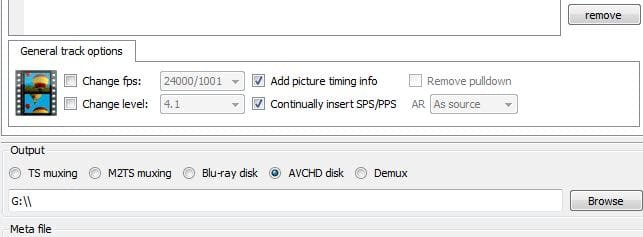
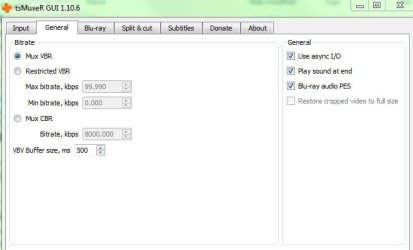
Do your TSMuxer settings look like this?
1.JPG 2.JPG

The major things that need to be set in the encoder should just be:
Ref. frames = 4
BFRames=3
KeyInt=24
MinKeyInt=2
BPyrimid=Strict
VBV Buffer 14500
Max Bitarte 14000

These settings should make the Video Stream BD/AVCHD compliant.
So bitrate and file size should all be done via the encoder itself.
 

My Computer

Computer Manufacturer/Model Number
Custom (Self Build)
OS
Windows 7 Home Premium 64bit
CPU
Intel Core i7 2700k
Motherboard
eVGA P67 SLI
Memory
8GB Mushkin Redline Ridgebacks @1866
Graphics Card(s)
EVGA GTX570 SC
Sound Card
XiFi Titanium HD
Monitor(s) Displays
LG W2453V
Screen Resolution
1920x1080
Hard Drives
Intel 320 80GB -- Intel X25-V 40GB --WD Black 1TB x2 -- WD Blue 640GB
PSU
Seasonic x750
Case
Corsair 600T SE White
Cooling
eVGA Superclocked CPU Cooler
Keyboard
Saitek Cyborg
Antivirus
Kaspersky
Browser
IE
Other Info
LG BD/DVD
Thanks Wishmaster I'll follow up shortly with a new thread using your post #18 as a first response.
The OP may want to push his question in a different direction to mine.
 

My Computer

Computer type
PC/Desktop
Computer Manufacturer/Model Number
Own build
OS
Windows 7x64 Home Premium SP1
CPU
Intel i7 2600k
Motherboard
ASUS P8Z68 Deluxe
Memory
G.Skill Ripjaws (DDR3-1600) 2x4GB
Graphics Card(s)
Nvidia GeForce GTS 450; Intel HD Graphics 3000(GT2+)
Monitor(s) Displays
Dell Ultrasharp IPS panel U2311H, Samsung SyncMaster P2350
Screen Resolution
1920x1080
Hard Drives
Samsung 850 Pro SSD 256GB, Samsung SSD 840 120GB, Seagates 1TB Barracuda ST31000528AS x2
PSU
Seasonic M12II 520W
Case
Lian Li Lancool PC-K60
Cooling
Case: 1x120mm, 3x140mm CPU: Hyper 212+
Keyboard
Logitech MK520 (wireless)
Mouse
Logitech MK520
Internet Speed
6-7 Mbps
Antivirus
Norton Security Premium, Malwarebytes on 2 (MSE on 3rd PC)
Browser
FireFox
Other Info
Audio: Logitech Z523 2.1
Back
Top