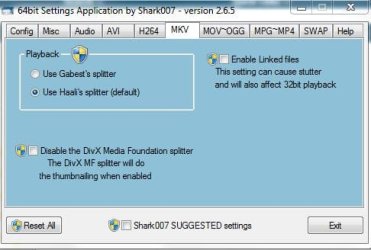
On 32bit you can get the exact same result as the DivX or Shark007 codec pack (Shark includes the DivX MKV thumbnailer) without actually installing any codecs or players. This is good if you're totally happy with the way everything works except for not having MKV thumbnails.
Download Shark007's Codec Pack.
We aren't going to install this. We only need three files from it.
Run the Win7codecs_v262.exe setup and click OK on the language selection screen.
Do NOT click NEXT when the InstallShield wizard appears
Go to your temp directory (type %temp% in an explorer address bar)
You'll find a directory called something like {67230314-E2C3-4091-842C-D9DC92796E93} (it's different every time) with a Win7codecs.msi in it.
Open an elevated command prompt in this directory and execute
msiexec /a Win7codecs.msi /qb TARGETDIR=c:\sharktemp
Close the command prompt and then CANCEL the Shark007 installation.
Go to c:\sharktemp
Copy the 3 files from C:\sharktemp\program files\Win7codecs\filters
DivXMFSource.dll
DivXPropertyHandler.dll
DivXThumbnailProvider.dll
to somewhere meaningful. I put them in the same ProgramFiles directory as the Haali Matroska Splitter since that made sense to me, but anywhere on your system drive that you won't accidentally delete them will do.
Now open an elevated command prompt in the directory where you copied the files and run
regsvr32 /s DivXMFSource.dll
regsvr32 /s DivXPropertyHandler.dll
regsvr32 /s DivXThumbnailProvider.dll
Done. MKV files will (hopefully) now be thumbnailed and have useful info in the 'Details' property sheet but you haven't got a whole load of cruft installed that you don't need. A reboot and/or thumbnail cache clear out may or may not be necessary. I didn't need to do either.
Delete c:\sharktemp
To uninstall simply execute (elevated command prompt wherever the files are)
regsvr32 /u DivXMFSource.dll
regsvr32 /u DivXPropertyHandler.dll
regsvr32 /u DivXThumbnailProvider.dll