Mmc- snap in errors.. Please help

Alexpho

New member
Member
Local time
4:47 PM
Messages
14
Hi There. Newbie here. I just completed installing Win7 Home Prem to my computer. I had to backup my old files because it was a " clean install ", going from a 32bit Vista to 64 bit Win7. Everything works fine except this problem that I can't figure out nor find any solutions for.

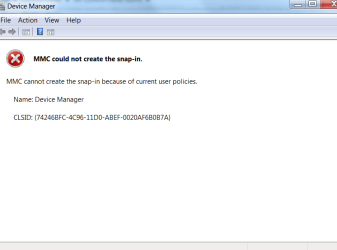
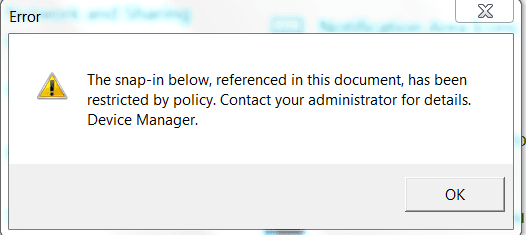
When I try to go into certain folders in control panel such as Device Manager, I get some sort of Snap In error, restricted by policy, access denied. I am the administrator of this computer. When I go into the MMC . exe screen, the left pane window is completely empty.

I really don't know how to fix this. Could someone please please treat me like a 3 year old and explain step by step how to resolve this issue? The screen shots are attached.

Thank you so much!!
 

Attachments
  • Capture.PNG
    Capture.PNG
    8.5 KB · Views: 26
  • Capture1.PNG
    Capture1.PNG
    12.1 KB · Views: 25
  • Capture2.PNG
    Capture2.PNG
    15.7 KB · Views: 19

My Computer

OS
Windows 7 Home Premiuem 64 bit
Hi Alexpho,

Try to reinstall IIS, from the add remove windows features in 'programs' in control panel. I think that this will fix it for you.

Regards

Tim

EDIT: I was just having a longer think about this....... It could be caused by many things including corrupt WMI, services not running, applied policy templates, registry corruption, permissions etc. Rather than fix this only to find another issue and since the install is fresh, a re-do might be the best option.
 

My Computer

Computer Manufacturer/Model Number
Custom Hack job
OS
Windows 7 Ultimate 64 bit
CPU
Intel(R) Core(TM)2 Quad CPU Q8200 @ 2.33GHz
Motherboard
GigaByte EP45-UD3
Memory
8 GB Kingston
Graphics Card(s)
Nvidia GeForce 9600GT
Sound Card
Soundblaster Audigy
Monitor(s) Displays
AOC x2 22"
Hard Drives
2 x Samsung 500GB (RAID)
2 x Samsung 2TB
1 x WD Green 2TB
1 x Seagate 1TB
1 x Samsung 500GB
PSU
Thermaltake QFan 750W
Case
CM Scout Gaming
Cooling
Coolermaster V10
Keyboard
Microsoft Wireless Keyboard 1000
Mouse
Microsoft Wireless Optical 2000
Internet Speed
320
Other Info
Winfast PVR2000CP
LG DVD-RAM DVD/RW/DL Super Multi
Linksys WMP300Nx2 Wireless Adapter
Thanks for the help Tim. Unfortunately, that did not resolve the problem. I will keep on waiting and searching for a solution.

Regards
 

My Computer

OS
Windows 7 Home Premiuem 64 bit
Thanks for the help Tim. Unfortunately, that did not resolve the problem. I will keep on waiting and searching for a solution.

Regards

So I guess that you want to repair it, rather than reinstall. Ok. We can go through the steps. Although I recommend a repair install first as this will probably fix it.

I have to run out at the moment, but I'll take you through sfc /scannow and WMI rebuilds as soon as I get back in an hour or so.

Timo
 

My Computer

Computer Manufacturer/Model Number
Custom Hack job
OS
Windows 7 Ultimate 64 bit
CPU
Intel(R) Core(TM)2 Quad CPU Q8200 @ 2.33GHz
Motherboard
GigaByte EP45-UD3
Memory
8 GB Kingston
Graphics Card(s)
Nvidia GeForce 9600GT
Sound Card
Soundblaster Audigy
Monitor(s) Displays
AOC x2 22"
Hard Drives
2 x Samsung 500GB (RAID)
2 x Samsung 2TB
1 x WD Green 2TB
1 x Seagate 1TB
1 x Samsung 500GB
PSU
Thermaltake QFan 750W
Case
CM Scout Gaming
Cooling
Coolermaster V10
Keyboard
Microsoft Wireless Keyboard 1000
Mouse
Microsoft Wireless Optical 2000
Internet Speed
320
Other Info
Winfast PVR2000CP
LG DVD-RAM DVD/RW/DL Super Multi
Linksys WMP300Nx2 Wireless Adapter
Am I missing something here? GPEDIT is not available in Win7 home premium, thats why you are getting the error.

The gpedit.msc is basically a front-end for various registry settings and so you can open the Registry Editor and change the key/s listed in the table.

This link Unravel Tweaks, Hacks & Settings buried inside Windows 7 Group Policy Editor | The Windows Club, lists the policy settings for configurations included in the administrative template files delivered with Windows 7. These files are used to expose policy settings when you edit Group Policy Objects (GPOs) using Group Policy Object Editor.
 

My Computer

Computer Manufacturer/Model Number
Too many to describe...
OS
Windows 7 x64 pro/ Windows 7 x86 Pro/ XP SP3 x86
I'm Back!

About gpedit.msc that's correct Bill; but some of the other MMC's should work, as well as device manager.

FYI - The error message for missing GPEDIT is "local Group ... Gpedit is not available in Windows 7 Home premium", it's not the problem that Alexpho is having. It's good info to know though as other readers might stumble across this post with that error. Thanks mate.

AlexPho, I'm putting together more the info for you know and will post it below as soon as I'm done.
 

My Computer

Computer Manufacturer/Model Number
Custom Hack job
OS
Windows 7 Ultimate 64 bit
CPU
Intel(R) Core(TM)2 Quad CPU Q8200 @ 2.33GHz
Motherboard
GigaByte EP45-UD3
Memory
8 GB Kingston
Graphics Card(s)
Nvidia GeForce 9600GT
Sound Card
Soundblaster Audigy
Monitor(s) Displays
AOC x2 22"
Hard Drives
2 x Samsung 500GB (RAID)
2 x Samsung 2TB
1 x WD Green 2TB
1 x Seagate 1TB
1 x Samsung 500GB
PSU
Thermaltake QFan 750W
Case
CM Scout Gaming
Cooling
Coolermaster V10
Keyboard
Microsoft Wireless Keyboard 1000
Mouse
Microsoft Wireless Optical 2000
Internet Speed
320
Other Info
Winfast PVR2000CP
LG DVD-RAM DVD/RW/DL Super Multi
Linksys WMP300Nx2 Wireless Adapter
Alexpho,

Here is a summary of things to check or solutions, if you would like me to ellaborate on any areas, please ask. I'd look at these in the posted order.

REPAIR INSTALL
By the far the best I can offer for your solution as we don't know exactly what has caused it. See how here.

RUNNING SERVICES
Firstly lets check some error reporting and critical services (if you can access them, if not i'll post a manual method of starting them or write you a script).
In Run or Search type services.msc and hit enter. Start the following (right click on the service for the option) if they are not running. Most of these should start during boot, but we want to make sure that they are a) still runing and b) have started:
- COM+ System Application
- COM+ Event System
- Windows Management Instrumentation
- System Event NOtification Service
- Windows Event Log
- Windows Event COllector
- Credential Manager
- DCOM Server Process Launcher
- REmote PRocedure Call (RPC)
- RPC Endpoint Mapper

PERMISSIONS
- Do you have full access to your SYSTEM32 and child folders (normally C:\windows\system32)? Right click on the folder and check.
- Open REGEDIT from Run or Search and navigate to COMPUTER\HKEY_CLASSES_ROOT\CLSID, ensure that you have full permissions to this string and all child keys (right click on the tree to edit permissions). If you prefer to only check or adjust permissions for the particlar MMC or feature that you can't open, then go to this site and check the GUID for it, then search for it in the registry.
e.g. Device manager is {74246bfc-4c96-11d0-abef-0020af6b0b7a}

SFC /SCANNOW
This utility is used to verify windows system file integrity, on a fresh install you SHOULD be ok. But it's quite a usefull antibiotic to use for many issues on your system. See how here.

WMI
The Windows Management Instrumentation is the framework for managing components in windows. Some of the services that we checked above are critical for it to work.
Sometimes it becomes corrupt and needs to be fixed.
- Open a Elevated command prompt and type the following (pressing ENTER after each one and answering any prompts)
- regsvr32 /s %systemroot%\system32\scecli.dll
- regsvr32 /s %systemroot%\system32\userenv.dll
- net stop winmgmt
- winmgmt /resetrepository
- net start winmgmt

Good luck

Tim

PS: If the event services started, see if you can access the Windows Event Viewer (type eventvwr.msc into RUN or SEARCH and press enter). Look at the windows logs for any errors and let me know if you find any. Also check any errors for online solutions (double click on them).
 

My Computer

Computer Manufacturer/Model Number
Custom Hack job
OS
Windows 7 Ultimate 64 bit
CPU
Intel(R) Core(TM)2 Quad CPU Q8200 @ 2.33GHz
Motherboard
GigaByte EP45-UD3
Memory
8 GB Kingston
Graphics Card(s)
Nvidia GeForce 9600GT
Sound Card
Soundblaster Audigy
Monitor(s) Displays
AOC x2 22"
Hard Drives
2 x Samsung 500GB (RAID)
2 x Samsung 2TB
1 x WD Green 2TB
1 x Seagate 1TB
1 x Samsung 500GB
PSU
Thermaltake QFan 750W
Case
CM Scout Gaming
Cooling
Coolermaster V10
Keyboard
Microsoft Wireless Keyboard 1000
Mouse
Microsoft Wireless Optical 2000
Internet Speed
320
Other Info
Winfast PVR2000CP
LG DVD-RAM DVD/RW/DL Super Multi
Linksys WMP300Nx2 Wireless Adapter
Wow Tim. Thank you so much for the valuable work that was put into this. The problem has been resolved.

Apparently, some of items that you've listed for me to check under " systems.msc " were indeed turned off.

Now no more Snap in errors and I can access the device manager.

Awesome. Thank you for your help!


PS- To Windows.... are you listening?? This is a simple problem from a clean install.
 

My Computer

OS
Windows 7 Home Premiuem 64 bit
Wow Tim. Thank you so much for the valuable work that was put into this. The problem has been resolved.

Apparently, some of items that you've listed for me to check under " systems.msc " were indeed turned off.

Now no more Snap in errors and I can access the device manager.

Awesome. Thank you for your help!


PS- To Windows.... are you listening?? This is a simple problem from a clean install.

That's Great news Alexpho! Also good that it was at the top of the list *phew*. ;)

Keep an eye on that event viewer and have a look for errors, we don't know what caused your services to be turned off and other features may have similar problems... if so, open a new job and we'll look into it for you.

Tim

PS: Please mark the thread as solved if you haven't already. Thanks!
 

My Computer

Computer Manufacturer/Model Number
Custom Hack job
OS
Windows 7 Ultimate 64 bit
CPU
Intel(R) Core(TM)2 Quad CPU Q8200 @ 2.33GHz
Motherboard
GigaByte EP45-UD3
Memory
8 GB Kingston
Graphics Card(s)
Nvidia GeForce 9600GT
Sound Card
Soundblaster Audigy
Monitor(s) Displays
AOC x2 22"
Hard Drives
2 x Samsung 500GB (RAID)
2 x Samsung 2TB
1 x WD Green 2TB
1 x Seagate 1TB
1 x Samsung 500GB
PSU
Thermaltake QFan 750W
Case
CM Scout Gaming
Cooling
Coolermaster V10
Keyboard
Microsoft Wireless Keyboard 1000
Mouse
Microsoft Wireless Optical 2000
Internet Speed
320
Other Info
Winfast PVR2000CP
LG DVD-RAM DVD/RW/DL Super Multi
Linksys WMP300Nx2 Wireless Adapter
Back
Top