
Hi SevenForum,
I intend to exchange my Intel mobo (LGA 1156) for an Asus one (LGA1150).
In fact, I never dared to do that but after reading Kaktus nice tutorial I thought I'll give it a try.
But having a multiboot setup as an additional difficulty I thought I'd ask you before I proceed.
OK, here's my setup:
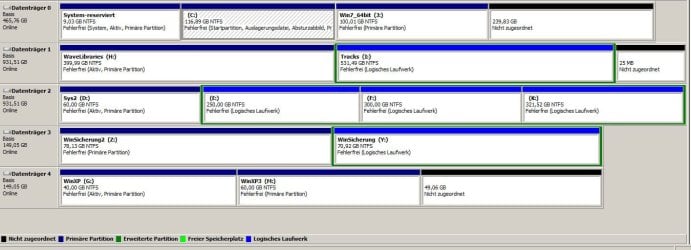
so you see on disc 0 are Win7 32bit and Win7 64 bit installs,
disc 1 has two partitions for files,
on disc 2 there is another Win7 32bit install and three partitions for files,
disc 3 has two backup partitions,
disc 4 holds two WinXp partitions.
My greatest concern is that, after connecting the HDs to the new mobo, Windows will assign new drive letters
With the file storage partitions H,I,E,F,K,Y,Z I think this won't be an issue as I can rename them later on in Windows.
But I'm worried about the partitions where the OS's are on: wrong drive letter=OS won't boot.
An additional issue is that the 'Sys2' Win7 install which has the drive letter D, has on its own partition the drive letter C, which makes no problem atm, but maybe will do when installing the new mobo.
What do you think?
Maybe it would help to connect the drives successively?
Is the (physical) position of the SATA connectors on the mobo important / should be 'copied' from the old mobo?
It would be a real pita if I would have to reinstall the whole mess, so I really would like to use the P2P_adjust_OS way, if possible.
Thanks in advance!
I intend to exchange my Intel mobo (LGA 1156) for an Asus one (LGA1150).
In fact, I never dared to do that but after reading Kaktus nice tutorial I thought I'll give it a try.
But having a multiboot setup as an additional difficulty I thought I'd ask you before I proceed.
OK, here's my setup:
so you see on disc 0 are Win7 32bit and Win7 64 bit installs,
disc 1 has two partitions for files,
on disc 2 there is another Win7 32bit install and three partitions for files,
disc 3 has two backup partitions,
disc 4 holds two WinXp partitions.
My greatest concern is that, after connecting the HDs to the new mobo, Windows will assign new drive letters
With the file storage partitions H,I,E,F,K,Y,Z I think this won't be an issue as I can rename them later on in Windows.
But I'm worried about the partitions where the OS's are on: wrong drive letter=OS won't boot.
An additional issue is that the 'Sys2' Win7 install which has the drive letter D, has on its own partition the drive letter C, which makes no problem atm, but maybe will do when installing the new mobo.
What do you think?
Maybe it would help to connect the drives successively?
Is the (physical) position of the SATA connectors on the mobo important / should be 'copied' from the old mobo?
It would be a real pita if I would have to reinstall the whole mess, so I really would like to use the P2P_adjust_OS way, if possible.
Thanks in advance!
My Computer
At a glance
Win 7 32 bit, Win 7 64 bit, Win XpIntel Core i7 8708 GbNvidia GeForce GT 520
- Computer type
- PC/Desktop
- Computer Manufacturer/Model Number
- custom build
- OS
- Win 7 32 bit, Win 7 64 bit, Win Xp
- CPU
- Intel Core i7 870
- Motherboard
- Intel DH55HC
- Memory
- 8 Gb
- Graphics Card(s)
- Nvidia GeForce GT 520
- Hard Drives
- Samsung HD 103SJ
Samsung HD 160JJ
Samsung HD 160JJ
Plextor DVDR PX-891A
- Browser
- Opera, Firefox