Modified dates reset by moving files

Mystery Salad

New member
Local time
2:51 PM
Messages
11
Hi this is my first post, I assume this is the right place for this topic.

I've encountered a very serious problem with Windows 7.

It's resetting the modified date on files when I move them.

I noticed this a couple of weeks ago when I moved the contents of my user folder to a different drive.

As a general habit, I used date modified as the sort order for my folders, so after moving everything, I went through the folders and set them up accordingly. Then I noticed that things were out of order and that a lot of the files had had their modified dates reset to the moment they were moved.

I'm mildly terrified of the idea that Windows 7 is capable of pulling a stunt like this.

Does anyone know what causes this, how I can fix the dates that have been changed (it's over 2,000 files), and / or how to prevent this from ever happening again? Is it a bug? It has to be right?
 

My Computer

OS
Windows 7 Home Premium 64 bit
G'day,

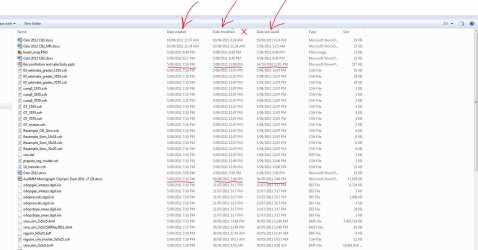
I think the Date Modified is referring to the change in folder structure, since you moved the folder to a new drive. You might be better off viewing your files in Explorer by enabling the Date Created, Date Modified and Date Last Saved options as shown in the image below.

You enable these by right-clicking on the Date Modified (shown as a red cross in the image below), and then selecting More... and scrolling down the list and selecting the options you want. Notice that in the image, these aren't neccessarily the same date.

Try that and see if it sets your mind at ease.

Regards,
Golden
 

Attachments

  • Capture.JPG
    Capture.JPG
    151.2 KB · Views: 170

My Computer

Computer type
PC/Desktop
Computer Manufacturer/Model Number
Golden Mk. I.4
OS
Windows 10 Pro x64 ; Xubuntu x64
CPU
Intel i7 860 @ 2.80 GHz O/C'ed to 4.0GHz
Motherboard
Gigabyte P55A-UD3R Rev.1. Award BIOS F13
Memory
16GB Corsair Vengance DDR3 @ 661 MHz Dual Channel (9-9-9-24)
Graphics Card(s)
EVGA NVidia GTX 560 1024MB
Sound Card
Realtek Integrated
Monitor(s) Displays
Dual Samsung SyncMaster 2494HS
Screen Resolution
1920*1080 and 1920*1080
Hard Drives
1*Samsung 840 EVO 120GB SSD;
1*OCZ Vertex 2 60GB SSD;
2*Samsung F3 SpinPoint 1TB in RAID0;
1*Samsung F1 SpinPoint 1TB;
2*Western Digital 1TB External USB 3.0
1*Western Digital 500GB External USB 3.0
1*Seagate 500GB External USB 2.0
PSU
Thermaltake ToughPower QFan 750W
Case
Thermaltake Element S VK60001W2Z
Cooling
Corsair H60 Water Cooling, 2*230mm and 2*80mm case fans
Keyboard
Logitech G110
Mouse
Logitech MX518
Hey thanks for the tip, but it didn't work. I enabled date last saved, but for the files in question, the date last saved was identical to the reset modified dates.

Just to be clear though, I was talking about files and not folders (I know that folders dates change when you change their contents and move them).

Here's a screenshot from the properties of one of the files, picked at random:

ModDateReset.jpg


The file in question is a .jpg that I created on April 14 (so it's created date is still correct), but I never modified it again after that.

Wednesday, 9 November 2011 was when I moved everything. Right after, I noticed that a couple of thousand files suddenly had modified dates of "Wednesday, 9 November 2011, 12:xx:xx AM"
 

My Computer

OS
Windows 7 Home Premium 64 bit
My usual disclaimer: I'm not an expert at anything! :)

I seem to recall that with earlier operating systems like Windows 98 there was a distinct difference between moving a file or copying a file. Moving a file changed the date(s) associated with that file while copying created an exact image with no changes to its dates. I was also told that copying was safer than moving because the original file remained intact. A person could verify the contents of the copied file and then delete the original. Yes, it was few extra steps but it supposedly protected the integrity of the original file better than just moving it. Maybe with Windows 7 it's a moot point.

FWIW :D

BTW: welcome to Seven Forums Mystery Salad!
 

My Computer

Computer type
Laptop
Computer Manufacturer/Model Number
Sony Vaio VPCEB47GM Laptop
OS
Win 7 Pro 64-bit
CPU
Intel i5 2.4 Ghz
Memory
8GB DDR3
Graphics Card(s)
Intel HD 3000
Sound Card
IDT High Definition
Monitor(s) Displays
15.6 WGXA Anti-Glare LED
Screen Resolution
1280x800
Hard Drives
640Gb 7200rpm
Antivirus
MSE
Browser
Opera (primary) with IE9 backup
True, Windows recognizes moving a file as a modification.
 

My Computer

Computer type
PC/Desktop
Computer Manufacturer/Model Number
Home Built Desktop By DataTech
OS
Windows 7 Ultimate X64 SP1
CPU
Intel i5-2550K, Differing ~4.4-4.8GHz No built in GPU
Motherboard
ASUS P8Z68-V PRO/GEN3
Memory
16GB G.Skill Sniper 1866MHz @ 2133MHz 2x8GB
Graphics Card(s)
ASUS GTX650TIB-DC2OC-2GD5, (650TI Boost)
Sound Card
Onboard Realtek 5-1
Monitor(s) Displays
Samsung P2570HD
Screen Resolution
1920x1080
Hard Drives
Samsung 840 Pro 256GB SSD for OS, 500GB Seagate Constellation (Enterprise drive) for Data
PSU
Corsair HX650W
Case
Inwin Dragon Rider
Cooling
Hyper 212 EVO w/two Noctua fans, push-pull, @1300 RPM
Keyboard
E-Z Eyes, bright yellow keys with large characters
Mouse
steelseries SENSEI Laser Pro Gaming
Internet Speed
48-51Mbs Mbs down, 11 Mbs up Xfinity Cable
Antivirus
Norton Internet Security 2013
Browser
IE 10, Opera, Pale Moon if needed
Other Info
4 case fans, LG BluRay-RE, ASUS DVD-RW, Mr. Fusion power supply, 1.21 gigawatts.
Hey thanks for the responses. I have to go to bed now but I'll post again tomorrow.

Also, a piece of information that I really should have mentioned in the original post but which I forgot that the time:
The date modified reset thing is actually SEMI-RANDOM. While the modified dates reset for MOST of the files, it didn't reset for all of them. I'll check the numbers tomorrow but I think it was 80% that were reset. And it's not like any of the files were treated differently by me when I moved them, they were all moved in one operation. So regardless of Windows' rules for copying vs moving, why the inconsistency?
 

My Computer

OS
Windows 7 Home Premium 64 bit
What security software are you running? The only thing that changes on my computer are folder modified dates, none of the files.
 

My Computer

Computer type
PC/Desktop
Computer Manufacturer/Model Number
Alienware Aurora ALX R4
OS
Windows 10 Pro (x64)
CPU
Intel Core i7-3930K (3.2GHz - 4.5GHz)
Motherboard
Alienware Aurora-R4 x79
Memory
4x Samsung 4GB PC3-12800 DDR3 (16GB 1600MHz)
Graphics Card(s)
Nvidia Geforce GTX 690
Sound Card
SteelSeries Siberia Elite
Monitor(s) Displays
Dell UltraSharp U3011
Screen Resolution
2560x1600
Hard Drives
Samsung 850 Pro 256 GB, Seagate 1TB Desktop Hybrid HDD, 2x Western Digital 4TB Green HDD
PSU
875W Some Dell PSU <.<
Case
Alienware Aurora ALX
Cooling
Custom Liquid Cooling (EK CPU & GPU blocks) dual EK 480RAD
Keyboard
Logitech G710+ Mechanical
Mouse
Logitech G700s
Internet Speed
Verizon Fios (50 mbps average)
Other Info
Server: Intel NUC D54250WYK: i5-4250U, 16GB, 256 GB mSATA, Windows Server 2012 R2
What security software are you running? The only thing that changes on my computer are folder modified dates, none of the files.

Bump? :S Sorry for late response. I just have Windows Security Essentials.
Yes, I know that folder dates change all the time, that's never confused me. But I've never had a file's modified date change (in all the years I was using XP, anyway) unless I've resaved it manually.

True, Windows recognizes moving a file as a modification.

No it doesn't. When you copy a file (ctrl+c, ctrl+v), the created date changes but not the modified date. When you move a file (ctrl+x, ctrl+v), the created date remains the same and so does the modified date. Either way, the modified date doesn't change.

That's how XP works at least. In my experience, Windows 7 works exactly the same 99% of the time, except in the freaky situation that prompted me to start the thread. Whatever the reason may be, I can't describe it as anything other than a "bug", because it doesn't happen consistently, and it resets the modified dates semi-randomly (i.e. doesn't do it to all files in the same move operation, just 80% of them.)
 

My Computer

OS
Windows 7 Home Premium 64 bit
Sorry for the bump, but I'm really curious to see if someone out there might have any idea what caused this? Anyone?

I was also wondering if there may exist some program that could batch-process-correct the reset modified dates on all the affected files by copying the date created attribute to date modified. I'm guessing probably not, but it's still worth asking just in case.

Thanks
 

My Computer

OS
Windows 7 Home Premium 64 bit
Often enough, I save web pages and download programs to the c:\ drive downloads folder. Several hours later after the internet session is ended, the files are moved to a different drive. Timestamps on these files reflect time of creation on c:\ drive. Where a folder is created, such as html's, timestamps reflect the time of move, as the folder is created in the different drive.

There were occasions when the timestamps of the contents in the folder showed the same as the folder, a wholesale change. I, too, was shocked at the modification. There were files created several years back and hadn't been modified prior to the move. I look at one of those files and can't wax nostalgic because the timestamp is recent. And to pile on, the modified date is earlier than the created date, reflecting an earlier move! Thus, a CD rip few years back reflect recent timestamps. My audio library is like that. Unfortunately, I don't recall the various details that led to the change. But it involved the operating system, either a reinstall or the use of a different PC. Folders were moved as a precautionary backup, not part of a backup process or a recovery process, since they were already on an external drive!
 

My Computer

OS
Windows 7 Home Premium x64
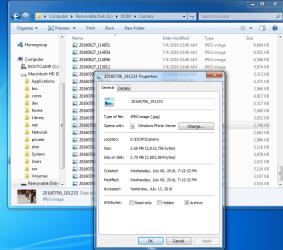
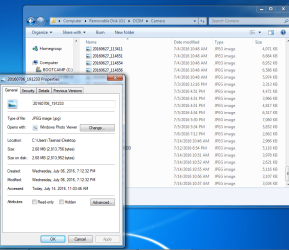
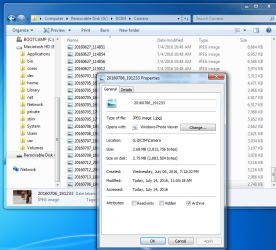
I had the same issue, see below:
 

Attachments

  • SD Card prior to move 1.png
    SD Card prior to move 1.png
    230.3 KB · Views: 0
  • Desktop After Move 2.png
    Desktop After Move 2.png
    208.1 KB · Views: 0
  • Move Back to SD Card 3.png
    Move Back to SD Card 3.png
    219.4 KB · Views: 0

My Computer

OS
XP
Back
Top