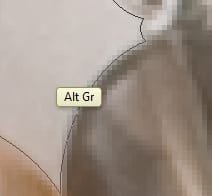
Modifier Key Shows Up In Floating Tag on Screen (alt, ctrl, shift etc)

lucraya

New member
Local time
2:25 PM
Messages
4
When I press a modifier key such as alt, ctrl or shift, a little yellow tag pops up next to my cursor that says the name of the of the key I'm pressing.

I find this completely infuriating and inhibiting to my workflow, and I have no idea how to turn it off.

Please help.

-lucraya
 

My Computer My Computer

At a glance

Windows 7
OS
Windows 7
I am not sure how this inhibits work flow, but I can image it is irritating.

There is nothing about this in the ease of access center, nor in mouse settings.

Could you post a screenshot?

~Lordbob
 

My Computer My Computer

At a glance

Windows 7 Ultimate x64, Mint 9Intel i5-2500k2x 4Gb Corsair VENGEANCE DDR3-1600NVidia GeForce N260GTX Twin Frozr
Computer Manufacturer/Model Number
Hera
OS
Windows 7 Ultimate x64, Mint 9
CPU
Intel i5-2500k
Motherboard
ASUS P8P67 Pro
Memory
2x 4Gb Corsair VENGEANCE DDR3-1600
Graphics Card(s)
NVidia GeForce N260GTX Twin Frozr
Sound Card
Realtek HD OnBoard Audio
Monitor(s) Displays
ASUS 24" Monitor
Screen Resolution
1920x1080
Hard Drives
G.SKILL Phoenix Series 60GB SATA II MLC Internal Solid State Drive (SSD)
SAMSUNG Spinpoint F3R 1TB 7200 RPM 32MB Cache SATA II
PSU
Cooler Master Real Power Pro 750W
Case
Cooler Master Haf 932
Cooling
Fans
Keyboard
Razer Tarantula
Mouse
Razer Lachesis
Internet Speed
not fast enough
Screenshot of Tag Issue

Here is a screenshot from photoshop of the problem. It didn't capture the image of my cursor for some reason, but the tag hovers just below it. The yellow box comes up while I'm holding down the "Alt" key, and others pop up for the "shift" and "ctrl" keys as well.

It inhibits my workflow in photoshop by pissing me off, mainly - plus it can get in the way of a path I'm creating with the pen tool.

Thank you for your reply.

-L
 

Attachments

  • screenshot.jpg
    screenshot.jpg
    4.1 KB · Views: 1,140

My Computer My Computer

At a glance

Windows 7
OS
Windows 7
Does this just happen in PS, or everywhere?

~Lordbob
 

My Computer My Computer

At a glance

Windows 7 Ultimate x64, Mint 9Intel i5-2500k2x 4Gb Corsair VENGEANCE DDR3-1600NVidia GeForce N260GTX Twin Frozr
Computer Manufacturer/Model Number
Hera
OS
Windows 7 Ultimate x64, Mint 9
CPU
Intel i5-2500k
Motherboard
ASUS P8P67 Pro
Memory
2x 4Gb Corsair VENGEANCE DDR3-1600
Graphics Card(s)
NVidia GeForce N260GTX Twin Frozr
Sound Card
Realtek HD OnBoard Audio
Monitor(s) Displays
ASUS 24" Monitor
Screen Resolution
1920x1080
Hard Drives
G.SKILL Phoenix Series 60GB SATA II MLC Internal Solid State Drive (SSD)
SAMSUNG Spinpoint F3R 1TB 7200 RPM 32MB Cache SATA II
PSU
Cooler Master Real Power Pro 750W
Case
Cooler Master Haf 932
Cooling
Fans
Keyboard
Razer Tarantula
Mouse
Razer Lachesis
Internet Speed
not fast enough
Everywhere.
 

My Computer My Computer

At a glance

Windows 7
OS
Windows 7
That is really strange.

Have you checked your ease of access settings, maybe there is something you have that I don't. Also check your mouse settings.

~Lordbob
 

My Computer My Computer

At a glance

Windows 7 Ultimate x64, Mint 9Intel i5-2500k2x 4Gb Corsair VENGEANCE DDR3-1600NVidia GeForce N260GTX Twin Frozr
Computer Manufacturer/Model Number
Hera
OS
Windows 7 Ultimate x64, Mint 9
CPU
Intel i5-2500k
Motherboard
ASUS P8P67 Pro
Memory
2x 4Gb Corsair VENGEANCE DDR3-1600
Graphics Card(s)
NVidia GeForce N260GTX Twin Frozr
Sound Card
Realtek HD OnBoard Audio
Monitor(s) Displays
ASUS 24" Monitor
Screen Resolution
1920x1080
Hard Drives
G.SKILL Phoenix Series 60GB SATA II MLC Internal Solid State Drive (SSD)
SAMSUNG Spinpoint F3R 1TB 7200 RPM 32MB Cache SATA II
PSU
Cooler Master Real Power Pro 750W
Case
Cooler Master Haf 932
Cooling
Fans
Keyboard
Razer Tarantula
Mouse
Razer Lachesis
Internet Speed
not fast enough
I went through everything in the control panel looking for some kind of setting I could adjust - including the settings for my Wacom tablet - and nothing did the trick. I also went through preferences in photoshop and that did nothing.

If there's a Windows employee reading this, let your company know that this feature is irritating and utterly useless, and to not even include the option of disabling it is a design faux pas to the highest degree.

Thank you.

-S
 

My Computer My Computer

At a glance

Windows 7
OS
Windows 7
I went through everything in the control panel looking for some kind of setting I could adjust - including the settings for my Wacom tablet - and nothing did the trick. I also went through preferences in photoshop and that did nothing.

If there's a Windows employee reading this, let your company know that this feature is irritating and utterly useless, and to not even include the option of disabling it is a design faux pas to the highest degree.

Thank you.

-S
I have never seen this happen before, nor do I know anyone that has had it. I doubt that it is a bug, but it is annoying. Keep checking settings, and perhaps google it some more.

~Lordbob
 

My Computer My Computer

At a glance

Windows 7 Ultimate x64, Mint 9Intel i5-2500k2x 4Gb Corsair VENGEANCE DDR3-1600NVidia GeForce N260GTX Twin Frozr
Computer Manufacturer/Model Number
Hera
OS
Windows 7 Ultimate x64, Mint 9
CPU
Intel i5-2500k
Motherboard
ASUS P8P67 Pro
Memory
2x 4Gb Corsair VENGEANCE DDR3-1600
Graphics Card(s)
NVidia GeForce N260GTX Twin Frozr
Sound Card
Realtek HD OnBoard Audio
Monitor(s) Displays
ASUS 24" Monitor
Screen Resolution
1920x1080
Hard Drives
G.SKILL Phoenix Series 60GB SATA II MLC Internal Solid State Drive (SSD)
SAMSUNG Spinpoint F3R 1TB 7200 RPM 32MB Cache SATA II
PSU
Cooler Master Real Power Pro 750W
Case
Cooler Master Haf 932
Cooling
Fans
Keyboard
Razer Tarantula
Mouse
Razer Lachesis
Internet Speed
not fast enough
When did this start, did you buy or build this computer, and are you running any external application or utility that could be doing this (ie a tray utility)?
 

My Computer My Computer

At a glance

Windows 7 Enterprise 64-bitAMD Phenom II X4 3.0GHz8GB G-Skill Ripjaws DDR3 1333PNY GeForce 460 GTX 1GB OC - Enthusiast Edition
OS
Windows 7 Enterprise 64-bit
CPU
AMD Phenom II X4 3.0GHz
Motherboard
ASUS M5A97
Memory
8GB G-Skill Ripjaws DDR3 1333
Graphics Card(s)
PNY GeForce 460 GTX 1GB OC - Enthusiast Edition
Sound Card
VIA High Definition Audio
Monitor(s) Displays
Dell 19"
Screen Resolution
1280x1024
Hard Drives
1TB - Primary
160GB - Secondary
250GB - External backup for important files
PSU
OCZ Fata1ty 700W Modular PSU
Case
ASUS
Keyboard
Microsoft Wireless Keyboard 2000
Mouse
Microsoft Wireless Mouse 2000
Internet Speed
3 Mbps/768 kbps
I went through all the logical places in on-screen keyboard and Ease of Access to find a switch or feature to turn off. Found nothing.

Very interesting issue.
 

My Computer My Computer

At a glance

Windows 10 Pro x64 EN-GB1.6 GHz Intel Core i7-720QM Processor6 GBATI Mobility Radeon HD 5850 Graphics
Computer type
Laptop
Computer Manufacturer/Model Number
HP ENVY 17-1150eg
OS
Windows 10 Pro x64 EN-GB
CPU
1.6 GHz Intel Core i7-720QM Processor
Memory
6 GB
Graphics Card(s)
ATI Mobility Radeon HD 5850 Graphics
Sound Card
Beats sound system with integrated subwoofer
Monitor(s) Displays
17" laptop display, 22" LED and 32" Full HD TV through HDMI
Screen Resolution
1600*900 (1), 1920*1080 (2&3)
Hard Drives
Internal: 2 x 500 GB SATA Hard Disk Drive 7200 rpm
External: 2TB for backups, 3TB USB3 network drive for media
Cooling
As Envy runs a bit warm, I have it on a Cooler Master pad
Keyboard
Logitech diNovo Media Desktop Laser (bluetooth)
Mouse
Logitech Performance Mouse MX
Internet Speed
50/10 Mbps VDSL
Antivirus
Windows Defender 4.3.9431.0
Browser
Maxthon 3.5.2., IE11
I would suggest that you check the options for your keyboard - I have seen several "advanced" keyboards that will display the pressing of keys on the screen, though not one that uses a tooltip to achieve this.

The best known of these keyboard indicators is logitec's setpoint which displays the key status in green at the bottom of the screen - this is of course optional and can be switched off
 

My Computers My Computers

  • At a glance

    Windows 11 Pro x64 [Latest Release and Releas...Ryzen 9 5950X, 3.8 - 5.2 MHz64GB [2 x 32GB] DDR4 3200MHz4GB NVIDIA GEFORCE GTX 1650 Ti
    Computer type
    PC/Desktop
    Computer Manufacturer/Model Number
    ChillBlast - Custom to my design
    OS
    Windows 11 Pro x64 [Latest Release and Release Preview]
    CPU
    Ryzen 9 5950X, 3.8 - 5.2 MHz
    Motherboard
    Asus Prime X570-Pro
    Memory
    64GB [2 x 32GB] DDR4 3200MHz
    Graphics Card(s)
    4GB NVIDIA GEFORCE GTX 1650 Ti
    Sound Card
    On-board SPDIF to 5.1 System + HDMI [5.1 system]
    Monitor(s) Displays
    32" UHD 32 Bit HDR Monitor + 43" UHD 4K 32Bit HDR TV
    Screen Resolution
    2 x 3840 x 2160 @60Hz
    Hard Drives
    1TB M2 SSD OS, 500GB Fast Access SSD, 2 x 8TB Data + Various Externals from 1TB to 4TB, 10TB NAS
    PSU
    NZXT C750 80 PLUS Gold 750W Modular PSU
    Case
    Workstation Case [Matt Black]
    Cooling
    NZXT Kraken X63 280mm CPU Cooler +2x Quiet Case fans
    Keyboard
    Logitech Wireless MX Keys & K400 + others
    Mouse
    Logitech Wireless MX Master 3S
    Internet Speed
    920 MB Down 50 MB Up
    Antivirus
    BitDefender Total Security Pro
    Browser
    Chrome (always run latest Non-Beta)
    Other Info
    Also run ...
    Laptop - Quad 8GB - Windows 10 Pro x64
    Nexus 7 Android tablet x2
    Samsung 10.2" tablet
    Blackview TAB 8 4G Android Tablet c/w Keyboard
    Wacom Intuos Pro Medium Pen Pad
    Wacom Intuos Pro Small Pen Pad
    Wacom Expresskeys Remote
    Loopdeck+ Graphics Controller
    Shuttle Pro v2 Control
  • At a glance

    Windows 11 Pro x64 Latest RPIntel I7 10750H 5.0GHz32GB [2x16GB] DDR4 2933 MHznVidia GTX1650Ti 4 GB GDDR6
    Computer type
    Laptop
    System Manufacturer/Model Number
    Dell XPS 17 10750H
    OS
    Windows 11 Pro x64 Latest RP
    CPU
    Intel I7 10750H 5.0GHz
    Motherboard
    Dell XPS
    Memory
    32GB [2x16GB] DDR4 2933 MHz
    Graphics Card(s)
    nVidia GTX1650Ti 4 GB GDDR6
    Sound Card
    Stock [Realtek] 4 Speaker
    Monitor(s) Displays
    17" IPS UHD+ Infinity Edge Touchscreen
    Screen Resolution
    3840 x 2400
    Hard Drives
    2TB M2 NVMe, 4TB External + various 500GB & 1TB External NVMe (also have access to spinner HDD from
    PSU
    Stock
    Case
    Stock XPS Aluminium & Carbon Fibre
    Cooling
    Stock - Active Fan Control
    Keyboard
    Backlit + Various Logitech
    Mouse
    Stock Track Pad + Logitech MX Trackball
    Internet Speed
    72 MB Down 18MB Up
    Browser
    Chrome
    Other Info
    Also run ...
    Laptop - Quad 8GB - Windows 10 Pro x64
    Nexus 7 Android tablet x2
    10.2" tablet
    Sony Z3 Android Smartphone
    Wacom Intuos Pro Medium Pen Pad
    Wacom Intuos Pro Small Pen Pad
    Wacom Expresskeys Remote
    Loopdeck+ Graphics Controller
    Shuttle Pro v2 Control Pad
    10TB NAS
I would suggest that you check the options for your keyboard - I have seen several "advanced" keyboards that will display the pressing of keys on the screen, though not one that uses a tooltip to achieve this.

The best known of these keyboard indicators is logitec's setpoint which displays the key status in green at the bottom of the screen - this is of course optional and can be switched off

Excellent point!
 

My Computer My Computer

At a glance

Windows 10 Pro x64 EN-GB1.6 GHz Intel Core i7-720QM Processor6 GBATI Mobility Radeon HD 5850 Graphics
Computer type
Laptop
Computer Manufacturer/Model Number
HP ENVY 17-1150eg
OS
Windows 10 Pro x64 EN-GB
CPU
1.6 GHz Intel Core i7-720QM Processor
Memory
6 GB
Graphics Card(s)
ATI Mobility Radeon HD 5850 Graphics
Sound Card
Beats sound system with integrated subwoofer
Monitor(s) Displays
17" laptop display, 22" LED and 32" Full HD TV through HDMI
Screen Resolution
1600*900 (1), 1920*1080 (2&3)
Hard Drives
Internal: 2 x 500 GB SATA Hard Disk Drive 7200 rpm
External: 2TB for backups, 3TB USB3 network drive for media
Cooling
As Envy runs a bit warm, I have it on a Cooler Master pad
Keyboard
Logitech diNovo Media Desktop Laser (bluetooth)
Mouse
Logitech Performance Mouse MX
Internet Speed
50/10 Mbps VDSL
Antivirus
Windows Defender 4.3.9431.0
Browser
Maxthon 3.5.2., IE11
I have exactly the same problems but with Adobe Premiere on win7u with Wacom Intuos 2 tablet. I could swear I remember that at one point it was something to do with tablet PC input keyboard but cannot find any related settings now and I have a fat feeling that these feedback balloons for modifier keys ARE the reason why Adobe programs are affected. Please help if you have any ideas.

Tue, 28/09/2010 just found out that if I use tablet's mouse than these modifier hints do not appear. It further points to the tablet PC setting, I suspect
 
Last edited:

My Computer My Computer

At a glance

win7 ult 32b and xp sp3 32bq66002gbnvidia 8800gtx
Computer Manufacturer/Model Number
dell
OS
win7 ult 32b and xp sp3 32b
CPU
q6600
Motherboard
dell xps
Memory
2gb
Graphics Card(s)
nvidia 8800gtx
Sound Card
built in
Monitor(s) Displays
acer
Hard Drives
2x300gb
I have this same problem, but sometimes the tags get stuck somewhere on screen and block where I'm trying to draw. It's irritating, and I've yet to find a fix for it. I've tried googling it, but this is the only result that might help me. I'm just using the tablet pc settings - not a physical tablet. I tried to tell it to use the regular mouse cursor, but the tags remained.
I know I'm using Vista but I guess the issue didn't get resolved
 
Last edited:

My Computer My Computer

At a glance

Windows Vista Business 32 Bit3GB
Computer Manufacturer/Model Number
Toshiba Tablet PC M700
OS
Windows Vista Business 32 Bit
Memory
3GB
How to turn off Modifier Key Tooltip display w/ Tablet

Per this posting: Wacom Forum - Wacom Europe GmbH • View topic - B.Pen&Touch/Win7/Modifier key tooltips
if you stop the TabletPC Input Service the tooltips shown under the mouse should stop. Evidently, people with Wacom or other tablets experience this tooltip when pressing Alt or Ctrl or Shift (modifier keys). Note: this service is used by Windows handwriting recognition so you'd need to start the service for those applications.
 

My Computer My Computer

At a glance

Windows 7 Ultimate x64
OS
Windows 7 Ultimate x64
Back
Top