Solved Modifying an app for Windows

richard9362

New member
Local time
7:25 PM
Messages
11
Location
UK
Hi. I run LibreOffice and I've reported a bug. But because the organisation will receive lots of bug notifications I doubt whether the bug will be fixed soon. So, I am wondering whether it's possible for a layman such as I to effect a solution. I'm thinking it may be possible because one possible solution would be to have a check box show a warning in text. I'd have to add regular text somewhere in the code of the app, which would show in the check box that appears when you want to sort a column in a table. How realistic is my quest I wonder. Thanks. Rich

EDIT. Page at Bugzilla: 128090 – EDITING sort warning needed or some form of protection
 
Last edited:

My Computer

Computer type
Laptop
Computer Manufacturer/Model Number
ACER 5315
OS
Windows 7 professional 32 bit
Memory
2Gb
Hard Drives
250Gb
Antivirus
AVG
Browser
FireFox
You should be able to modify the code like you say, since it is open-source software. But I have no idea how you could do that.

But I have another suggestion: If you are currently running LibreOffice 6.x, go back to the latest stable version of 5.x. The latest 5.x was the most mature version of 5.x prior to their moving up to 6.x. In the case of 5.x, that would be version 5.4.7.2.
 

My Computer

Computer type
PC/Desktop
Computer Manufacturer/Model Number
Dell
OS
Linux Mint 18.2 xfce 64-bit (VMWare host) / Windows 8.1 Pro 32-bit (VMWare guest)
CPU
Haswell
Memory
4 GB
Monitor(s) Displays
Acer 23"
Screen Resolution
1920 x 1080
Hard Drives
Two hard drives, 1TB each: One for Linux, one for my data.
Keyboard
IBM Model M
Antivirus
Sophos (Linux), Trend Micro (Windows)
Browser
Firefox, Opera
Other Info
I use Samba to share my data drive with the other computers at my house and with my guest session in VMWare Workstation Player.
LibreOffice is open source so in theory anyone could modify it. But we have to be realistic. Unless you are an experienced programmer with more than a casual familiarity with the language it is written in the chances of a successful fix are very small. Programming is simple if you don't consider the details but programming requires managing a great many details. It requires a mindset that many people struggle with and never really master.
 

My Computer

Computer type
PC/Desktop
Computer Manufacturer/Model Number
HP
OS
Windows 7 Pro 64 bit
CPU
Xeon W3520
Memory
8 GB
Graphics Card(s)
Nvidia Geforce 210
It's entirely possible to do the change all by yourself, considering that LibreOffice is open source, so you have the means and the legal right to do it if you really want. Problem is that you need the knowledge to do such a thing, which is not so easy if you're "a layman" as you said.

Specifically, you need to do all these things to do the change yourself:
- Define the possible solution and contrast it with the existing code base
- Check out the current source code.
- Find the exact piece of code that would be affected.
- Add or modify the code to show the new option and the proposed warning.
- Compile it yourself.
- Deploy in your computer and run it.
- Test the change and correct any possible mistakes.
- Check that you haven't broken anything else (this is really hard if you don't know the codebase).
- Enjoy.

Optionally, if you want to publish your changes back into the official LibreOffice you also need to:
- Check your changes against the project style/convention.
- Make a patch out of your change or make a pull request.
- Correct any possible problems the maintainers might spot.

If you feel you can accomplish all that, by all means, do it! I personally find it a little difficult to anyone without a programming background to do so (and being a programmer myself, I also find it difficult for a codebase the size of LibreOffice without having an understanding on it). As a learning exercise, it can also be great and challenging if you want to do so.

And if you really want it so badly, you can ask a programmer friend if you have one, or just hire a freelancer developer to do the job.
 

My Computer

Computer type
Laptop
Computer Manufacturer/Model Number
Toshiba Sattelite A665-S6092
OS
Windows 7 Ultimate x64
CPU
Intel Core i7-740QM
Memory
8 GB DDR3
Graphics Card(s)
NVIDIA GeForce 330GT
Screen Resolution
1366x768
Hard Drives
Samsung 840 SSD 500GB
1TB USB3 external HD
Cooling
Coolermaster Notepal U3 notebook cooling pad
Internet Speed
3mbps ASDL
Antivirus
ClamWin 0.98.7
Browser
Opera 12.17 x86 (main), Firefox 38 (sec), IE11 (last resort)
Hi. Affecting a solution is probably beyond me, mostly because of the time it may take which is an issue at the moment. To recap: If you create a table in LibreOffice Writer, if you select only one column before moving on to the sort tick box, when you do sort you will destroy the data relationshiip across the columns (or across rows, same thing). You might want to do a test to prove it. In LibreOffice calc you would get a sort warning.

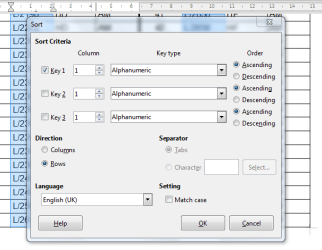
So, it seems to me the simplest option for Writer, would be to get the tick box to show a warning text. I attach a picture of what the tick box looks like for the sort function. It would be immensly useful if a warning was seen somewhere in that box.

As a lay person I wonder if the text string "Sort Criteria" could simply be lengthened to "Sort Criteria----WARNING: If...." Perhaps not a trivial matter as I thought, not entirely sure. I raise this issue, in an attempt to help other LibreOffice Writer users avoid spending hours making up tables only to have them sort of corrupted by failing to select all columns prior to moving on to the sort tick box.
 

Attachments

  • Screenshot tick box sort.PNG
    Screenshot tick box sort.PNG
    70.2 KB · Views: 10
Last edited:

My Computer

Computer type
Laptop
Computer Manufacturer/Model Number
ACER 5315
OS
Windows 7 professional 32 bit
Memory
2Gb
Hard Drives
250Gb
Antivirus
AVG
Browser
FireFox
Back
Top