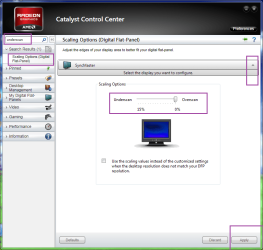
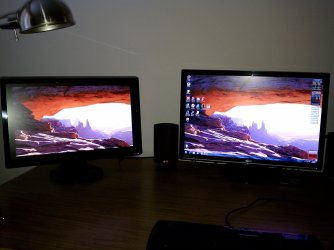
I have a three monitor setup, my main is connected DVI, the third is connected DisplayPort through a active DP/DVI adapter, and the second monitor in question is connected HDMI. The second monitor will not fullscreen the desktop, by this I just mean the background image and any picture, program or video I attempt to play and fullscreen. I can't find anything in the monitor manual or in windows display settings or the CCC settings that would adjust this. The pic shows the monitor in question on the left, there is at least one inch of black border not being used, when connected with DVI this is not an issue and fullscreen is maximized.
Attachments
My Computer
- Computer type
- Laptop
- Computer Manufacturer/Model Number
- Alienware 17/Asus U46E-BAL 7/Lenovo G580
- OS
- Home 7 64 on Alienware and Asus. W8 on Lenovo.
- CPU
- 4th gen Intel i7 4800MQ/i7 2640M/i5 3210M
- Memory
- 16GB/8GB/4GB
- Graphics Card(s)
- GTX 780M
- Monitor(s) Displays
- 17"/14"/15.5"
- Screen Resolution
- 1920x1080/1366x768
- Hard Drives
- 750GB/750GB/500GB
Four WD Elements 2TB Externals
- Internet Speed
- 40MB Down/5MB Up
- Antivirus
- Microsoft Security Essentials/Windows Firewall/Malwarebytes
- Browser
- IE. Haven't used IE in years, is current superior browser
- Other Info
- 2,000 Watt Yamaha/Klipsch sound system via HDMI