Monitor and Video Card

r2d2

New member
Local time
1:27 AM
Messages
2
Hi!! I have a question, how do I change my resolution to 1440x900? I go into Screen Resolution and there is no 1440x900 in between 1360x768 and 1600x900. I have the driver for my monitor and my Nvidia 8300 GS Video Card (256 MB), so what do I do???

r2d2

P.S!!!!!!
Yes I have windows 7.
 

My Computer My Computer

At a glance

Windows 7AMD Athelon 64 X2 Dual Core Processer 5000+ 2...3 GB RAMNvidia GeForce 8300 GS 512MB
Computer Manufacturer/Model Number
Gateway GT5644E
OS
Windows 7
CPU
AMD Athelon 64 X2 Dual Core Processer 5000+ 2.60 Ghz
Motherboard
Nvidia Nforce 430
Memory
3 GB RAM
Graphics Card(s)
Nvidia GeForce 8300 GS 512MB
Sound Card
Integrated 8-Channel (7.1) HD Audio
Monitor(s) Displays
19" Acer AL1916W LCD Flat Panel
Hard Drives
400 GB SATA II HD
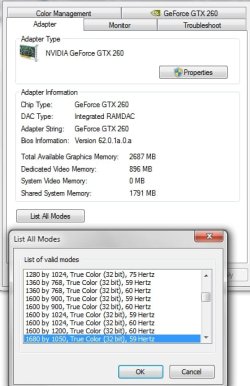
Go to the advanced options on that screen and on the adapter Tab you will see a button for List all Modes and you should be able to select the resolution you want from there.

2009-08-06_044216.jpg
 

My Computer My Computer

At a glance

Windows 7 Ultimate Vista Ultimate x64Core 2 Duo E8500 3.16Ghz @ 3.8Ghz2x2Gigs Patriot PC2-6400 LLInno3D GeForce GTX260 216 SP
Computer Manufacturer/Model Number
Home Brew
OS
Windows 7 Ultimate Vista Ultimate x64
CPU
Core 2 Duo E8500 3.16Ghz @ 3.8Ghz
Motherboard
eVGA 750i FTW
Memory
2x2Gigs Patriot PC2-6400 LL
Graphics Card(s)
Inno3D GeForce GTX260 216 SP
Monitor(s) Displays
ASUS VW222U 22" 2ms Response time
Screen Resolution
1680x1050
Hard Drives
SATA 150GB
SATA II 250GB
USB IDE 750GB Ext.
PSU
HYTEC 600W & Thermaltake 650W Toughpower Power Exp
Case
Thermaltake Armor LCS (Liquid Cooling System)
Cooling
Liquid Cooling System
Keyboard
Logitech G15 Gaming Keyboard
Mouse
Logitech G9 Gaming Mouse
above post is correct, though you may have to uncheck "hide modes this monitor does not support" option in the "monitor" tab, for the resolution you want to be in the list of modes you can select.

Be careful with these modes (namely refresh rate) it is possible (very unlikely though) to damage your monitor by setting the wrong mode
 

My Computer My Computer

At a glance

Null3.4 P4EE512x4 DDR400 MushkinPCI- Ati Radeon x1550 / Integreated Intel 845GV
OS
Null
CPU
3.4 P4EE
Motherboard
Asus P4P800-MX
Memory
512x4 DDR400 Mushkin
Graphics Card(s)
PCI- Ati Radeon x1550 / Integreated Intel 845GV
Sound Card
Soundblaster
Monitor(s) Displays
Gateway 19" CRT, Compaq 14" CRT, HannsG 22" LCD, 35" Tv
Screen Resolution
Primary 1920x1080, Other 3 displays 1024x768
Hard Drives
ST3160023A
ST3160012A
PSU
Thermal Take PurePower 430w
Case
What case
Cooling
Passive
Keyboard
$4 Micro innovations 107 Keys
Mouse
Fellowes FDM-G26 P
Internet Speed
1200/768 KBps
Other Info
I rule you all.
couldn't find it but set a custom resolution using Nvidia.
 

My Computer My Computer

At a glance

Windows 7AMD Athelon 64 X2 Dual Core Processer 5000+ 2...3 GB RAMNvidia GeForce 8300 GS 512MB
Computer Manufacturer/Model Number
Gateway GT5644E
OS
Windows 7
CPU
AMD Athelon 64 X2 Dual Core Processer 5000+ 2.60 Ghz
Motherboard
Nvidia Nforce 430
Memory
3 GB RAM
Graphics Card(s)
Nvidia GeForce 8300 GS 512MB
Sound Card
Integrated 8-Channel (7.1) HD Audio
Monitor(s) Displays
19" Acer AL1916W LCD Flat Panel
Hard Drives
400 GB SATA II HD
Hi!! I have a question, how do I change my resolution to 1440x900? I go into Screen Resolution and there is no 1440x900 in between 1360x768 and 1600x900. I have the driver for my monitor and my Nvidia 8300 GS Video Card (256 MB), so what do I do???

r2d2

P.S!!!!!!
Yes I have windows 7.


r2d2

What refresh rate are you using? maybe supports 1440x900 at 60hz but not 75.

ken
 

My Computer My Computer

At a glance

Win 8 Release candidate 8400[email protected]4 gigsNvidia 9600M
Computer Manufacturer/Model Number
HP Pavillion dv-7 1005 Tx
OS
Win 8 Release candidate 8400
CPU
[email protected]
Memory
4 gigs
Graphics Card(s)
Nvidia 9600M
Sound Card
HD built-in
Monitor(s) Displays
17" Wxga
Screen Resolution
1440x900
Cooling
none
Internet Speed
45Mb down 5Mb up
Back
Top