Solved Monitor audio desperation thread

JoostLuiten

New member
Local time
10:06 PM
Messages
4
Hey everyone,

I made an account here especially to be able to post this thread, which makes me feel like a bit of a leech, but perhaps some of you will be kind enough to help.

I've purchased a new desktop computer and a new monitor but I can't get the integrated audio on my monitor to work. I've read many a thread which seems similar but in the end my situation seems to be different each time and none of the suggestions elsewhere have worked for me. Let me start of by giving the specs, and then some details on what I've tried so far.

Desktop specs:
Intel Core i5-3450 3.10 GHz
MSI H77MA-G43
"7.1 soundcard"
8GB DDR3 Corsair
AMD Radeon 7770 1GB
Windows 7 Home Premium 64Bit

Monitor:
Philips brilliance 228C3LH

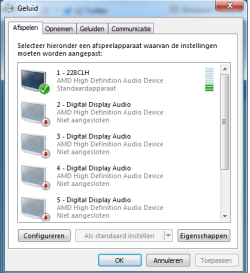
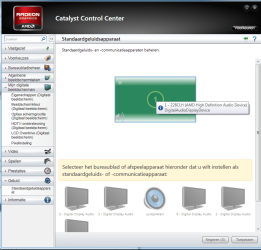
So the desktop and monitor are connected through an HDMI cable. The monitor is set as my standard audio device and you can even see the soundbars go up and down when I play something in media player (see first screenshot). The monitor's audio is enabled and the audio level is set to 80/100 so it's not that. In the catalyst control center you can also see that it's set as the standard audio device (second screenshot). I've tried updating my AMD drivers, plugging the HDMI in and out, shutting down the audio device and turning it back on in the windows audio menu but nothing works. So I'm hoping someone here has a brilliant idea.

My version of windows is in Dutch, so I think the screenshots are self-explanatory but if anything is unclear please ask. Also, I'm not a complete layman but I'm not an expert either, so please keep that in mind when answering. '

I'd appreciate any suggestions because I haven't even been able to enjoy my awesome new pc because of this stuff giving me headaches :P.
 

Attachments

  • standard audio device.png
    standard audio device.png
    14.9 KB · Views: 10
  • CCC audio.png
    CCC audio.png
    49.6 KB · Views: 6

My Computer

OS
windows 7 home premium 64bit
CPU
Intel Core i5-3450
Motherboard
MSI H77MA-G43
Memory
8GB DDR3 Corsair
Graphics Card(s)
AMD Radeon 7770 1GB
Sound Card
7.1 soundcard
Monitor(s) Displays
Philips brilliance 228C3LH
Hard Drives
1TB SataIII
Case
Cooler Master CM 690 II
Cooling
600 Watt cooler master
It does not look like the Phillips monitor is being properly detected. It looks like its just a standard monitor as its not identified. Do you have drivers for the Phillips monitor? and have they been installed or can you get drivers from Phillips?

I did a google search and could not find the technical specifications for this monitor.
 

My Computer

Computer type
PC/Desktop
Computer Manufacturer/Model Number
My Own Build
OS
Windows 10 64 bit
CPU
Intel i7 6700K
Motherboard
ASUS ROG Maximus VIII Hero
Memory
16GB Corsair Dominator
Graphics Card(s)
Intel CPU Graphics
Sound Card
RealTek
Monitor(s) Displays
27" Dell S2719dgf
Screen Resolution
2560X1440
Hard Drives
1 TB Samsung 850 EVO SSD for Win 10 Pro
500GB Samsung 850 EVO SSD for Win 10 Insider
2 TB drive for backup
PSU
EVGA Supernova 750G2
Case
BeQuiet Silent Base 600
Cooling
Deepcool Captain 120EX
Keyboard
Microsoft Wireless 2000
Mouse
Microsoft wireless
Internet Speed
100 MB/sec (Cable)
Antivirus
Microsoft Defender and Malwarebytes
Browser
Edge/Firefox
Other Info
Cakewalk (Sonar) by BandLab and Studio One 4.1 Pro recording studio software. MOTU 896Mk3 Hybrid recording interface, Frontier Tranzport wireless control unit, Behringer X-Touch Control Surface.
Five USB connected optical drives for CD Audio production using Nero BurningROM
Thanks for the response,

So the fact that it lists the correct productnumber '228C3LH' doesn't mean it's being properly detected?

I've tried finding the drivers myself (there was no cd with the monitor) and came up with this 228C3LHSB/00 Philips Brilliance LCD monitor with LED 228C3LHSB Moda 21.5" / 54.6 cm with SmartImage - Philips Support

However, that folder only contains an .inf, .cat. and a .icm file... However that page does list the manual (which doens't help me in this, I've looked) and other stuff so if you still want further specifications they should be on there
 

My Computer

OS
windows 7 home premium 64bit
CPU
Intel Core i5-3450
Motherboard
MSI H77MA-G43
Memory
8GB DDR3 Corsair
Graphics Card(s)
AMD Radeon 7770 1GB
Sound Card
7.1 soundcard
Monitor(s) Displays
Philips brilliance 228C3LH
Hard Drives
1TB SataIII
Case
Cooler Master CM 690 II
Cooling
600 Watt cooler master
It is detected in the sound panel but not in the Video panel and why I asked. Phillips says it is plug and play and in that case you should not need drivers.

However, there is nothing in any Phillips document that I've found that says there are speakers in this monitor. It has a volume control (in the monitor setup) but only refers to connecting external speakers.
 

My Computer

Computer type
PC/Desktop
Computer Manufacturer/Model Number
My Own Build
OS
Windows 10 64 bit
CPU
Intel i7 6700K
Motherboard
ASUS ROG Maximus VIII Hero
Memory
16GB Corsair Dominator
Graphics Card(s)
Intel CPU Graphics
Sound Card
RealTek
Monitor(s) Displays
27" Dell S2719dgf
Screen Resolution
2560X1440
Hard Drives
1 TB Samsung 850 EVO SSD for Win 10 Pro
500GB Samsung 850 EVO SSD for Win 10 Insider
2 TB drive for backup
PSU
EVGA Supernova 750G2
Case
BeQuiet Silent Base 600
Cooling
Deepcool Captain 120EX
Keyboard
Microsoft Wireless 2000
Mouse
Microsoft wireless
Internet Speed
100 MB/sec (Cable)
Antivirus
Microsoft Defender and Malwarebytes
Browser
Edge/Firefox
Other Info
Cakewalk (Sonar) by BandLab and Studio One 4.1 Pro recording studio software. MOTU 896Mk3 Hybrid recording interface, Frontier Tranzport wireless control unit, Behringer X-Touch Control Surface.
Five USB connected optical drives for CD Audio production using Nero BurningROM
You don't state whether you have speakers connected to the 7:1 Soundcard fitted to your PC.

Take a look at the rear of the monitor: does it have an Audio socket, to accept a cable? Sometimes, if the monitor has speakers, an audio cable comes supplied, in the box with the monitor. It's normally just a single jack at each end, connects to the PC soundcard.

Monitor speakers are garbage anyway, usually only 1 or 2 Watts. If you don't have a speaker set up on your PC, I advise you to get one, even if you did have speakers on the monitor. If you don't want "Surround Sound" a simple 2 speaker setup would give you stereo, some have a bass woofer (2:1 setup)

Such as THIS:

TinyURL.com - shorten that long URL into a tiny URL

Hope that helps.
 

My Computer

Computer type
PC/Desktop
Computer Manufacturer/Model Number
bertison
OS
Windows 7/64 HPremium.
CPU
AMD FX-6300.
Motherboard
Asus M5A78L-M LE/USB3.
Memory
Corsair (2x4) GB DDR3 CMXGX3M2A1337CL9.
Graphics Card(s)
NVidia/Gigabyte GT730 (2GB) GDDR5.
Sound Card
Onboard.
Monitor(s) Displays
Iiyama PLE2407HDS.
Screen Resolution
1920 x 1280
Hard Drives
Desktop: 1TB. WD10EZEX-00BN5A0.
Zyxel nsa310 NAS: 2TB Seagate Barracuda 7200.14.
Cache Drive: Sandisk SDSSDRC032G.
Laptop Lenovo B50/80 128 GB SSD.
PSU
Corsair 750M.
Case
Coolermaster N300.
Cooling
FRONT: (2X) 140mm. TOP: (1x) 120mm. REAR: (1x) 120mm.
Keyboard
Logitech K290
Mouse
Trust Optical Wired
Internet Speed
15 Mb Down, 0.55 Up.
Antivirus
Kaspersky Total Security 2017, Hitman Pro.
Browser
Firefox.
Other Info
NETWORK:
Sky "Q box" and router.
Desktop & NAS - 30 Metres Cat6 Ethernet wired, via TP-Link 4-port switch.
Lenovo B50/80 Laptop, 2x Wileyfox phones, Lenovo TAB3-8 tablet - all wireless.
Grandchildren, their parents and friends as bandwidth 'parasites' at various times!
In that case this would be a wild goose chase if there ever was one... The grating definitely looks like it should have speakers behind it, but you're right, it isn't mentioned anywhere. I've posted a question to the Philips customer service so I'll soon find out. If you're right then I'm very sorry to have wasted your time!

I was referring to fireberds post of course ^^

Marked it as solved, if it turns out I wasn't in fact missing the obvious all along I'll repost
 

My Computer

OS
windows 7 home premium 64bit
CPU
Intel Core i5-3450
Motherboard
MSI H77MA-G43
Memory
8GB DDR3 Corsair
Graphics Card(s)
AMD Radeon 7770 1GB
Sound Card
7.1 soundcard
Monitor(s) Displays
Philips brilliance 228C3LH
Hard Drives
1TB SataIII
Case
Cooler Master CM 690 II
Cooling
600 Watt cooler master
You are wasting no one's time my friend.

I am happy to help someone from the Netherlands. As an ex-Para, I had a terrific welcome in your country, when taking part in the Nijmegen marches. (Remembering Arnhem)

And my mates and I toured the Amstel brewery once. I think we had a good time, details are quite hazy!
 

My Computer

Computer type
PC/Desktop
Computer Manufacturer/Model Number
bertison
OS
Windows 7/64 HPremium.
CPU
AMD FX-6300.
Motherboard
Asus M5A78L-M LE/USB3.
Memory
Corsair (2x4) GB DDR3 CMXGX3M2A1337CL9.
Graphics Card(s)
NVidia/Gigabyte GT730 (2GB) GDDR5.
Sound Card
Onboard.
Monitor(s) Displays
Iiyama PLE2407HDS.
Screen Resolution
1920 x 1280
Hard Drives
Desktop: 1TB. WD10EZEX-00BN5A0.
Zyxel nsa310 NAS: 2TB Seagate Barracuda 7200.14.
Cache Drive: Sandisk SDSSDRC032G.
Laptop Lenovo B50/80 128 GB SSD.
PSU
Corsair 750M.
Case
Coolermaster N300.
Cooling
FRONT: (2X) 140mm. TOP: (1x) 120mm. REAR: (1x) 120mm.
Keyboard
Logitech K290
Mouse
Trust Optical Wired
Internet Speed
15 Mb Down, 0.55 Up.
Antivirus
Kaspersky Total Security 2017, Hitman Pro.
Browser
Firefox.
Other Info
NETWORK:
Sky "Q box" and router.
Desktop & NAS - 30 Metres Cat6 Ethernet wired, via TP-Link 4-port switch.
Lenovo B50/80 Laptop, 2x Wileyfox phones, Lenovo TAB3-8 tablet - all wireless.
Grandchildren, their parents and friends as bandwidth 'parasites' at various times!
Glad to hear it :). I'll put up the reply from Philips asa I get one.
 

My Computer

OS
windows 7 home premium 64bit
CPU
Intel Core i5-3450
Motherboard
MSI H77MA-G43
Memory
8GB DDR3 Corsair
Graphics Card(s)
AMD Radeon 7770 1GB
Sound Card
7.1 soundcard
Monitor(s) Displays
Philips brilliance 228C3LH
Hard Drives
1TB SataIII
Case
Cooler Master CM 690 II
Cooling
600 Watt cooler master
Back
Top