Monitor displays "no signal" when HDMI is used

KidWrath

New member
Local time
1:56 PM
Messages
6
Alrighty guys, i have a problem.

About a week ago, my PC was running just fine. My monitor was also running fine(Im using a HDMI cable for my monitor).
Then one morning i turn on my PC, and my monitor displays "no signal" with a black background. So i try using the VGA cord and poof! It works! But when i switch back to the HDMI the same thing as before happens.
I conclude that i needed a new Graphics Card.
So i go ahead and buy the nVidia Geforce GTX 650 2G.
It came in this morning and i installed in onto the PC. I figure out that the output from this Graphics Card is mini-HDMI so i buy a mini-HDMI to HDMI cable.
Guess what happens???
SAME THING!!! Black screen with "No Signal"
I revert back to the VGA cord and poof! It magically works!
I have gone all over the web searching for solutions. NONE!!!
I rolled back the driver, system restored, changed the resolution, changed the cable, and still i get no result.
So i decided to try it on a different monitor.
It worked! But right after the system booted up, literally right before the login screen would come up, the screen goes black and there is no signal!
So i restarted my PC and decided to run it again but in safe mode. And it worked fine, only on safe mode.
I also tried using the monitor with another system (Xbox 360) using a HDMI cable.
It worked on both inputs...

Right now I can only use my VGA cable, and i want to use my HDMI.
Im not setting up dual screens or anything. Im just siplmy trying to view my computer in HD.
Please help me...
 

My Computer My Computer

At a glance

Windows 7 Home Premium 32bit
Computer type
PC/Desktop
OS
Windows 7 Home Premium 32bit
Hi KidWrath, welcome to the Seven Forums.

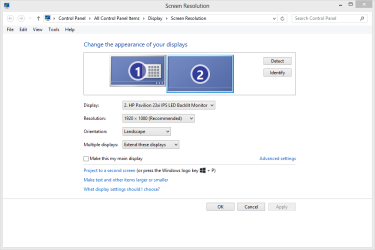
Please post a screenshot of your Screen Resolution Tool window when the display is connected with HDMI even if it shows No signal (right click an empty spot on Desktop, select Screen resolution from the context menu, post a pic of the window that opens).

This is what I'm asking you to post:

Screen Resolution.png

Tutorials for making a screenshot and posting it here:
Kari
 

My Computer My Computer

At a glance

Windows 10 Pro x64 EN-GB1.6 GHz Intel Core i7-720QM Processor6 GBATI Mobility Radeon HD 5850 Graphics
Computer type
Laptop
Computer Manufacturer/Model Number
HP ENVY 17-1150eg
OS
Windows 10 Pro x64 EN-GB
CPU
1.6 GHz Intel Core i7-720QM Processor
Memory
6 GB
Graphics Card(s)
ATI Mobility Radeon HD 5850 Graphics
Sound Card
Beats sound system with integrated subwoofer
Monitor(s) Displays
17" laptop display, 22" LED and 32" Full HD TV through HDMI
Screen Resolution
1600*900 (1), 1920*1080 (2&3)
Hard Drives
Internal: 2 x 500 GB SATA Hard Disk Drive 7200 rpm
External: 2TB for backups, 3TB USB3 network drive for media
Cooling
As Envy runs a bit warm, I have it on a Cooler Master pad
Keyboard
Logitech diNovo Media Desktop Laser (bluetooth)
Mouse
Logitech Performance Mouse MX
Internet Speed
50/10 Mbps VDSL
Antivirus
Windows Defender 4.3.9431.0
Browser
Maxthon 3.5.2., IE11
Alrighty will do. Give me a sec.
 

My Computer My Computer

At a glance

Windows 7 Home Premium 32bit
Computer type
PC/Desktop
OS
Windows 7 Home Premium 32bit
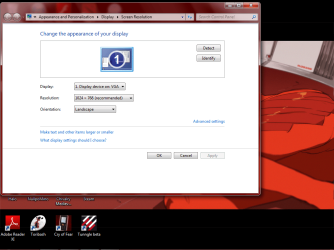
Desktop Reso.png
The weird thing is that it says "Display device on: VGA", but i did not have the VGA cable hooked up.
 

My Computer My Computer

At a glance

Windows 7 Home Premium 32bit
Computer type
PC/Desktop
OS
Windows 7 Home Premium 32bit
OK, the display is not there.

Did you install the display drivers for your Geforce GPU? Anyway, I recommend you to test the HDMI cable, it might be so simple that the cable is broken. Even without the drivers the system should find the display.
 

My Computer My Computer

At a glance

Windows 10 Pro x64 EN-GB1.6 GHz Intel Core i7-720QM Processor6 GBATI Mobility Radeon HD 5850 Graphics
Computer type
Laptop
Computer Manufacturer/Model Number
HP ENVY 17-1150eg
OS
Windows 10 Pro x64 EN-GB
CPU
1.6 GHz Intel Core i7-720QM Processor
Memory
6 GB
Graphics Card(s)
ATI Mobility Radeon HD 5850 Graphics
Sound Card
Beats sound system with integrated subwoofer
Monitor(s) Displays
17" laptop display, 22" LED and 32" Full HD TV through HDMI
Screen Resolution
1600*900 (1), 1920*1080 (2&3)
Hard Drives
Internal: 2 x 500 GB SATA Hard Disk Drive 7200 rpm
External: 2TB for backups, 3TB USB3 network drive for media
Cooling
As Envy runs a bit warm, I have it on a Cooler Master pad
Keyboard
Logitech diNovo Media Desktop Laser (bluetooth)
Mouse
Logitech Performance Mouse MX
Internet Speed
50/10 Mbps VDSL
Antivirus
Windows Defender 4.3.9431.0
Browser
Maxthon 3.5.2., IE11
The HDMI cable is fine, already tested it.
But you know what? I dont think i installed the display adapter. Let me check...
 

My Computer My Computer

At a glance

Windows 7 Home Premium 32bit
Computer type
PC/Desktop
OS
Windows 7 Home Premium 32bit
Well i re-installed it. Guess i had it the whole time.
 

My Computer My Computer

At a glance

Windows 7 Home Premium 32bit
Computer type
PC/Desktop
OS
Windows 7 Home Premium 32bit
Check that the HDMI cable is really connected to display; as the slot is behind the display it sometimes get partially out, only hanging there. Open then the Screen resolution Tool again and click Detect.
 

My Computer My Computer

At a glance

Windows 10 Pro x64 EN-GB1.6 GHz Intel Core i7-720QM Processor6 GBATI Mobility Radeon HD 5850 Graphics
Computer type
Laptop
Computer Manufacturer/Model Number
HP ENVY 17-1150eg
OS
Windows 10 Pro x64 EN-GB
CPU
1.6 GHz Intel Core i7-720QM Processor
Memory
6 GB
Graphics Card(s)
ATI Mobility Radeon HD 5850 Graphics
Sound Card
Beats sound system with integrated subwoofer
Monitor(s) Displays
17" laptop display, 22" LED and 32" Full HD TV through HDMI
Screen Resolution
1600*900 (1), 1920*1080 (2&3)
Hard Drives
Internal: 2 x 500 GB SATA Hard Disk Drive 7200 rpm
External: 2TB for backups, 3TB USB3 network drive for media
Cooling
As Envy runs a bit warm, I have it on a Cooler Master pad
Keyboard
Logitech diNovo Media Desktop Laser (bluetooth)
Mouse
Logitech Performance Mouse MX
Internet Speed
50/10 Mbps VDSL
Antivirus
Windows Defender 4.3.9431.0
Browser
Maxthon 3.5.2., IE11
Well i checked them, they seem to be in place.
Thanks for the replies btw.
 

My Computer My Computer

At a glance

Windows 7 Home Premium 32bit
Computer type
PC/Desktop
OS
Windows 7 Home Premium 32bit
Hi

I have the same problem as you mentioned above.
Did you get the solution?

I tried everything as you described but same black screen on display monitor

Please help if you get solution already.
 

My Computer My Computer

At a glance

Windows 7 Gamer edition 64bitIntel i3 2100 3.10 ghz8 gb ddr3 1333mhzNvidia geforce gtx 960 2gb
Computer type
PC/Desktop
Computer Manufacturer/Model Number
Asus
OS
Windows 7 Gamer edition 64bit
CPU
Intel i3 2100 3.10 ghz
Motherboard
Asus p8H67-m
Memory
8 gb ddr3 1333mhz
Graphics Card(s)
Nvidia geforce gtx 960 2gb
Hard Drives
1 tab sea gate 7200rpm sata
Antivirus
Avg internet security
Browser
Firefox
Same thing here. Not sure I should start a new thread. Could this be related to Drivers?? I use a NV Card EVGA 760 and one day out of no where the screen will just go to "no signal" after logging in - it might take 5 minutes or last na hour and have to do a hard reset to get it back. I tested PSU and thats fine I reseated all cables and memory and bought a new video card upgraded to GTX 970 and still same issue. Very frustrating b/c everything has been working fine for 3 years and this PC I built.. at a loss.. i'm using HDMI cable to my LG TV.. maybe the mother board is going b/c VGA doesn't work now but I still have my card installed just not plugged in.

I'm at work today but all week I never had time to search Google online b/c of this issue. So I'll check the resolution and I have a HDMI/DVI cable from work i'll try. Any suggestions would be HUGE!

thx :confused:
 

My Computer My Computer

At a glance

Windows 10 64-bitIntel i7K 8700K16GB Dual Channel DDR4 @2666MHzEVGA GeForce RTX 2080 Ti XC Ultra Gaming 11GB...
Computer type
PC/Desktop
Computer Manufacturer/Model Number
Dell Alienware Aurora R7
OS
Windows 10 64-bit
CPU
Intel i7K 8700K
Motherboard
Alienware 0VDT73
Memory
16GB Dual Channel DDR4 @2666MHz
Graphics Card(s)
EVGA GeForce RTX 2080 Ti XC Ultra Gaming 11GB GDDR6
Sound Card
Realtek on-board w/Logitech z506 5.1 Surround
Monitor(s) Displays
LG - 65" Class - OLED - C9
Screen Resolution
3840 x 2160 4K
Hard Drives
512GB M.2 PCIe SSD
1TB 7200RPM SATA 6Gb/s (Storage)
PSU
850W EPA Bronze PSU Liquid Cooled Chassis
Case
Alienware Aurora
Cooling
Liquid Cooled
Keyboard
Logitech Wireless K800
Mouse
Logitech Performance MX
Internet Speed
100MB
Antivirus
Emsisoft
Browser
Firefox 64-bit
Other Info
Steelseries Artics Pro Wireless gaming headset.

https://steelseries.com/gaming-headsets/arctis-pro-wireless

My Computer My Computer

At a glance

Windows 10 64-bitIntel i7K 8700K16GB Dual Channel DDR4 @2666MHzEVGA GeForce RTX 2080 Ti XC Ultra Gaming 11GB...
Computer type
PC/Desktop
Computer Manufacturer/Model Number
Dell Alienware Aurora R7
OS
Windows 10 64-bit
CPU
Intel i7K 8700K
Motherboard
Alienware 0VDT73
Memory
16GB Dual Channel DDR4 @2666MHz
Graphics Card(s)
EVGA GeForce RTX 2080 Ti XC Ultra Gaming 11GB GDDR6
Sound Card
Realtek on-board w/Logitech z506 5.1 Surround
Monitor(s) Displays
LG - 65" Class - OLED - C9
Screen Resolution
3840 x 2160 4K
Hard Drives
512GB M.2 PCIe SSD
1TB 7200RPM SATA 6Gb/s (Storage)
PSU
850W EPA Bronze PSU Liquid Cooled Chassis
Case
Alienware Aurora
Cooling
Liquid Cooled
Keyboard
Logitech Wireless K800
Mouse
Logitech Performance MX
Internet Speed
100MB
Antivirus
Emsisoft
Browser
Firefox 64-bit
Other Info
Steelseries Artics Pro Wireless gaming headset.

https://steelseries.com/gaming-headsets/arctis-pro-wireless
update SOLVED: all I did was reset BIOS to default settings and then my video settings appeared, must have been something off in there. PC was on 5 hours w/o going in to that no signal screen. Just wanted to pass it along
 

My Computer My Computer

At a glance

Windows 10 64-bitIntel i7K 8700K16GB Dual Channel DDR4 @2666MHzEVGA GeForce RTX 2080 Ti XC Ultra Gaming 11GB...
Computer type
PC/Desktop
Computer Manufacturer/Model Number
Dell Alienware Aurora R7
OS
Windows 10 64-bit
CPU
Intel i7K 8700K
Motherboard
Alienware 0VDT73
Memory
16GB Dual Channel DDR4 @2666MHz
Graphics Card(s)
EVGA GeForce RTX 2080 Ti XC Ultra Gaming 11GB GDDR6
Sound Card
Realtek on-board w/Logitech z506 5.1 Surround
Monitor(s) Displays
LG - 65" Class - OLED - C9
Screen Resolution
3840 x 2160 4K
Hard Drives
512GB M.2 PCIe SSD
1TB 7200RPM SATA 6Gb/s (Storage)
PSU
850W EPA Bronze PSU Liquid Cooled Chassis
Case
Alienware Aurora
Cooling
Liquid Cooled
Keyboard
Logitech Wireless K800
Mouse
Logitech Performance MX
Internet Speed
100MB
Antivirus
Emsisoft
Browser
Firefox 64-bit
Other Info
Steelseries Artics Pro Wireless gaming headset.

https://steelseries.com/gaming-headsets/arctis-pro-wireless
Back
Top