
-- Note: --
This issue is still NOT resolved, please help if you can.
I summed up everything in this first post (that happened meanwhile) so you can quickly catch up with the thread!
Hi,
We have a new monitor but I'm unable to use it's native resolution.
We're using it with a notebook (Intel GMA x3100 GPU) and it seems the graphics driver has no clue which resolutions are supported.
There's a monitor driver available url=http://www.lg.com/hu/termektamogatas/lg-M2232D]here[/url] (you can download it to examine it even if you don't own this product)
When I run the monitor driver setup, it wants me to select the display driver output. (There are two of them)
I selected the one I had the monitor connected (It said Non-PNP display). It had no effect so I installed it on the other one too but still no effect.
What should I do?
I did a system restore to try again (as there is no uninstaller for the driver)
Now it is doing the same, it says install successful, but just then I get another popup saying install failed...
Updates to sum up the things we've already discussed:
I have seriously no idea why is this happening. I'm not sure if it's a problem related to Intel's GMA Driver (since the problem is only present on computers that have Intel GMA) OR to the monitor itself. (even though it's working on the 2 desktop computers!)
The monitor is still under warranty. Should I send it back?
do you think this issue can be related to the monitor itself by any chance?
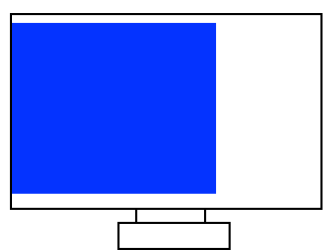
Blue space means visible image. Everything else is blank.
This issue is still NOT resolved, please help if you can.
I summed up everything in this first post (that happened meanwhile) so you can quickly catch up with the thread!
Hi,
We have a new monitor but I'm unable to use it's native resolution.
We're using it with a notebook (Intel GMA x3100 GPU) and it seems the graphics driver has no clue which resolutions are supported.
There's a monitor driver available url=http://www.lg.com/hu/termektamogatas/lg-M2232D]here[/url] (you can download it to examine it even if you don't own this product)
When I run the monitor driver setup, it wants me to select the display driver output. (There are two of them)
I selected the one I had the monitor connected (It said Non-PNP display). It had no effect so I installed it on the other one too but still no effect.
What should I do?
I did a system restore to try again (as there is no uninstaller for the driver)
Now it is doing the same, it says install successful, but just then I get another popup saying install failed...
Updates to sum up the things we've already discussed:
- I tried installing the monitor driver, both normally and manually in Device Manager. No effect.
- I tried unchecking "Hide modes that this monitor can't display" -> Many resolutions appear, but most of the supported ones are missing, even the native resolution is missing (1920x1080)
- Graphics driver is up to date
- I tried THIS (from Intel's website). It displayed different resolutions by default but still not the supported ones! 1920x1080 was still missing.
- I tried it with a different notebook (HP 6730b / Intel 4500MHD). Same, but it had an option for custom resolution. I entered 1920x1080, then rebooted. I could force it to show in this mode but it was really weird. I'll attach a drawing of how it looked on the monitor. (Basically it used 3/4 space and the left was blank.
- Despite all of this this display is working fine on 2 desktop computer, one with NVIDIA 7600GT (native resolution worked fine by default, image filled entire screen & was smooth), and one with AMD 4650 (worked but required manual overscan setting to "fit the screen", else it was shrinked to the center in 1920x1080)
- Monitor supports 1920x1080 over RGB. It's manual suggests to use this resolution over RGB.
I have seriously no idea why is this happening. I'm not sure if it's a problem related to Intel's GMA Driver (since the problem is only present on computers that have Intel GMA) OR to the monitor itself. (even though it's working on the 2 desktop computers!)
The monitor is still under warranty. Should I send it back?
do you think this issue can be related to the monitor itself by any chance?
Blue space means visible image. Everything else is blank.
Last edited:
My Computer
- Computer type
- Laptop
- Computer Manufacturer/Model Number
- HP Compaq 6720s
- OS
- Microsoft® Windows 7 Professional 64-bit
- CPU
- Intel(R) Pentium(R) Dual CPU T2310 @ 1.46GHz
- Motherboard
- Hewlett-Packard 30D8
- Memory
- 4,00 GB
- Graphics Card(s)
- (1) Mobile Intel(R) 965 Express Chipset Family (2) Mobile
- Sound Card
- (1) Bluetooth Hands-free Audio (2) Bluetooth Stereo Audio
- Screen Resolution
- 1280 x 800 x 32 bits (4294967296 colors) @ 59 Hz
- Hard Drives
- (1) Hitachi HTS542516K9SA00 ATA Device (2) Multi Flash Reader USB Device


