Solved Monitor not at full resolution

bigseb

Same old, same old
Power User
VIP
Local time
7:15 AM
Messages
722
Location
Lutterworth, Leicestershire
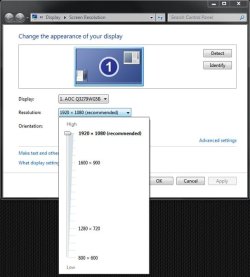
Just bought a AOC Q3279VWF 31.5" monitor. Everything hooked, drivers installed but the max resolution I'm getting is 1920 x 1080 instead of 2560 x 1440. The max resolution isn't even listed in the drop down. What am I doing wrong?


Q3279VWF | AOC Europe
 

My Computer

Computer type
PC/Desktop
Computer Manufacturer/Model Number
Own build
OS
Windows 7 x64 Professional
CPU
Intel Core i7-870 Lynnfield 2.93 GHz
Motherboard
Intel Whitesburg P55 LGA1156
Memory
Kingston Hyper X 1333MHz DDR3 4x4Gb
Graphics Card(s)
Nvidia GTS 250
Monitor(s) Displays
AOC Q3279VWF 31.5"
Screen Resolution
2560x1440
Hard Drives
Western Digital 1000GB Hard Drive (SATA 3.0Gb/s, 7200rpm, 32MB Cache)
Verbatim 500GB (External)
PSU
650W
Case
Coolermaster HAF 912
Cooling
Stock
Keyboard
Logitech
Mouse
Logitech
Antivirus
Avira
Browser
Firefox
Other Info
LG OptDrive 24x SATA DVDRW Lightscribe
Hi bigseb,

Just bought a AOC Q3279VWF 31.5" monitor. Everything hooked, drivers installed but the max resolution I'm getting is 1920 x 1080 instead of 2560 x 1440. The max resolution isn't even listed in the drop down. What am I doing wrong?

Q3279VWF | AOC Europe

Have you checked the graphics driver for updates?
 

My Computer

Computer type
Laptop
Computer Manufacturer/Model Number
Fujitsu LIFEBOOK
OS
Win 7 HP SP1 64-bit Vista HB SP2 32-bit Linux Mint 18.3
CPU
Intel(R) Pentium(R) CPU P6200 @ 2.13GHz
Motherboard
FUJITSU FJNBB06
Memory
4.00 GB
Graphics Card(s)
Intel(R) Graphics Media Accelerator HD
Sound Card
[1] Realtek High Definition Audio [2] Intel(R) Display Audio
Screen Resolution
1366 x 768 x 32 bits (4294967296 colors) @ 59 Hz
Hard Drives
TOSHIBA MK5076GSX
Antivirus
AVG FREE
Yes
 

My Computer

Computer type
PC/Desktop
Computer Manufacturer/Model Number
Own build
OS
Windows 7 x64 Professional
CPU
Intel Core i7-870 Lynnfield 2.93 GHz
Motherboard
Intel Whitesburg P55 LGA1156
Memory
Kingston Hyper X 1333MHz DDR3 4x4Gb
Graphics Card(s)
Nvidia GTS 250
Monitor(s) Displays
AOC Q3279VWF 31.5"
Screen Resolution
2560x1440
Hard Drives
Western Digital 1000GB Hard Drive (SATA 3.0Gb/s, 7200rpm, 32MB Cache)
Verbatim 500GB (External)
PSU
650W
Case
Coolermaster HAF 912
Cooling
Stock
Keyboard
Logitech
Mouse
Logitech
Antivirus
Avira
Browser
Firefox
Other Info
LG OptDrive 24x SATA DVDRW Lightscribe
HDMI.


I notice that the settings on the monitor itself (where one sets brightness and all that) is also says 1920x1080. However the manual clearly states 2560x1440 using HDMI so...


Pretty sure its me thats missing something. Googled this but nothing leaps out at me.
 

My Computer

Computer type
PC/Desktop
Computer Manufacturer/Model Number
Own build
OS
Windows 7 x64 Professional
CPU
Intel Core i7-870 Lynnfield 2.93 GHz
Motherboard
Intel Whitesburg P55 LGA1156
Memory
Kingston Hyper X 1333MHz DDR3 4x4Gb
Graphics Card(s)
Nvidia GTS 250
Monitor(s) Displays
AOC Q3279VWF 31.5"
Screen Resolution
2560x1440
Hard Drives
Western Digital 1000GB Hard Drive (SATA 3.0Gb/s, 7200rpm, 32MB Cache)
Verbatim 500GB (External)
PSU
650W
Case
Coolermaster HAF 912
Cooling
Stock
Keyboard
Logitech
Mouse
Logitech
Antivirus
Avira
Browser
Firefox
Other Info
LG OptDrive 24x SATA DVDRW Lightscribe
Are you using your own HDMI or one that came with the card? old cables may not be up to the job.
 

My Computer

Computer type
PC/Desktop
OS
Windows 11
The new one.
 

My Computer

Computer type
PC/Desktop
Computer Manufacturer/Model Number
Own build
OS
Windows 7 x64 Professional
CPU
Intel Core i7-870 Lynnfield 2.93 GHz
Motherboard
Intel Whitesburg P55 LGA1156
Memory
Kingston Hyper X 1333MHz DDR3 4x4Gb
Graphics Card(s)
Nvidia GTS 250
Monitor(s) Displays
AOC Q3279VWF 31.5"
Screen Resolution
2560x1440
Hard Drives
Western Digital 1000GB Hard Drive (SATA 3.0Gb/s, 7200rpm, 32MB Cache)
Verbatim 500GB (External)
PSU
650W
Case
Coolermaster HAF 912
Cooling
Stock
Keyboard
Logitech
Mouse
Logitech
Antivirus
Avira
Browser
Firefox
Other Info
LG OptDrive 24x SATA DVDRW Lightscribe
001.JPG
 

My Computer

Computer type
PC/Desktop
Computer Manufacturer/Model Number
Own build
OS
Windows 7 x64 Professional
CPU
Intel Core i7-870 Lynnfield 2.93 GHz
Motherboard
Intel Whitesburg P55 LGA1156
Memory
Kingston Hyper X 1333MHz DDR3 4x4Gb
Graphics Card(s)
Nvidia GTS 250
Monitor(s) Displays
AOC Q3279VWF 31.5"
Screen Resolution
2560x1440
Hard Drives
Western Digital 1000GB Hard Drive (SATA 3.0Gb/s, 7200rpm, 32MB Cache)
Verbatim 500GB (External)
PSU
650W
Case
Coolermaster HAF 912
Cooling
Stock
Keyboard
Logitech
Mouse
Logitech
Antivirus
Avira
Browser
Firefox
Other Info
LG OptDrive 24x SATA DVDRW Lightscribe
002.jpg
 

My Computer

Computer type
PC/Desktop
Computer Manufacturer/Model Number
Own build
OS
Windows 7 x64 Professional
CPU
Intel Core i7-870 Lynnfield 2.93 GHz
Motherboard
Intel Whitesburg P55 LGA1156
Memory
Kingston Hyper X 1333MHz DDR3 4x4Gb
Graphics Card(s)
Nvidia GTS 250
Monitor(s) Displays
AOC Q3279VWF 31.5"
Screen Resolution
2560x1440
Hard Drives
Western Digital 1000GB Hard Drive (SATA 3.0Gb/s, 7200rpm, 32MB Cache)
Verbatim 500GB (External)
PSU
650W
Case
Coolermaster HAF 912
Cooling
Stock
Keyboard
Logitech
Mouse
Logitech
Antivirus
Avira
Browser
Firefox
Other Info
LG OptDrive 24x SATA DVDRW Lightscribe
003.jpg
 

My Computer

Computer type
PC/Desktop
Computer Manufacturer/Model Number
Own build
OS
Windows 7 x64 Professional
CPU
Intel Core i7-870 Lynnfield 2.93 GHz
Motherboard
Intel Whitesburg P55 LGA1156
Memory
Kingston Hyper X 1333MHz DDR3 4x4Gb
Graphics Card(s)
Nvidia GTS 250
Monitor(s) Displays
AOC Q3279VWF 31.5"
Screen Resolution
2560x1440
Hard Drives
Western Digital 1000GB Hard Drive (SATA 3.0Gb/s, 7200rpm, 32MB Cache)
Verbatim 500GB (External)
PSU
650W
Case
Coolermaster HAF 912
Cooling
Stock
Keyboard
Logitech
Mouse
Logitech
Antivirus
Avira
Browser
Firefox
Other Info
LG OptDrive 24x SATA DVDRW Lightscribe
It just doesn't give any option for setting it to 2560x1440. What am I doing wrong?
 

My Computer

Computer type
PC/Desktop
Computer Manufacturer/Model Number
Own build
OS
Windows 7 x64 Professional
CPU
Intel Core i7-870 Lynnfield 2.93 GHz
Motherboard
Intel Whitesburg P55 LGA1156
Memory
Kingston Hyper X 1333MHz DDR3 4x4Gb
Graphics Card(s)
Nvidia GTS 250
Monitor(s) Displays
AOC Q3279VWF 31.5"
Screen Resolution
2560x1440
Hard Drives
Western Digital 1000GB Hard Drive (SATA 3.0Gb/s, 7200rpm, 32MB Cache)
Verbatim 500GB (External)
PSU
650W
Case
Coolermaster HAF 912
Cooling
Stock
Keyboard
Logitech
Mouse
Logitech
Antivirus
Avira
Browser
Firefox
Other Info
LG OptDrive 24x SATA DVDRW Lightscribe
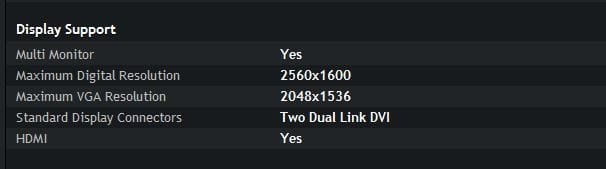
Are you still running the GTS250 card you have in your specs here? The card is pretty old and I think I have a vague recollection of running the same cards myself and HDMI would only do 1080, DVI was fine though - try a DVI if you have one.
 

My Computer

Computer type
PC/Desktop
OS
Windows 11
It is an old card, yes, but the specs show it being capable of running the monitor at full resolution. I don't know if I have a DVI cable, will have to root around for one...


004.JPG
 

My Computer

Computer type
PC/Desktop
Computer Manufacturer/Model Number
Own build
OS
Windows 7 x64 Professional
CPU
Intel Core i7-870 Lynnfield 2.93 GHz
Motherboard
Intel Whitesburg P55 LGA1156
Memory
Kingston Hyper X 1333MHz DDR3 4x4Gb
Graphics Card(s)
Nvidia GTS 250
Monitor(s) Displays
AOC Q3279VWF 31.5"
Screen Resolution
2560x1440
Hard Drives
Western Digital 1000GB Hard Drive (SATA 3.0Gb/s, 7200rpm, 32MB Cache)
Verbatim 500GB (External)
PSU
650W
Case
Coolermaster HAF 912
Cooling
Stock
Keyboard
Logitech
Mouse
Logitech
Antivirus
Avira
Browser
Firefox
Other Info
LG OptDrive 24x SATA DVDRW Lightscribe
That's weird that your monitor controls are showing 1920x1080 max. Just to be precise about what hardware you have, can you do start > run > wmic PATH Win32_videocontroller GET pnpdeviceid |clip > press enter, then do a right-click paste into a reply to this post. That will tell us your graphics adapter hardware device ID.

While you are at it, you might also do start > run > cmd > press enter > dumpedid. You will have to put dumpedid in your path, I put mine in my c:\windows folder. You get it here

DumpEDID - Dump EDID information

It will tell you everything that windows sees about your monitor. Too much info to post here, but it will show resolutions and other info
 

My Computer

Computer type
PC/Desktop
Computer Manufacturer/Model Number
diy
OS
Win7 pro x64
CPU
stock i7 7700k
Motherboard
Gigabyte Z270N-WIFI mini-ITX
Memory
Corsair Vengeance LPX 16GB (2x8GB) DDR4 @ 3200MHz
Graphics Card(s)
integrated Intel HD 630
Sound Card
onboard Realtek ALC1220
Monitor(s) Displays
two vertically mounted samsung 55" 4k un55mu8000
Screen Resolution
1920x1280
Hard Drives
256GB Samsung EVO 960 M.2 pci-e NVMe SSD
PSU
SilverStone Nightjar ST45NF 450Watt Fanless
Case
No case. Motherboard is mounted directly onto power supply
Cooling
Evercool low profile 815EP with Panaflow 12L fan at 7v
Keyboard
Ortek MCK-86 mini
Mouse
Belkin 5-button USB
Internet Speed
spectrum 400mbps
FIXED


Changed the HDMI for a DVI cable. All sorted now. Thank you to all those that replied!
 

My Computer

Computer type
PC/Desktop
Computer Manufacturer/Model Number
Own build
OS
Windows 7 x64 Professional
CPU
Intel Core i7-870 Lynnfield 2.93 GHz
Motherboard
Intel Whitesburg P55 LGA1156
Memory
Kingston Hyper X 1333MHz DDR3 4x4Gb
Graphics Card(s)
Nvidia GTS 250
Monitor(s) Displays
AOC Q3279VWF 31.5"
Screen Resolution
2560x1440
Hard Drives
Western Digital 1000GB Hard Drive (SATA 3.0Gb/s, 7200rpm, 32MB Cache)
Verbatim 500GB (External)
PSU
650W
Case
Coolermaster HAF 912
Cooling
Stock
Keyboard
Logitech
Mouse
Logitech
Antivirus
Avira
Browser
Firefox
Other Info
LG OptDrive 24x SATA DVDRW Lightscribe
Back
Top