
Monitor not detecting gfx card

bart3215

New member
Local time
1:28 AM
Messages
13
Hi, I have a ATI Radeon Mobility 3450 HD, but recently I screwed something up when trying to reinstall drivers and now my display settings don't recognize my adapter type.
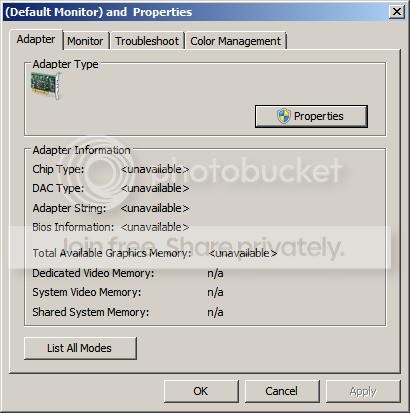
help.png


I didn't realize this until I was trying to hook my tv up to my laptop, and the closest restore point is too long ago so I was wondering if there was a way to detect my adapter type. Thanks.
 

My Computer

Computer Manufacturer/Model Number
Dell Inspiron 17R N7710
OS
Windows 7 64 bit
CPU
Intel Core i3 2310M (2nd Gen)
Memory
6gb
Graphics Card(s)
Nvidia GT525M/built in Intel 3000HD
Screen Resolution
1600x900
Hi, I have a ATI Radeon Mobility 3450 HD, but recently I screwed something up when trying to reinstall drivers and now my display settings don't recognize my adapter type.
help.png


I didn't realize this until I was trying to hook my tv up to my laptop, and the closest restore point is too long ago so I was wondering if there was a way to detect my adapter type. Thanks.


Sorry you are having issues bart!

It sure looks like you need to reinstall the driver. However there are many companies that make AIT graphics cards under license from ATI. Who is the manufacturer of your card?
 

My Computer

Computer Manufacturer/Model Number
Homebrew PC - "Alpha_Dawg"
OS
Windows 7 Ultimate 64 bit Steve Ballmer Signature Edition
CPU
Intel Core 2 Quad - Q9550 - 2.83GHz stock - OC'd to 3.6GHz
Motherboard
Gigabyte EP45-UD3P
Memory
4GB DDR2 800MHz (PC6400) OCZ Reaper
Graphics Card(s)
Nvidia GE Force 8800 GTS
Sound Card
Asus Xonar DX
Monitor(s) Displays
Samsung SyncMaster 2333HD
Screen Resolution
1920 x 1080
Hard Drives
WD Caviar Black 750GB - 7200RPM - 32MB cache
WD Caviar Green 1.5TB - 5400RPM - 64MB cache
WD Caviar Green 2.0TB - 5400RPM - 64MB cache
PSU
PC Power & Cooling Silencer 750
Case
Gigabyte 3D Aurora
Cooling
Case is Air - 5ea. 120mm fans (mix of Arctic and Xigmatec)
Keyboard
MS Natural Wireless KB
Mouse
MS Wireless Mouse
Internet Speed
50 mbps down/5 mbps up
Other Info
AVerMedia - AVerTVHD G2 Dual Tuner Card
Thanks for the quick reply.
Where would I find who manufactures it? In device manager it still comes up as my display adapter. And under properties it says the manufacturer is ATI Technologies Inc. Is this the answer to your question, if not please let me know how to find the manufacturer. Thanks.
 

My Computer

Computer Manufacturer/Model Number
Dell Inspiron 17R N7710
OS
Windows 7 64 bit
CPU
Intel Core i3 2310M (2nd Gen)
Memory
6gb
Graphics Card(s)
Nvidia GT525M/built in Intel 3000HD
Screen Resolution
1600x900
Now Ati officially supports mobility cards. From 10.3 IIRC.
 

My Computer

OS
Win Xp/7
CPU
Sempron 2600 1.8 Gh
Motherboard
Asus A7N8X-X nForce2
Memory
1GB DDR
Graphics Card(s)
Asus AH HD3450 AGP
Sound Card
Integrated
Monitor(s) Displays
CRT :)
Hard Drives
80GB WD Caviar
PSU
300W
Internet Speed
1Mbit
Just attempted to uninstall and reinstall the ATI drivers, but it still doesn't appear.
 

My Computer

Computer Manufacturer/Model Number
Dell Inspiron 17R N7710
OS
Windows 7 64 bit
CPU
Intel Core i3 2310M (2nd Gen)
Memory
6gb
Graphics Card(s)
Nvidia GT525M/built in Intel 3000HD
Screen Resolution
1600x900
Uninstall drivers. Reboot. Use driver sweeper. Reboot. Install drivers.

What shows the log after driver installation?
 

My Computer

OS
Win Xp/7
CPU
Sempron 2600 1.8 Gh
Motherboard
Asus A7N8X-X nForce2
Memory
1GB DDR
Graphics Card(s)
Asus AH HD3450 AGP
Sound Card
Integrated
Monitor(s) Displays
CRT :)
Hard Drives
80GB WD Caviar
PSU
300W
Internet Speed
1Mbit
Since I couldn't upload the xml file, I just copied and pasted it into wordpad.

I don't know if this has anything to do with it, but my Fn key(s) don't work anymore.
 

Attachments

Last edited:

My Computer

Computer Manufacturer/Model Number
Dell Inspiron 17R N7710
OS
Windows 7 64 bit
CPU
Intel Core i3 2310M (2nd Gen)
Memory
6gb
Graphics Card(s)
Nvidia GT525M/built in Intel 3000HD
Screen Resolution
1600x900
The file looks like it updated everything but the actual driver itself. Try reinstalling the Catalyst package and doing a Custom install. Make sure everything is selected when you do it. I would uninstall Catalyst first, though.
 

My Computer

Computer type
PC/Desktop
Computer Manufacturer/Model Number
Mellon Labs (custom build)
OS
Win 7 Pro x64/Win 10 Pro x64 dual boot
CPU
AMD FX 8350 Vishera @ 4200
Motherboard
ASUS M5A97 R2.0
Memory
16 GB Mushkin Blackline DDR3-2400 @ 1866 (9-10-10-10-31)
Graphics Card(s)
XFX Radeon R9 280 Double D Black Edition
Sound Card
Realtek HD Audio on MB. Sounds great.
Monitor(s) Displays
Acer 24", Acer 22"
Screen Resolution
3840 x 1080
Hard Drives
1 x Mushkin Chronos 120 GB SSD (Win 10)
1 x Samsung 850 EVO 250 GB SSD (Win 7)
1 x WD 1TB SATA Blue
1 x WD 1TB SATA Green
PSU
Corsair TX-750
Case
CoolerMaster HAF 912+
Cooling
Coolermaster Seidon 240M Liquid AIO. 6 case fans
Keyboard
Logitech G710+
Mouse
Logitech G500s
Internet Speed
Much better since I got fiber, but still way overpriced.
Antivirus
MSE, Malware Bytes for scanning
Browser
Firefox
Other Info
Corsair VOID USB headphones.

A Mellon Labs X-1 - LCD Smartie driven system status display.

Brought to you by the letter E
So I just attempted that again, and noticed on the reinstall that catalyst install manager was still installed. Am I uninstalling incorrectly or something? I run the install program and click uninstall. I've tried both the custom and express. I also noticed that after uninstalling the ATI folders were still in place.
 

My Computer

Computer Manufacturer/Model Number
Dell Inspiron 17R N7710
OS
Windows 7 64 bit
CPU
Intel Core i3 2310M (2nd Gen)
Memory
6gb
Graphics Card(s)
Nvidia GT525M/built in Intel 3000HD
Screen Resolution
1600x900
The ATI folder in the root directory are the install files, and is safe to delete after the install is done and working correctly. After upgrading my drivers, I delete the folder since it's just a waste of space.

IIRC, the install manager will stay installed, and when you reinstall CCC and the drivers, it just reinstalls (or else updates) the install manager. That seems to be normal for the Catalyst package.

Since this is a laptop, it might be an idea to check with the manufacturer for a driver. Laptops can be funny that way.
 

My Computer

Computer type
PC/Desktop
Computer Manufacturer/Model Number
Mellon Labs (custom build)
OS
Win 7 Pro x64/Win 10 Pro x64 dual boot
CPU
AMD FX 8350 Vishera @ 4200
Motherboard
ASUS M5A97 R2.0
Memory
16 GB Mushkin Blackline DDR3-2400 @ 1866 (9-10-10-10-31)
Graphics Card(s)
XFX Radeon R9 280 Double D Black Edition
Sound Card
Realtek HD Audio on MB. Sounds great.
Monitor(s) Displays
Acer 24", Acer 22"
Screen Resolution
3840 x 1080
Hard Drives
1 x Mushkin Chronos 120 GB SSD (Win 10)
1 x Samsung 850 EVO 250 GB SSD (Win 7)
1 x WD 1TB SATA Blue
1 x WD 1TB SATA Green
PSU
Corsair TX-750
Case
CoolerMaster HAF 912+
Cooling
Coolermaster Seidon 240M Liquid AIO. 6 case fans
Keyboard
Logitech G710+
Mouse
Logitech G500s
Internet Speed
Much better since I got fiber, but still way overpriced.
Antivirus
MSE, Malware Bytes for scanning
Browser
Firefox
Other Info
Corsair VOID USB headphones.

A Mellon Labs X-1 - LCD Smartie driven system status display.

Brought to you by the letter E
Ahh, that was it. The first time I checked there I didn't download the option for ati/amd display driver because it said version 8.xxx so I assumed it was an older ATI version, but it ended up being the solution. Thanks.
 

My Computer

Computer Manufacturer/Model Number
Dell Inspiron 17R N7710
OS
Windows 7 64 bit
CPU
Intel Core i3 2310M (2nd Gen)
Memory
6gb
Graphics Card(s)
Nvidia GT525M/built in Intel 3000HD
Screen Resolution
1600x900
Excellent. Glad it worked. :)
 

My Computer

Computer type
PC/Desktop
Computer Manufacturer/Model Number
Mellon Labs (custom build)
OS
Win 7 Pro x64/Win 10 Pro x64 dual boot
CPU
AMD FX 8350 Vishera @ 4200
Motherboard
ASUS M5A97 R2.0
Memory
16 GB Mushkin Blackline DDR3-2400 @ 1866 (9-10-10-10-31)
Graphics Card(s)
XFX Radeon R9 280 Double D Black Edition
Sound Card
Realtek HD Audio on MB. Sounds great.
Monitor(s) Displays
Acer 24", Acer 22"
Screen Resolution
3840 x 1080
Hard Drives
1 x Mushkin Chronos 120 GB SSD (Win 10)
1 x Samsung 850 EVO 250 GB SSD (Win 7)
1 x WD 1TB SATA Blue
1 x WD 1TB SATA Green
PSU
Corsair TX-750
Case
CoolerMaster HAF 912+
Cooling
Coolermaster Seidon 240M Liquid AIO. 6 case fans
Keyboard
Logitech G710+
Mouse
Logitech G500s
Internet Speed
Much better since I got fiber, but still way overpriced.
Antivirus
MSE, Malware Bytes for scanning
Browser
Firefox
Other Info
Corsair VOID USB headphones.

A Mellon Labs X-1 - LCD Smartie driven system status display.

Brought to you by the letter E
Back
Top