Monitor not Recognized after Windows Update

jimbeis462

New member
Local time
5:42 PM
Messages
13
Hi guys,

I got this problem probably 3 days ago, I woke up one morning and saw that my computer had restarted itself from a Windows Update.

I turned my monitors on, and it only seemed as if one was plugged in, (the Samsung on the right).

So I checked connections, had a look in screen resolution settings and CCC, and neither could detect my ASUS on the left.

After more screwing around, I unplugged both monitors, and then just plugged in the ASUS using its own cable and port that it always uses, and the screen came on.
So to me, this rules out cable and GFX card problems?

I now see in CCC that the ASUS is an Unknown monitor, it ALWAYS used to say ASUS.
ajmgbn.jpg


Now when I plug in my Samsung, the ASUS turns off and the image moves over to the Samsung.

For the ASUS I use a DVI to HDMI cable (HDMI end at GFX card)
and the the Samsung uses a regular DVI cable.

Thanks guys

Forgot to add; I also tried graphics driver rollback, uninstall Windows Update and then downloaded latest AMD graphics drivers, none of which seemed to help at all.
 

My Computer

Computer type
PC/Desktop
Computer Manufacturer/Model Number
Custom
OS
Windows 7 Ultimate 64bit
CPU
Intel Core i5-2400 CPU @ 3.10 GHz
Motherboard
ASUS P8H61-M LE
Memory
16GB G-Skill
Graphics Card(s)
AMD Radeon HD 6700
Sound Card
Onboard Realtek
Monitor(s) Displays
ASUS VW220T & Samsung SyncMaster 206BW
Screen Resolution
1680x1050
PSU
Antec 500 Neo HE
Case
Cheap eBay Beast
Keyboard
G110
Mouse
G500
Internet Speed
100 MBit
Antivirus
MSE
Browser
Firefox

My Computer

Computer type
PC/Desktop
Computer Manufacturer/Model Number
Dude Build
OS
Windows 10 Pro X64
CPU
Intel(R) Core(TM) i5-3570K CPU OC@ 4.5GHZ Turbo
Motherboard
MSI Z77A-G45 Gaming
Memory
8.00 GB DDR3 1600Mhz
Graphics Card(s)
MSI Gaming X GTX 1070
Sound Card
Realtek High Definition
Monitor(s) Displays
Dell S23O9W, HP L1710
Screen Resolution
DELL-1920 x 1080 HP-1280 x1024
Hard Drives
Crucial m4 256 SSD, WD 7200RPM 500GB WD 1TB
PSU
Seasonic X650 GOLD
Case
Zalman Z12
Cooling
Antec Kuhler 920
Keyboard
Logitech
Mouse
MSI DS100 Interceptor
Internet Speed
50 down and 5 up
Antivirus
MSE
Browser
Chrome, IE 11
Other Info
Logitech X-620 Speakers
hi thanks for reply, in my system restore menu, the only restore point I can choose is labelled as todays date, 29-4-2013,
should I try this anyway?
 

My Computer

Computer type
PC/Desktop
Computer Manufacturer/Model Number
Custom
OS
Windows 7 Ultimate 64bit
CPU
Intel Core i5-2400 CPU @ 3.10 GHz
Motherboard
ASUS P8H61-M LE
Memory
16GB G-Skill
Graphics Card(s)
AMD Radeon HD 6700
Sound Card
Onboard Realtek
Monitor(s) Displays
ASUS VW220T & Samsung SyncMaster 206BW
Screen Resolution
1680x1050
PSU
Antec 500 Neo HE
Case
Cheap eBay Beast
Keyboard
G110
Mouse
G500
Internet Speed
100 MBit
Antivirus
MSE
Browser
Firefox
Don't that will work since it is after the problem. Try this click start/devices and printers, right click the monitor and click troubleshoot.
 

My Computer

Computer type
PC/Desktop
Computer Manufacturer/Model Number
Dude Build
OS
Windows 10 Pro X64
CPU
Intel(R) Core(TM) i5-3570K CPU OC@ 4.5GHZ Turbo
Motherboard
MSI Z77A-G45 Gaming
Memory
8.00 GB DDR3 1600Mhz
Graphics Card(s)
MSI Gaming X GTX 1070
Sound Card
Realtek High Definition
Monitor(s) Displays
Dell S23O9W, HP L1710
Screen Resolution
DELL-1920 x 1080 HP-1280 x1024
Hard Drives
Crucial m4 256 SSD, WD 7200RPM 500GB WD 1TB
PSU
Seasonic X650 GOLD
Case
Zalman Z12
Cooling
Antec Kuhler 920
Keyboard
Logitech
Mouse
MSI DS100 Interceptor
Internet Speed
50 down and 5 up
Antivirus
MSE
Browser
Chrome, IE 11
Other Info
Logitech X-620 Speakers
hi, I have a couple of screenshots for you:


This is with ASUS plugged in:
333c20m.jpg


This is with Samsung plugged in:
u4f4l.jpg


So as you can see, I can't right click it :/

I also tried to right click it in CCC, but its not possible to do much from that program...

cheers
 

My Computer

Computer type
PC/Desktop
Computer Manufacturer/Model Number
Custom
OS
Windows 7 Ultimate 64bit
CPU
Intel Core i5-2400 CPU @ 3.10 GHz
Motherboard
ASUS P8H61-M LE
Memory
16GB G-Skill
Graphics Card(s)
AMD Radeon HD 6700
Sound Card
Onboard Realtek
Monitor(s) Displays
ASUS VW220T & Samsung SyncMaster 206BW
Screen Resolution
1680x1050
PSU
Antec 500 Neo HE
Case
Cheap eBay Beast
Keyboard
G110
Mouse
G500
Internet Speed
100 MBit
Antivirus
MSE
Browser
Firefox
does it show in device manager with a bang?
 

My Computer

Computer type
PC/Desktop
Computer Manufacturer/Model Number
Dude Build
OS
Windows 10 Pro X64
CPU
Intel(R) Core(TM) i5-3570K CPU OC@ 4.5GHZ Turbo
Motherboard
MSI Z77A-G45 Gaming
Memory
8.00 GB DDR3 1600Mhz
Graphics Card(s)
MSI Gaming X GTX 1070
Sound Card
Realtek High Definition
Monitor(s) Displays
Dell S23O9W, HP L1710
Screen Resolution
DELL-1920 x 1080 HP-1280 x1024
Hard Drives
Crucial m4 256 SSD, WD 7200RPM 500GB WD 1TB
PSU
Seasonic X650 GOLD
Case
Zalman Z12
Cooling
Antec Kuhler 920
Keyboard
Logitech
Mouse
MSI DS100 Interceptor
Internet Speed
50 down and 5 up
Antivirus
MSE
Browser
Chrome, IE 11
Other Info
Logitech X-620 Speakers
nope :D
 

My Computer

Computer type
PC/Desktop
Computer Manufacturer/Model Number
Custom
OS
Windows 7 Ultimate 64bit
CPU
Intel Core i5-2400 CPU @ 3.10 GHz
Motherboard
ASUS P8H61-M LE
Memory
16GB G-Skill
Graphics Card(s)
AMD Radeon HD 6700
Sound Card
Onboard Realtek
Monitor(s) Displays
ASUS VW220T & Samsung SyncMaster 206BW
Screen Resolution
1680x1050
PSU
Antec 500 Neo HE
Case
Cheap eBay Beast
Keyboard
G110
Mouse
G500
Internet Speed
100 MBit
Antivirus
MSE
Browser
Firefox
what is the model number of your vid card? And what ports are you hooking the monitors into?
 

My Computer

Computer type
PC/Desktop
Computer Manufacturer/Model Number
Dude Build
OS
Windows 10 Pro X64
CPU
Intel(R) Core(TM) i5-3570K CPU OC@ 4.5GHZ Turbo
Motherboard
MSI Z77A-G45 Gaming
Memory
8.00 GB DDR3 1600Mhz
Graphics Card(s)
MSI Gaming X GTX 1070
Sound Card
Realtek High Definition
Monitor(s) Displays
Dell S23O9W, HP L1710
Screen Resolution
DELL-1920 x 1080 HP-1280 x1024
Hard Drives
Crucial m4 256 SSD, WD 7200RPM 500GB WD 1TB
PSU
Seasonic X650 GOLD
Case
Zalman Z12
Cooling
Antec Kuhler 920
Keyboard
Logitech
Mouse
MSI DS100 Interceptor
Internet Speed
50 down and 5 up
Antivirus
MSE
Browser
Chrome, IE 11
Other Info
Logitech X-620 Speakers
Graphics Card AMD Radeon HD 6700

HDMI port: HDMI-to-DVI cable to ASUS
DVI port: DVI cable to Sammy

It doesnt matter which ports or cable I use though, same thing happens
 

My Computer

Computer type
PC/Desktop
Computer Manufacturer/Model Number
Custom
OS
Windows 7 Ultimate 64bit
CPU
Intel Core i5-2400 CPU @ 3.10 GHz
Motherboard
ASUS P8H61-M LE
Memory
16GB G-Skill
Graphics Card(s)
AMD Radeon HD 6700
Sound Card
Onboard Realtek
Monitor(s) Displays
ASUS VW220T & Samsung SyncMaster 206BW
Screen Resolution
1680x1050
PSU
Antec 500 Neo HE
Case
Cheap eBay Beast
Keyboard
G110
Mouse
G500
Internet Speed
100 MBit
Antivirus
MSE
Browser
Firefox
okay lets try this. hook one of the monitors to the onboard video. You will have to go in your bios and enable multimonitor and you IGPU.

Here is a link to your manual to view the BIOS settings


Download

 
Last edited:

My Computer

Computer type
PC/Desktop
Computer Manufacturer/Model Number
Dude Build
OS
Windows 10 Pro X64
CPU
Intel(R) Core(TM) i5-3570K CPU OC@ 4.5GHZ Turbo
Motherboard
MSI Z77A-G45 Gaming
Memory
8.00 GB DDR3 1600Mhz
Graphics Card(s)
MSI Gaming X GTX 1070
Sound Card
Realtek High Definition
Monitor(s) Displays
Dell S23O9W, HP L1710
Screen Resolution
DELL-1920 x 1080 HP-1280 x1024
Hard Drives
Crucial m4 256 SSD, WD 7200RPM 500GB WD 1TB
PSU
Seasonic X650 GOLD
Case
Zalman Z12
Cooling
Antec Kuhler 920
Keyboard
Logitech
Mouse
MSI DS100 Interceptor
Internet Speed
50 down and 5 up
Antivirus
MSE
Browser
Chrome, IE 11
Other Info
Logitech X-620 Speakers
ok i did that, when the samsung was plugged into the onboard, it worked fine, but when i plugged in the asus and restarted, the resolution was very low, then after i logged on, the screen went into standby mode, so then i just reset all the bios settings and here i am!
 

My Computer

Computer type
PC/Desktop
Computer Manufacturer/Model Number
Custom
OS
Windows 7 Ultimate 64bit
CPU
Intel Core i5-2400 CPU @ 3.10 GHz
Motherboard
ASUS P8H61-M LE
Memory
16GB G-Skill
Graphics Card(s)
AMD Radeon HD 6700
Sound Card
Onboard Realtek
Monitor(s) Displays
ASUS VW220T & Samsung SyncMaster 206BW
Screen Resolution
1680x1050
PSU
Antec 500 Neo HE
Case
Cheap eBay Beast
Keyboard
G110
Mouse
G500
Internet Speed
100 MBit
Antivirus
MSE
Browser
Firefox
Does it now show the asus in device manager? Did you change the bios settings back and disable the IGPU?
 

My Computer

Computer type
PC/Desktop
Computer Manufacturer/Model Number
Dude Build
OS
Windows 10 Pro X64
CPU
Intel(R) Core(TM) i5-3570K CPU OC@ 4.5GHZ Turbo
Motherboard
MSI Z77A-G45 Gaming
Memory
8.00 GB DDR3 1600Mhz
Graphics Card(s)
MSI Gaming X GTX 1070
Sound Card
Realtek High Definition
Monitor(s) Displays
Dell S23O9W, HP L1710
Screen Resolution
DELL-1920 x 1080 HP-1280 x1024
Hard Drives
Crucial m4 256 SSD, WD 7200RPM 500GB WD 1TB
PSU
Seasonic X650 GOLD
Case
Zalman Z12
Cooling
Antec Kuhler 920
Keyboard
Logitech
Mouse
MSI DS100 Interceptor
Internet Speed
50 down and 5 up
Antivirus
MSE
Browser
Chrome, IE 11
Other Info
Logitech X-620 Speakers
no, it didn't show up, and yeah i put the settings back the way they were in bios
 

My Computer

Computer type
PC/Desktop
Computer Manufacturer/Model Number
Custom
OS
Windows 7 Ultimate 64bit
CPU
Intel Core i5-2400 CPU @ 3.10 GHz
Motherboard
ASUS P8H61-M LE
Memory
16GB G-Skill
Graphics Card(s)
AMD Radeon HD 6700
Sound Card
Onboard Realtek
Monitor(s) Displays
ASUS VW220T & Samsung SyncMaster 206BW
Screen Resolution
1680x1050
PSU
Antec 500 Neo HE
Case
Cheap eBay Beast
Keyboard
G110
Mouse
G500
Internet Speed
100 MBit
Antivirus
MSE
Browser
Firefox
try using a vga or another dvi cable to it and see if that works.
 

My Computer

Computer type
PC/Desktop
Computer Manufacturer/Model Number
Dude Build
OS
Windows 10 Pro X64
CPU
Intel(R) Core(TM) i5-3570K CPU OC@ 4.5GHZ Turbo
Motherboard
MSI Z77A-G45 Gaming
Memory
8.00 GB DDR3 1600Mhz
Graphics Card(s)
MSI Gaming X GTX 1070
Sound Card
Realtek High Definition
Monitor(s) Displays
Dell S23O9W, HP L1710
Screen Resolution
DELL-1920 x 1080 HP-1280 x1024
Hard Drives
Crucial m4 256 SSD, WD 7200RPM 500GB WD 1TB
PSU
Seasonic X650 GOLD
Case
Zalman Z12
Cooling
Antec Kuhler 920
Keyboard
Logitech
Mouse
MSI DS100 Interceptor
Internet Speed
50 down and 5 up
Antivirus
MSE
Browser
Chrome, IE 11
Other Info
Logitech X-620 Speakers
still the same problem
 

My Computer

Computer type
PC/Desktop
Computer Manufacturer/Model Number
Custom
OS
Windows 7 Ultimate 64bit
CPU
Intel Core i5-2400 CPU @ 3.10 GHz
Motherboard
ASUS P8H61-M LE
Memory
16GB G-Skill
Graphics Card(s)
AMD Radeon HD 6700
Sound Card
Onboard Realtek
Monitor(s) Displays
ASUS VW220T & Samsung SyncMaster 206BW
Screen Resolution
1680x1050
PSU
Antec 500 Neo HE
Case
Cheap eBay Beast
Keyboard
G110
Mouse
G500
Internet Speed
100 MBit
Antivirus
MSE
Browser
Firefox
ok i did that, when the samsung was plugged into the onboard, it worked fine, but when i plugged in the asus and restarted, the resolution was very low, then after i logged on, the screen went into standby mode, so then i just reset all the bios settings and here i am!

Try the steps mentioned here, resetting your card, booting in safe mode.

Then let's try going back to this point (BOLD in above quote). Don't reset the bios and see if the asus shows up in device manager.
 
Last edited:

My Computer

Computer type
PC/Desktop
Computer Manufacturer/Model Number
Dude Build
OS
Windows 10 Pro X64
CPU
Intel(R) Core(TM) i5-3570K CPU OC@ 4.5GHZ Turbo
Motherboard
MSI Z77A-G45 Gaming
Memory
8.00 GB DDR3 1600Mhz
Graphics Card(s)
MSI Gaming X GTX 1070
Sound Card
Realtek High Definition
Monitor(s) Displays
Dell S23O9W, HP L1710
Screen Resolution
DELL-1920 x 1080 HP-1280 x1024
Hard Drives
Crucial m4 256 SSD, WD 7200RPM 500GB WD 1TB
PSU
Seasonic X650 GOLD
Case
Zalman Z12
Cooling
Antec Kuhler 920
Keyboard
Logitech
Mouse
MSI DS100 Interceptor
Internet Speed
50 down and 5 up
Antivirus
MSE
Browser
Chrome, IE 11
Other Info
Logitech X-620 Speakers
hi thanks for reply, in my system restore menu, the only restore point I can choose is labelled as todays date, 29-4-2013,
should I try this anyway?

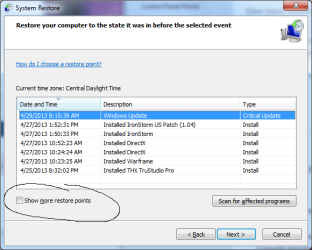
Had to ask, did you click show more restore points
system restore.png

And also lets try uninstalling CCC and see how windows handles it.
 
Last edited:

My Computer

Computer type
PC/Desktop
Computer Manufacturer/Model Number
Dude Build
OS
Windows 10 Pro X64
CPU
Intel(R) Core(TM) i5-3570K CPU OC@ 4.5GHZ Turbo
Motherboard
MSI Z77A-G45 Gaming
Memory
8.00 GB DDR3 1600Mhz
Graphics Card(s)
MSI Gaming X GTX 1070
Sound Card
Realtek High Definition
Monitor(s) Displays
Dell S23O9W, HP L1710
Screen Resolution
DELL-1920 x 1080 HP-1280 x1024
Hard Drives
Crucial m4 256 SSD, WD 7200RPM 500GB WD 1TB
PSU
Seasonic X650 GOLD
Case
Zalman Z12
Cooling
Antec Kuhler 920
Keyboard
Logitech
Mouse
MSI DS100 Interceptor
Internet Speed
50 down and 5 up
Antivirus
MSE
Browser
Chrome, IE 11
Other Info
Logitech X-620 Speakers
So if you have both connected and right click the desktop of the one that appears, and take Screen Resolution, they are not both showing up as 1 & 2 in some fashion, then you just have to go to the last item and make it extended desktop?

You have reinstalled Catalyst 13.1 also, right?


I have one DVI, one HDMI (used as main desktop) and there have been some quirks, but it's rare and just a matter of having the HDMI one on when I boot up for sure, not after.
 

My Computer

Computer type
PC/Desktop
Computer Manufacturer/Model Number
Self Built Custom
OS
Windows 7 Ultimate Retail Box (64-bit installed) + Service Pack 1
CPU
AMD FX-8350 CPU v1.15 (or 1.0F) BIOS was required!
Motherboard
MSI 890FXA-GD70
Memory
8G CAS-7 G-Skill DDR3 @1333 (2 fours) [mobo nonOC max rec'd]
Graphics Card(s)
Radeon HD 7950 [3 gigs of GDDR5] MSI Twin Frozr model
Sound Card
Realtek High Definition Audio (onboard mobo, ALC-889 chip)
Monitor(s) Displays
2 WS LED Monitors: One LG One Viewsonic
Screen Resolution
1920 by 1080
Hard Drives
SSD for OS: Samsung 840 Pro
SSD for VM and utilities: Adata SX900
7200 RPM SATA HDs for the rest: Hitachi and Seagate
PSU
Corsair TX850 - 850W max, in service since August 2010.
Case
Thermaltake Armor A90
Cooling
Thermaltake Spin Q CPU Cooler, in service since August 2010
Keyboard
Logitech G11
Mouse
Logitech M310 Wireless
Internet Speed
100 Megabit broadband supposedly upgraded from 50 (Cable)
Antivirus
Bitdefender Internet Security 2014 suite
Browser
Pale Moon 64-bit main, also IceDragon, Opera, and Maxthon.
Other Info
CompTIA A+ certified (220-800 series) in July 2013.
Might not help but worth a try: I have an Asus display that will occasionally loose track of what connector is in use. It will come up saying HDMI NO Signal when in fact I have a DVI cable connected. It's happened about three times over the last couple of years. When it happens, I turn it off and unplug the power cord for a minute or so. After that, it works fine. Just turning it off never worked--It has to have the power cord unplugged. (PC powered down.)
 

My Computer

Computer type
PC/Desktop
Computer Manufacturer/Model Number
Built 2/11/2011
OS
Windows 7 Pro-x64
CPU
i7-2600 3.4GHz - 3.8GHz Turbo
Motherboard
Intel DH67BL-B3
Memory
8Gb - 2x4GB, Muskin 991770 PC3-1333
Graphics Card(s)
Integrated Intel HD 2000
Sound Card
Integrated Intel 10.1 HD, RealTek ALC892
Monitor(s) Displays
Asus LCD VH222H, Haier HL24XSL2a
Screen Resolution
1920x1080, 1920x1080
Hard Drives
Crucial SSD C300-128Gb,
Western Digital WD5002AALX - 500Gb,
Western Digital WD7501AALS - 750Gb
PSU
Seasonic 650W 80+ Gold Modular
Case
Rosewill Defender
Cooling
Stock CPU, Four 120mm case fans, PCH fan added
Keyboard
Logitech EX100 Y-RBH94 Wireless
Mouse
Logitech EX100 M-RCE95 Wireless
Internet Speed
3.0/1.5 Mbs
Antivirus
Microsoft Security Essentials
Browser
Microsoft Internet Explorer 11
Other Info
Antec Veris Premier-Multimedia IR Station,
Cyber Accoustics-3602 Speakers,
AFT XM-5U Card Reader,
Hauppauge TV-HVR-2250,
Sony LX300 USB Turntable
well you wouldn't believe it, but carwiz wins!

zojbf7.jpg

Cheers for the help all :D
 

My Computer

Computer type
PC/Desktop
Computer Manufacturer/Model Number
Custom
OS
Windows 7 Ultimate 64bit
CPU
Intel Core i5-2400 CPU @ 3.10 GHz
Motherboard
ASUS P8H61-M LE
Memory
16GB G-Skill
Graphics Card(s)
AMD Radeon HD 6700
Sound Card
Onboard Realtek
Monitor(s) Displays
ASUS VW220T & Samsung SyncMaster 206BW
Screen Resolution
1680x1050
PSU
Antec 500 Neo HE
Case
Cheap eBay Beast
Keyboard
G110
Mouse
G500
Internet Speed
100 MBit
Antivirus
MSE
Browser
Firefox
Back
Top