Monitor Resolution out of range when trying to set 1680x1050

daelo

New member
Local time
6:01 AM
Messages
7
Hello windows 7 users , what a big ass step up in performance going from vista 32 bit to 7 64 bit, wow!

So anyway ive managed to get everthing else working on my computer but am having a problem setting the native resolution of my LG Flatron L204WS monitor. I've had a search in this part of the forums and couldnt find anyone with a similar problem so i hope im not posting another unecessary post!

Graphic card: 8800 GTX
Driver version: Windows update, the newest Nvidia Drivers for windows 7
Monitor cable: VGA, as this is all it supports

The problem: When trying to set the native resolution of my monitor to 1680x1050 im getting the message from my monitor that it is out of range, i think the setting for refresh rate is at 59hz and wont change to 60. I have located some LG drivers for the monitor and installed those and now windows recognizes my monitor in the advanced settings but not in the direct window of screen resolution. Could this be why? Or could it be related to the fact that the resolution atm 1400x1050 works with 59Hz but 1680x1050 does not work with 59Hz?

Ive seen a few other posts with people stuck on 59 and not being able to change to 60 but there has been no real solution found as of yet. I think i have listed all the relevant information needed for a bit of troubleshooting only if you were so kind to have a look and have a ponder ;)

O yes there was one other very strange oddity, when i run a game such as Team Fortress 2, i can set my resolution to 1680x1050 and it runs fine, how very odd! Thats where this problem stumps me even more!
 
Last edited:

My Computer My Computer

At a glance

Windows 7 64 Bit
OS
Windows 7 64 Bit
I have the same resolution on mine and it seem the 59Mhz problem is the same for everyone so that should not be a factor for you, the only thing I can suggest is updating your video driver and see if that makes a difference.

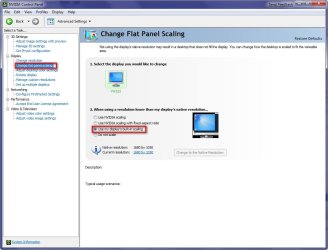
Have been to the Nvidia control and set it to use the monitors built in scaling?

2009-01-18_012446.jpg
 

My Computer My Computer

At a glance

Windows 7 Ultimate Vista Ultimate x64Core 2 Duo E8500 3.16Ghz @ 3.8Ghz2x2Gigs Patriot PC2-6400 LLInno3D GeForce GTX260 216 SP
Computer Manufacturer/Model Number
Home Brew
OS
Windows 7 Ultimate Vista Ultimate x64
CPU
Core 2 Duo E8500 3.16Ghz @ 3.8Ghz
Motherboard
eVGA 750i FTW
Memory
2x2Gigs Patriot PC2-6400 LL
Graphics Card(s)
Inno3D GeForce GTX260 216 SP
Monitor(s) Displays
ASUS VW222U 22" 2ms Response time
Screen Resolution
1680x1050
Hard Drives
SATA 150GB
SATA II 250GB
USB IDE 750GB Ext.
PSU
HYTEC 600W & Thermaltake 650W Toughpower Power Exp
Case
Thermaltake Armor LCS (Liquid Cooling System)
Cooling
Liquid Cooling System
Keyboard
Logitech G15 Gaming Keyboard
Mouse
Logitech G9 Gaming Mouse
its gotta be the monitor itself.... if your getting an ''out of range'' message on screen, i think its safe to say its not OS related..?? the fact you can hold 1680x1050 while gaming is very strange though, this shows the monitors capability to run that res with no problem..??

but you say you updated your monitor driver..?? try uninstalling the monitor drivers, unplug the monitor from the wall & the DVI port, let it sit there for a few minutes & plug it back in & allow windows to find a generic driver for it.... there maybe a conflict going on..


:)SK
 

My Computer My Computer

At a glance

SEVEN x64Q9450 @ 3.6GHZ 1.34v8GB 1066 buffalo firestix @ 1152mhz CL5Sapphire HD 5970 + GTX260 (physX)
Computer Manufacturer/Model Number
myself
OS
SEVEN x64
CPU
Q9450 @ 3.6GHZ 1.34v
Motherboard
ASUS P5K PREMIUM P35
Memory
8GB 1066 buffalo firestix @ 1152mhz CL5
Graphics Card(s)
Sapphire HD 5970 + GTX260 (physX)
Sound Card
Creative X-FI Xtreme Gamer
Monitor(s) Displays
SAMSUNG 20'' & SAMSUNG 23'' (dual screens)
Screen Resolution
2048x1152 & 1680x1050
Hard Drives
1x seagate 160gb IDE & 1x seagate 160gb SATA
PSU
XCILIO 850w (78A)
Case
CM590 1x 120x38mm & 2x92x38mm / 4x 120x25mm
Cooling
AC7 PRO @ 92x38mm blower, Lamptron military bus bay controll
Keyboard
LOGITECH E110
Mouse
logitech NX5
Internet Speed
2MB
Other Info
its a continual ''work in progress''....
Right i tried the uninstalling drivers and unplugging monitor and VGA cable for a a couple of minutes and still no luck, reinstalled the LG monitor driver again still nothing.

Just thought of something though, what if this 59Hz default setting will not work with my monitor at a resolution of 1680x1050, i.e. this resolution must be set at 60Hz for it to work.

With a resolution of 1440x900 the default is 60hz as this is the next step down from the native resolution of 1680x1050(which works), so im wondering whether or not this bug is holding back the enabling of 1680x1050 due to only being able to use 59Hz with this res due to windows 7?

This would also explain why TF2 would work as its probably setting the screen refresh rate to 60Hz and not 59Hz like windows is.

Is there a way of setting the 60Hz permanantly, such as a workaround maybe?

Continued help is much appreciated :)
 

My Computer My Computer

At a glance

Windows 7 64 Bit
OS
Windows 7 64 Bit
You just gave me the answer, it's the VGA cable, try a DVI cable and you will be Sweet, someone else had the same problem and that's what fixed his.
 

My Computer My Computer

At a glance

Windows 7 Ultimate Vista Ultimate x64Core 2 Duo E8500 3.16Ghz @ 3.8Ghz2x2Gigs Patriot PC2-6400 LLInno3D GeForce GTX260 216 SP
Computer Manufacturer/Model Number
Home Brew
OS
Windows 7 Ultimate Vista Ultimate x64
CPU
Core 2 Duo E8500 3.16Ghz @ 3.8Ghz
Motherboard
eVGA 750i FTW
Memory
2x2Gigs Patriot PC2-6400 LL
Graphics Card(s)
Inno3D GeForce GTX260 216 SP
Monitor(s) Displays
ASUS VW222U 22" 2ms Response time
Screen Resolution
1680x1050
Hard Drives
SATA 150GB
SATA II 250GB
USB IDE 750GB Ext.
PSU
HYTEC 600W & Thermaltake 650W Toughpower Power Exp
Case
Thermaltake Armor LCS (Liquid Cooling System)
Cooling
Liquid Cooling System
Keyboard
Logitech G15 Gaming Keyboard
Mouse
Logitech G9 Gaming Mouse
Oh urmm lol thats not possible unfortunatly because my monitor only has 1 input being a VGA input, in saying this is it a problem with windows and analogue displays?
 

My Computer My Computer

At a glance

Windows 7 64 Bit
OS
Windows 7 64 Bit
WOW that's weird having a 22" monitor that doesn't have DVI, are you sure? Anyway that's what fixed someone Else's problem, have you updated t the latest Nvidia Vista driver 181.22?
 

My Computer My Computer

At a glance

Windows 7 Ultimate Vista Ultimate x64Core 2 Duo E8500 3.16Ghz @ 3.8Ghz2x2Gigs Patriot PC2-6400 LLInno3D GeForce GTX260 216 SP
Computer Manufacturer/Model Number
Home Brew
OS
Windows 7 Ultimate Vista Ultimate x64
CPU
Core 2 Duo E8500 3.16Ghz @ 3.8Ghz
Motherboard
eVGA 750i FTW
Memory
2x2Gigs Patriot PC2-6400 LL
Graphics Card(s)
Inno3D GeForce GTX260 216 SP
Monitor(s) Displays
ASUS VW222U 22" 2ms Response time
Screen Resolution
1680x1050
Hard Drives
SATA 150GB
SATA II 250GB
USB IDE 750GB Ext.
PSU
HYTEC 600W & Thermaltake 650W Toughpower Power Exp
Case
Thermaltake Armor LCS (Liquid Cooling System)
Cooling
Liquid Cooling System
Keyboard
Logitech G15 Gaming Keyboard
Mouse
Logitech G9 Gaming Mouse
Right, installed windows 7, did microsoft update and im running on WDD1 1.1, so im thinking then according to your logic i should try installing vista 64 bit newest drivers to hopefully solve this problem. Nvidia say that the newest ones at the moment are 181.20 for 64 bit vista, are these alright, should i uninstall the windows update driver with that drive cleaner program? or can i just go ahead and remove them via control panel and reinstall new ones?
 

My Computer My Computer

At a glance

Windows 7 64 Bit
OS
Windows 7 64 Bit
I always just install it without worrying about uninstalling the last one and I've never had any issues.

Vista x64 181.22
 

My Computer My Computer

At a glance

Windows 7 Ultimate Vista Ultimate x64Core 2 Duo E8500 3.16Ghz @ 3.8Ghz2x2Gigs Patriot PC2-6400 LLInno3D GeForce GTX260 216 SP
Computer Manufacturer/Model Number
Home Brew
OS
Windows 7 Ultimate Vista Ultimate x64
CPU
Core 2 Duo E8500 3.16Ghz @ 3.8Ghz
Motherboard
eVGA 750i FTW
Memory
2x2Gigs Patriot PC2-6400 LL
Graphics Card(s)
Inno3D GeForce GTX260 216 SP
Monitor(s) Displays
ASUS VW222U 22" 2ms Response time
Screen Resolution
1680x1050
Hard Drives
SATA 150GB
SATA II 250GB
USB IDE 750GB Ext.
PSU
HYTEC 600W & Thermaltake 650W Toughpower Power Exp
Case
Thermaltake Armor LCS (Liquid Cooling System)
Cooling
Liquid Cooling System
Keyboard
Logitech G15 Gaming Keyboard
Mouse
Logitech G9 Gaming Mouse
:( still nothing have installed those new drivers 181.22 but still cannot get 1680x1050 to work. tried the installing and uninstalling monitor drivers again but still nothing, im completely stumped :(

btw its a pooey 20.4 inch widescreen nothing fancy thats why no DVI or HDMI port.
 

My Computer My Computer

At a glance

Windows 7 64 Bit
OS
Windows 7 64 Bit
Not sure how to edit posts but i just tried that temp fix for 59Hz with directrefresh but that didnt work either :(
 

My Computer My Computer

At a glance

Windows 7 64 Bit
OS
Windows 7 64 Bit
Same problem here, and my monitor is VGA-only as well. I've had limited success getting it to work in 1680x1050 by using a program called PowerStrip 3.84. I think what the problem is, is Windows 7 can't read the monitor's EDID information over the VGA cable. They must have changed something since XP/Vista, because this monitor works fine in its native resolution in those OSes. PowerStrip can read the EDID fine and when I use it to set the resolution, bypassing Windows's settings, the monitor works fine.

Using ATI HD 3450 with latest drivers here. So I do not think this is a video card problem. Anyone else using a monitor that is VGA cable only that has a native resolution of 1680x1050? What is your experience with this?

Update: I went out and bought a DVI-to-VGA converter ($12.49 at Best Buy) and after a reboot, it now runs in 1680x1050 perfectly (even via the Windows panel). This just adds to my suspicion that 7 has trouble with LCD VGA connections.
 
Last edited:

My Computer My Computer

At a glance

Windows 7 Beta 1 b7000Intel Pentium 44GBATI Radeon HD3450
Computer Manufacturer/Model Number
Dell 8400
OS
Windows 7 Beta 1 b7000
CPU
Intel Pentium 4
Memory
4GB
Graphics Card(s)
ATI Radeon HD3450
Sound Card
Creative SoundBlaster Audigy 2
Monitor(s) Displays
Acer AL2016W
Screen Resolution
1680x1050
Hard Drives
1x500GB
1x100GB
Case
Dell 8400
Cooling
Standard
Keyboard
Dell Multimedia Keyboard
Mouse
Logitech MediaPlay
Internet Speed
Comcastic!
Hello renthor, i tried that little program you pointed out and it seems to work a treat! now running at 1680x1050 without any hiccups. Only 1 being that when i was running a game fallout 3 , it crashed then screen when out of sync(something got buggered up) and had to use a mates monitor to set back to lower res in order to see windows again!

But apart from that all seems good , funny i have one of those adapters too that came with my graphics card (8800gtx, 2 infact) but still windows cannot change resolution itself, maybe its the adapter because ive had a few before which havent worked!

Thanks anyway for your fix and yes windows 7 does seem to have a problem with analogue VGA monitors, but i will live with it because of the performance increases in 7 compared to vista!

:D
 

My Computer My Computer

At a glance

Windows 7 64 Bit
OS
Windows 7 64 Bit
Not sure how to edit posts but i just tried that temp fix for 59Hz with directrefresh but that didnt work either :(

Should be an Edit button on the bottom right of your posts. Make the changes and click save.

Gary
 

My Computer My Computer

At a glance

Vista Ult 64 bit Seven Ult RTM x64Intel Core2 Quad Q6600 2.40 gigahertzCrucial Ballistix 4x2GB PC2 6400NVIDIA GeForce 8600 GTS 256 MB
Computer Manufacturer/Model Number
Dell XPS420
OS
Vista Ult 64 bit Seven Ult RTM x64
CPU
Intel Core2 Quad Q6600 2.40 gigahertz
Memory
Crucial Ballistix 4x2GB PC2 6400
Graphics Card(s)
NVIDIA GeForce 8600 GTS 256 MB
Sound Card
Creative SB X-Fi audio
Monitor(s) Displays
HP w2207 + HPvs15
Screen Resolution
1680x1050 + 1024x768
Hard Drives
2-WD5000AAKS-500 GB
WD5000AAV-500 GB external
Keyboard
Microsoft Comfort Curve
Mouse
MX Revolution
Other Info
Wacom Intuos 2 Graphics Tablet
Experience Index=5.5
Hello renthor, i tried that little program you pointed out and it seems to work a treat! now running at 1680x1050 without any hiccups. Only 1 being that when i was running a game fallout 3 , it crashed then screen when out of sync(something got buggered up) and had to use a mates monitor to set back to lower res in order to see windows again!

But apart from that all seems good , funny i have one of those adapters too that came with my graphics card (8800gtx, 2 infact) but still windows cannot change resolution itself, maybe its the adapter because ive had a few before which havent worked!

Thanks anyway for your fix and yes windows 7 does seem to have a problem with analogue VGA monitors, but i will live with it because of the performance increases in 7 compared to vista!

:D
You're welcome, glad it helped you out! Odd about the adapter not working for you. And yeah, Power Strip is a bit flaky, especially when switching in and out of another program that also sets a resolution (like a game). I don't think Power Strip re-applies your settings, so it just defaults to whatever Windows wants, meaning you'd have to tell Power Strip to set the resolution every time it changes. Hence my limited success, hah. Here's hoping Microsoft fixes the VGA issues soon!
 

My Computer My Computer

At a glance

Windows 7 Beta 1 b7000Intel Pentium 44GBATI Radeon HD3450
Computer Manufacturer/Model Number
Dell 8400
OS
Windows 7 Beta 1 b7000
CPU
Intel Pentium 4
Memory
4GB
Graphics Card(s)
ATI Radeon HD3450
Sound Card
Creative SoundBlaster Audigy 2
Monitor(s) Displays
Acer AL2016W
Screen Resolution
1680x1050
Hard Drives
1x500GB
1x100GB
Case
Dell 8400
Cooling
Standard
Keyboard
Dell Multimedia Keyboard
Mouse
Logitech MediaPlay
Internet Speed
Comcastic!
ok along similar lines, I got this exact problem with an onboard card - Intel(R) G33/G31 Express Chipset Family on fresh install of Win7 and with a Dell 20' 2005FPW monitor. Although the monitor has both DVI and VGA inputs, i'm only using VGA for the onboard connection.

native resolution is 1680 x 1050 but the Win7 driver worked partially..skewing the display to the right so that the right side of the taskbar (clock, time, sound settings etc) and the window close, restore and maximize buttons were off screen area and not visible.

ok so i decided to try revert to the vista driver and that worked perfectly. although the installation is likely to remind you that the installed version is newer, it might be still worth a try for those who still need a quick solution.
 

My Computer My Computer

At a glance

Windows 7Dual Core E2160 1.8 GHz4GB
Computer Manufacturer/Model Number
DELL Vostro 200
OS
Windows 7
CPU
Dual Core E2160 1.8 GHz
Memory
4GB
Monitor(s) Displays
DELL 2005FPW
Screen Resolution
1680 x 1050
Hard Drives
500 GB
im using a chimei cmv 221d that has tha same 1680x1080 native RES as yours. It worked fine at this res until 2 days ago now it wont go past 1024x768 with drivers installed and the screen comes up as "Unknown display device".

The weird thing is if i uninstall all drivers, it detects the screen fine and will run native RES, but of course i cant run any games or anything without drivers 8-(

Im using a DVI not VGA though
 

My Computer My Computer

At a glance

Windows 7
OS
Windows 7
im using a chimei cmv 221d that has tha same 1680x1080 native RES as yours. It worked fine at this res until 2 days ago now it wont go past 1024x768 with drivers installed and the screen comes up as "Unknown display device".

The weird thing is if i uninstall all drivers, it detects the screen fine and will run native RES, but of course i cant run any games or anything without drivers 8-(

Im using a DVI not VGA though

What video card and driver version?
 

My Computer My Computer

At a glance

El Capitan / Windows 10i7-4980HQ16GBIris 5200
Computer type
Laptop
Computer Manufacturer/Model Number
Apple
OS
El Capitan / Windows 10
CPU
i7-4980HQ
Memory
16GB
Graphics Card(s)
Iris 5200
What video card and driver version?


Nvidea 9600GT. I have tried several drivers including WDDM v1.1 as well as some older ones downloaded from the Nvidea website. One thing i noticed is i no longer have a"nvidea control panel"
 

My Computer My Computer

At a glance

Windows 7
OS
Windows 7
I´ve b7057 x64 + ATI 4850 + EIZO HD2442W (DVI cable) and looking in user manual there is written that it supports 60Hz in 1920x1200 but in W7 its set
to 59Hz but in OSD on monitor is 60Hz. In control pan. I can choose between
59 and 60Hz but after restart it´s set 59Hz. Any solution how to fix it permanently to 60Hz?
 

My Computer My Computer

At a glance

Windows7 b7057
OS
Windows7 b7057
Back
Top