
Monitor screen size issue?

JDRhoads

New member
Local time
6:07 PM
Messages
1
I am using Windows 7 Home Premium 64 bit. My monitor size is 25 inches. I am using and ATI Radeon 6970 with an i7 960, and 12gb of Ram. My problem is I reformatted and the display was smaller than the actual monitor. You used to be able to fix this with the "overscan image" in Catalyst Control Centers options. However when you use this now it overscals the image past the actual monitors size and looks like the image posted. I try enabling GPU scaling however when I restart it goes back to the same over-scaled image. And when its scaled properly before reboot, it causes games to crash. Any ideas?
 

Attachments
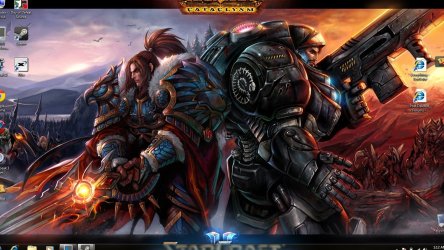
  • cut off screen.jpg
    cut off screen.jpg
    210.7 KB · Views: 11

My Computer

OS
Windows 7 Home Premium 64bit
Sounds like the gpu driver has gotten corrupted some how. Re-download driver from AMD and save it. Then uninstall current GPU driver, a reboot might happen, if not reboot anyway. Then after reboot, re-install new saved GPU driver.
 

My Computer

Computer Manufacturer/Model Number
Custom built
OS
Windows 7 Ultimate 64 bit
CPU
AMD Phenom II X4 965 Black Edition
Motherboard
Gigabyte GA-MA790X-DS4
Memory
GSkill 4 X 2 GB PC 8500
Graphics Card(s)
XFX Radeon HD 6790 D
Sound Card
On board RealTek HD
Monitor(s) Displays
Dual monitors:Samsung SyncMaster S20B300
Screen Resolution
1600 X 900
Hard Drives
Seagate Barracuda 1TB (primary)
Seagate Barracuda 2 X 320 GB
PSU
Ultra X4 750 watt fully modular
Case
Thermaltake Overseer RX 1 full tower
Cooling
Core-Contact 92 mm CPU Cooler
Keyboard
Logitech G510
Mouse
Razor DeathAdder
Internet Speed
50/5 Mbps UL/DL
Other Info
Optical: Super Muliti DVD burner w/lightscribe, Hauppauge WinTV HVR-1800
What about raising the resolution a notch, making the picture slightly smaller. :)
 

My Computer

Computer Manufacturer/Model Number
DELLXPS 8300
OS
WIN7 x64 Home Premium SP1
CPU
Intel Core i5-2400 processor(6MB Cache, 3.1GHz)
Memory
8 GB RAM
Hard Drives
1.5TB C Drive
Back
Top