
Monitor the Energy Power Requirements of Your PC

swarfega

da Cleaner
Guru
Gold Member
VIP
Local time
6:40 PM
Messages
4,925
Some have calculated the amount of CO2 produced by simple Google searches, taking the entire study to the level of finding out the amount of dioxide carbon produced by data centers. The results can be disputed, of course, but whether you like it or not, even your computer contributes to the global CO2 emission.

Joulemeter-Review-2.png

Few are the users that can tell exactly how much power their computer sucks in. That is understandable since most of us are more interested in the performance of the machine and its accessories and award little importance to things such as power usage. As unbelievable as it may seem, such software ready to give you the numbers in watts and even calculate CO2 emission footprint.

Joulemeter is a simple application created in Microsoft Research Labs designed to measure the energy used by your computer. Its purpose can be extended to calculating the power required by virtual machines, servers, desktops and noteboks. Even individual software running on the computer can be measured in terms of electricity usage as each program comes with specific stress on the system’s hardware components.

Installing the app does not require too much effort from your part. There are no extra programs pushed in, just Joulemeter all way through. It will install as a service on the system and immediately start monitoring the main components of the system that fluctuate in power usage.

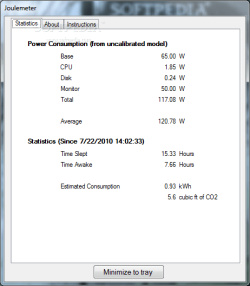
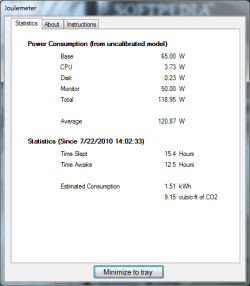
Main application window is as simple as can be. It shows three tabs, but only one is of continuous interest to you: the one displaying the power usage statistics. There is nothing scary about it except for the values it draws from monitoring the components. Depending on their current load, the values for the CPU and disk fluctuate in Joulemeter. We noticed that a simple file copy or move operation automatically impacts on the power usage of the disk increasing the watts in the application (proportional with the speed of the job). The same behavior was recorded the moment we started to stress the central processing unit.

On the downside, in the case of the monitor, which is also listed among the recorded power draining components, the program showed the same amount of power usage all way through the tests. This occurred regardless of our changing of the profiles and holding them steady for some good 20 minutes. This comes as a major pitfall in the application as plenty of the monitors today come with sensors that trigger brightness and contrast changes depending on the user set profile or on the bright the room is. You will also be provided with information on the minimum power drawn by the system when powered on.

Besides specific stats broken down according to hardware components, Joulemeter also calculates a total of the watts your station used as well as estimates an average usage which builds up in time. This data may turn pretty important if you want to see the amount of electricity the system requires for your gaming sessions.

Another sort of statistics available in Joulemeter detail the amount of time the computer was in Sleep or Hibernate modes or simply shut down. The time the machine was on is also calculated. For both of these values the time is estimated in hours.

One last piece of information the application provides is the estimated energy usage and the CO2 emission. The first is calculated in kWh while the second in cubic ft. It would be nice to have an option for the metric system, but at this time the program is in alpha stage, so there are still loose ends to be taken care of.

In order to get more accurate data, Joulemeter has to calibrate your machine. The application can do this for three types of systems: desktop, laptop and server (our tests included only the first two options). If you are using a desktop the app requires you to connect a WattsUp meter in order to start calibrating. For laptops things are much simpler as they have to be at least 75% charged to start the testing. It’ll take some time to calibrate all components (battery, monitor and CPU/disk) – in our case the entire process was carried out in about 30 minutes.

When tested on a laptop Joulemeter behaved differently than in our previous test on a desktop computer. On the mobile system the application immediately noticed the switch of the power plan and showed decreased energy consumption when the monitor dimmed and increased values when the monitor would run in best performance mode.

The Good

Joulemeter is extremely simple and requires no other settings than calibration in order to obtain more accurate data. It functions as a Windows service so it’ll always be keeping tabs on computer activity and show you energy usage and CO2 emissions.

The Bad

Although the application does not really show its early development stage it is in alpha state, which means that the team still has some polishing to do.

The Truth

Even in alpha stage the application does a great job monitoring computer components activity and recording in real-time the amount of energy each of them requires. In this edition there are only a few hardware components involved. Hopefully future versions will make available monitoring of a wider array of components (optical units or peripherals connected to the machine and charging).

NOTE: The application is not in a final stage of development for this version and, as such, it receives the default 3 star rating from Softpedia.
Joulemeter_01large.png Joulemeter_02large.png

source
 

My Computer My Computer

At a glance

Windows 7 Professional 64-bitIntel E8400 3GHzKingston PC3-10700H 4GbXFX Radeon HD 5850 BlackEd.
Computer Manufacturer/Model Number
self built
OS
Windows 7 Professional 64-bit
CPU
Intel E8400 3GHz
Motherboard
Intel DX48BT2
Memory
Kingston PC3-10700H 4Gb
Graphics Card(s)
XFX Radeon HD 5850 BlackEd.
Sound Card
Asus Xonar DG
Monitor(s) Displays
2x Samsung SM-T220HD 22"
Screen Resolution
1680x1050 on two monitors
Hard Drives
OCZ Vertex 2 120gb 3.5" (OS)
Seagate Momentus XT 500gb
Samsung F3 1Tb (games)
2x Samsung F1 1Tb
PSU
Thermaltake ToughPower 850w
Case
Thermaltake Armor
Cooling
Scythe Mugen II
Keyboard
Microsoft Comfort Curve USB
Mouse
Razer Diamondback 3G
Internet Speed
8128/443
interesting piece of software, I'll give it a look
 

My Computer My Computer

At a glance

Windows 8.1 x64 Enterprisei5 4690KCorsair 16 GB DDR3 2000MhzAsus GTX760 2GB 256bit
Computer type
PC/Desktop
Computer Manufacturer/Model Number
2015 Home Made with Great Performance
OS
Windows 8.1 x64 Enterprise
CPU
i5 4690K
Motherboard
Gigabyte GA-Z87X-UD5H
Memory
Corsair 16 GB DDR3 2000Mhz
Graphics Card(s)
Asus GTX760 2GB 256bit
Sound Card
Realtek OnBoard
Monitor(s) Displays
Samsung SyncMaster SA350 + LG 42LA660S
Screen Resolution
1920x1080 Full HD
Hard Drives
1x 640GB Western Digital SATA
1x 4TB Western Digital Green SATA
3x 2TB Western Digital Caviar Green RS SATA
1x 3TB Western Digital Caviar Green SATA
1x 128GB Corsair Force Red SSD
PSU
Corsair CX 600W
Case
Nexus Prominent 5
Cooling
CPU: Artic Cooler Freezer 13 + 5x120mm Case Fans @ 700RPM
Keyboard
Microsoft Wired Keyboard 600
Mouse
Microsoft Wireless Mobile Mouse 1000
Internet Speed
FO 1 Gbit/s
Antivirus
ESET / Malwarebytes
Browser
Opera / Chrome
Other Info
- Fan Controller Aerocool X-Vision 5
- 1x 1TB Hitachi DeskPlus External USB
- 1x 1TB Western Digital Passport External USB3
Only thing is, it didnt work when I tried it. It installed but windows crash handler stepped in.
 

My Computer My Computer

At a glance

Windows 7 Professional 64-bitIntel E8400 3GHzKingston PC3-10700H 4GbXFX Radeon HD 5850 BlackEd.
Computer Manufacturer/Model Number
self built
OS
Windows 7 Professional 64-bit
CPU
Intel E8400 3GHz
Motherboard
Intel DX48BT2
Memory
Kingston PC3-10700H 4Gb
Graphics Card(s)
XFX Radeon HD 5850 BlackEd.
Sound Card
Asus Xonar DG
Monitor(s) Displays
2x Samsung SM-T220HD 22"
Screen Resolution
1680x1050 on two monitors
Hard Drives
OCZ Vertex 2 120gb 3.5" (OS)
Seagate Momentus XT 500gb
Samsung F3 1Tb (games)
2x Samsung F1 1Tb
PSU
Thermaltake ToughPower 850w
Case
Thermaltake Armor
Cooling
Scythe Mugen II
Keyboard
Microsoft Comfort Curve USB
Mouse
Razer Diamondback 3G
Internet Speed
8128/443
seems that i have installed it for no use, it won't run on a desktop without a "WattsUp meter", whatever that is...
 

My Computer My Computer

At a glance

Windows 8.1 x64 Enterprisei5 4690KCorsair 16 GB DDR3 2000MhzAsus GTX760 2GB 256bit
Computer type
PC/Desktop
Computer Manufacturer/Model Number
2015 Home Made with Great Performance
OS
Windows 8.1 x64 Enterprise
CPU
i5 4690K
Motherboard
Gigabyte GA-Z87X-UD5H
Memory
Corsair 16 GB DDR3 2000Mhz
Graphics Card(s)
Asus GTX760 2GB 256bit
Sound Card
Realtek OnBoard
Monitor(s) Displays
Samsung SyncMaster SA350 + LG 42LA660S
Screen Resolution
1920x1080 Full HD
Hard Drives
1x 640GB Western Digital SATA
1x 4TB Western Digital Green SATA
3x 2TB Western Digital Caviar Green RS SATA
1x 3TB Western Digital Caviar Green SATA
1x 128GB Corsair Force Red SSD
PSU
Corsair CX 600W
Case
Nexus Prominent 5
Cooling
CPU: Artic Cooler Freezer 13 + 5x120mm Case Fans @ 700RPM
Keyboard
Microsoft Wired Keyboard 600
Mouse
Microsoft Wireless Mobile Mouse 1000
Internet Speed
FO 1 Gbit/s
Antivirus
ESET / Malwarebytes
Browser
Opera / Chrome
Other Info
- Fan Controller Aerocool X-Vision 5
- 1x 1TB Hitachi DeskPlus External USB
- 1x 1TB Western Digital Passport External USB3

My Computer My Computer

At a glance

Windows 7 Professional 64-bitIntel E8400 3GHzKingston PC3-10700H 4GbXFX Radeon HD 5850 BlackEd.
Computer Manufacturer/Model Number
self built
OS
Windows 7 Professional 64-bit
CPU
Intel E8400 3GHz
Motherboard
Intel DX48BT2
Memory
Kingston PC3-10700H 4Gb
Graphics Card(s)
XFX Radeon HD 5850 BlackEd.
Sound Card
Asus Xonar DG
Monitor(s) Displays
2x Samsung SM-T220HD 22"
Screen Resolution
1680x1050 on two monitors
Hard Drives
OCZ Vertex 2 120gb 3.5" (OS)
Seagate Momentus XT 500gb
Samsung F3 1Tb (games)
2x Samsung F1 1Tb
PSU
Thermaltake ToughPower 850w
Case
Thermaltake Armor
Cooling
Scythe Mugen II
Keyboard
Microsoft Comfort Curve USB
Mouse
Razer Diamondback 3G
Internet Speed
8128/443

My Computer My Computer

At a glance

Win 7 Ultimate x64FX-8350 @ 4.6 GHz so farADATA XPG V1 Series Black 8GB DDR3 1600Sapphire R9 270x Dual-X
Computer type
PC/Desktop
Computer Manufacturer/Model Number
Me
OS
Win 7 Ultimate x64
CPU
FX-8350 @ 4.6 GHz so far
Motherboard
Asus M5A97 EVO
Memory
ADATA XPG V1 Series Black 8GB DDR3 1600
Graphics Card(s)
Sapphire R9 270x Dual-X
Sound Card
Xonar DGX w/ Corsair Vengence 1300
Monitor(s) Displays
Acer S232HL Abid
Screen Resolution
1920x1080
Hard Drives
120 GB OCZ Vertex 3
500 GB Seagate 7200.12
PSU
Antec Earthwatts 650W Green
Case
Antec Three Hundred
Cooling
Cooler Master 212 EVO
Keyboard
Logitech G510
Mouse
Logitech G500s
Internet Speed
35000/3000
Good suggestion.
 

My Computer My Computer

At a glance

Windows 7 Professional 64-bitIntel E8400 3GHzKingston PC3-10700H 4GbXFX Radeon HD 5850 BlackEd.
Computer Manufacturer/Model Number
self built
OS
Windows 7 Professional 64-bit
CPU
Intel E8400 3GHz
Motherboard
Intel DX48BT2
Memory
Kingston PC3-10700H 4Gb
Graphics Card(s)
XFX Radeon HD 5850 BlackEd.
Sound Card
Asus Xonar DG
Monitor(s) Displays
2x Samsung SM-T220HD 22"
Screen Resolution
1680x1050 on two monitors
Hard Drives
OCZ Vertex 2 120gb 3.5" (OS)
Seagate Momentus XT 500gb
Samsung F3 1Tb (games)
2x Samsung F1 1Tb
PSU
Thermaltake ToughPower 850w
Case
Thermaltake Armor
Cooling
Scythe Mugen II
Keyboard
Microsoft Comfort Curve USB
Mouse
Razer Diamondback 3G
Internet Speed
8128/443
the idea is not bad, i would prefer a free software over some hardware stuff that's over 30 bucks

maybe the next version will have full desktop support, it's just in alpha state...
 

My Computer My Computer

At a glance

Windows 8.1 x64 Enterprisei5 4690KCorsair 16 GB DDR3 2000MhzAsus GTX760 2GB 256bit
Computer type
PC/Desktop
Computer Manufacturer/Model Number
2015 Home Made with Great Performance
OS
Windows 8.1 x64 Enterprise
CPU
i5 4690K
Motherboard
Gigabyte GA-Z87X-UD5H
Memory
Corsair 16 GB DDR3 2000Mhz
Graphics Card(s)
Asus GTX760 2GB 256bit
Sound Card
Realtek OnBoard
Monitor(s) Displays
Samsung SyncMaster SA350 + LG 42LA660S
Screen Resolution
1920x1080 Full HD
Hard Drives
1x 640GB Western Digital SATA
1x 4TB Western Digital Green SATA
3x 2TB Western Digital Caviar Green RS SATA
1x 3TB Western Digital Caviar Green SATA
1x 128GB Corsair Force Red SSD
PSU
Corsair CX 600W
Case
Nexus Prominent 5
Cooling
CPU: Artic Cooler Freezer 13 + 5x120mm Case Fans @ 700RPM
Keyboard
Microsoft Wired Keyboard 600
Mouse
Microsoft Wireless Mobile Mouse 1000
Internet Speed
FO 1 Gbit/s
Antivirus
ESET / Malwarebytes
Browser
Opera / Chrome
Other Info
- Fan Controller Aerocool X-Vision 5
- 1x 1TB Hitachi DeskPlus External USB
- 1x 1TB Western Digital Passport External USB3

My Computer My Computer

At a glance

Windows 7 Ultimate x64Intel Q9550 2.83Ghz OC'd to 3.40Ghz8GB G.Skill PI DDR2-800, 4-4-4-12 timingsEVGA 1280MB Nvidia GeForce GTX570
Computer Manufacturer/Model Number
Self-Built in July 2009
OS
Windows 7 Ultimate x64
CPU
Intel Q9550 2.83Ghz OC'd to 3.40Ghz
Motherboard
Gigabyte GA-EP45-UD3R rev. 1.1, F12 BIOS
Memory
8GB G.Skill PI DDR2-800, 4-4-4-12 timings
Graphics Card(s)
EVGA 1280MB Nvidia GeForce GTX570
Sound Card
Realtek ALC899A 8 channel onboard audio
Monitor(s) Displays
23" Acer x233H
Screen Resolution
1920x1080
Hard Drives
Intel X25-M 80GB Gen 2 SSD
Western Digital 1TB Caviar Black, 32MB cache. WD1001FALS
PSU
Corsair 620HX modular
Case
Antec P182
Cooling
stock
Keyboard
ABS M1 Mechanical
Mouse
Logitech G9 Laser Mouse
Internet Speed
15/2 cable modem
Other Info
Windows and Linux enthusiast. Logitech G35 Headset.
Back
Top