
Solved Monitor wrong one ?? windows 7 home 64 bit

kiltylyn

kiltylyn
Member
Local time
7:59 AM
Messages
62
Location
scotland
mon.jpg

Image1.jpg


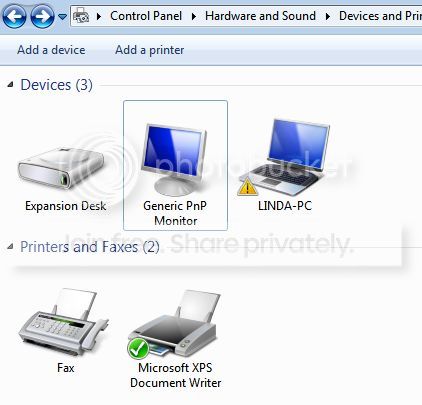
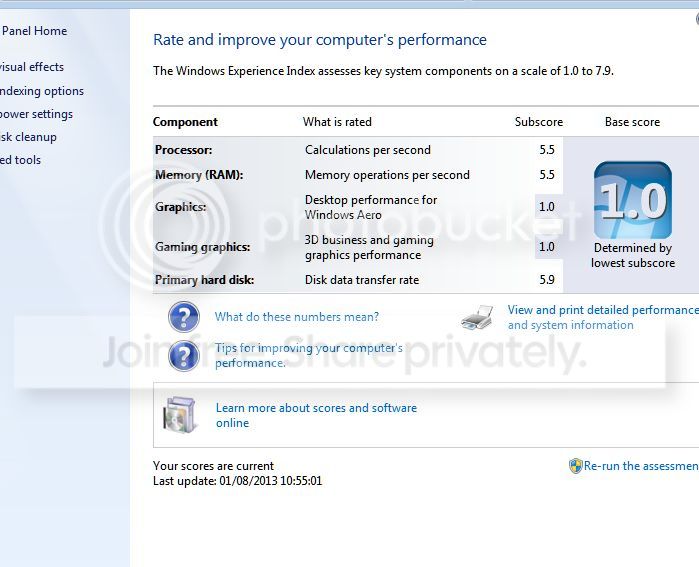
have just installed clean install of windows 7 dell studio 1749 with help from here. Anyone any idea what the PNP monitor is, should it not be Linda PC?? I will post my score in the correct thread. cant i just unistal it and then laptop will use linda's pc?
thanks
 
Last edited:

My Computer

Computer type
Laptop
Computer Manufacturer/Model Number
dell studio 1749
OS
Microsoft Windows 7 Ultimate 64-bit 7601 Multiprocessor Free Service Pack 1
CPU
Intel(R) Core(TM) i5 CPU M 450 @ 2.40GHz
Motherboard
Dell Inc. 0KVMW2
Memory
4.00 GB
Graphics Card(s)
AMD Radeon HD 6500M/5600/5700 Series
Sound Card
(1) AMD High Definition Audio Device (2) IDT High Definiti
Screen Resolution
1600 x 900 x 32 bits (4294967296 colors) @ 60 Hz
Hard Drives
(1) TOSHIBA MK5056GSY ATA Device (2) Seagate Expansion Desk USB Device
Antivirus
Avast
Browser
google chrome
Have you tried updating the drivers from the Device Manager? Also, did you install the latest GPU drivers available?
 

My Computer

OS
Windows 7 x64 Ultimate
yes downloaded all drivers on CD, even uploads from dell , however cant load certain drivers ,graphics driver , storage driver , Intel graphics media accelerator , Intel management on that PNP monitor , its causing me all sorts of probs, im on a 17 inch laptop and resolution all wrong, i even uninstalled the VGA adapter and rebooted however it just reinstall when powered up. major issues here and dont have the answer :0(
 

My Computer

Computer type
Laptop
Computer Manufacturer/Model Number
dell studio 1749
OS
Microsoft Windows 7 Ultimate 64-bit 7601 Multiprocessor Free Service Pack 1
CPU
Intel(R) Core(TM) i5 CPU M 450 @ 2.40GHz
Motherboard
Dell Inc. 0KVMW2
Memory
4.00 GB
Graphics Card(s)
AMD Radeon HD 6500M/5600/5700 Series
Sound Card
(1) AMD High Definition Audio Device (2) IDT High Definiti
Screen Resolution
1600 x 900 x 32 bits (4294967296 colors) @ 60 Hz
Hard Drives
(1) TOSHIBA MK5056GSY ATA Device (2) Seagate Expansion Desk USB Device
Antivirus
Avast
Browser
google chrome
yes downloaded all drivers on CD, even uploads from dell , however cant load certain drivers ,graphics driver , storage driver , Intel graphics media accelerator , Intel management on that PNP monitor , its causing me all sorts of probs, im on a 17 inch laptop and resolution all wrong, i even uninstalled the VGA adapter and rebooted however it just reinstall when powered up. major issues here and dont have the answer :0(

The fact you can't even install the graphics drivers might be related to the problem. Have you made sure your BIOS is up to date? If all these things aren't working properly, I'd advise making sure your BIOS is up to date. I recently couldn't install any drivers on my computer and once I updated the BIOS to the latest version, everything worked perfectly.
 

My Computer

OS
Windows 7 x64 Ultimate
Hi Linda What has happened thought all was working well ?
 

My Computer

Computer Manufacturer/Model Number
W530-3630QM1
OS
windows 7 home 64bit
CPU
INTEL-CORE I7
Memory
16GB
Hard Drives
750GB
Browser
Chrome
hiya maxie
it all went wrong again :0( once i began to load my things back on it, i discovered there were two monitors in device and printers, then as i started to install things that's when the problems started, i think now that what JUUB is saying i need to reinstall yet again grrrr lol and use the BIOS on dell website rather than the one on cd as its an updated version, what do you think ?? Ive to log off for now but will be back on later, just not to sure what to do, will leave this post for a wee while just incase there are more posts. the laptop is 3 years old but i did see on dell site that there are a few updated drivers. Its that PNP monitor that is causing me the probs, cant load a few of the drivers because of it, catch you later :0)
 

My Computer

Computer type
Laptop
Computer Manufacturer/Model Number
dell studio 1749
OS
Microsoft Windows 7 Ultimate 64-bit 7601 Multiprocessor Free Service Pack 1
CPU
Intel(R) Core(TM) i5 CPU M 450 @ 2.40GHz
Motherboard
Dell Inc. 0KVMW2
Memory
4.00 GB
Graphics Card(s)
AMD Radeon HD 6500M/5600/5700 Series
Sound Card
(1) AMD High Definition Audio Device (2) IDT High Definiti
Screen Resolution
1600 x 900 x 32 bits (4294967296 colors) @ 60 Hz
Hard Drives
(1) TOSHIBA MK5056GSY ATA Device (2) Seagate Expansion Desk USB Device
Antivirus
Avast
Browser
google chrome
Hey Linda Do not touch the BIOS .. Maybe you have a restore point ? First ting to do is disconnect the Monitor and get the Laptop up and running again .. Have you ran Windows updates yet ?
 

My Computer

Computer Manufacturer/Model Number
W530-3630QM1
OS
windows 7 home 64bit
CPU
INTEL-CORE I7
Memory
16GB
Hard Drives
750GB
Browser
Chrome
hiya maxie
it all went wrong again :0( once i began to load my things back on it, i discovered there were two monitors in device and printers, then as i started to install things that's when the problems started, i think now that what JUUB is saying i need to reinstall yet again grrrr lol and use the BIOS on dell website rather than the one on cd as its an updated version, what do you think ?? Ive to log off for now but will be back on later, just not to sure what to do, will leave this post for a wee while just incase there are more posts. the laptop is 3 years old but i did see on dell site that there are a few updated drivers. Its that PNP monitor that is causing me the probs, cant load a few of the drivers because of it, catch you later :0)
If your lappy is 3 years old, odds are the drivers are at least 3 years old as well. There may be some updated BIOS on the manufacturer's website. Update your BIOS to the latest version and keep us posted.
 

My Computer

OS
Windows 7 x64 Ultimate
Hey Linda Do not touch the BIOS .. Maybe you have a restore point ? First ting to do is disconnect the Monitor and get the Laptop up and running again .. Have you ran Windows updates yet ?

You think it'd be a bad idea to update it?
 

My Computer

OS
Windows 7 x64 Ultimate
Hey Linda Do not touch the BIOS .. Maybe you have a restore point ? First ting to do is disconnect the Monitor and get the Laptop up and running again .. Have you ran Windows updates yet ?

You think it'd be a bad idea to update it?

Yes i do this Ladys Laptop was working perfectly last night after having the same problems .. Plus IMO a BIOS update is only a last resort
 

My Computer

Computer Manufacturer/Model Number
W530-3630QM1
OS
windows 7 home 64bit
CPU
INTEL-CORE I7
Memory
16GB
Hard Drives
750GB
Browser
Chrome
hi guys the BIOS was updated last night to a 2011 version. The laptop monitor isnt connected to anything. maxie it had improved greatly the screen reso., however it was when i started loading stuff thats when i realized the probs, im in the midst of downloading all the drivers from Delluk and will put them on disc , then it looks like im going to have to start again hoping that the PNP monitor doesn't appear again :0( I can load pages etc no probs but its not working as it should be for example., couldnt play a game on the vga driver , not that i play them lol i cant load mass storage controller on the system the way it is either, i need to be rid of that monitor and work from LInda's pc , guess im in tonight lol
 

My Computer

Computer type
Laptop
Computer Manufacturer/Model Number
dell studio 1749
OS
Microsoft Windows 7 Ultimate 64-bit 7601 Multiprocessor Free Service Pack 1
CPU
Intel(R) Core(TM) i5 CPU M 450 @ 2.40GHz
Motherboard
Dell Inc. 0KVMW2
Memory
4.00 GB
Graphics Card(s)
AMD Radeon HD 6500M/5600/5700 Series
Sound Card
(1) AMD High Definition Audio Device (2) IDT High Definiti
Screen Resolution
1600 x 900 x 32 bits (4294967296 colors) @ 60 Hz
Hard Drives
(1) TOSHIBA MK5056GSY ATA Device (2) Seagate Expansion Desk USB Device
Antivirus
Avast
Browser
google chrome
Hi there .. So are you going to Re-install again .. I guess so good luck
 

My Computer

Computer Manufacturer/Model Number
W530-3630QM1
OS
windows 7 home 64bit
CPU
INTEL-CORE I7
Memory
16GB
Hard Drives
750GB
Browser
Chrome
dont think ive much choice maxie , as cant get rid of that monitor, im downloading all the drivers from dell as we speak and will use them on a disc rather than the disc that came with it. :cry: I cant seem to find the correct order for the drivers to be loaded but im hunting lol
 

My Computer

Computer type
Laptop
Computer Manufacturer/Model Number
dell studio 1749
OS
Microsoft Windows 7 Ultimate 64-bit 7601 Multiprocessor Free Service Pack 1
CPU
Intel(R) Core(TM) i5 CPU M 450 @ 2.40GHz
Motherboard
Dell Inc. 0KVMW2
Memory
4.00 GB
Graphics Card(s)
AMD Radeon HD 6500M/5600/5700 Series
Sound Card
(1) AMD High Definition Audio Device (2) IDT High Definiti
Screen Resolution
1600 x 900 x 32 bits (4294967296 colors) @ 60 Hz
Hard Drives
(1) TOSHIBA MK5056GSY ATA Device (2) Seagate Expansion Desk USB Device
Antivirus
Avast
Browser
google chrome
Well once you do get a clean Install make sure you run Windows updates . Look on the bright side it wont take you that long . Just keep that bottle of scotch handy .. And if you really get stuck i can send my son round
 

My Computer

Computer Manufacturer/Model Number
W530-3630QM1
OS
windows 7 home 64bit
CPU
INTEL-CORE I7
Memory
16GB
Hard Drives
750GB
Browser
Chrome
:mad: rofl ive not got any scotch but a wee dram of southern comfort will be coming my way lol na your right it wont take long, its getting the right ones i guess and put them on in right order, will be back to update you:0)
 

My Computer

Computer type
Laptop
Computer Manufacturer/Model Number
dell studio 1749
OS
Microsoft Windows 7 Ultimate 64-bit 7601 Multiprocessor Free Service Pack 1
CPU
Intel(R) Core(TM) i5 CPU M 450 @ 2.40GHz
Motherboard
Dell Inc. 0KVMW2
Memory
4.00 GB
Graphics Card(s)
AMD Radeon HD 6500M/5600/5700 Series
Sound Card
(1) AMD High Definition Audio Device (2) IDT High Definiti
Screen Resolution
1600 x 900 x 32 bits (4294967296 colors) @ 60 Hz
Hard Drives
(1) TOSHIBA MK5056GSY ATA Device (2) Seagate Expansion Desk USB Device
Antivirus
Avast
Browser
google chrome
Hi there .. You will need to Install the Graphics Driver . Then see what is missing Windows will probably Install most of them .
 

My Computer

Computer Manufacturer/Model Number
W530-3630QM1
OS
windows 7 home 64bit
CPU
INTEL-CORE I7
Memory
16GB
Hard Drives
750GB
Browser
Chrome
morning :0)
I had a post on the dell website so what i was missing was catalyst control centre, installed that, rebooted and now the PNP monitor has gone and its using Linda's PC , so no install today for me whoooooo lol This 17 inch screen is brill , thanks for being there for me, needed the support, my graphics driver is now up and running :0)
 

My Computer

Computer type
Laptop
Computer Manufacturer/Model Number
dell studio 1749
OS
Microsoft Windows 7 Ultimate 64-bit 7601 Multiprocessor Free Service Pack 1
CPU
Intel(R) Core(TM) i5 CPU M 450 @ 2.40GHz
Motherboard
Dell Inc. 0KVMW2
Memory
4.00 GB
Graphics Card(s)
AMD Radeon HD 6500M/5600/5700 Series
Sound Card
(1) AMD High Definition Audio Device (2) IDT High Definiti
Screen Resolution
1600 x 900 x 32 bits (4294967296 colors) @ 60 Hz
Hard Drives
(1) TOSHIBA MK5056GSY ATA Device (2) Seagate Expansion Desk USB Device
Antivirus
Avast
Browser
google chrome
morning :0)
I had a post on the dell website so what i was missing was catalyst control centre, installed that, rebooted and now the PNP monitor has gone and its using Linda's PC , so no install today for me whoooooo lol This 17 inch screen is brill , thanks for being there for me, needed the support, my graphics driver is now up and running :0)

Glad you sorted that out. As I had said earlier, I was suspecting it was related to the GPU drivers. Thought you had them all installed. Grats for solving the issue. :thumbsup:
 

My Computer

OS
Windows 7 x64 Ultimate
Hi Linda .. Well that is great news . Make sure you do an Image now and backup regular to that external Drive
 

My Computer

Computer Manufacturer/Model Number
W530-3630QM1
OS
windows 7 home 64bit
CPU
INTEL-CORE I7
Memory
16GB
Hard Drives
750GB
Browser
Chrome
im so happy, its running better than ever before, like a new laptop :0) Now to do a image back up as suggested, huge thanks to you both :0). Linda
 

My Computer

Computer type
Laptop
Computer Manufacturer/Model Number
dell studio 1749
OS
Microsoft Windows 7 Ultimate 64-bit 7601 Multiprocessor Free Service Pack 1
CPU
Intel(R) Core(TM) i5 CPU M 450 @ 2.40GHz
Motherboard
Dell Inc. 0KVMW2
Memory
4.00 GB
Graphics Card(s)
AMD Radeon HD 6500M/5600/5700 Series
Sound Card
(1) AMD High Definition Audio Device (2) IDT High Definiti
Screen Resolution
1600 x 900 x 32 bits (4294967296 colors) @ 60 Hz
Hard Drives
(1) TOSHIBA MK5056GSY ATA Device (2) Seagate Expansion Desk USB Device
Antivirus
Avast
Browser
google chrome
Back
Top