Monitoring internet usage

bigseb

Same old, same old
Power User
VIP
Local time
1:03 AM
Messages
722
Location
Lutterworth, Leicestershire
Is the an app or some thing that can tell me exactly where my bandwidth is going. Somehow my PC managed to gobble up 500Mb in 4 days. All updates except Avira were turned off, I did no real downloading or uploading (just browsing forums). My connection was on for several hours each of the those days.

I can't afford to go through bandwidth like this. I want to know exactly 'what' is using 'how much'. Can anyone help here?

Thanks.
 

My Computer

Computer type
PC/Desktop
Computer Manufacturer/Model Number
Own build
OS
Windows 7 x64 Professional
CPU
Intel Core i7-870 Lynnfield 2.93 GHz
Motherboard
Intel Whitesburg P55 LGA1156
Memory
Kingston Hyper X 1333MHz DDR3 4x4Gb
Graphics Card(s)
Nvidia GTS 250
Monitor(s) Displays
AOC Q3279VWF 31.5"
Screen Resolution
2560x1440
Hard Drives
Western Digital 1000GB Hard Drive (SATA 3.0Gb/s, 7200rpm, 32MB Cache)
Verbatim 500GB (External)
PSU
650W
Case
Coolermaster HAF 912
Cooling
Stock
Keyboard
Logitech
Mouse
Logitech
Antivirus
Avira
Browser
Firefox
Other Info
LG OptDrive 24x SATA DVDRW Lightscribe
Try this site.
INFO
 

My Computer

Computer Manufacturer/Model Number
msi
OS
Windos 7 Ultimate 64 bit
CPU
intel quad core
Motherboard
msi
Memory
4bg DDr3
Monitor(s) Displays
18.5" Inch WideScreen
Screen Resolution
1366 x 768
Hard Drives
250gb samsung hdd
Keyboard
ps2
Mouse
usb
Starts at $795 :eek:

:D Yay a free version :party:
 

My Computer

Computer type
PC/Desktop
Computer Manufacturer/Model Number
Own build
OS
Windows 7 x64 Professional
CPU
Intel Core i7-870 Lynnfield 2.93 GHz
Motherboard
Intel Whitesburg P55 LGA1156
Memory
Kingston Hyper X 1333MHz DDR3 4x4Gb
Graphics Card(s)
Nvidia GTS 250
Monitor(s) Displays
AOC Q3279VWF 31.5"
Screen Resolution
2560x1440
Hard Drives
Western Digital 1000GB Hard Drive (SATA 3.0Gb/s, 7200rpm, 32MB Cache)
Verbatim 500GB (External)
PSU
650W
Case
Coolermaster HAF 912
Cooling
Stock
Keyboard
Logitech
Mouse
Logitech
Antivirus
Avira
Browser
Firefox
Other Info
LG OptDrive 24x SATA DVDRW Lightscribe
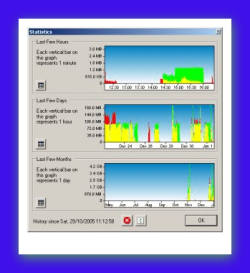
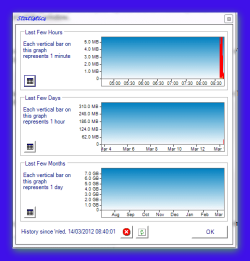
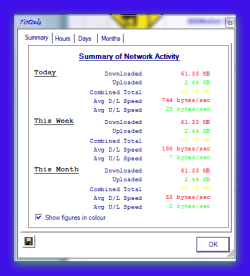
BitMeter II this is a handy tool that may help you >>> Codebox Software - BitMeter II


BitMeter features:

Audio notification at regular (configurable) time intervals - different tones are played according to your current upload or download speed (tone boundaries are also configurable)
Audio notification each time a certain amount of data is transferred (uploaded, downloaded or both)
Animated System Tray icon shows upload and download speeds
Check for new version (with auto-check option and proxy support)
Select any combination of network cards to monitor or ignore
Configurable graph scale - set to any value, or set to auto-adjust according to your speed
Connection Speed Helper
Option to display current graph maximum on screen
Change units used in readout (Kb,KB,Mb,MB)
Change graph type (bar or line graph)
Interval bars with adjustable time period
Adjustable scroll interval (anywhere between 1 and 60 seconds)
Save favourite colour combinations for later use, or use one of the preconfigured colour-schemes.
Configure System Tray tooltip information (including speeds and days totals)
Show or hide readout area, or adjust its font-size.
Auto-start option for current user, or all users
Manual and automatic backup options of configuration and traffic history information.
....
and many more
 

Attachments

  • Brys Snap 01  ?14 ?March ?2012 .png
    Brys Snap 01 ?14 ?March ?2012 .png
    32.9 KB · Views: 13
  • Brys Snap 02  ?14 ?March ?2012 .png
    Brys Snap 02 ?14 ?March ?2012 .png
    48.8 KB · Views: 10
  • Brys Snap 03  ?14 ?March ?2012 .png
    Brys Snap 03 ?14 ?March ?2012 .png
    13.7 KB · Views: 8
  • Brys Snap 04  ?14 ?March ?2012 .png
    Brys Snap 04 ?14 ?March ?2012 .png
    13.5 KB · Views: 10
Last edited:

My Computer

Computer Manufacturer/Model Number
packard bell IXTREME M5722
OS
Operating System : Windows 7 Home Premium Edition 6.01.7600 SP1 (x64)
CPU
Processor : Intel Core 2 Quad Q8300 @ 2500 MHz
Motherboard
Mainboard : Packard Bell (Acer EG43M )
Memory
Physical Memory :8GB Corsair4x 2GB 800MHz C5 DDR2
Graphics Card(s)
Video Card : XFX 6700 AMD
Monitor(s) Displays
Maestro 234DL - BenQ V2220 - BenQ VW2420H
Screen Resolution
Current Display :1920x1080p pixels at 60 Hz in HD LED
Hard Drives
Hard Disks : WDC (1000 GB)
Drive C: (Hard Disk) : 428 GB available on 491 GB
Drive D: (Hard Disk) : 426 GB available on 492 GB
SAMSUNG spinpoint HD103SJ 1000.2 GB
(X 2) KINGSTON SSD NOW V 30GB
PSU
XFX ProSeries 550W PSU
Case
PACKARD BELL IXTREME
Cooling
System Blower Current: 150mA Air Flow16CFM ;Akasa 90mm rear
Keyboard
Gigabyte Aivia K8100
Mouse
TRUST-Wireless Laser Mouse - Carbon edition MI-7770C
Internet Speed
TP-LINK > TL-WN951N / AV500 Gigabit Powerline Adapters
Browser
chrome dev
Other Info
EXTRA COOLING>(FAN CONTROLLER) PC Bay Cooler 3 x 40mm fans; Akasa AK-HD-BL Blue hard drive cooler 2 x 40 mm fan 4500 rpm 29.7 dBA
Bios> American Megatrends Inc.
Version : P01-A1
Date : 08/31/2009
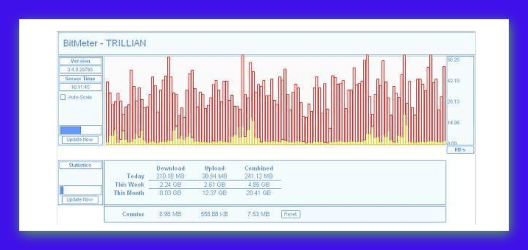
also there is a BitMeter OS from same developers >>> Codebox Software - BitMeter OS

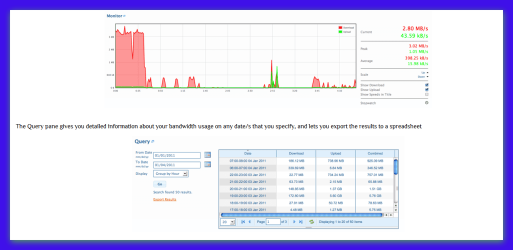
The Web Interface displays various graphs and charts that show how your internet/network connection has been used over time, why not try out the online demo right now?

The Monitor pane displays a graph that updates once each second, showing you what's happening with your connection right now:


Attachments

  • Brys Snap 01  ?14 ?March ?2012 .png
    Brys Snap 01 ?14 ?March ?2012 .png
    43 KB · Views: 5

My Computer

Computer Manufacturer/Model Number
packard bell IXTREME M5722
OS
Operating System : Windows 7 Home Premium Edition 6.01.7600 SP1 (x64)
CPU
Processor : Intel Core 2 Quad Q8300 @ 2500 MHz
Motherboard
Mainboard : Packard Bell (Acer EG43M )
Memory
Physical Memory :8GB Corsair4x 2GB 800MHz C5 DDR2
Graphics Card(s)
Video Card : XFX 6700 AMD
Monitor(s) Displays
Maestro 234DL - BenQ V2220 - BenQ VW2420H
Screen Resolution
Current Display :1920x1080p pixels at 60 Hz in HD LED
Hard Drives
Hard Disks : WDC (1000 GB)
Drive C: (Hard Disk) : 428 GB available on 491 GB
Drive D: (Hard Disk) : 426 GB available on 492 GB
SAMSUNG spinpoint HD103SJ 1000.2 GB
(X 2) KINGSTON SSD NOW V 30GB
PSU
XFX ProSeries 550W PSU
Case
PACKARD BELL IXTREME
Cooling
System Blower Current: 150mA Air Flow16CFM ;Akasa 90mm rear
Keyboard
Gigabyte Aivia K8100
Mouse
TRUST-Wireless Laser Mouse - Carbon edition MI-7770C
Internet Speed
TP-LINK > TL-WN951N / AV500 Gigabit Powerline Adapters
Browser
chrome dev
Other Info
EXTRA COOLING>(FAN CONTROLLER) PC Bay Cooler 3 x 40mm fans; Akasa AK-HD-BL Blue hard drive cooler 2 x 40 mm fan 4500 rpm 29.7 dBA
Bios> American Megatrends Inc.
Version : P01-A1
Date : 08/31/2009
Uhm... I'm not sure if these are really what I'm looking for. I would like something that tells me which installed programs are using the bandwidth for updates etc.

For example:

Of 200mb used, 20% was for adobe, 25% for the OS, etc.
 

My Computer

Computer type
PC/Desktop
Computer Manufacturer/Model Number
Own build
OS
Windows 7 x64 Professional
CPU
Intel Core i7-870 Lynnfield 2.93 GHz
Motherboard
Intel Whitesburg P55 LGA1156
Memory
Kingston Hyper X 1333MHz DDR3 4x4Gb
Graphics Card(s)
Nvidia GTS 250
Monitor(s) Displays
AOC Q3279VWF 31.5"
Screen Resolution
2560x1440
Hard Drives
Western Digital 1000GB Hard Drive (SATA 3.0Gb/s, 7200rpm, 32MB Cache)
Verbatim 500GB (External)
PSU
650W
Case
Coolermaster HAF 912
Cooling
Stock
Keyboard
Logitech
Mouse
Logitech
Antivirus
Avira
Browser
Firefox
Other Info
LG OptDrive 24x SATA DVDRW Lightscribe
This is what you want I think - NetLimiter - The Ultimate Bandwidth Shaper. I wouldn't say it's perfect but I think it'll help. Only problem is it's a 30 day trail. If you discover where your data is going then you might not wish to purchase unless you wish to check further down the track.

I've attached a screenshot to show you how to read the data use from individual programs.
No. 1 - right click your computer name and from the pop up menu select Stats.
No. 2 - Change the drop down box to Apps download.

You can also select the time period from the box with the dates in it.
 

Attachments

  • Netlimiter.jpg
    Netlimiter.jpg
    136.1 KB · Views: 17

My Computer

Computer Manufacturer/Model Number
Self built
OS
Windows 7 Ultimate x64
CPU
Intel Pentium Dual Core E5200 2.5GHz (3.77GHz OC)
Motherboard
Asus P5Q-E
Memory
Corsair 4GB DDR2 (4x1GB CM2X1024-6400C4)
Graphics Card(s)
Palit GeForce GTS 250 (1024MB)
Sound Card
On Board (ADI AD2000B 8ch HD)
Monitor(s) Displays
Samsung 32in LCD TV
Screen Resolution
1360x768
Hard Drives
2 x 1TB Samsung 103SJ (Raid0)
2 x External 500GB Samsung 502IJ (NexStar 3 HD Enclosures)
PSU
550W Antec Neo HE 550
Case
Antec P180
Cooling
Xigmatex Red Scorpion CPU Cooler. 3x120mm Fans
Keyboard
Logitech MX5000 Laser (Combo)
Mouse
Logitech MX5000 Laser (Combo)
Internet Speed
ADSL2+ (avg 10 Mbps Down, 0.80 Mbps up)
Other Info
Gigabyte GN-WP01GS 54g Wireless Lan Card
Thanks Duzzy, that's looks interesting, I'll definitely check it out.

On a related note, someone suggested it may be the anti-virus. Something about it downloading the same updates over and over but not installing them. I use Avira (the free version). Could this be the problem?
 

My Computer

Computer type
PC/Desktop
Computer Manufacturer/Model Number
Own build
OS
Windows 7 x64 Professional
CPU
Intel Core i7-870 Lynnfield 2.93 GHz
Motherboard
Intel Whitesburg P55 LGA1156
Memory
Kingston Hyper X 1333MHz DDR3 4x4Gb
Graphics Card(s)
Nvidia GTS 250
Monitor(s) Displays
AOC Q3279VWF 31.5"
Screen Resolution
2560x1440
Hard Drives
Western Digital 1000GB Hard Drive (SATA 3.0Gb/s, 7200rpm, 32MB Cache)
Verbatim 500GB (External)
PSU
650W
Case
Coolermaster HAF 912
Cooling
Stock
Keyboard
Logitech
Mouse
Logitech
Antivirus
Avira
Browser
Firefox
Other Info
LG OptDrive 24x SATA DVDRW Lightscribe
Albeit, a little late in the discussion, I found Networx to be a good little program. It allowed me to monitor each person, and sync the data between all installed machines. It can even be setup as a service, and its open source.
 

My Computer

Computer type
PC/Desktop
Computer Manufacturer/Model Number
Home Made
OS
Linux Mint 17 Cinnamon | Win 7 Ult x64
CPU
Intel I7-3770K @ 4.2ghz
Motherboard
ASRock Extreme 4
Memory
32GB G-Skill C10Q
Graphics Card(s)
EVGA GTX 670 2GB SC
Sound Card
Creative Fatality ExtremeGamer
Monitor(s) Displays
LG E2742V x 2
Screen Resolution
1920x1080
Hard Drives
256GB Vertex 4 SSD
2TB Seagate ST2000DM001
1TB Seagate ST1000DM003
PSU
Corsair HX 650
Case
HAF 932 advanced
Cooling
Corsair H100i liquid cooler
Keyboard
Logitech Wireless
Mouse
Logitech Wireless
Internet Speed
OptusNet NBN 100/40
Antivirus
Malwarebytes
Browser
Firefox 30
Other Info
Router: Sagemcom F@st 3846 Crippled by Optus.
Thanks Duzzy, that's looks interesting, I'll definitely check it out.

On a related note, someone suggested it may be the anti-virus. Something about it downloading the same updates over and over but not installing them. I use Avira (the free version). Could this be the problem?
I'm not sure about the antivirus you could open it to the manual update section. If it's like Avast it will tell you the current version of the definitions and the release date. If the release date is older than 4 or 5 days since you last used your computer then it's a good chance it's not installing them. You could then try manually updating them and see if the version changes.

Things you could consider:
Do you use Facebook and play the games on it? (I think they take a bit)
Do you watch a lot of YouTube videos in 720p? (One 4min video came in at 32.4mb)
Does you ISP count uploads?
Do you use a Torrent client?
Do you upload files to any sites?
 

My Computer

Computer Manufacturer/Model Number
Self built
OS
Windows 7 Ultimate x64
CPU
Intel Pentium Dual Core E5200 2.5GHz (3.77GHz OC)
Motherboard
Asus P5Q-E
Memory
Corsair 4GB DDR2 (4x1GB CM2X1024-6400C4)
Graphics Card(s)
Palit GeForce GTS 250 (1024MB)
Sound Card
On Board (ADI AD2000B 8ch HD)
Monitor(s) Displays
Samsung 32in LCD TV
Screen Resolution
1360x768
Hard Drives
2 x 1TB Samsung 103SJ (Raid0)
2 x External 500GB Samsung 502IJ (NexStar 3 HD Enclosures)
PSU
550W Antec Neo HE 550
Case
Antec P180
Cooling
Xigmatex Red Scorpion CPU Cooler. 3x120mm Fans
Keyboard
Logitech MX5000 Laser (Combo)
Mouse
Logitech MX5000 Laser (Combo)
Internet Speed
ADSL2+ (avg 10 Mbps Down, 0.80 Mbps up)
Other Info
Gigabyte GN-WP01GS 54g Wireless Lan Card
Things you could consider:
Do you use Facebook and play the games on it? (I think they take a bit)
Do you watch a lot of YouTube videos in 720p? (One 4min video came in at 32.4mb)
Does you ISP count uploads?
Do you use a Torrent client?
Do you upload files to any sites?

No
No
Yes
No
Yes

I upload to GrabCAD regularly. In fact, I uploaded there just yesterday, a file size of 12Mb. Total bandwidth used in that time 77Mb which is crazy.

More puzzling is that my wife now has the exact same problem and she does very little internet stuff. She has been having this problem now for 2 weeks, me for a month. This coincides with each of us getting the latest Avira so maybe...

On the other hand it could be a virus but I haven't the faintest idea how to start looking for it. Avira doesn't give any warnings...
 

My Computer

Computer type
PC/Desktop
Computer Manufacturer/Model Number
Own build
OS
Windows 7 x64 Professional
CPU
Intel Core i7-870 Lynnfield 2.93 GHz
Motherboard
Intel Whitesburg P55 LGA1156
Memory
Kingston Hyper X 1333MHz DDR3 4x4Gb
Graphics Card(s)
Nvidia GTS 250
Monitor(s) Displays
AOC Q3279VWF 31.5"
Screen Resolution
2560x1440
Hard Drives
Western Digital 1000GB Hard Drive (SATA 3.0Gb/s, 7200rpm, 32MB Cache)
Verbatim 500GB (External)
PSU
650W
Case
Coolermaster HAF 912
Cooling
Stock
Keyboard
Logitech
Mouse
Logitech
Antivirus
Avira
Browser
Firefox
Other Info
LG OptDrive 24x SATA DVDRW Lightscribe
If your not uploading much I would suggest giving NetLimiter - The Ultimate Bandwidth Shaper a try, it might give you an idea. Just make sure it loads with Windows and is running then check it every couple of days when you get off the internet to see what has been using the data.
 

My Computer

Computer Manufacturer/Model Number
Self built
OS
Windows 7 Ultimate x64
CPU
Intel Pentium Dual Core E5200 2.5GHz (3.77GHz OC)
Motherboard
Asus P5Q-E
Memory
Corsair 4GB DDR2 (4x1GB CM2X1024-6400C4)
Graphics Card(s)
Palit GeForce GTS 250 (1024MB)
Sound Card
On Board (ADI AD2000B 8ch HD)
Monitor(s) Displays
Samsung 32in LCD TV
Screen Resolution
1360x768
Hard Drives
2 x 1TB Samsung 103SJ (Raid0)
2 x External 500GB Samsung 502IJ (NexStar 3 HD Enclosures)
PSU
550W Antec Neo HE 550
Case
Antec P180
Cooling
Xigmatex Red Scorpion CPU Cooler. 3x120mm Fans
Keyboard
Logitech MX5000 Laser (Combo)
Mouse
Logitech MX5000 Laser (Combo)
Internet Speed
ADSL2+ (avg 10 Mbps Down, 0.80 Mbps up)
Other Info
Gigabyte GN-WP01GS 54g Wireless Lan Card
Back
Top