monitoring network trafic

akramh

New member
Power User
VIP
Local time
1:20 AM
Messages
282
Location
Amman, Jordan
Hi, just wondering if you know about any good solution that monitors network trafic and works with windows 7, I want to know what is happening on my wireless network, who is doing what etc, I have about 4-5 PCs connected and want to minitor how they use the network and who is taking the bandwidth, and who is connected. I tried using look@LAN but it seems it doesn't work very well for PCs that are firewalled, it doesn't even detect them, they still get an IP address from the router and connect to the internet but I have no way to monitor them or know they are actually using the network, thanks
 

My Computer

Computer Manufacturer/Model Number
home made
OS
Windows 7 7264x64(main), 7260x86(secendary), XP SP3 Triple Boot
CPU
Intel Core 2 Duo E7400 2.8Mhz
Motherboard
Intel G33 express chipset
Memory
2GB DD2 667
Graphics Card(s)
Intel(R) 82G33 Graphics and Memory Controller Hub
Sound Card
Realtek Built into the G31
Monitor(s) Displays
19"
Screen Resolution
1280x1024
Hard Drives
320GB SATA (Main), 160GB IDE (Backup)
Case
Gigabyte SETTO
Keyboard
Genius
Mouse
Logitech
Internet Speed
1MB Download, 128k Upload
what kind of router do you have? Using a router with special firmware is one of the best ways to monitor the network.
 

My Computer

Computer Manufacturer/Model Number
Too many to list.
OS
XP, Seven, 2008R2
CPU
AMD, Intel, VIA
Motherboard
Various
Memory
Corsair, Kingston, etc.
Graphics Card(s)
ATI, NVIDIA
Monitor(s) Displays
Samsung
Hard Drives
Maxtor, Western Digital
Keyboard
qwerty
Internet Speed
22 Mb/s @ home, 1 Gb/s @ server
Other Info
All of my systems still run fastest on XP 32-bit for the most part. Win7 is fun to play with, but I still prefer XP for raw speed, security, and functionality.
packet sniffer

Hi, just wondering if you know about any good solution that monitors network trafic and works with windows 7, I want to know what is happening on my wireless network, who is doing what etc, I have about 4-5 PCs connected and want to minitor how they use the network and who is taking the bandwidth, and who is connected. I tried using look@LAN but it seems it doesn't work very well for PCs that are firewalled, it doesn't even detect them, they still get an IP address from the router and connect to the internet but I have no way to monitor them or know they are actually using the network, thanks

do you want just to know who is talking to who, or do you want to know every single bit of info?

There are applications that do both

Ken
 

My Computer

Computer Manufacturer/Model Number
HP Pavillion dv-7 1005 Tx
OS
Win 8 Release candidate 8400
CPU
[email protected]
Memory
4 gigs
Graphics Card(s)
Nvidia 9600M
Sound Card
HD built-in
Monitor(s) Displays
17" Wxga
Screen Resolution
1440x900
Cooling
none
Internet Speed
45Mb down 5Mb up
First I want to know who is using the network, just to make sure nobody is on the network that I don't know of. I have a linksys WRT54GC, yeah with the C in the end it means I cannot run the tomato firmware.

once I know who is on the network, I want to know what are they doing, like what applications are they using, normal browsing or torrent or whatever they are doing, and how much bandwidth they are taking, that's all.

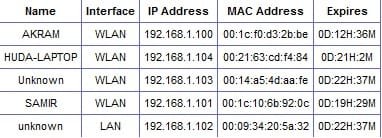
I have done some searches on google, and it does seem possible if I can run the tomato firmware but I can't run it on the WRT54GC :( . if i logon to the WRT54GC administrator console through the browser, I can check the IP addresses that have been given through DHCP, and some of them I can't ping and not sure who they are... here is a pic that shows the info I can see, but this is all I can see. I cannot even ping some of the unknown ones, could be a firewall blocking the ping duno
 

Attachments

  • unknown.jpg
    unknown.jpg
    16.6 KB · Views: 20

My Computer

Computer Manufacturer/Model Number
home made
OS
Windows 7 7264x64(main), 7260x86(secendary), XP SP3 Triple Boot
CPU
Intel Core 2 Duo E7400 2.8Mhz
Motherboard
Intel G33 express chipset
Memory
2GB DD2 667
Graphics Card(s)
Intel(R) 82G33 Graphics and Memory Controller Hub
Sound Card
Realtek Built into the G31
Monitor(s) Displays
19"
Screen Resolution
1280x1024
Hard Drives
320GB SATA (Main), 160GB IDE (Backup)
Case
Gigabyte SETTO
Keyboard
Genius
Mouse
Logitech
Internet Speed
1MB Download, 128k Upload
Packet Sniffers

First I want to know who is using the network, just to make sure nobody is on the network that I don't know of. I have a linksys WRT54GC, yeah with the C in the end it means I cannot run the tomato firmware.

once I know who is on the network, I want to know what are they doing, like what applications are they using, normal browsing or torrent or whatever they are doing, and how much bandwidth they are taking, that's all.

I have done some searches on google, and it does seem possible if I can run the tomato firmware but I can't run it on the WRT54GC :( . if i logon to the WRT54GC administrator console through the browser, I can check the IP addresses that have been given through DHCP, and some of them I can't ping and not sure who they are... here is a pic that shows the info I can see, but this is all I can see. I cannot even ping some of the unknown ones, could be a firewall blocking the ping duno

All the data that goes into and out of a pc is sent and received in packets. from the packets you can tell what the machines mac address is, what their IP is, read their passords, uid, anything that is sent in clear text. the one thing a packet sniffer cannot do is tell if they are playing a game on the pc or opening a folder.
Anything external web browser, email, IM, can be decyphered by a packet sniffer. the biggest BUT is there is a big learning curve. They are hard to learn. there are several light weight sniffers like wireshark, or etherpeek NX. wireshark is free and easiest to use. there is tons of data so dont ask for everything be specific and they will be easier to use

I hope this has helped somewhat

Ken
 

My Computer

Computer Manufacturer/Model Number
HP Pavillion dv-7 1005 Tx
OS
Win 8 Release candidate 8400
CPU
[email protected]
Memory
4 gigs
Graphics Card(s)
Nvidia 9600M
Sound Card
HD built-in
Monitor(s) Displays
17" Wxga
Screen Resolution
1440x900
Cooling
none
Internet Speed
45Mb down 5Mb up

My Computers

System One System Two

  • Computer type
    PC/Desktop
    Computer Manufacturer/Model Number
    ChillBlast - Custom to my design
    OS
    Windows 11 Pro x64 [Latest Release and Release Preview]
    CPU
    Ryzen 9 5950X, 3.8 - 5.2 MHz
    Motherboard
    Asus Prime X570-Pro
    Memory
    64GB [2 x 32GB] DDR4 3200MHz
    Graphics Card(s)
    4GB NVIDIA GEFORCE GTX 1650 Ti
    Sound Card
    On-board SPDIF to 5.1 System + HDMI [5.1 system]
    Monitor(s) Displays
    32" UHD 32 Bit HDR Monitor + 43" UHD 4K 32Bit HDR TV
    Screen Resolution
    2 x 3840 x 2160 @60Hz
    Hard Drives
    1TB M2 SSD OS, 500GB Fast Access SSD, 2 x 8TB Data + Various Externals from 1TB to 4TB, 10TB NAS
    PSU
    NZXT C750 80 PLUS Gold 750W Modular PSU
    Case
    Workstation Case [Matt Black]
    Cooling
    NZXT Kraken X63 280mm CPU Cooler +2x Quiet Case fans
    Keyboard
    Logitech Wireless MX Keys & K400 + others
    Mouse
    Logitech Wireless MX Master 3S
    Internet Speed
    920 MB Down 50 MB Up
    Antivirus
    BitDefender Total Security Pro
    Browser
    Chrome (always run latest Non-Beta)
    Other Info
    Also run ...
    Laptop - Quad 8GB - Windows 10 Pro x64
    Nexus 7 Android tablet x2
    Samsung 10.2" tablet
    Blackview TAB 8 4G Android Tablet c/w Keyboard
    Wacom Intuos Pro Medium Pen Pad
    Wacom Intuos Pro Small Pen Pad
    Wacom Expresskeys Remote
    Loopdeck+ Graphics Controller
    Shuttle Pro v2 Control
  • Computer type
    Laptop
    System Manufacturer/Model Number
    Dell XPS 17 10750H
    OS
    Windows 11 Pro x64 Latest RP
    CPU
    Intel I7 10750H 5.0GHz
    Motherboard
    Dell XPS
    Memory
    32GB [2x16GB] DDR4 2933 MHz
    Graphics Card(s)
    nVidia GTX1650Ti 4 GB GDDR6
    Sound Card
    Stock [Realtek] 4 Speaker
    Monitor(s) Displays
    17" IPS UHD+ Infinity Edge Touchscreen
    Screen Resolution
    3840 x 2400
    Hard Drives
    2TB M2 NVMe, 4TB External + various 500GB & 1TB External NVMe (also have access to spinner HDD from
    PSU
    Stock
    Case
    Stock XPS Aluminium & Carbon Fibre
    Cooling
    Stock - Active Fan Control
    Keyboard
    Backlit + Various Logitech
    Mouse
    Stock Track Pad + Logitech MX Trackball
    Internet Speed
    72 MB Down 18MB Up
    Browser
    Chrome
    Other Info
    Also run ...
    Laptop - Quad 8GB - Windows 10 Pro x64
    Nexus 7 Android tablet x2
    10.2" tablet
    Sony Z3 Android Smartphone
    Wacom Intuos Pro Medium Pen Pad
    Wacom Intuos Pro Small Pen Pad
    Wacom Expresskeys Remote
    Loopdeck+ Graphics Controller
    Shuttle Pro v2 Control Pad
    10TB NAS
Thanks for the info guys, I'll give wireshark a try I guess.
barman56, I don't have a Microsoft Live ID to download it, is there a way to get a trial version of that software? how do you get a Microsoft Live ID anyway?
 

My Computer

Computer Manufacturer/Model Number
home made
OS
Windows 7 7264x64(main), 7260x86(secendary), XP SP3 Triple Boot
CPU
Intel Core 2 Duo E7400 2.8Mhz
Motherboard
Intel G33 express chipset
Memory
2GB DD2 667
Graphics Card(s)
Intel(R) 82G33 Graphics and Memory Controller Hub
Sound Card
Realtek Built into the G31
Monitor(s) Displays
19"
Screen Resolution
1280x1024
Hard Drives
320GB SATA (Main), 160GB IDE (Backup)
Case
Gigabyte SETTO
Keyboard
Genius
Mouse
Logitech
Internet Speed
1MB Download, 128k Upload

My Computer

Computer Manufacturer/Model Number
Too many to list.
OS
XP, Seven, 2008R2
CPU
AMD, Intel, VIA
Motherboard
Various
Memory
Corsair, Kingston, etc.
Graphics Card(s)
ATI, NVIDIA
Monitor(s) Displays
Samsung
Hard Drives
Maxtor, Western Digital
Keyboard
qwerty
Internet Speed
22 Mb/s @ home, 1 Gb/s @ server
Other Info
All of my systems still run fastest on XP 32-bit for the most part. Win7 is fun to play with, but I still prefer XP for raw speed, security, and functionality.
Windows Live Sign-up ...

Sign In
 

My Computers

System One System Two

  • Computer type
    PC/Desktop
    Computer Manufacturer/Model Number
    ChillBlast - Custom to my design
    OS
    Windows 11 Pro x64 [Latest Release and Release Preview]
    CPU
    Ryzen 9 5950X, 3.8 - 5.2 MHz
    Motherboard
    Asus Prime X570-Pro
    Memory
    64GB [2 x 32GB] DDR4 3200MHz
    Graphics Card(s)
    4GB NVIDIA GEFORCE GTX 1650 Ti
    Sound Card
    On-board SPDIF to 5.1 System + HDMI [5.1 system]
    Monitor(s) Displays
    32" UHD 32 Bit HDR Monitor + 43" UHD 4K 32Bit HDR TV
    Screen Resolution
    2 x 3840 x 2160 @60Hz
    Hard Drives
    1TB M2 SSD OS, 500GB Fast Access SSD, 2 x 8TB Data + Various Externals from 1TB to 4TB, 10TB NAS
    PSU
    NZXT C750 80 PLUS Gold 750W Modular PSU
    Case
    Workstation Case [Matt Black]
    Cooling
    NZXT Kraken X63 280mm CPU Cooler +2x Quiet Case fans
    Keyboard
    Logitech Wireless MX Keys & K400 + others
    Mouse
    Logitech Wireless MX Master 3S
    Internet Speed
    920 MB Down 50 MB Up
    Antivirus
    BitDefender Total Security Pro
    Browser
    Chrome (always run latest Non-Beta)
    Other Info
    Also run ...
    Laptop - Quad 8GB - Windows 10 Pro x64
    Nexus 7 Android tablet x2
    Samsung 10.2" tablet
    Blackview TAB 8 4G Android Tablet c/w Keyboard
    Wacom Intuos Pro Medium Pen Pad
    Wacom Intuos Pro Small Pen Pad
    Wacom Expresskeys Remote
    Loopdeck+ Graphics Controller
    Shuttle Pro v2 Control
  • Computer type
    Laptop
    System Manufacturer/Model Number
    Dell XPS 17 10750H
    OS
    Windows 11 Pro x64 Latest RP
    CPU
    Intel I7 10750H 5.0GHz
    Motherboard
    Dell XPS
    Memory
    32GB [2x16GB] DDR4 2933 MHz
    Graphics Card(s)
    nVidia GTX1650Ti 4 GB GDDR6
    Sound Card
    Stock [Realtek] 4 Speaker
    Monitor(s) Displays
    17" IPS UHD+ Infinity Edge Touchscreen
    Screen Resolution
    3840 x 2400
    Hard Drives
    2TB M2 NVMe, 4TB External + various 500GB & 1TB External NVMe (also have access to spinner HDD from
    PSU
    Stock
    Case
    Stock XPS Aluminium & Carbon Fibre
    Cooling
    Stock - Active Fan Control
    Keyboard
    Backlit + Various Logitech
    Mouse
    Stock Track Pad + Logitech MX Trackball
    Internet Speed
    72 MB Down 18MB Up
    Browser
    Chrome
    Other Info
    Also run ...
    Laptop - Quad 8GB - Windows 10 Pro x64
    Nexus 7 Android tablet x2
    10.2" tablet
    Sony Z3 Android Smartphone
    Wacom Intuos Pro Medium Pen Pad
    Wacom Intuos Pro Small Pen Pad
    Wacom Expresskeys Remote
    Loopdeck+ Graphics Controller
    Shuttle Pro v2 Control Pad
    10TB NAS
oh thanks how stupid of me, I already have a windows live ID! I misunderstood I thought your talking about something like technet lol thanks for the links guys.

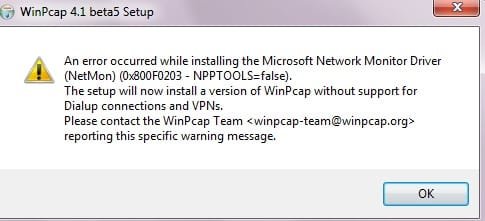
also tried that Wireshark, v1.2 beta but it's a no go with Windows 7, I do have another PC i could try it with that's running XP though, so might do that, but since I can get a trial for Microsoft's own network monitor I will look into that first as it sounds promising!
 

Attachments

  • not supported with windows 7.jpg
    not supported with windows 7.jpg
    16.3 KB · Views: 15

My Computer

Computer Manufacturer/Model Number
home made
OS
Windows 7 7264x64(main), 7260x86(secendary), XP SP3 Triple Boot
CPU
Intel Core 2 Duo E7400 2.8Mhz
Motherboard
Intel G33 express chipset
Memory
2GB DD2 667
Graphics Card(s)
Intel(R) 82G33 Graphics and Memory Controller Hub
Sound Card
Realtek Built into the G31
Monitor(s) Displays
19"
Screen Resolution
1280x1024
Hard Drives
320GB SATA (Main), 160GB IDE (Backup)
Case
Gigabyte SETTO
Keyboard
Genius
Mouse
Logitech
Internet Speed
1MB Download, 128k Upload
packet sniffers

Everyone I like MS as well but unless you install the core and parser set you are only getting a stripted down lite version

The Network Monitor core engine has been decoupled from the parser set. To install the full Network Monitor 3.3 product:
  • Run the setup.exe for the platform you are installing.
  • You will be prompted first to install the core engine. Follow the installation directions. Make sure you close existing instances of netmon.exe, nmcap.exe and any running NMAPI applications.
  • Next you will be prompted to install the parser package. Follow the installation directions:
As a beginner I thought the OP would think the ease of use would be the most important factor.

Ken
 

My Computer

Computer Manufacturer/Model Number
HP Pavillion dv-7 1005 Tx
OS
Win 8 Release candidate 8400
CPU
[email protected]
Memory
4 gigs
Graphics Card(s)
Nvidia 9600M
Sound Card
HD built-in
Monitor(s) Displays
17" Wxga
Screen Resolution
1440x900
Cooling
none
Internet Speed
45Mb down 5Mb up
A packet sniffer probably isn't going to give you enough info to work with, unless you do something like perform MITM, spoof the router's MAC address, or setup a mirrored port which the Linksys probably cannot do.

If anyone is wired into the router via ethernet, the switch inside the router will prevent you from sniffing other people's traffic (besides doing the techniques I mentioned above).
 

My Computer

Computer Manufacturer/Model Number
Too many to list.
OS
XP, Seven, 2008R2
CPU
AMD, Intel, VIA
Motherboard
Various
Memory
Corsair, Kingston, etc.
Graphics Card(s)
ATI, NVIDIA
Monitor(s) Displays
Samsung
Hard Drives
Maxtor, Western Digital
Keyboard
qwerty
Internet Speed
22 Mb/s @ home, 1 Gb/s @ server
Other Info
All of my systems still run fastest on XP 32-bit for the most part. Win7 is fun to play with, but I still prefer XP for raw speed, security, and functionality.
A packet sniffer probably isn't going to give you enough info to work with, unless you do something like perform MITM, spoof the router's MAC address, or setup a mirrored port which the Linksys probably cannot do.

If anyone is wired into the router via ethernet, the switch inside the router will prevent you from sniffing other people's traffic (besides doing the techniques I mentioned above).
Yea this is what I read in some places while googling, so MITM/Spoofing the router's MAC address/setting up mirrored port are all not supported with the linksys routers?

I played around a little with Wireshark, but it seems it can only monitor the local trafic on the locally installed NICs, unless you have something installed on the other computers... when I tried to monitor a remote computer it said that the server software was maybe not running on it....
 

My Computer

Computer Manufacturer/Model Number
home made
OS
Windows 7 7264x64(main), 7260x86(secendary), XP SP3 Triple Boot
CPU
Intel Core 2 Duo E7400 2.8Mhz
Motherboard
Intel G33 express chipset
Memory
2GB DD2 667
Graphics Card(s)
Intel(R) 82G33 Graphics and Memory Controller Hub
Sound Card
Realtek Built into the G31
Monitor(s) Displays
19"
Screen Resolution
1280x1024
Hard Drives
320GB SATA (Main), 160GB IDE (Backup)
Case
Gigabyte SETTO
Keyboard
Genius
Mouse
Logitech
Internet Speed
1MB Download, 128k Upload
packet sniffer

A packet sniffer probably isn't going to give you enough info to work with, unless you do something like perform MITM, spoof the router's MAC address, or setup a mirrored port which the Linksys probably cannot do.

If anyone is wired into the router via ethernet, the switch inside the router will prevent you from sniffing other people's traffic (besides doing the techniques I mentioned above).

Not if It has remotes like Observer, and is not passive, or he runs it in the DMZ

K
 

My Computer

Computer Manufacturer/Model Number
HP Pavillion dv-7 1005 Tx
OS
Win 8 Release candidate 8400
CPU
[email protected]
Memory
4 gigs
Graphics Card(s)
Nvidia 9600M
Sound Card
HD built-in
Monitor(s) Displays
17" Wxga
Screen Resolution
1440x900
Cooling
none
Internet Speed
45Mb down 5Mb up
you can do MITM or MAC spoofing on just about any router. Mirrored port will require special firmware on Linksys.

Not if It has remotes like Observer, and is not passive, or he runs it in the DMZ

K

remotes like Observer?

DMZ is not even real on Linksys routers. It's just Masquerade.
 

My Computer

Computer Manufacturer/Model Number
Too many to list.
OS
XP, Seven, 2008R2
CPU
AMD, Intel, VIA
Motherboard
Various
Memory
Corsair, Kingston, etc.
Graphics Card(s)
ATI, NVIDIA
Monitor(s) Displays
Samsung
Hard Drives
Maxtor, Western Digital
Keyboard
qwerty
Internet Speed
22 Mb/s @ home, 1 Gb/s @ server
Other Info
All of my systems still run fastest on XP 32-bit for the most part. Win7 is fun to play with, but I still prefer XP for raw speed, security, and functionality.
remotes like Observer?

DMZ is not even real on Linksys routers. It's just Masquerade.

Yep I knew you were lurking. I said nothing abt Linksys.

Ken
 

My Computer

Computer Manufacturer/Model Number
HP Pavillion dv-7 1005 Tx
OS
Win 8 Release candidate 8400
CPU
[email protected]
Memory
4 gigs
Graphics Card(s)
Nvidia 9600M
Sound Card
HD built-in
Monitor(s) Displays
17" Wxga
Screen Resolution
1440x900
Cooling
none
Internet Speed
45Mb down 5Mb up
akramh has a Linksys router. Why you talking about DMZ?

I played around a little with Wireshark, but it seems it can only monitor the local trafic on the locally installed NICs, unless you have something installed on the other computers... when I tried to monitor a remote computer it said that the server software was maybe not running on it....

Wireshark can monitor in promiscuous mode depending on your NIC and depending on if your wireless NIC supports monitor mode. I think you should be able to sniff other people's traffic with it, but it is not a very good solution unless you're an expert at reading packet captures.
 

My Computer

Computer Manufacturer/Model Number
Too many to list.
OS
XP, Seven, 2008R2
CPU
AMD, Intel, VIA
Motherboard
Various
Memory
Corsair, Kingston, etc.
Graphics Card(s)
ATI, NVIDIA
Monitor(s) Displays
Samsung
Hard Drives
Maxtor, Western Digital
Keyboard
qwerty
Internet Speed
22 Mb/s @ home, 1 Gb/s @ server
Other Info
All of my systems still run fastest on XP 32-bit for the most part. Win7 is fun to play with, but I still prefer XP for raw speed, security, and functionality.
you can do MITM or MAC spoofing on just about any router. Mirrored port will require special firmware on Linksys.
ok you know of any guides that I can use to do that? what software is used?

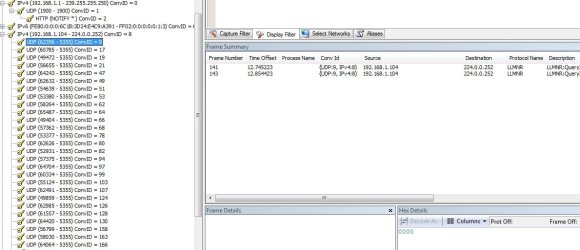
btw started playing around with microsoft network minotor 3.3, I noticed there is "My trafic" and "Other Trafic" sections, under "My trafic" I can see the applications that are on my PC that are using the net. on "other trafic" I can see the IP Addresses that are on the network, one of them I can't even ping but I can see some information on it, but not detailed, like I don't know what applications are being used and how much badwidth, here is a screen shot:
 

Attachments

  • network monitoring.jpg
    network monitoring.jpg
    76.9 KB · Views: 205

My Computer

Computer Manufacturer/Model Number
home made
OS
Windows 7 7264x64(main), 7260x86(secendary), XP SP3 Triple Boot
CPU
Intel Core 2 Duo E7400 2.8Mhz
Motherboard
Intel G33 express chipset
Memory
2GB DD2 667
Graphics Card(s)
Intel(R) 82G33 Graphics and Memory Controller Hub
Sound Card
Realtek Built into the G31
Monitor(s) Displays
19"
Screen Resolution
1280x1024
Hard Drives
320GB SATA (Main), 160GB IDE (Backup)
Case
Gigabyte SETTO
Keyboard
Genius
Mouse
Logitech
Internet Speed
1MB Download, 128k Upload
again

akramh has a Linksys router. Why you talking about DMZ?


Wireshark can monitor in promiscuous mode depending on your NIC and depending on if your wireless NIC supports monitor mode. I think you should be able to sniff other people's traffic with it, but it is not a very good solution unless you're an expert at reading packet captures.

I suggested wireshark because its easy and free. I could have just as easily said MS, so. I said observer, and etherpeek in case the OP ever gets to the point where he know enough to want more, and Yes I am expert an captures, but he isn't when he plays some he will ask more questions and after all isn't that why we do this? We are here to help not bicker.

Ken
 

My Computer

Computer Manufacturer/Model Number
HP Pavillion dv-7 1005 Tx
OS
Win 8 Release candidate 8400
CPU
[email protected]
Memory
4 gigs
Graphics Card(s)
Nvidia 9600M
Sound Card
HD built-in
Monitor(s) Displays
17" Wxga
Screen Resolution
1440x900
Cooling
none
Internet Speed
45Mb down 5Mb up

My Computer

Computer Manufacturer/Model Number
Too many to list.
OS
XP, Seven, 2008R2
CPU
AMD, Intel, VIA
Motherboard
Various
Memory
Corsair, Kingston, etc.
Graphics Card(s)
ATI, NVIDIA
Monitor(s) Displays
Samsung
Hard Drives
Maxtor, Western Digital
Keyboard
qwerty
Internet Speed
22 Mb/s @ home, 1 Gb/s @ server
Other Info
All of my systems still run fastest on XP 32-bit for the most part. Win7 is fun to play with, but I still prefer XP for raw speed, security, and functionality.
Back
Top