Monthly malware via windows update

Davidk101

New member
Member
Local time
8:49 AM
Messages
47
My wife runs a toshiba laptop with win7x64 on it. Prior to a recent event (corrupted boot software) it received and ran the monthly malware update via windows update, even tho it's long past the MS support date for the OS.
The recent event with corrupted boot software involved a specialist recovery of the entire OS (a backup of the C drive did not fix the issue, don't know why: the backup recovered OK but it still would not boot). Now, even tho the OS has all the relevant updates to end-of-support, the monthly malware scan isn't received via windows update.
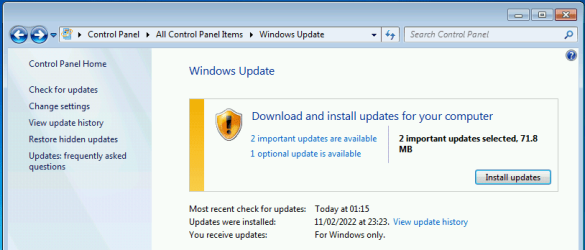
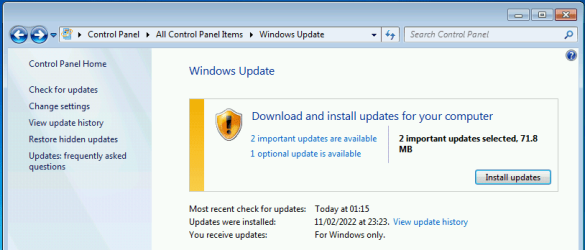
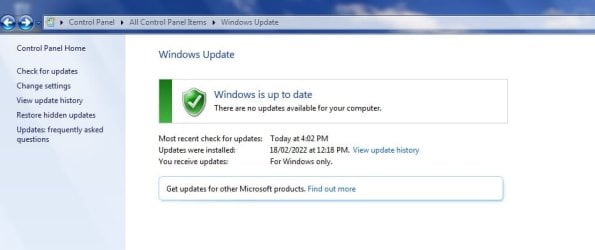
I infer that this is because the OS has been re-set to "receive updates for windows only" - see screenshot. The updates date in the image is the date of the recovery action.

How can I re-configure to again receive the monthly malware release via windows update??
 

Attachments
  • C665 updates.jpg
    C665 updates.jpg
    68.7 KB · Views: 1

My Computer

Computer type
PC/Desktop
Computer Manufacturer/Model Number
custom build
OS
windows 7 home premium 64bit
CPU
Intel core i3-4700
Motherboard
Gigabyte GA-H97M-d3H
Memory
8gb
Hard Drives
1x256gb SSD
3x500gb HDD
My wife runs a toshiba laptop with win7x64 on it. Prior to a recent event (corrupted boot software) it received and ran the monthly malware update via windows update, even tho it's long past the MS support date for the OS.
The recent event with corrupted boot software involved a specialist recovery of the entire OS (a backup of the C drive did not fix the issue, don't know why: the backup recovered OK but it still would not boot). Now, even tho the OS has all the relevant updates to end-of-support, the monthly malware scan isn't received via windows update.
I infer that this is because the OS has been re-set to "receive updates for windows only" - see screenshot. The updates date in the image is the date of the recovery action.

How can I re-configure to again receive the monthly malware release via windows update??

No, you should still get the Malicious Software Removal Tool. That is counted as being 'for Windows'.

image.pngimage.png


Have you tried clicking on 'Check for updates' since you did the reset?

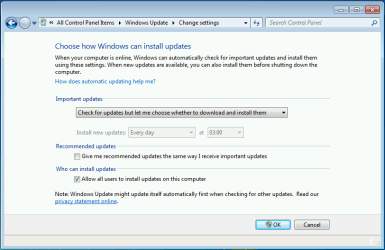
You could also click on 'Change settings' and see if 'Choose how Windows installs updates' has been set to 'never check'.

image.png
 

My Computers

System One System Two

  • Computer type
    Laptop
    Computer Manufacturer/Model Number
    Toshiba satellite C650D
    OS
    Windows 7 Home Premium x64
    CPU
    AMD V120
    Memory
    4GB
    Internet Speed
    150 Mbps
    Antivirus
    MSE
    Browser
    IE11, Edge, Firefox
    Other Info
    I also have W7 Pro on my System Two, and several W7 Hyper-V VMs. My other machines run Windows 10/11. Their specs are in my Ten Forums & Eleven Forum profiles.
  • Computer type
    Laptop
    System Manufacturer/Model Number
    Lenovo Thinkpad T430
    OS
    Windows 7 Pro x64
    CPU
    Intel i5-3320M
    Memory
    8 GB
    Hard Drives
    250GB Samsung SSD 860 EVO
    Other Info
    Antivirus: MSE
Bree,
Hi, thanks for replying so promptly.
Answering your Q's:
1. Yep, I found the issue after reviewing the results of a 'check for updates' - a monthly habit I got into. I was expecting the malware removal tool to be there - and it wasn't.
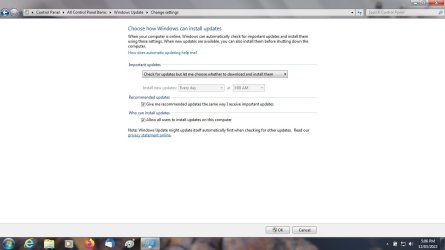
So, I went looking for a setting: checked change settings item and got the related page (screenshot, attached). It was set for auto update, so I changed it to what it shows now, but 2 further check for updates since has not changed the result; no malware removal tool listed. I could not find anything else, so I called here.

2. see reply for 1.

The page also lists a link for find out more about other updates - so I clicked it, but all that got me was the Bing search engine within the browser - waiting, going nowhere. I was expecting it would link into a MS page that told me how to do it, but that did not happen either.
 

Attachments

  • C665 updates 2.jpg
    C665 updates 2.jpg
    131.2 KB · Views: 1

My Computer

Computer type
PC/Desktop
Computer Manufacturer/Model Number
custom build
OS
windows 7 home premium 64bit
CPU
Intel core i3-4700
Motherboard
Gigabyte GA-H97M-d3H
Memory
8gb
Hard Drives
1x256gb SSD
3x500gb HDD
So, I went looking for a setting: checked change settings item and got the related page (screenshot, attached). It was set for auto update, so I changed it to what it shows now, but 2 further check for updates since has not changed the result; no malware removal tool listed.

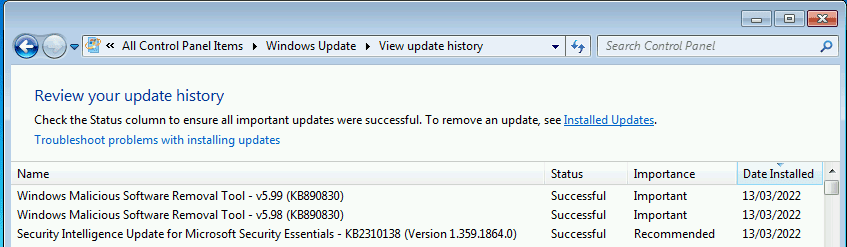
Ah, so if it was set for auto update you may have already had the Malicious Software Removal Tool installed without you realising. On this screen....

image.png

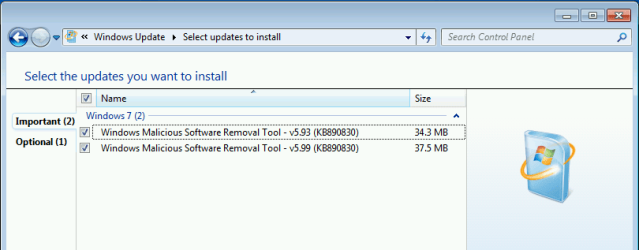
Click 'View update history' and see if the latest one, v5.99 is listed there, like this....

installed upates.png

If so, you won't see a new MSRT issued until next month's Patch Tuesday, the 2nd Tuesday of the month.
 

My Computers

System One System Two

  • Computer type
    Laptop
    Computer Manufacturer/Model Number
    Toshiba satellite C650D
    OS
    Windows 7 Home Premium x64
    CPU
    AMD V120
    Memory
    4GB
    Internet Speed
    150 Mbps
    Antivirus
    MSE
    Browser
    IE11, Edge, Firefox
    Other Info
    I also have W7 Pro on my System Two, and several W7 Hyper-V VMs. My other machines run Windows 10/11. Their specs are in my Ten Forums & Eleven Forum profiles.
  • Computer type
    Laptop
    System Manufacturer/Model Number
    Lenovo Thinkpad T430
    OS
    Windows 7 Pro x64
    CPU
    Intel i5-3320M
    Memory
    8 GB
    Hard Drives
    250GB Samsung SSD 860 EVO
    Other Info
    Antivirus: MSE
Hi Bree,
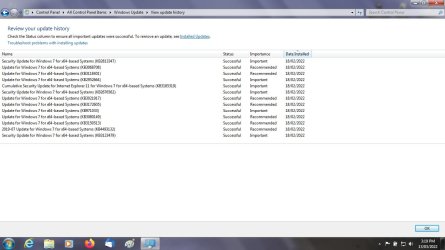
No, there wasn't one, and despite the repeated check for updates since, still isn't. see screenshot.

My usual method is to check for the monthly updates on the 3rd day after patch tuesday each month (why 3rd day? been burnt a few times by applying updates too soon, so now I wait a few days). In the past 2 years there's been only 1 update each month: the malware removal tool. After the rebuild on 18 Feb, the March patch tuesday came, no tool listed, so I checked the history: it was per the screenshot. And thus we are having this conversation . .

Today I did think that it might be related to having previously run the tool manually, so I found downloaded and ran the march tool (KB890830-x64-5.99.exe) separately: no infections, and very specifically no change in the update history in the screenshot after the scan.

Really perplexed by this: if it's part of windows, why won't the PC (otherwise running fine) detect the tool and flag it in the updates page????
 

Attachments

  • C665 updates 3.jpg
    C665 updates 3.jpg
    200.5 KB · Views: 1

My Computer

Computer type
PC/Desktop
Computer Manufacturer/Model Number
custom build
OS
windows 7 home premium 64bit
CPU
Intel core i3-4700
Motherboard
Gigabyte GA-H97M-d3H
Memory
8gb
Hard Drives
1x256gb SSD
3x500gb HDD
Hi

Dont panic that KB along with KB947821 are run once updates, ie non-permenant. They do NOT install as such
not sure if it will appear as being run in MSE logs, KB947821 shows up in the CBS folder
 

My Computer

Computer type
PC/Desktop
Computer Manufacturer/Model Number
medionl/Aspire 6930G/acer x55a
OS
W7 home premium 32bit/W7HP 64bit/w10 tp insider ring
CPU
E5300 dual core
Motherboard
medion MS7366
Memory
3gb
Graphics Card(s)
Nvidia Geforce 7100 Nforce 630i
Monitor(s) Displays
avixc
Internet Speed
n (isp resticted to 72)
Antivirus
mse/pands
Browser
palemoon
Other Info
Belkin Fd7050 n USB using Railink RT2870 drivers, more upto date
Torchwood,
Thanks for that info: each of those malware tools is about 35Mb, and over time that would build up to a substantial memory usage.
I have a 2nd laptop - hp g6-2002 - also running win7 x64, and it's had no problems: the regular monthly malware tool is detected and once downloaded it runs fine. The update history on that machine shows malware monthly updates going back a long time. So, if they are run once, don't install, can I assume that the history of any specific tool is just an entry only, the tool itself not retained after running without issues?? the long-term memory use of that had begun to concern me.

Which doesn't answer why, on the re-installed Toshiba machine, the updates pages don't detect the malware tool even when specifically commanded to search for updates. It's like a setting somewhere has that turned off, and while I can't find it, it seems the forum doesn't know either.
 

My Computer

Computer type
PC/Desktop
Computer Manufacturer/Model Number
custom build
OS
windows 7 home premium 64bit
CPU
Intel core i3-4700
Motherboard
Gigabyte GA-H97M-d3H
Memory
8gb
Hard Drives
1x256gb SSD
3x500gb HDD
...Which doesn't answer why, on the re-installed Toshiba machine, the updates pages don't detect the malware tool even when specifically commanded to search for updates. It's like a setting somewhere has that turned off, and while I can't find it, it seems the forum doesn't know either.
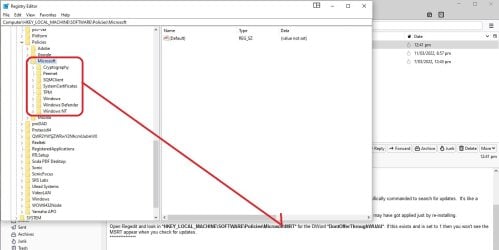
It's a long shot, but there's a policy that can block receiving the MSRT through Windows Update. Though I can't think of a reason it may have got applied just by re-installing.

Open Regedit and look in HKEY_LOCAL_MACHINE\SOFTWARE\Policies\Microsoft\MRT for the DWord DontOfferThroughWUAU. If this exists and is set to 1 then you won't see the MSRT appear when you check for updates.
 

My Computers

System One System Two

  • Computer type
    Laptop
    Computer Manufacturer/Model Number
    Toshiba satellite C650D
    OS
    Windows 7 Home Premium x64
    CPU
    AMD V120
    Memory
    4GB
    Internet Speed
    150 Mbps
    Antivirus
    MSE
    Browser
    IE11, Edge, Firefox
    Other Info
    I also have W7 Pro on my System Two, and several W7 Hyper-V VMs. My other machines run Windows 10/11. Their specs are in my Ten Forums & Eleven Forum profiles.
  • Computer type
    Laptop
    System Manufacturer/Model Number
    Lenovo Thinkpad T430
    OS
    Windows 7 Pro x64
    CPU
    Intel i5-3320M
    Memory
    8 GB
    Hard Drives
    250GB Samsung SSD 860 EVO
    Other Info
    Antivirus: MSE
Hi Bree,
I looked, and there isn't a policy for WSRT . . . screenshot.

More thinks on this???
 

Attachments

  • WSRT policy.jpg
    WSRT policy.jpg
    167.7 KB · Views: 1

My Computer

Computer type
PC/Desktop
Computer Manufacturer/Model Number
custom build
OS
windows 7 home premium 64bit
CPU
Intel core i3-4700
Motherboard
Gigabyte GA-H97M-d3H
Memory
8gb
Hard Drives
1x256gb SSD
3x500gb HDD
Back
Top