More 2010 help, please

vix2000

New member
Local time
9:20 PM
Messages
24
After retrieving my lost emails the other day, I have been trying to customise my email folders to my preferences. I dont like having seperate data files for every email address as I have a different address for different things. So I figured I could create a folder in my main data file, and direct the emails for that address into the new folder. I could then close, (hide) the data file in the root menu, so that I am only veiwing what I need to veiw. This all went fine until I needed to add a new email address today, and although I have been able to direct it to a folder on my main data file, I cannot hide the original data file, only delete it, which then deletes the whole address. Can anyone direct to me to where I managed to hide the other data files please? Hope you can understand this!!!!
 

My Computer

OS
vista
File - account settings - select the account from the list - at the bottom there is an entry for deliver new messages to ....

Change to required folder location

Note this may not be available for IMAP accounts
 

My Computers

System One System Two

  • Computer type
    PC/Desktop
    Computer Manufacturer/Model Number
    ChillBlast - Custom to my design
    OS
    Windows 11 Pro x64 [Latest Release and Release Preview]
    CPU
    Ryzen 9 5950X, 3.8 - 5.2 MHz
    Motherboard
    Asus Prime X570-Pro
    Memory
    64GB [2 x 32GB] DDR4 3200MHz
    Graphics Card(s)
    4GB NVIDIA GEFORCE GTX 1650 Ti
    Sound Card
    On-board SPDIF to 5.1 System + HDMI [5.1 system]
    Monitor(s) Displays
    32" UHD 32 Bit HDR Monitor + 43" UHD 4K 32Bit HDR TV
    Screen Resolution
    2 x 3840 x 2160 @60Hz
    Hard Drives
    1TB M2 SSD OS, 500GB Fast Access SSD, 2 x 8TB Data + Various Externals from 1TB to 4TB, 10TB NAS
    PSU
    NZXT C750 80 PLUS Gold 750W Modular PSU
    Case
    Workstation Case [Matt Black]
    Cooling
    NZXT Kraken X63 280mm CPU Cooler +2x Quiet Case fans
    Keyboard
    Logitech Wireless MX Keys & K400 + others
    Mouse
    Logitech Wireless MX Master 3S
    Internet Speed
    920 MB Down 50 MB Up
    Antivirus
    BitDefender Total Security Pro
    Browser
    Chrome (always run latest Non-Beta)
    Other Info
    Also run ...
    Laptop - Quad 8GB - Windows 10 Pro x64
    Nexus 7 Android tablet x2
    Samsung 10.2" tablet
    Blackview TAB 8 4G Android Tablet c/w Keyboard
    Wacom Intuos Pro Medium Pen Pad
    Wacom Intuos Pro Small Pen Pad
    Wacom Expresskeys Remote
    Loopdeck+ Graphics Controller
    Shuttle Pro v2 Control
  • Computer type
    Laptop
    System Manufacturer/Model Number
    Dell XPS 17 10750H
    OS
    Windows 11 Pro x64 Latest RP
    CPU
    Intel I7 10750H 5.0GHz
    Motherboard
    Dell XPS
    Memory
    32GB [2x16GB] DDR4 2933 MHz
    Graphics Card(s)
    nVidia GTX1650Ti 4 GB GDDR6
    Sound Card
    Stock [Realtek] 4 Speaker
    Monitor(s) Displays
    17" IPS UHD+ Infinity Edge Touchscreen
    Screen Resolution
    3840 x 2400
    Hard Drives
    2TB M2 NVMe, 4TB External + various 500GB & 1TB External NVMe (also have access to spinner HDD from
    PSU
    Stock
    Case
    Stock XPS Aluminium & Carbon Fibre
    Cooling
    Stock - Active Fan Control
    Keyboard
    Backlit + Various Logitech
    Mouse
    Stock Track Pad + Logitech MX Trackball
    Internet Speed
    72 MB Down 18MB Up
    Browser
    Chrome
    Other Info
    Also run ...
    Laptop - Quad 8GB - Windows 10 Pro x64
    Nexus 7 Android tablet x2
    10.2" tablet
    Sony Z3 Android Smartphone
    Wacom Intuos Pro Medium Pen Pad
    Wacom Intuos Pro Small Pen Pad
    Wacom Expresskeys Remote
    Loopdeck+ Graphics Controller
    Shuttle Pro v2 Control Pad
    10TB NAS
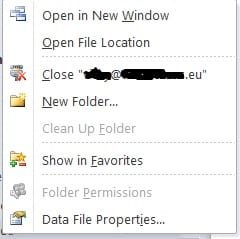
Hi I have managed to direct my mail to my preferred folders with the above method and have managed to close most of the original data files which when right clicked give the following options, and I choose to close the file.
scshot2.jpg


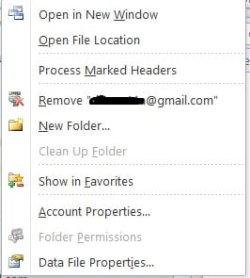
Unfortunately the problem file does not give the 'close' option, but the 'remove' option, which removes the original file plus all related data, in reality removing the email address totally.
sshot2.jpg

I just wondered if anyone knew why the 2 data files would show different menus as they're both pop3 accounts with the same settings.
 

My Computer

OS
vista
No joy with the above, so have backed up my files and reinstalled outlook to start from scratch. Guess what, I've now encountered another problem!!! As I said, I am trying to set up outlook from scratch. I have set up 1 email address to a new profile/data file and its fine. I then go to add a second email, (manually) and try to add it to 'existing outlook datafile' rather than setting up a new datafile, as is the choice in the set up options, and it comes up with an exclaimation mark in a yellow triangle and says the requested operation failed. Does anyone know if I need to change any settings to set up multiple email addresses in one data file please?
 

My Computer

OS
vista
I've found the solution to my problem. My aim was to have my multiple email addresses delivered to one data file as I do not like 2010s way of setting up a full set of files for each address. Basically I followed this guide:-


Add to an existing profile

  • Close Outlook.
  • In Control Panel, click or double-click Mail

The title bar of the Mail Setup dialog box contains the name of the current profile. To select a different existing profile, click Show Profiles, select the profile name, and then click Properties.


  • Click E-mail Accounts.
  • Proceed to one of the following sections of this article:
    • Manually configure a POP3 or IMAP account
    • Manually configure a Microsoft Exchange account


Then in the inbox of my one data file I created folders for every email address I wanted to add. Then in account settings, change folder I directed each address to the corresponding folder. Hope this might help someone.
 

My Computer

OS
vista
Well I thought everything was sorted until I tried to send an email tonight and found that I could only recieve and not send.

After extensive searching for solutions I have created a new profile about a million times, reinstalled twice, installed another version, and don't know what else to do. I have now a new profile that is at least recieving, but when I try to send I get 'the operation failed. An object cannot be found."

After about 6 hours solid and mostly having no send or recieve, and at one point I couldnt even open outlook, I am giving up for tonight, recieving is a bonus, in the hope that some kind soul will put me out of my misery and give me the solution. If not I'm afraid its reluctanty back to 2007 for me.
 

My Computer

OS
vista
Back
Top