Solved more control over UAC

meamjw

New member
Local time
6:58 AM
Messages
24
I am using Win 7 Pro 64 bit and I use Photoshop a lot. Just a few days ago UAC started interfering every time I try to launch Photoshop. I have no idea what caused the change but I don't like it. I just explored the UAC settings and I have the notification slider set at the midpoint. I did not knowingly change that before the meddlesome trouble began.
What I want to know is how to get UAC to leave Photoshop alone without disabling notification for all programs. There should be something like a white list for trusted programs, but I can't find one.
 

My Computer

OS
Win 7
There is no trusted whitelist unfortunately. And if there was, malware could easily use it to its advantage. I believe thats the reason there is none.

I am not sure why photoshop is prompting for admin rights. It should not need them. Is photoshop updated?
Do you have it set to run as admin? Right click the shortcut and click properties-compatibility tab. Is run this program as an administrator checked? If so remove it.

Otherwise, its only one click so it should not be that much of an annoyance.
 

My Computer

Computer type
PC/Desktop
Computer Manufacturer/Model Number
Custom Built
OS
Windows 10 Pro
CPU
AMD Ryzen 5 2400G Processor with Radeon RX Vega 11 Graphics
Motherboard
ASRock X470 Master SLI/AC AM4 AMD Promontory X470 SATA 6Gb/s
Memory
G.SKILL Ripjaws V Series 16GB (2 x 8GB) 288-Pin DDR4 SDRAM D
Graphics Card(s)
2047MB NVIDIA GeForce GTX 1060 6GB (EVGA)
Sound Card
Motherboard Built in
Monitor(s) Displays
Acer R240HY bidx 23.8-Inch IPS HDMI DVI VGA (1920 x 1080) Wi
Screen Resolution
1920 x 1080
Hard Drives
1TB Sandisk SSD PLUS (Main drive)
500 GB Seagate 7200 RPM (Games)
500 GB Western Digital 7200 RPM (Virtual Machines)
PSU
CORSAIR TX Series TX650M 650W 80+ Gold Modular Power Supply
Case
CORSAIR CARBIDE SPEC-02 Mid-Tower Gaming Case, Red LED Fan
Cooling
220mm, two 120mm, and four 60mm fans
Keyboard
Wired Dell keyboard
Mouse
Wireless Logitech mouse
Internet Speed
250mb down, 30mb up
Antivirus
Panda Cloud Antivirus
Browser
Chrome-ish x64
Other Info
Your awesome for reading this.
Andrew, you were right about the "run this program as administrator" box being checked and I don't know how it got that way. I didn't even know there were such options in shortcuts. Anyway unchecking that fixed my problem. Thanks a bunch. I made a similar reply a few days ago, but it seems to have died on the way to this page.
 

My Computer

OS
Win 7
you fixed it Andrew

Andrew, you were right about the "run this program as administrator" box being checked, but I don't know how it got that way. I didn't even know there were such thing s in shortcuts. Anyway, unchecking it fixed my problem. Thanks.
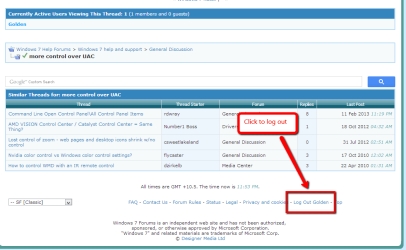
I'm not getting along well with navigating this site. I tried posting a similar reply yesterday, but it didn't seem to arrive. Also, I can't find a button to log out.
Someone please mark this as solved for me because I can't find a solved button either.
 

My Computer

OS
Win 7

My Computer

Computer type
PC/Desktop
Computer Manufacturer/Model Number
Golden Mk. I.4
OS
Windows 10 Pro x64 ; Xubuntu x64
CPU
Intel i7 860 @ 2.80 GHz O/C'ed to 4.0GHz
Motherboard
Gigabyte P55A-UD3R Rev.1. Award BIOS F13
Memory
16GB Corsair Vengance DDR3 @ 661 MHz Dual Channel (9-9-9-24)
Graphics Card(s)
EVGA NVidia GTX 560 1024MB
Sound Card
Realtek Integrated
Monitor(s) Displays
Dual Samsung SyncMaster 2494HS
Screen Resolution
1920*1080 and 1920*1080
Hard Drives
1*Samsung 840 EVO 120GB SSD;
1*OCZ Vertex 2 60GB SSD;
2*Samsung F3 SpinPoint 1TB in RAID0;
1*Samsung F1 SpinPoint 1TB;
2*Western Digital 1TB External USB 3.0
1*Western Digital 500GB External USB 3.0
1*Seagate 500GB External USB 2.0
PSU
Thermaltake ToughPower QFan 750W
Case
Thermaltake Element S VK60001W2Z
Cooling
Corsair H60 Water Cooling, 2*230mm and 2*80mm case fans
Keyboard
Logitech G110
Mouse
Logitech MX518
@meamjw

I am glad that solution worked for you. That is odd like you said about that being checked to run as admin when you do not remember checking it. I don't know of any program that does that automatically.

Have a good one!
 

My Computer

Computer type
PC/Desktop
Computer Manufacturer/Model Number
Custom Built
OS
Windows 10 Pro
CPU
AMD Ryzen 5 2400G Processor with Radeon RX Vega 11 Graphics
Motherboard
ASRock X470 Master SLI/AC AM4 AMD Promontory X470 SATA 6Gb/s
Memory
G.SKILL Ripjaws V Series 16GB (2 x 8GB) 288-Pin DDR4 SDRAM D
Graphics Card(s)
2047MB NVIDIA GeForce GTX 1060 6GB (EVGA)
Sound Card
Motherboard Built in
Monitor(s) Displays
Acer R240HY bidx 23.8-Inch IPS HDMI DVI VGA (1920 x 1080) Wi
Screen Resolution
1920 x 1080
Hard Drives
1TB Sandisk SSD PLUS (Main drive)
500 GB Seagate 7200 RPM (Games)
500 GB Western Digital 7200 RPM (Virtual Machines)
PSU
CORSAIR TX Series TX650M 650W 80+ Gold Modular Power Supply
Case
CORSAIR CARBIDE SPEC-02 Mid-Tower Gaming Case, Red LED Fan
Cooling
220mm, two 120mm, and four 60mm fans
Keyboard
Wired Dell keyboard
Mouse
Wireless Logitech mouse
Internet Speed
250mb down, 30mb up
Antivirus
Panda Cloud Antivirus
Browser
Chrome-ish x64
Other Info
Your awesome for reading this.
Back
Top