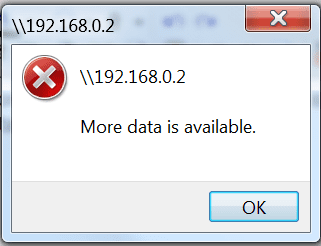
More Data is Available

kgbwolf

New member
Local time
9:12 PM
Messages
1
When i try to access any pc on my network for ex \\server or \\192.168.0.2 i get More Data is Available see attachment. Firewall is turned off. how can i fix this?
 

Attachments

  • error.png
    error.png
    9 KB · Views: 27

My Computer

OS
7
Apparently, you wait for the next build! This started with me on build 7057 and continues with 7068. I retrograded to 7048 and networking works with Windows XP machines again. I'm back to 7068 because I don't need to network with the one XP machine I have left that badly, but it will be nice to get this fixed.
 

My Computer

Computer Manufacturer/Model Number
Dell / Studio xps
OS
Windows7 x64 7600 16385
CPU
Intel I7 920
Motherboard
Dell
Memory
6GB DDR3
Graphics Card(s)
ATI Radeon HD4350
Sound Card
Integrated 7.1 channel
Hard Drives
Hitachi HDT721064SLA360 (596 GB)
Keyboard
Logitech EX110
Mouse
Logitech LX8
I don't think it's a problem specific to any build. Networking has been going strong for me on all of them, x86. This includes when my downstairs machine was only XPSP3 (which it's now only 7068 x86.)

I have all the drives mapped to there, and they're hidden with a $.

When I type \\ipaddresshere or \\computernamehere in windows explorer, it asks me for the user/pass, I put it, and expectedly it shows a screen with no shares. If I didn't hide them, all the shares would show. There are no errors in any of this for me.

I forget what default is, but I have the homegroup services on manual for startup type and they are not running at any given time I check. I also map computer names to ip addresses in the hosts file. The "use sharing wizard (recommended)" check box that you could find in windows explorer | organize | folder and search options | view tab I uncheck. I also assign static ips, give permissions to everyone and then only allow access to one machine, since that's all that's ever needed on my 2 pc, 1 ps3 network.

On my D-Link DI-624 router 100mbps, I am seeing up to between 10-11 megabytes per second between the 2 7068 boxes here.

bw.jpg
 
Last edited:

My Computer

Computer Manufacturer/Model Number
self built
OS
7600.20510 x86
CPU
P4 550 3.4 GHz HT running at 3.5 GHz
Motherboard
MSI PM8M3-V (MS-7211 v1.x) Micro-ATX mainboard
Memory
OCZ 2 GB(2x1GB) DDR400mHz running @ 414 mHz
Graphics Card(s)
HIS Radeon HD 3850 IceQ 3 Turbo HDMI Dual DL-DVI AGP
Sound Card
MOTU Traveler firewire studio interface 192 kHz 24 bit
Monitor(s) Displays
22" widescreen Acer X223W LCD, 17" Compaq P75 CRT
Screen Resolution
1680x1050 and 1280x1024
Hard Drives
SATA I x2 WD, 400 GB and 120 GB, SATA 2 WD Caviar Black 1 TB
PSU
350W generic
Case
Cybertronpc, it glows blue
Cooling
stock cpu fan, Ice-Q 3 gpu and system, many case fans
Keyboard
Logitch Classical Keyboard 200
Mouse
Logitech Mediaplay cordless
Internet Speed
1792/448 kbits/sec
Other Info
SATA II PCI fake RAID adapter, 1 GB Readyboost, original ATI Remote Wonder (even works with WMC perfectly), Logitech Rumblepad 2 game controller x2
I found something else which may or may not be relevant.

"My file name was too long and now with less that 12 caracters it worked.

Thanks..."

...at the bottom of this thread...

can't map network driver "more data is available"? - WinDrivers Computer Tech Support Forums

I think he's trying to say that his share name was too long. If yours is long, try shortening it. I had to put this here, but now on win 7, I am guessing there are no such restrictions. Maybe though.

And I also read the Acronis True Image on an XP box can cause this error as well.
 

My Computer

Computer Manufacturer/Model Number
self built
OS
7600.20510 x86
CPU
P4 550 3.4 GHz HT running at 3.5 GHz
Motherboard
MSI PM8M3-V (MS-7211 v1.x) Micro-ATX mainboard
Memory
OCZ 2 GB(2x1GB) DDR400mHz running @ 414 mHz
Graphics Card(s)
HIS Radeon HD 3850 IceQ 3 Turbo HDMI Dual DL-DVI AGP
Sound Card
MOTU Traveler firewire studio interface 192 kHz 24 bit
Monitor(s) Displays
22" widescreen Acer X223W LCD, 17" Compaq P75 CRT
Screen Resolution
1680x1050 and 1280x1024
Hard Drives
SATA I x2 WD, 400 GB and 120 GB, SATA 2 WD Caviar Black 1 TB
PSU
350W generic
Case
Cybertronpc, it glows blue
Cooling
stock cpu fan, Ice-Q 3 gpu and system, many case fans
Keyboard
Logitch Classical Keyboard 200
Mouse
Logitech Mediaplay cordless
Internet Speed
1792/448 kbits/sec
Other Info
SATA II PCI fake RAID adapter, 1 GB Readyboost, original ATI Remote Wonder (even works with WMC perfectly), Logitech Rumblepad 2 game controller x2
Back
Top