More DirectX issues!

Titanomachy

New member
Local time
12:13 AM
Messages
16
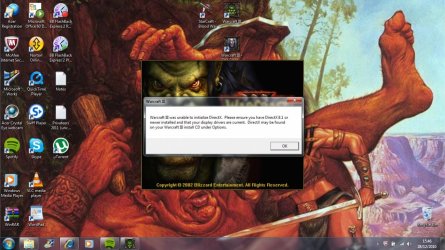
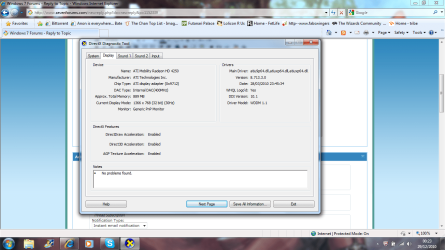
Hello all, still very new to these forums but finding them extremely useful. I've been running Warcraft III for a few days with no major problems on my new Acer laptop. I say no major problems, the fmv sequences just seem to skip, they won't play, but the game itself was playing fine. As of today I'm (finally) online at home, although the laptop has been online plenty in the few weeks I've had it with wifi at work, so updates have been installing no problem. Now I've installed the Frozen Throne expansion and the game won't start, I've included a screencap of the error, my dxdiag and a copy of the text document 'DirectX' from my windows folder which is all I can find on the computer relating to DirectX. My understanding is that I should have DirectX 11 with windows 7, which should Include all previous DirectX, yet the game doesn't seem to be finding it. Help is much appreciated!

Regards
 

My Computer

Computer Manufacturer/Model Number
Acer Aspire 5551
OS
Windows 7 Home Premium 64bit
CPU
AMD Athlon(tm) II P320 Dual-Core Processor (2 CPUs), ~2.1GHz
Memory
2048MB RAM
Graphics Card(s)
ATI Mobility Radeon HD 4250
Sound Card
Realtek HDMI Output (ATI HDMI Audio)
Keyboard
Standard PS/2 Keyboard
Mouse
HID-compliant mouse
Last edited:

My Computer

Computer Manufacturer/Model Number
Acer Aspire 5551
OS
Windows 7 Home Premium 64bit
CPU
AMD Athlon(tm) II P320 Dual-Core Processor (2 CPUs), ~2.1GHz
Memory
2048MB RAM
Graphics Card(s)
ATI Mobility Radeon HD 4250
Sound Card
Realtek HDMI Output (ATI HDMI Audio)
Keyboard
Standard PS/2 Keyboard
Mouse
HID-compliant mouse
Should I have posted this in the gaming forum?
 

My Computer

Computer Manufacturer/Model Number
Acer Aspire 5551
OS
Windows 7 Home Premium 64bit
CPU
AMD Athlon(tm) II P320 Dual-Core Processor (2 CPUs), ~2.1GHz
Memory
2048MB RAM
Graphics Card(s)
ATI Mobility Radeon HD 4250
Sound Card
Realtek HDMI Output (ATI HDMI Audio)
Keyboard
Standard PS/2 Keyboard
Mouse
HID-compliant mouse
Titanomachy, you will get a better response if you fill in your system specs please.
 

My Computer

Computer type
PC/Desktop
Computer Manufacturer/Model Number
Self Build
OS
MS Windows 7 Professional 64-bit SP1
CPU
AMD FX(tm)-6100 Six-Core Processor Socket AM3+ (942)
Motherboard
ASUSTeK COMPUTER INC. SABERTOOTH 990FX (AM3r2)
Memory
8.00 GB Dual-Channel DDR3 @ 802MHz (11-11-11-36) 1.5Volts
Graphics Card(s)
NVIDIA GeForce GTX 560 Ti
Sound Card
Onboard Realtek HD
Monitor(s) Displays
shimian (1920x1080@60Hz)
Screen Resolution
1920*1080
Hard Drives
OCZ-AGIL ITY3 SATA Disk Device 120GB
PSU
Corsair TX 750
Case
Corsair
Cooling
WaterCooled
Keyboard
Microsoft Wired
Mouse
Logitech USB Optical TiltWheel Mouse
Internet Speed
Realtek PCIe GBE Family Controller 20MB*1MB
Antivirus
Avast
Browser
Firefox
Other Info
150GB Internal Hard Drive for Backing Up Important Files -
Hauppauge Nova-DT Dual DVB-T Tuner Device (+IR) -
USB PC Camera with Mic (SN9C105)

My Computer

Computer type
PC/Desktop
Computer Manufacturer/Model Number
Alienware Aurora ALX R4
OS
Windows 10 Pro (x64)
CPU
Intel Core i7-3930K (3.2GHz - 4.5GHz)
Motherboard
Alienware Aurora-R4 x79
Memory
4x Samsung 4GB PC3-12800 DDR3 (16GB 1600MHz)
Graphics Card(s)
Nvidia Geforce GTX 690
Sound Card
SteelSeries Siberia Elite
Monitor(s) Displays
Dell UltraSharp U3011
Screen Resolution
2560x1600
Hard Drives
Samsung 850 Pro 256 GB, Seagate 1TB Desktop Hybrid HDD, 2x Western Digital 4TB Green HDD
PSU
875W Some Dell PSU <.<
Case
Alienware Aurora ALX
Cooling
Custom Liquid Cooling (EK CPU & GPU blocks) dual EK 480RAD
Keyboard
Logitech G710+ Mechanical
Mouse
Logitech G700s
Internet Speed
Verizon Fios (50 mbps average)
Other Info
Server: Intel NUC D54250WYK: i5-4250U, 16GB, 256 GB mSATA, Windows Server 2012 R2
If updating the DirectX run time doesn't help, you can also try:

► Running the Game as Admin

Disable then re-enable Direct 3D:

- Click Start (For Vista/7 Users, press the Windows Key (the key with the Windows logo on your keyboard) + R (at the same time) and skip to step 3)
- Click Run
- Type dxdiag and push Enter
- Select the Display tab
- Click the Disable button next to Direct3D Acceleration
- Click the Enable button next to Direct3D Acceleration and try the game again

If all else fails, you could try running the game in OpenGl by using the OpenGl switch.

Change your shortcuts target so it looks like this : "C:\Program Files(x86)\Warcraft III\Warcraft III.exe" -opengl
 

My Computer

Computer type
PC/Desktop
Computer Manufacturer/Model Number
Systems by SmartEyeball
OS
8 Pro x64
CPU
i7 3770K 4.6GHz
Motherboard
ASUS P8Z77 WS
Memory
16GB G.Skill Trident X 2666mhz
Graphics Card(s)
x2 EVGA 780 Ti Superclocked SLI
Sound Card
SB X-FI Surround 5.1 PRO USB / ATH-AD900 Headphones
Monitor(s) Displays
x3 Dell U2410 / 58" Samsung
Screen Resolution
5760*1200/ 1920*1200
Hard Drives
2x Intel 520 240GB (RAID 0) * 2x WD Caviar Blacks 2TB (RAID 0) * 2TB WD Caviar Black * Sony Optirac DVD
PSU
Silverstone Strider Evolution 1200W
Case
Thermaltake Level 10 GT Snow Edition
Cooling
Noctua NH-D14
Keyboard
Topre Realforce // Ducky Shine MX Black // Filco Ninja TKL
Mouse
Thermaltake Theron (Highly Recommended) + Razer Imperator
Antivirus
MSE
Browser
IE, FF, WaterFox
Other Info
GT Extreme V2 Sim Racing Cockpit + 40" LCD and K/B Mouse stand ▼
Fanatec CSR Elite Wheel + Clubsport V1 Pedals + CSR shifter/7G-H ▼Saitek X52 Pro ▼ TrackIR 5 Pro
Buttkicker v2 Seat Rumbler with Dedicated 5.1 and Sub Woofer attached to frame ▼
=
Bloody Big Grin

My Computer

Computer Manufacturer/Model Number
Acer Aspire 5551
OS
Windows 7 Home Premium 64bit
CPU
AMD Athlon(tm) II P320 Dual-Core Processor (2 CPUs), ~2.1GHz
Memory
2048MB RAM
Graphics Card(s)
ATI Mobility Radeon HD 4250
Sound Card
Realtek HDMI Output (ATI HDMI Audio)
Keyboard
Standard PS/2 Keyboard
Mouse
HID-compliant mouse
If updating the DirectX run time doesn't help, you can also try:

► Running the Game as Admin

Disable then re-enable Direct 3D:

- Click Start (For Vista/7 Users, press the Windows Key (the key with the Windows logo on your keyboard) + R (at the same time) and skip to step 3)
- Click Run
- Type dxdiag and push Enter
- Select the Display tab
- Click the Disable button next to Direct3D Acceleration
- Click the Enable button next to Direct3D Acceleration and try the game again

If all else fails, you could try running the game in OpenGl by using the OpenGl switch.

Change your shortcuts target so it looks like this : "C:\Program Files(x86)\Warcraft III\Warcraft III.exe" -opengl

Thanks for the reply.

Running game as admin doesn't seem to make a difference.

I don't seem to be able to locate any buttons on my dxdiag tool, the display tab is shown in the attachments, nothing that I can click on there to disable the Direct3D Acceleration, it doesn't seem interactive just a reporting tool.

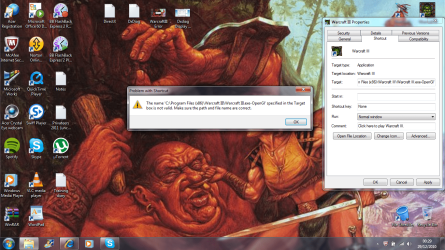
I'm sorry I don't quite follow the procedure for using the OpenGl (capital i or small L?) It doesn't let me change the shortcut when I try, I get the error shown in the attachment.

Dxdiag Display Screencap.png

Shortcut Change Error.png
 

My Computer

Computer Manufacturer/Model Number
Acer Aspire 5551
OS
Windows 7 Home Premium 64bit
CPU
AMD Athlon(tm) II P320 Dual-Core Processor (2 CPUs), ~2.1GHz
Memory
2048MB RAM
Graphics Card(s)
ATI Mobility Radeon HD 4250
Sound Card
Realtek HDMI Output (ATI HDMI Audio)
Keyboard
Standard PS/2 Keyboard
Mouse
HID-compliant mouse
Small l and you need a space between the .exe" and the -switch

(You can just copy and paste "C:\Program Files(x86)\Warcraft III\Warcraft III.exe" -opengl straight into the target field.)

On the Warcraft disc, is there a directx.exe that you can manually execute?


(Those dxdiag instructions looks like they refer to an older version so it's not applicable :huh: )
 

My Computer

Computer type
PC/Desktop
Computer Manufacturer/Model Number
Systems by SmartEyeball
OS
8 Pro x64
CPU
i7 3770K 4.6GHz
Motherboard
ASUS P8Z77 WS
Memory
16GB G.Skill Trident X 2666mhz
Graphics Card(s)
x2 EVGA 780 Ti Superclocked SLI
Sound Card
SB X-FI Surround 5.1 PRO USB / ATH-AD900 Headphones
Monitor(s) Displays
x3 Dell U2410 / 58" Samsung
Screen Resolution
5760*1200/ 1920*1200
Hard Drives
2x Intel 520 240GB (RAID 0) * 2x WD Caviar Blacks 2TB (RAID 0) * 2TB WD Caviar Black * Sony Optirac DVD
PSU
Silverstone Strider Evolution 1200W
Case
Thermaltake Level 10 GT Snow Edition
Cooling
Noctua NH-D14
Keyboard
Topre Realforce // Ducky Shine MX Black // Filco Ninja TKL
Mouse
Thermaltake Theron (Highly Recommended) + Razer Imperator
Antivirus
MSE
Browser
IE, FF, WaterFox
Other Info
GT Extreme V2 Sim Racing Cockpit + 40" LCD and K/B Mouse stand ▼
Fanatec CSR Elite Wheel + Clubsport V1 Pedals + CSR shifter/7G-H ▼Saitek X52 Pro ▼ TrackIR 5 Pro
Buttkicker v2 Seat Rumbler with Dedicated 5.1 and Sub Woofer attached to frame ▼
=
Bloody Big Grin
Small l and you need a space between the .exe" and the -switch

(You can just copy and paste "C:\Program Files(x86)\Warcraft III\Warcraft III.exe" -opengl straight into the target field.)

On the Warcraft disc, is there a directx.exe that you can manually execute?


(Those dxdiag instructions looks like they refer to an older version so it's not applicable :huh: )

I've tried copy and pasting that line into the target box, still getting the same error message as before.

There was a DirectX folder on the game cd, and a dxsetup.exe in that, which I ran and seemed to install fine, but didn't make a difference, still getting the same error message saying I don't have DirectX. All of the other files in that DirectX folder were zipped, might that be the issue? I've included another screencap.

I really appreciate the time you're giving this, by the way!
 

My Computer

Computer Manufacturer/Model Number
Acer Aspire 5551
OS
Windows 7 Home Premium 64bit
CPU
AMD Athlon(tm) II P320 Dual-Core Processor (2 CPUs), ~2.1GHz
Memory
2048MB RAM
Graphics Card(s)
ATI Mobility Radeon HD 4250
Sound Card
Realtek HDMI Output (ATI HDMI Audio)
Keyboard
Standard PS/2 Keyboard
Mouse
HID-compliant mouse
Ok I've now done a reinstall and left the expansion out and I'm still getting this issue. I can't work it out, I have DirectX!
 

My Computer

Computer Manufacturer/Model Number
Acer Aspire 5551
OS
Windows 7 Home Premium 64bit
CPU
AMD Athlon(tm) II P320 Dual-Core Processor (2 CPUs), ~2.1GHz
Memory
2048MB RAM
Graphics Card(s)
ATI Mobility Radeon HD 4250
Sound Card
Realtek HDMI Output (ATI HDMI Audio)
Keyboard
Standard PS/2 Keyboard
Mouse
HID-compliant mouse
Back
Top