
more homegroup issues

benstevensuk

New member
Local time
5:34 AM
Messages
38
hi guys

i have two laptops i am trying to link using homegroup.

i have had several issues and overcome most of them so far, but i've got a new one.

by turning off my firewall i can now get one to recognise there is a homegroup and offers the "join" option. when i try to join, enter password, and nothing happens. it says it "cannot connect this laptop to homegroup" any ideas why this might be?

I can see and view my folders through my small network via router, but it would be nice to get homegroups up and running, before i add my other computers to win 7.

so far i have had to reset through safe mode to enable drives again.
i have enabled lots of network services, and i have disabled my firewall (i dont want this to be permenant obviously), oh and my clocks are spot on
 

My Computer

Computer Manufacturer/Model Number
sony / asus / toshiba / hand-built / dell / merion
OS
win7 / win7 / win7 / win7 / vista / xp
Can the machines ping each other successfully?
 

My Computer

Computer type
PC/Desktop
Computer Manufacturer/Model Number
DELL VOSTRO 3650
OS
Windows 8.1 PRO
CPU
3rd Generation Intel Core i7‐3612QM CPU @ 2.10GHZ
Memory
8GB DDR3
Graphics Card(s)
NVIDIA GeForce GT 525M (128 bit), 1GB Grpahics
Screen Resolution
1920X1080
Hard Drives
750GB 5400RPM
how do you ping? i will have a try
 

My Computer

Computer Manufacturer/Model Number
sony / asus / toshiba / hand-built / dell / merion
OS
win7 / win7 / win7 / win7 / vista / xp
how do you ping? i will have a try

Press Windows + R keys,type "cmd",a window will appear,type "ping xx.xxx.xxx"
where xx.xxx.xxx is other machine ip,for example ping 192.168.1.65!
Make a screenshot and upload it here!
 

My Computer

Computer Manufacturer/Model Number
Fujitsu Siemens
OS
XP SP2
CPU
Intel Celeron D 3.07 GHz
Motherboard
/
Memory
1GB
Graphics Card(s)
Nvidia GeForce 6200 SE 256mb
Sound Card
Realtek
Monitor(s) Displays
17 "
Screen Resolution
1280x1024
Hard Drives
160GB
Internet Speed
2mb
both ping'd and both came back fine. one is avg 7ms other is avg 4ms
 

My Computer

Computer Manufacturer/Model Number
sony / asus / toshiba / hand-built / dell / merion
OS
win7 / win7 / win7 / win7 / vista / xp
i wonder if its something to do with firewalls still. anyone else had something similar? where it tells you it cant connect "this" computer to homegroup?
 

My Computer

Computer Manufacturer/Model Number
sony / asus / toshiba / hand-built / dell / merion
OS
win7 / win7 / win7 / win7 / vista / xp
So basically you have two laptops, both of them in the same workgroup eg 'HOME", and you can't access the files on one other via the same computers?
 

My Computer

Computer type
PC/Desktop
Computer Manufacturer/Model Number
DELL VOSTRO 3650
OS
Windows 8.1 PRO
CPU
3rd Generation Intel Core i7‐3612QM CPU @ 2.10GHZ
Memory
8GB DDR3
Graphics Card(s)
NVIDIA GeForce GT 525M (128 bit), 1GB Grpahics
Screen Resolution
1920X1080
Hard Drives
750GB 5400RPM
So when you go to My computer/Network you can see each other and access shared files each other?
 

My Computer

Computer Manufacturer/Model Number
Fujitsu Siemens
OS
XP SP2
CPU
Intel Celeron D 3.07 GHz
Motherboard
/
Memory
1GB
Graphics Card(s)
Nvidia GeForce 6200 SE 256mb
Sound Card
Realtek
Monitor(s) Displays
17 "
Screen Resolution
1280x1024
Hard Drives
160GB
Internet Speed
2mb
hi guys

i have two laptops i am trying to link using homegroup.

i have had several issues and overcome most of them so far, but i've got a new one.

by turning off my firewall i can now get one to recognise there is a homegroup and offers the "join" option. when i try to join, enter password, and nothing happens. it says it "cannot connect this laptop to homegroup" any ideas why this might be?

I can see and view my folders through my small network via router, but it would be nice to get homegroups up and running, before i add my other computers to win 7.

so far i have had to reset through safe mode to enable drives again.
i have enabled lots of network services, and i have disabled my firewall (i dont want this to be permenant obviously), oh and my clocks are spot on

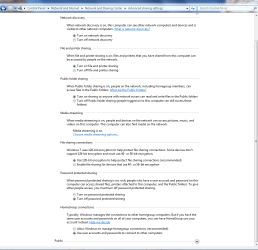
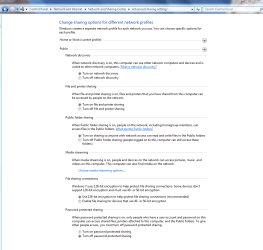
In order for homegroups to work properly you need to first share libraries in both computers, however you do not need to share libraries in order to share file's.

For file sharing you just need to enable everything in the picture below.
 

Attachments

  • network sharing enabled.PNG
    network sharing enabled.PNG
    39 KB · Views: 103
  • network sharing public.PNG
    network sharing public.PNG
    38 KB · Views: 76

My Computer

Computer type
PC/Desktop
Computer Manufacturer/Model Number
Home built
OS
Windows 7 Ult, Windows 8.1 Pro,
CPU
Q9650-4.275GHz, E8600 4.5GHz, E6750-3.8GHz
Motherboard
Evga 780i FTW
Memory
G.Skill PC2 9600 1200Mhz 5 5 5 15 2T
Graphics Card(s)
GTX480
Sound Card
Asus Xonar D2
Monitor(s) Displays
HannsG
Screen Resolution
1680X1050
Hard Drives
GSkill Phoenix Pro 120GB SSD
PSU
ThermalTake Toughpower 1000Watt modular
Case
ThermalTake XaserV
Cooling
Xigmatek S1283
Keyboard
Logitech G15
Mouse
Logitech G9
Internet Speed
T1
everything is shared, and i mean everything.

they network, they are visible, everything is enabled in services menus, i can access through the network from all computers.

it is just that the homegroup wont setup. i've tried leaving and starting from scratch, along with having to reset user access to hard drives everytime you do that (that was a worry at first), but i cant seem to get them to do the home group thing. strange
 

My Computer

Computer Manufacturer/Model Number
sony / asus / toshiba / hand-built / dell / merion
OS
win7 / win7 / win7 / win7 / vista / xp
everything is shared, and i mean everything.

they network, they are visible, everything is enabled in services menus, i can access through the network from all computers.

it is just that the homegroup wont setup. i've tried leaving and starting from scratch, along with having to reset user access to hard drives everytime you do that (that was a worry at first), but i cant seem to get them to do the home group thing. strange

All machines have Windows 7?
 

My Computer

Computer Manufacturer/Model Number
Fujitsu Siemens
OS
XP SP2
CPU
Intel Celeron D 3.07 GHz
Motherboard
/
Memory
1GB
Graphics Card(s)
Nvidia GeForce 6200 SE 256mb
Sound Card
Realtek
Monitor(s) Displays
17 "
Screen Resolution
1280x1024
Hard Drives
160GB
Internet Speed
2mb
yep, win 7 on both. very strange
 

My Computer

Computer Manufacturer/Model Number
sony / asus / toshiba / hand-built / dell / merion
OS
win7 / win7 / win7 / win7 / vista / xp
I heard that the system time on the homegroup computers needs to be perfectly in sync for it to work correctly. Other than that I would try a reinstall on the system that it isn't working on.
 

My Computer

Computer type
PC/Desktop
Computer Manufacturer/Model Number
Home built
OS
Windows 7 Ult, Windows 8.1 Pro,
CPU
Q9650-4.275GHz, E8600 4.5GHz, E6750-3.8GHz
Motherboard
Evga 780i FTW
Memory
G.Skill PC2 9600 1200Mhz 5 5 5 15 2T
Graphics Card(s)
GTX480
Sound Card
Asus Xonar D2
Monitor(s) Displays
HannsG
Screen Resolution
1680X1050
Hard Drives
GSkill Phoenix Pro 120GB SSD
PSU
ThermalTake Toughpower 1000Watt modular
Case
ThermalTake XaserV
Cooling
Xigmatek S1283
Keyboard
Logitech G15
Mouse
Logitech G9
Internet Speed
T1
both clocks working in sync. i could re-install. that might be worth a try.
 

My Computer

Computer Manufacturer/Model Number
sony / asus / toshiba / hand-built / dell / merion
OS
win7 / win7 / win7 / win7 / vista / xp
had a similar problem in early win7 betas; turned out that if either machine had ipv6 disabled homegroup did not register. might that be your problem?
 

My Computer

OS
win7
what's ipv6? cheers
 

My Computer

Computer Manufacturer/Model Number
sony / asus / toshiba / hand-built / dell / merion
OS
win7 / win7 / win7 / win7 / vista / xp
what's ipv6? cheers
Internet Protocol Version 6...most of the world uses Version 4. It assigns your computer an IP address

Hardly any Internet Providers provide IPv6 so usually it is better to uncheck it to make sure there are apps not trying to get an IP from that protocol defaultly
 

My Computer

Computer Manufacturer/Model Number
Compal JFT02 (Custom Build Laptop)
OS
Windows 7 Home Premium x64 - Mac OS X 10.6.4 x64
CPU
Intel Core 2 Duo T9300 2.5 GHz
Motherboard
JFT02
Memory
4GB Kingston DDR2-800
Graphics Card(s)
NVIDIA Geforce 8600M GT (512MB Model)
Sound Card
Realtek HD Audio
Monitor(s) Displays
WUXGA Standard Laptop Display
Screen Resolution
1680*1050
Hard Drives
Toshiba 320GB 5400RPM Laptop HD
PSU
Standard Laptop Power Supply
Case
Standard Laptop Case
Cooling
Standard Laptop Cooling
Keyboard
Standard Laptop 105 Key-Keyboard
Mouse
Synaptics Touchpad
Internet Speed
Verizion Online DSL 3360/864 kbs (dl/up)
Back
Top