More Lost DATA with program called ARC-160

Dick H

New member
Member
VIP
Local time
9:15 PM
Messages
102
I don't know where this belongs, but since someone moved my last thread here . . .

I use a program called ARC-160 to program radio scanners. The program allows me to enter hundreds of frequencies and other data, then it saves them in a file.
Normally (as recently as last week), when I click OPEN, I see all the files I have saved. Then I can choose one to edit it or create a new one.

NOW when I click OPEN, I get a Document Library and my files are NOT there.
Where can they be?

Here is a screen shot showing what I get.

126348976.jpg
 
Last edited by a moderator:

My Computer

OS
Windows 7 Home Premium
I don't know where this belongs, but since someone moved my last thread here . . .

I use a program called ARC-160 to program radio scanners. The program allows me to enter hundreds of frequencies and other data, then it saves them in a file.
Normally (as recently as last week), when I click OPEN, I see all the files I have saved. Then I can choose one to edit it or create a new one.

NOW when I click OPEN, I get a Document Library and my files are NOT there.
Where can they be?

Here is a screen shot showing what I get.

http://www.pbase.com/image/126348976.jpg
Hello Dick, welcome to windows 7 support forums,
does arc use excel to create the database?
If not do you know how arc creates your files and what extension does it create.
 

My Computer

Computer Manufacturer/Model Number
Custom Build
OS
Windows 7 7600 1 X64
CPU
AMD PHENOM II X 550 PROCESSOR 3.1 ghz
Motherboard
ASUS M4A78-TE
Memory
Corsair 4 gig ddr 3
Graphics Card(s)
ati radeon 3300
Sound Card
ati hd
Monitor(s) Displays
syncmaster 2033sw
Screen Resolution
1600X900 60 hz refresh
Hard Drives
twin_seagates SATA's 1 TB & 500 Gig, hitachi_slimline 160 gig
PSU
antec_550 watt
Case
cooler master GLite
Cooling
stock_heat sink
Internet Speed
20mbs up/ 1.5mbs down
Other Info
favorite child "stewie"
favorite dog "brian"
Bad Image

Dick, your image is not clear, are you able to make a screenshot and upload it?
 

My Computer

Computer Manufacturer/Model Number
Custom Build
OS
Windows 7 7600 1 X64
CPU
AMD PHENOM II X 550 PROCESSOR 3.1 ghz
Motherboard
ASUS M4A78-TE
Memory
Corsair 4 gig ddr 3
Graphics Card(s)
ati radeon 3300
Sound Card
ati hd
Monitor(s) Displays
syncmaster 2033sw
Screen Resolution
1600X900 60 hz refresh
Hard Drives
twin_seagates SATA's 1 TB & 500 Gig, hitachi_slimline 160 gig
PSU
antec_550 watt
Case
cooler master GLite
Cooling
stock_heat sink
Internet Speed
20mbs up/ 1.5mbs down
Other Info
favorite child "stewie"
favorite dog "brian"
You may find them under your users folder here:
C:\Users\<user name>\AppData\Local\<program name>\...
(Enable viewing of hidden files to see it)
 

My Computer

Computer Manufacturer/Model Number
Scratch built
OS
Windows 7 x64 Ultimate
CPU
i7 960
Motherboard
Asus P6X58D
Memory
12 Gig Corsair Dominator
Graphics Card(s)
Nvidia 480
Sound Card
Maudio Delta 44 + breakout box
Monitor(s) Displays
Dell UltraSharp U2410 24in and Samsung 21 dual monitors
Screen Resolution
1920x1200 and 1280x1024
Hard Drives
Primary: Intel X-25M G2 160G SSD
Secondary: Segate baracuda 1.0 TB
HDs in AHCI mode.
PSU
Corasair TX850
Case
Cooler Master HAF
Cooling
Corsair H50
Keyboard
Logitech G15 + N52 game pad
Mouse
Logitech MX518
Internet Speed
15kbs down 4.5kbps up
Other Info
WEI 7.6
CPU & RAM 7.6
Graphics 7.9
Hard disk 7.7
csv

do file search for .csv files.
 

My Computer

Computer Manufacturer/Model Number
Custom Build
OS
Windows 7 7600 1 X64
CPU
AMD PHENOM II X 550 PROCESSOR 3.1 ghz
Motherboard
ASUS M4A78-TE
Memory
Corsair 4 gig ddr 3
Graphics Card(s)
ati radeon 3300
Sound Card
ati hd
Monitor(s) Displays
syncmaster 2033sw
Screen Resolution
1600X900 60 hz refresh
Hard Drives
twin_seagates SATA's 1 TB & 500 Gig, hitachi_slimline 160 gig
PSU
antec_550 watt
Case
cooler master GLite
Cooling
stock_heat sink
Internet Speed
20mbs up/ 1.5mbs down
Other Info
favorite child "stewie"
favorite dog "brian"
[/QUOTE]
Hello Dick, welcome to windows 7 support forums,
does arc use excel to create the database?
If not do you know how arc creates your files and what extension does it create.[/QUOTE]
Sorry, I don't know. The file extension is a special one that can only be opened via the program.
But all of that is irrelevant because it has been working just fine until I did what the Tutorial (see other thread) told me to do - add a registry file to correct another problem. So I believe it is all related to that new file.
That other problem caused me to lose the data in my Works Spreadsheets. The data must still be there because the file sizes range from 11KB to 31KB.
 

My Computer

OS
Windows 7 Home Premium
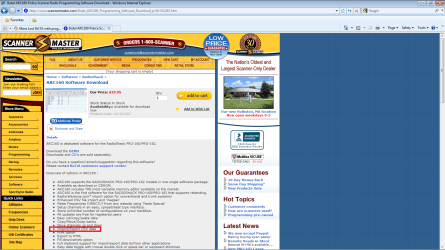
Well from what I can see from your support page: Butel ARC160 Police Scanner Radio Programming Software Download
It exports data files as a "CSV" which is a comma delete file that excel can view.
I attached a screenshot.
Also beware! Never edit any registry files with in your operating system. It will give you no joy.
 

Attachments

  • arc.png
    arc.png
    98.4 KB · Views: 2

My Computer

Computer Manufacturer/Model Number
Custom Build
OS
Windows 7 7600 1 X64
CPU
AMD PHENOM II X 550 PROCESSOR 3.1 ghz
Motherboard
ASUS M4A78-TE
Memory
Corsair 4 gig ddr 3
Graphics Card(s)
ati radeon 3300
Sound Card
ati hd
Monitor(s) Displays
syncmaster 2033sw
Screen Resolution
1600X900 60 hz refresh
Hard Drives
twin_seagates SATA's 1 TB & 500 Gig, hitachi_slimline 160 gig
PSU
antec_550 watt
Case
cooler master GLite
Cooling
stock_heat sink
Internet Speed
20mbs up/ 1.5mbs down
Other Info
favorite child "stewie"
favorite dog "brian"
Back
Top