More on search hell

gilmoses

New member
Local time
12:14 AM
Messages
23
Hi,

I'm back with another frustrating search problem:
How to find a file by a string in the middle of the filename?

E.g. I'm searching for files with "Persist" in their name, in C:\Windows:

filename:Persist

10 items are found, but not this one:
"CbsPersist_20101012145040.cab" (in my C:\Windows\Logs)

That's because "Persist" does not start the filename, and is not after a dot or a hyphen.
I've tried looking in the advanced syntax for search but to no avail.

This is of course an example, I have dozens of log files with a similar naming convention (capital letter for each word start, LikeThisForExample) from which I must find a file.

Please help,

Thanks,
Gil.
 

My Computer

OS
Windows 7 Professional 64 bit
Hi! gilmoses, welcome to W7F :)

Just off the top of my head, have you tried *Persist* or %Persist%
 

My Computer

Computer type
PC/Desktop
Computer Manufacturer/Model Number
Gateway DX4831-01e (Mid-Tower Desktop)
OS
Originally Win 7 Hm Prem x64 Ver 6.1.7600 Build 7601-SP1 | Upgraded to Windows 10 December 14, 2019
CPU
Intel i3 530 2.93GHz, 2933MHz 2 Cores 4 Logical Processors
Motherboard
Gateway H57M01 133 megahertz
Memory
6GB of 1,333MHz DDR3 SDRAM
Graphics Card(s)
32MB Intel Graphics Media Accelerator HD IGChip
Sound Card
Realtek High Definition Audio
Monitor(s) Displays
Gateway HX2000 20inch TFT active matrix TN
Screen Resolution
1600 x 900 x 59 hertz
Hard Drives
WDC WD10EADS-00M2B0 [HDD] (1000.20 GB) -- drive 0,
HL-DT-ST DVDRAM GH41N [CD-ROM dr]
Four card readers, and Four USB 2.0
PSU
300watts.
Case
Mid-Tower Desktop
Cooling
Stock from Gateway
Keyboard
Natural Ergonomic Keyboard 4000, see Other Info
Mouse
Orig. Gateway wore out now using Insignia USB wired optical
Internet Speed
Vz FIOS 10ms png 57.64Mbps down 65.53Mbps up Speedtest.org
Antivirus
Zamana Anti-logger with Anti-malware, MSE, Windows Firewall,
Browser
IE11.0.9600.19399-Upd ver11.0.135, Firefox 68.0.1 x64
Other Info
System Specs by Belarc.

BIOS: American Megatrends Inc. P01-A0 11/17/2009

Replaced the MS 'Natural' Standard PS/2 Enhanced 101-102 Keyboard with a new Natural Ergonomic Keyboard 4000 on August 1st 2014.

Canon Pixma MG3222 Printer.

Updated to IE11 on 12102015 | Fios Quantum Router g1100

Additional AV: SpywareBlaster, manual Mbam, SAS
Hi Anak,

Ok, *Persist* found the file. However this is the only way to find it and Windows Help doesn't tell you the file won't be found otherwise.

Thanks for that!

Gil.
 

My Computer

OS
Windows 7 Professional 64 bit
Hi,

I'm back with another frustrating search problem:
How to find a file by a string in the middle of the filename?

E.g. I'm searching for files with "Persist" in their name, in C:\Windows:

filename:Persist

10 items are found, but not this one:
"CbsPersist_20101012145040.cab" (in my C:\Windows\Logs)

That's because "Persist" does not start the filename, and is not after a dot or a hyphen.
I've tried looking in the advanced syntax for search but to no avail.

This is of course an example, I have dozens of log files with a similar naming convention (capital letter for each word start, LikeThisForExample) from which I must find a file.

Please help,

Thanks,
Gil.

You can't find those files, because by default the "C:\Windows" folder, and all it's subfolders, are not included in the search index.

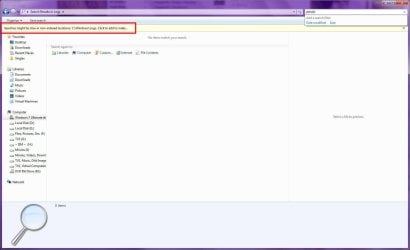
I did a quick test to verify that I had files with "persist" in the filename:
Image1.jpg

But as you can see, a search in Windows found nothing:
Image2.jpg

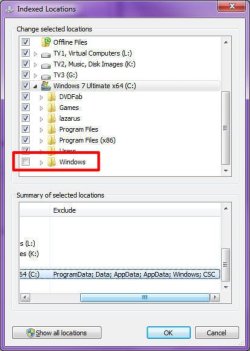
As stated, this is because "C:\Windows" is excluded from the index:
Image3.jpg

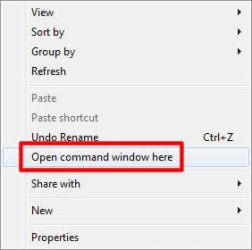
So if you absolutely must find such files, but are not willing to add "C:\Windows" to the index, try this:

Image4.jpg
  1. Open Windows Explorer, and navigate to "C:\Windows"
  2. Make sure that there are no files selected.
  3. Hold down the <SHIFT> key, and right-click an empty part of the list (anything not containing an icon)
  4. Click the "Open command window here" option
  5. A Command Prompt should open to "C:\Windows"
  6. If you only want to search the LOGS folders, type "CD Logs" (without quotes) and press <ENTER>
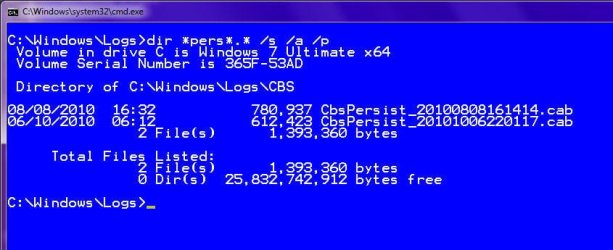
  7. Type "dir *persist*.* /a /s /p" (without the quotes) and press <ENTER>.
For more information on the parameters of DIR, type "DIR /?" (without quotes) and press <ENTER>

Code:
[FONT=Courier New]C:\Windows\Logs>[B]dir *persist*.* /a /s /p
[/B] Volume in drive C is Windows 7 Ultimate x64
 Volume Serial Number is 365F-53AD[/FONT]
[FONT=Courier New] Directory of C:\Windows\Logs\CBS[/FONT]
[FONT=Courier New]08/08/2010  16:32           780,937 CbsPersist_20100808161414.cab
06/10/2010  06:12           612,423 CbsPersist_20101006220117.cab
               2 File(s)      1,393,360 bytes[/FONT]
[FONT=Courier New]     Total Files Listed:
               2 File(s)      1,393,360 bytes
               0 Dir(s)  25,829,761,024 bytes free[/FONT]
[FONT=Courier New]C:\Windows\Logs>[B]dir *persist*.* /a /s /p /b
[/B]C:\Windows\Logs\CBS\CbsPersist_20100808161414.cab
C:\Windows\Logs\CBS\CbsPersist_20101006220117.cab[/FONT]
[FONT=Courier New]C:\Windows\Logs>
[/FONT]
 

My Computer

Computer type
PC/Desktop
Computer Manufacturer/Model Number
Virtual Machine
OS
Windows 7 Professional 32-bit SP1
CPU
AMD A4/A6
Motherboard
Intel Corporation 440BX Desktop Reference Platform
Memory
3.00GB EDO
Graphics Card(s)
VMware SVGA 3D
Sound Card
High Definition Audio Device
Monitor(s) Displays
Generic Non-PnP Monitor on VMware SVGA 3D
Screen Resolution
1440x900
Hard Drives
1 x 60GB VMware Virtual SATA Hard Drive ATA Device
Antivirus
Kaspersky Total Security
Find any one of differently named files
Code:
find . \( -name "*jsp" -o -name "*java" \) -type f -ls

The -ls option prints extended information, and the example finds any file whose name ends with either 'jsp' or 'java'. Note that the parentheses are required. Also note that the operator "or" can be abbreviated as "o". The "and" operator is assumed where no operator is given. In many shells the parentheses must be escaped with a backslash, "\(" and "\)", to prevent them from being interpreted as special shell characters. The -ls option and the -or operator are not available on all versions of find.
find - Wiki

Your word would have to be inserted where jsp and java are.
 

My Computer

Computer type
PC/Desktop
Computer Manufacturer/Model Number
Gateway DX4831-01e (Mid-Tower Desktop)
OS
Originally Win 7 Hm Prem x64 Ver 6.1.7600 Build 7601-SP1 | Upgraded to Windows 10 December 14, 2019
CPU
Intel i3 530 2.93GHz, 2933MHz 2 Cores 4 Logical Processors
Motherboard
Gateway H57M01 133 megahertz
Memory
6GB of 1,333MHz DDR3 SDRAM
Graphics Card(s)
32MB Intel Graphics Media Accelerator HD IGChip
Sound Card
Realtek High Definition Audio
Monitor(s) Displays
Gateway HX2000 20inch TFT active matrix TN
Screen Resolution
1600 x 900 x 59 hertz
Hard Drives
WDC WD10EADS-00M2B0 [HDD] (1000.20 GB) -- drive 0,
HL-DT-ST DVDRAM GH41N [CD-ROM dr]
Four card readers, and Four USB 2.0
PSU
300watts.
Case
Mid-Tower Desktop
Cooling
Stock from Gateway
Keyboard
Natural Ergonomic Keyboard 4000, see Other Info
Mouse
Orig. Gateway wore out now using Insignia USB wired optical
Internet Speed
Vz FIOS 10ms png 57.64Mbps down 65.53Mbps up Speedtest.org
Antivirus
Zamana Anti-logger with Anti-malware, MSE, Windows Firewall,
Browser
IE11.0.9600.19399-Upd ver11.0.135, Firefox 68.0.1 x64
Other Info
System Specs by Belarc.

BIOS: American Megatrends Inc. P01-A0 11/17/2009

Replaced the MS 'Natural' Standard PS/2 Enhanced 101-102 Keyboard with a new Natural Ergonomic Keyboard 4000 on August 1st 2014.

Canon Pixma MG3222 Printer.

Updated to IE11 on 12102015 | Fios Quantum Router g1100

Additional AV: SpywareBlaster, manual Mbam, SAS
Dzomlija,
As Anak had pointed out, you WILL find the file if you specify filename:*persist*.

I don't think a folder must be indexed in order to find a file there - that would be ridiculous. The search will just be slower.

Gil.
 

My Computer

OS
Windows 7 Professional 64 bit
Peter, would the command line work even if the HDD was not Indexed?
 

My Computer

Computer type
PC/Desktop
Computer Manufacturer/Model Number
Gateway DX4831-01e (Mid-Tower Desktop)
OS
Originally Win 7 Hm Prem x64 Ver 6.1.7600 Build 7601-SP1 | Upgraded to Windows 10 December 14, 2019
CPU
Intel i3 530 2.93GHz, 2933MHz 2 Cores 4 Logical Processors
Motherboard
Gateway H57M01 133 megahertz
Memory
6GB of 1,333MHz DDR3 SDRAM
Graphics Card(s)
32MB Intel Graphics Media Accelerator HD IGChip
Sound Card
Realtek High Definition Audio
Monitor(s) Displays
Gateway HX2000 20inch TFT active matrix TN
Screen Resolution
1600 x 900 x 59 hertz
Hard Drives
WDC WD10EADS-00M2B0 [HDD] (1000.20 GB) -- drive 0,
HL-DT-ST DVDRAM GH41N [CD-ROM dr]
Four card readers, and Four USB 2.0
PSU
300watts.
Case
Mid-Tower Desktop
Cooling
Stock from Gateway
Keyboard
Natural Ergonomic Keyboard 4000, see Other Info
Mouse
Orig. Gateway wore out now using Insignia USB wired optical
Internet Speed
Vz FIOS 10ms png 57.64Mbps down 65.53Mbps up Speedtest.org
Antivirus
Zamana Anti-logger with Anti-malware, MSE, Windows Firewall,
Browser
IE11.0.9600.19399-Upd ver11.0.135, Firefox 68.0.1 x64
Other Info
System Specs by Belarc.

BIOS: American Megatrends Inc. P01-A0 11/17/2009

Replaced the MS 'Natural' Standard PS/2 Enhanced 101-102 Keyboard with a new Natural Ergonomic Keyboard 4000 on August 1st 2014.

Canon Pixma MG3222 Printer.

Updated to IE11 on 12102015 | Fios Quantum Router g1100

Additional AV: SpywareBlaster, manual Mbam, SAS

My Computer

Computer type
PC/Desktop
Computer Manufacturer/Model Number
Virtual Machine
OS
Windows 7 Professional 32-bit SP1
CPU
AMD A4/A6
Motherboard
Intel Corporation 440BX Desktop Reference Platform
Memory
3.00GB EDO
Graphics Card(s)
VMware SVGA 3D
Sound Card
High Definition Audio Device
Monitor(s) Displays
Generic Non-PnP Monitor on VMware SVGA 3D
Screen Resolution
1440x900
Hard Drives
1 x 60GB VMware Virtual SATA Hard Drive ATA Device
Antivirus
Kaspersky Total Security
Peter, would the command line work even if the HDD was not Indexed?

I'm not Peter but please allow me to answer: Yes.

BTW, there's two ways to use Windows search, searching index only and searching all locations.

When you search using Start Menu > Search field, you search indexed locations only. Searching from Explorer window's search field searches also non indexed locations from that location and downwards for instance searching in Explorer window for C:\Windows searches C:\Windows and all its subfolders, searching in My Computer window searches the whole computer, searching Explorer window for drive F: searches the whole drive F:.

Kari
 

My Computer

Computer type
Laptop
Computer Manufacturer/Model Number
HP ENVY 17-1150eg
OS
Windows 10 Pro x64 EN-GB
CPU
1.6 GHz Intel Core i7-720QM Processor
Memory
6 GB
Graphics Card(s)
ATI Mobility Radeon HD 5850 Graphics
Sound Card
Beats sound system with integrated subwoofer
Monitor(s) Displays
17" laptop display, 22" LED and 32" Full HD TV through HDMI
Screen Resolution
1600*900 (1), 1920*1080 (2&3)
Hard Drives
Internal: 2 x 500 GB SATA Hard Disk Drive 7200 rpm
External: 2TB for backups, 3TB USB3 network drive for media
Cooling
As Envy runs a bit warm, I have it on a Cooler Master pad
Keyboard
Logitech diNovo Media Desktop Laser (bluetooth)
Mouse
Logitech Performance Mouse MX
Internet Speed
50/10 Mbps VDSL
Antivirus
Windows Defender 4.3.9431.0
Browser
Maxthon 3.5.2., IE11
Dzomlija,
As Anak had pointed out, you WILL find the file if you specify filename:*persist*.

I don't think a folder must be indexed in order to find a file there - that would be ridiculous. The search will just be slower.

Gil.

Sorry 'bout that, I'm a bit daft this morning [HITTING MYSELF ON THE HEAD], and should've remembered the wildcards.:o
 

My Computer

Computer type
PC/Desktop
Computer Manufacturer/Model Number
Virtual Machine
OS
Windows 7 Professional 32-bit SP1
CPU
AMD A4/A6
Motherboard
Intel Corporation 440BX Desktop Reference Platform
Memory
3.00GB EDO
Graphics Card(s)
VMware SVGA 3D
Sound Card
High Definition Audio Device
Monitor(s) Displays
Generic Non-PnP Monitor on VMware SVGA 3D
Screen Resolution
1440x900
Hard Drives
1 x 60GB VMware Virtual SATA Hard Drive ATA Device
Antivirus
Kaspersky Total Security
Ok, I think the wildcard trick does not work for file contents... try this:

Create a folder, say, 'Gil', in it create a text file with any name.
Edit the file, type in: TryToFindThis - then save.

Navigate to folder Gil, in the search bar type: "Try": the file is found.
Now type: To, or *To* - nothing.

Gil.
 

My Computer

OS
Windows 7 Professional 64 bit
Ok, I think the wildcard trick does not work for file contents... try this:
Create a folder, say, 'Gil', in it create a text file with any name.
Edit the file, type in: TryToFindThis - then save.
Navigate to folder Gil, in the search bar type: "Try": the file is found.
Now type: To, or *To* - nothing.
Gil.
You find it if you also mark the extension with wildcard(s) for instance *To*.*


Remember:
  • wildcard * (asterisk) replaces zero to 255 characters (maximum length of filename)
    • Ka*ri.* = all files starting with Ka and ending with ri, any extension (Kari.txt, Katamaran_ri.jpg, Kalahari.doc etc.)
  • wildcard ? (question mark) replaces one character
    • pic???.* = all files with a six character name where three first characters are pic, any extension (picABC.png, pic123.jpg etc.)
    • pic???.j* = as above but extension must start with j (pic777.jpeg, picxyz.jpg, picA93.jpg2 etc.)
    • Memo_2010????.doc = all files where filename starts with Memo_2010, followed by four characters, extension doc
Kari
 

My Computer

Computer type
Laptop
Computer Manufacturer/Model Number
HP ENVY 17-1150eg
OS
Windows 10 Pro x64 EN-GB
CPU
1.6 GHz Intel Core i7-720QM Processor
Memory
6 GB
Graphics Card(s)
ATI Mobility Radeon HD 5850 Graphics
Sound Card
Beats sound system with integrated subwoofer
Monitor(s) Displays
17" laptop display, 22" LED and 32" Full HD TV through HDMI
Screen Resolution
1600*900 (1), 1920*1080 (2&3)
Hard Drives
Internal: 2 x 500 GB SATA Hard Disk Drive 7200 rpm
External: 2TB for backups, 3TB USB3 network drive for media
Cooling
As Envy runs a bit warm, I have it on a Cooler Master pad
Keyboard
Logitech diNovo Media Desktop Laser (bluetooth)
Mouse
Logitech Performance Mouse MX
Internet Speed
50/10 Mbps VDSL
Antivirus
Windows Defender 4.3.9431.0
Browser
Maxthon 3.5.2., IE11
Kari I was referring to the file CONTENTS, not name.

Please try out my example as I described...
Thanks!
Gil.
 

My Computer

OS
Windows 7 Professional 64 bit
Hi Anak,

Ok, *Persist* found the file. However this is the only way to find it and Windows Help doesn't tell you the file won't be found otherwise.

Thanks for that!

Gil.
Your welcome!

Peter, would the command line work even if the HDD was not Indexed?

I'm not Peter but please allow me to answer: Yes.
Kari
That's quite all right Kari, I always felt the more the merrier!
I wonder what size surf board or Skis Dzomlija would need.

Sorry 'bout that, I'm a bit daft this morning [HITTING MYSELF ON THE HEAD], and should've remembered the wildcards.:o
Dz, don't be so hard on yourself.
I'm a little off my sleep schedule myself.


Gil I would think it would come under this
  • wildcard * (asterisk) replaces zero to 255 characters (maximum length of filename)
    • Ka*ri.* = all files starting with Ka and ending with ri, any extension (Kari.txt, Katamaran_ri.jpg, Kalahari.doc etc.)
Kari
Try using a word that you know exists in the file.
 

My Computer

Computer type
PC/Desktop
Computer Manufacturer/Model Number
Gateway DX4831-01e (Mid-Tower Desktop)
OS
Originally Win 7 Hm Prem x64 Ver 6.1.7600 Build 7601-SP1 | Upgraded to Windows 10 December 14, 2019
CPU
Intel i3 530 2.93GHz, 2933MHz 2 Cores 4 Logical Processors
Motherboard
Gateway H57M01 133 megahertz
Memory
6GB of 1,333MHz DDR3 SDRAM
Graphics Card(s)
32MB Intel Graphics Media Accelerator HD IGChip
Sound Card
Realtek High Definition Audio
Monitor(s) Displays
Gateway HX2000 20inch TFT active matrix TN
Screen Resolution
1600 x 900 x 59 hertz
Hard Drives
WDC WD10EADS-00M2B0 [HDD] (1000.20 GB) -- drive 0,
HL-DT-ST DVDRAM GH41N [CD-ROM dr]
Four card readers, and Four USB 2.0
PSU
300watts.
Case
Mid-Tower Desktop
Cooling
Stock from Gateway
Keyboard
Natural Ergonomic Keyboard 4000, see Other Info
Mouse
Orig. Gateway wore out now using Insignia USB wired optical
Internet Speed
Vz FIOS 10ms png 57.64Mbps down 65.53Mbps up Speedtest.org
Antivirus
Zamana Anti-logger with Anti-malware, MSE, Windows Firewall,
Browser
IE11.0.9600.19399-Upd ver11.0.135, Firefox 68.0.1 x64
Other Info
System Specs by Belarc.

BIOS: American Megatrends Inc. P01-A0 11/17/2009

Replaced the MS 'Natural' Standard PS/2 Enhanced 101-102 Keyboard with a new Natural Ergonomic Keyboard 4000 on August 1st 2014.

Canon Pixma MG3222 Printer.

Updated to IE11 on 12102015 | Fios Quantum Router g1100

Additional AV: SpywareBlaster, manual Mbam, SAS
Anak,
Please try it for yourself.
It does not work.
Please use my example above.
 

My Computer

OS
Windows 7 Professional 64 bit

My Computer

Computer type
PC/Desktop
Computer Manufacturer/Model Number
Gateway DX4831-01e (Mid-Tower Desktop)
OS
Originally Win 7 Hm Prem x64 Ver 6.1.7600 Build 7601-SP1 | Upgraded to Windows 10 December 14, 2019
CPU
Intel i3 530 2.93GHz, 2933MHz 2 Cores 4 Logical Processors
Motherboard
Gateway H57M01 133 megahertz
Memory
6GB of 1,333MHz DDR3 SDRAM
Graphics Card(s)
32MB Intel Graphics Media Accelerator HD IGChip
Sound Card
Realtek High Definition Audio
Monitor(s) Displays
Gateway HX2000 20inch TFT active matrix TN
Screen Resolution
1600 x 900 x 59 hertz
Hard Drives
WDC WD10EADS-00M2B0 [HDD] (1000.20 GB) -- drive 0,
HL-DT-ST DVDRAM GH41N [CD-ROM dr]
Four card readers, and Four USB 2.0
PSU
300watts.
Case
Mid-Tower Desktop
Cooling
Stock from Gateway
Keyboard
Natural Ergonomic Keyboard 4000, see Other Info
Mouse
Orig. Gateway wore out now using Insignia USB wired optical
Internet Speed
Vz FIOS 10ms png 57.64Mbps down 65.53Mbps up Speedtest.org
Antivirus
Zamana Anti-logger with Anti-malware, MSE, Windows Firewall,
Browser
IE11.0.9600.19399-Upd ver11.0.135, Firefox 68.0.1 x64
Other Info
System Specs by Belarc.

BIOS: American Megatrends Inc. P01-A0 11/17/2009

Replaced the MS 'Natural' Standard PS/2 Enhanced 101-102 Keyboard with a new Natural Ergonomic Keyboard 4000 on August 1st 2014.

Canon Pixma MG3222 Printer.

Updated to IE11 on 12102015 | Fios Quantum Router g1100

Additional AV: SpywareBlaster, manual Mbam, SAS

My Computer

Computer type
Laptop
Computer Manufacturer/Model Number
HP ENVY 17-1150eg
OS
Windows 10 Pro x64 EN-GB
CPU
1.6 GHz Intel Core i7-720QM Processor
Memory
6 GB
Graphics Card(s)
ATI Mobility Radeon HD 5850 Graphics
Sound Card
Beats sound system with integrated subwoofer
Monitor(s) Displays
17" laptop display, 22" LED and 32" Full HD TV through HDMI
Screen Resolution
1600*900 (1), 1920*1080 (2&3)
Hard Drives
Internal: 2 x 500 GB SATA Hard Disk Drive 7200 rpm
External: 2TB for backups, 3TB USB3 network drive for media
Cooling
As Envy runs a bit warm, I have it on a Cooler Master pad
Keyboard
Logitech diNovo Media Desktop Laser (bluetooth)
Mouse
Logitech Performance Mouse MX
Internet Speed
50/10 Mbps VDSL
Antivirus
Windows Defender 4.3.9431.0
Browser
Maxthon 3.5.2., IE11

My Computer

Computer type
PC/Desktop
Computer Manufacturer/Model Number
Gateway DX4831-01e (Mid-Tower Desktop)
OS
Originally Win 7 Hm Prem x64 Ver 6.1.7600 Build 7601-SP1 | Upgraded to Windows 10 December 14, 2019
CPU
Intel i3 530 2.93GHz, 2933MHz 2 Cores 4 Logical Processors
Motherboard
Gateway H57M01 133 megahertz
Memory
6GB of 1,333MHz DDR3 SDRAM
Graphics Card(s)
32MB Intel Graphics Media Accelerator HD IGChip
Sound Card
Realtek High Definition Audio
Monitor(s) Displays
Gateway HX2000 20inch TFT active matrix TN
Screen Resolution
1600 x 900 x 59 hertz
Hard Drives
WDC WD10EADS-00M2B0 [HDD] (1000.20 GB) -- drive 0,
HL-DT-ST DVDRAM GH41N [CD-ROM dr]
Four card readers, and Four USB 2.0
PSU
300watts.
Case
Mid-Tower Desktop
Cooling
Stock from Gateway
Keyboard
Natural Ergonomic Keyboard 4000, see Other Info
Mouse
Orig. Gateway wore out now using Insignia USB wired optical
Internet Speed
Vz FIOS 10ms png 57.64Mbps down 65.53Mbps up Speedtest.org
Antivirus
Zamana Anti-logger with Anti-malware, MSE, Windows Firewall,
Browser
IE11.0.9600.19399-Upd ver11.0.135, Firefox 68.0.1 x64
Other Info
System Specs by Belarc.

BIOS: American Megatrends Inc. P01-A0 11/17/2009

Replaced the MS 'Natural' Standard PS/2 Enhanced 101-102 Keyboard with a new Natural Ergonomic Keyboard 4000 on August 1st 2014.

Canon Pixma MG3222 Printer.

Updated to IE11 on 12102015 | Fios Quantum Router g1100

Additional AV: SpywareBlaster, manual Mbam, SAS
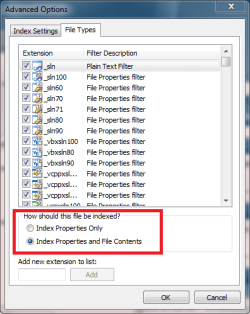
Just a thought:

Search_Indexing_Options.png

Check that you have text files (.txt, .doc, .xml etc.) set to index also the contents.
 

My Computer

Computer type
Laptop
Computer Manufacturer/Model Number
HP ENVY 17-1150eg
OS
Windows 10 Pro x64 EN-GB
CPU
1.6 GHz Intel Core i7-720QM Processor
Memory
6 GB
Graphics Card(s)
ATI Mobility Radeon HD 5850 Graphics
Sound Card
Beats sound system with integrated subwoofer
Monitor(s) Displays
17" laptop display, 22" LED and 32" Full HD TV through HDMI
Screen Resolution
1600*900 (1), 1920*1080 (2&3)
Hard Drives
Internal: 2 x 500 GB SATA Hard Disk Drive 7200 rpm
External: 2TB for backups, 3TB USB3 network drive for media
Cooling
As Envy runs a bit warm, I have it on a Cooler Master pad
Keyboard
Logitech diNovo Media Desktop Laser (bluetooth)
Mouse
Logitech Performance Mouse MX
Internet Speed
50/10 Mbps VDSL
Antivirus
Windows Defender 4.3.9431.0
Browser
Maxthon 3.5.2., IE11
Kari,
The article is dated 2007, and does not apply in this simple case of a .txt file.

Anak,
It does not say there how to use the Win7 built-in search for the simple case I presented, it mostly praises 3rd party search apps.

Isn't there a way to do this in Win7??

Thanks,
Gil.
 

My Computer

OS
Windows 7 Professional 64 bit
Back
Top