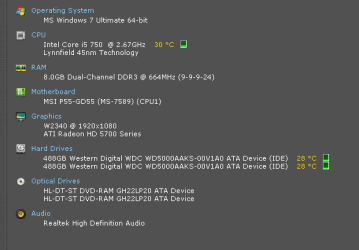
more RAM!

Bushman5

New member
Local time
4:50 PM
Messages
84
treated myself to more ram.....seeing as it was on sale by my local computer store, and they were kind enough to call me informing they saved me a set of it... :cool:

my games are absolutely flying...... :devil::devil::devil::devil::devil:

8 GB of dual channel DDR3 RAM! :p:p:p :geek::geek::geek:

my MOBO can support 16GB, so at some point, just for kicks and giggles, i will put 16GB in......... :D:D:D:D:D
 

Attachments

  • RAMspecs.PNG
    RAMspecs.PNG
    6.8 KB · Views: 19
  • sysspecs.PNG
    sysspecs.PNG
    6.1 KB · Views: 19

My Computer

Computer Manufacturer/Model Number
homebuilt
OS
WIN7 Ultimate, 64bit OEM
CPU
i5-750 quad core
Motherboard
MSI P55-GD55 (MS-7589) (CPU1)
Memory
8GB dual channel DDR3 @ 668MHZ (9-9-9-24) 4 x 2GB each
Graphics Card(s)
ATI Radeon HD5750
Sound Card
onboard
Monitor(s) Displays
LG widescreen LCD 1920 x 1080 FLATRON
Hard Drives
2 x WD 500 GB SATA drives, room for 8 more in the drive bays. 1 WD USB 320 GB used for backup the system.
PSU
SEASONIC M-12D 850 watt sli ready
Case
ANTEC DARK FLEET (biggest one they make)
Cooling
case: 6 x 120mm fans 2 x 140mm fans, CPU: Corsair H50
Keyboard
generic
Mouse
microsoft wireless
Internet Speed
bloody slow thanks to Canadian ISP's throttling our net
Other Info
soon to have a ZALMAN RESERATOR just for the GPU...also dedicated 500 GB of virtual memory for paging file,caching
How much RAM were you coming from? And which games in particular?

I'd assume that you were upgrading from 4Gb to 8GB...but I wouldn't expect much improvement with games if this were the case. If you went from 2GB to 8GB...then yes.
 

My Computer

Computer Manufacturer/Model Number
Self-Built in July 2009
OS
Windows 7 Ultimate x64
CPU
Intel Q9550 2.83Ghz OC'd to 3.40Ghz
Motherboard
Gigabyte GA-EP45-UD3R rev. 1.1, F12 BIOS
Memory
8GB G.Skill PI DDR2-800, 4-4-4-12 timings
Graphics Card(s)
EVGA 1280MB Nvidia GeForce GTX570
Sound Card
Realtek ALC899A 8 channel onboard audio
Monitor(s) Displays
23" Acer x233H
Screen Resolution
1920x1080
Hard Drives
Intel X25-M 80GB Gen 2 SSD
Western Digital 1TB Caviar Black, 32MB cache. WD1001FALS
PSU
Corsair 620HX modular
Case
Antec P182
Cooling
stock
Keyboard
ABS M1 Mechanical
Mouse
Logitech G9 Laser Mouse
Internet Speed
15/2 cable modem
Other Info
Windows and Linux enthusiast. Logitech G35 Headset.
I honestly couldnt tell any difference from 4GB -> 8Gb of RAM for Gaming.

However, I do alot of video encoding, mostly with 1080P material.
In that area, it did help.

The extra RAM seems to made things smoother. I often have multiple scripts open, resizing and editing as well as the encoding process itself.

But for gaming and most everything else I commonly do, It didnt seem to help that much at all.
 

My Computer

Computer Manufacturer/Model Number
Custom (Self Build)
OS
Windows 7 Home Premium 64bit
CPU
Intel Core i7 2700k
Motherboard
eVGA P67 SLI
Memory
8GB Mushkin Redline Ridgebacks @1866
Graphics Card(s)
EVGA GTX570 SC
Sound Card
XiFi Titanium HD
Monitor(s) Displays
LG W2453V
Screen Resolution
1920x1080
Hard Drives
Intel 320 80GB -- Intel X25-V 40GB --WD Black 1TB x2 -- WD Blue 640GB
PSU
Seasonic x750
Case
Corsair 600T SE White
Cooling
eVGA Superclocked CPU Cooler
Keyboard
Saitek Cyborg
Antivirus
Kaspersky
Browser
IE
Other Info
LG BD/DVD
I honestly couldnt tell any difference from 4GB -> 8Gb of RAM for Gaming.

However, I do alot of video encoding, mostly with 1080P material.
In that area, it did help.

The extra RAM seems to made things smoother. I often have multiple scripts open, resizing and editing as well as the encoding process itself.

But for gaming and most everything else I commonly do, It didnt seem to help that much at all.

That's exactly what I would expect.
 

My Computer

Computer Manufacturer/Model Number
Self-Built in July 2009
OS
Windows 7 Ultimate x64
CPU
Intel Q9550 2.83Ghz OC'd to 3.40Ghz
Motherboard
Gigabyte GA-EP45-UD3R rev. 1.1, F12 BIOS
Memory
8GB G.Skill PI DDR2-800, 4-4-4-12 timings
Graphics Card(s)
EVGA 1280MB Nvidia GeForce GTX570
Sound Card
Realtek ALC899A 8 channel onboard audio
Monitor(s) Displays
23" Acer x233H
Screen Resolution
1920x1080
Hard Drives
Intel X25-M 80GB Gen 2 SSD
Western Digital 1TB Caviar Black, 32MB cache. WD1001FALS
PSU
Corsair 620HX modular
Case
Antec P182
Cooling
stock
Keyboard
ABS M1 Mechanical
Mouse
Logitech G9 Laser Mouse
Internet Speed
15/2 cable modem
Other Info
Windows and Linux enthusiast. Logitech G35 Headset.
Actually, Wishmaster... It would depend more on what you were doing on the computer persay.

In my case, under XP, I was only seeing 3.0 Gigs on my system. I was consistently hitting near cap running Wow, a web browser, a RSS Feed reader, a VOIP app (Either Ventrilo or Teamspeak), AV, Googletalk, maybe music. And that isn't including the fact there was VM page swapping going on like crazy. With Windows 7, while it didn't improve my gaming persay, it also didn't slow the system too much due to VM swapping.

Also with things the way they are now... I am barely using half my memory as it is which makes things a bit more tolerable.
 

My Computer

Computer Manufacturer/Model Number
Alienware Area 51 Desktop and Dell Inspirion 17R (N7010)
OS
Windows 7 Ultimate x64 and Home Premium x64
CPU
Intel i7 960 (3.2 GHz Quad Core)
Motherboard
Alienware Intel based X58
Memory
12 Gigs (Triple Channel)
Graphics Card(s)
Alienware OEM nVidia GTX 560 Ti (1.25 Gig)
Sound Card
Creative Labs X-Fi Titanium
Monitor(s) Displays
Samsung PX2370 LED 23" Monitor
Screen Resolution
1920x1080
Hard Drives
2 320 Gig SATA in Raid 1 Configuration (System/App)
1 1 Tera SATA (Games)
1 1 Tera SATA (Data/Music/Videos)
PSU
750 Watt Power Supply
Case
Alienware Area 51 Desktop
Cooling
Liquid Cooled
Keyboard
Logitech G510
Mouse
Microsoft Trackball Explorer
Internet Speed
Cable
Hi there
Sorry to sound a bit bit like the "5th" player in a String Quartet but often adding more RAM after you've got an adequate amount doesn't deliver the performance you might expect.

Things like running VIRTUAL MACHINES or very large databases or having Multiple concurrent users (servers, Web sites etc) will benefit hugely by more RAM.


Editing (or creating) HD video streams can benefit of course but this will also need FAST processors to do it at acceptable speed and more RAM (up to a point) might benefit big Photoshop users.

Single user systems will see FAR MORE benefit by IMPROVING THE I/O -- faster Disks will probably improve your system NO END - probably even more than a faster processor too.

Games aren't often RAM intensive -- especially these days where a lot of stuff is actually done within a separate GPU chip.

Typical Home and single user applications won't often benefit from having more than 4GB RAM (although if its cheap enough there's nothing WRONG in adding it).

I would still tend to go for something like SSD drives if it was within my budget before massively increasing RAM.

Optimising systems is a difficult task since a lot of it is based on the work you actually DO on your computer -- and this is hugely varied.

Most people tend to surf the net or perform relatively undemanding (computer wise, not Intellectually wise) tasks that don't consume a huge amount of resources.

I'll almost bet that for a significant percentage of users out there a standard Netbook is probably sufficient provided they can plug in an external monitor. My experience is that it isn't much fun looking at a large EXCEL spreadsheet on a small netbook screen.

Cheers
jimbo
 

My Computer

Computer type
PC/Desktop
Computer Manufacturer/Model Number
Custom built, several laptops HP/ASUS
OS
Linux CENTOS 7 / various Windows OS'es and servers
CPU
Intel i7 Intel i5
Memory
8GB, 16GB
Graphics Card(s)
On Motherboard
Sound Card
Realtek HD audio
Monitor(s) Displays
Apple Cinema display, Samsung LCD
Screen Resolution
1920 X 1080
Hard Drives
4 X 1TB SATA
Mouse
Toshiba wireless laser
Internet Speed
> 20MB up
a little off topic and probably the wrong forum even, but 8 Gigs of ram is just enough to run vBox with VMs of xp, vista and windows 7 simultaneously in ubuntu, all in 32 bit color.. including transparency and aero effects in the windows 7 vm.. while playing doom 3 in wine on the 4th desktop.
 
running GIMP, Virtual OS's, etc.

even when not running those i noticed a marked increase in CRYSIS's performance compared to before.
 

My Computer

Computer Manufacturer/Model Number
homebuilt
OS
WIN7 Ultimate, 64bit OEM
CPU
i5-750 quad core
Motherboard
MSI P55-GD55 (MS-7589) (CPU1)
Memory
8GB dual channel DDR3 @ 668MHZ (9-9-9-24) 4 x 2GB each
Graphics Card(s)
ATI Radeon HD5750
Sound Card
onboard
Monitor(s) Displays
LG widescreen LCD 1920 x 1080 FLATRON
Hard Drives
2 x WD 500 GB SATA drives, room for 8 more in the drive bays. 1 WD USB 320 GB used for backup the system.
PSU
SEASONIC M-12D 850 watt sli ready
Case
ANTEC DARK FLEET (biggest one they make)
Cooling
case: 6 x 120mm fans 2 x 140mm fans, CPU: Corsair H50
Keyboard
generic
Mouse
microsoft wireless
Internet Speed
bloody slow thanks to Canadian ISP's throttling our net
Other Info
soon to have a ZALMAN RESERATOR just for the GPU...also dedicated 500 GB of virtual memory for paging file,caching
Hi there
as I said for running VM's - especially simultanously then more RAM is a good idea.
Maybe also for GIMP and Photoshop but a decent SSD drive would work almost as good for Photoshop scratch areas whilme really BOOSTING performance of the OS.

Just increasing RAM won't normally buy you much once you get past 4GB if you aren't running the apps outlined above or you aren't running a multi user server system.

Cheers
jimbo
 

My Computer

Computer type
PC/Desktop
Computer Manufacturer/Model Number
Custom built, several laptops HP/ASUS
OS
Linux CENTOS 7 / various Windows OS'es and servers
CPU
Intel i7 Intel i5
Memory
8GB, 16GB
Graphics Card(s)
On Motherboard
Sound Card
Realtek HD audio
Monitor(s) Displays
Apple Cinema display, Samsung LCD
Screen Resolution
1920 X 1080
Hard Drives
4 X 1TB SATA
Mouse
Toshiba wireless laser
Internet Speed
> 20MB up
Back
Top