More Security

squidgy

New member
Member
I had a backdoor trojan on my machine. Never can be sure its really gone so its a fresh install for me. (and image it this time) I want to harden it this go since it will be from the ground up. What should be on my of list of steps to take, beyond the usual AV? For that Im currently using Mbam, Panda Cloud, superantispyware and Sandboxie. I try to keep an eye on connections and ports with TCPview,Tcpcon and NetLimiter but not religiously, and it can be time consuming.

It doesnt have to be like NORAD at Cheyenne Mountain, but relatively screwed down.
 

My Computer

Computer type
Laptop
Computer Manufacturer/Model Number
Dell Latitude D830
OS
Windows 7 Professional 32 bit
CPU
Intel Core Two Duo T9300 2.5GHz
Memory
4GB
Graphics Card(s)
NVIDIA Quadro NVS 140
Sound Card
Integrated High Definition Audio Device
Monitor(s) Displays
15.4"
Screen Resolution
1680x1050
HitmanPro. I've been recommending it to a bunch of people on the forums. I've used it, and it's great. It uses cloud scanning technologies that let it do absolutely amazing things. Also, if you have a rootkit or an especially pesky malware, it'll boot up before they do (certain malware boot before windows in order to have total control) and securely clear them. It scans your boot sectors, everything.
 

My Computer

OS
Windows 7 Home Premium 64bit
Sorry for the delay. Thanks for the recommendation. I will check it out.

Any other opinions as to whether I should reformat or not?
 

My Computer

Computer type
Laptop
Computer Manufacturer/Model Number
Dell Latitude D830
OS
Windows 7 Professional 32 bit
CPU
Intel Core Two Duo T9300 2.5GHz
Memory
4GB
Graphics Card(s)
NVIDIA Quadro NVS 140
Sound Card
Integrated High Definition Audio Device
Monitor(s) Displays
15.4"
Screen Resolution
1680x1050
Malwarebytes and MSE, but you could keep Hitman Pro too. And a fresh install is always a good idea. More over when its a virus that came from the Back Door :p (JK) :geek: :) I would say yes, for a fresh install :)
 

My Computer

Computer type
PC/Desktop
Computer Manufacturer/Model Number
Self assembled
OS
Windows 10 Home 64Bit
CPU
Intel Core i5 10400 @ 2.90GHz
Motherboard
Intel Corporation DG41WV (PROCESSOR)
Memory
8.00GB Single-Channel Unknown @ 1329MHz (16-20-20-38)
Sound Card
Realtek High Definition Audio
Monitor(s) Displays
DELL E170S
Screen Resolution
1280x1024 pixels
Hard Drives
931GB TOSHIBA DT01ACA100 (SATA)
238GB TEAM TM8PS7256G (SATA SSD)
Case
Nothing Fancy
Cooling
Fans
Keyboard
A4 Tech Co LTD
Mouse
A4 Tech Co Ltd/Logitech
Internet Speed
25 Mbps
I'm not a fan of piling on tools. ONE of each type, don't use IE9 or any of its predecessors - Chrome, FF, maybe Safari. No 3rd party cookies, no toolbars unless you are 100% DEAD CERTAIN that it cannot be compromised.

I use/reco AVAST free edition for xpp and 7, not vista. MSE is apparently pretty good though I would love to see full detail of real, rigorous testing on it
see this, its recent: Best Free Antivirus Software

I don't see the point in re-installing unless you have reason to believe you have OS file damage - it can/does happen with rootkit infections but usually not with Trojan-class.
If you do reinstall, be sure to scan the media from which you wish to do the reinstall.

you can turn off Defender.

It usually does not get mentioned in these 'security' discussions, but I'll throw one "ringer" into the mix here and explain.
"WinPatrol" Download WinPatrol 24.0.2012.1 - FileHippo.com
It has a unique sort of role to play. For tech-novices or simply for those who do not want to visit nerd forums to learn of the latest steps to keep tidy etc etc, winpatrol, once the initial setup is done [that takes a little work, just like Autoruns does] sits unobtrusively in the background and monitors for any new executable that happens along and tries to fire itself up. My instruction to the user is simple: "if you are not 100% sure what it is that is newly trying to insinuate itself in your stack, say 'no' ".
In real use, people click all sorts of phony links, load up IE with toolbars, gimmicks, games, "coupon deal of the day" - endless dangerous things. WP can greatly reduce the risk and clutter if the user will just let it do its job.


Sorry for the delay. Thanks for the recommendation. I will check it out.

Any other opinions as to whether I should reformat or not?
 

My Computer

Computer Manufacturer/Model Number
HP DC7600, HP DC7600[2], HP DC7100, Samsung NC10
OS
Windows XP Pro SP3, Windows 7 Pro 32-bit, Windows 7 Ultimate 64bit, Windows XP Home SP3
CPU
Pentium 4 3.2GHz, Pentium 4 3.4GHz 64bit, Atom,
Motherboard
Dunno
Memory
4GB matched, 1GB, 2.5GB, 4.0 GB
Graphics Card(s)
Geforce 8400 GS and others
Sound Card
RealteK ALC260 and others
Monitor(s) Displays
Asus HD
Screen Resolution
1920x1080
Hard Drives
WD Caviar 640gb SATA
Cooling
We Be Cool
Hi,

Some of the things that are commonly forgotten include ensuring that Adobe products such as FlashPlayer and Java are always up-to-date. Malware has an increasing propensity to use these for piggybacking onto systems.

You can use this tutorial to help you scan for the most common software vulnerabilities:

http://www.sevenforums.com/tutorials/181981-secunia-online-software-inspector.html

Regards,
Golden
 

My Computer

Computer type
PC/Desktop
Computer Manufacturer/Model Number
Golden Mk. I.4
OS
Windows 10 Pro x64 ; Xubuntu x64
CPU
Intel i7 860 @ 2.80 GHz O/C'ed to 4.0GHz
Motherboard
Gigabyte P55A-UD3R Rev.1. Award BIOS F13
Memory
16GB Corsair Vengance DDR3 @ 661 MHz Dual Channel (9-9-9-24)
Graphics Card(s)
EVGA NVidia GTX 560 1024MB
Sound Card
Realtek Integrated
Monitor(s) Displays
Dual Samsung SyncMaster 2494HS
Screen Resolution
1920*1080 and 1920*1080
Hard Drives
1*Samsung 840 EVO 120GB SSD;
1*OCZ Vertex 2 60GB SSD;
2*Samsung F3 SpinPoint 1TB in RAID0;
1*Samsung F1 SpinPoint 1TB;
2*Western Digital 1TB External USB 3.0
1*Western Digital 500GB External USB 3.0
1*Seagate 500GB External USB 2.0
PSU
Thermaltake ToughPower QFan 750W
Case
Thermaltake Element S VK60001W2Z
Cooling
Corsair H60 Water Cooling, 2*230mm and 2*80mm case fans
Keyboard
Logitech G110
Mouse
Logitech MX518
  • Like
Reactions: JMH
Havent gone for the fresh install yet. I updated Java 6 to update 31 and FF Java Console 6.0.31, set the automatic update downloads. Flash Player plugin version already is 11.1.202.55, only beta versions after that. Adobe is such a pain finding the updates you want. No, I dont want a debugger! Didnt see an update for Flash Player ActiveX, have 10.3.187.3 now.

The only FF add-ons Im using now are:

Greasemonkey 0.9.17
Imgur uploader 1.0.3
MeasureIt 0.4.10
My Homepage 1.2
Open With Photoshop 1.8
SortPlaces 1.9.1

NO silly toolbars!

I didnt run Secunia. It says it doesnt check Firefox 10, Chrome 17 or WMP 12. Dont think it checks full Acrobat. So I dont have anything it checks.

I ran HitmanPro35 from a flash drive. It found a bunch of things but the only ones that werent false positives were some tracking cookies.

I dont use IE unless I absolutely have to. I have 8.0.7601.17514

SuperAntiSpyware rarely catches anything with Real-Time BTW.

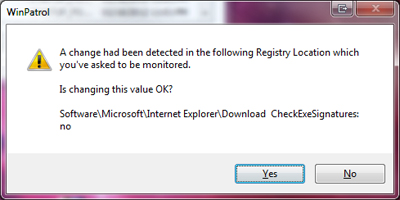
WinPatrol looks very comprehensive, I went with the defaults. Is the Plus version worth getting? It popped this up at installation, dont know why:

CEnv7.jpg


Seemed to me the right answer was no (as in 'is it ok to change it from yes to no'), checking exe signatures sounds like a good thing. Is that HKLM or HKCU?
 

My Computer

Computer type
Laptop
Computer Manufacturer/Model Number
Dell Latitude D830
OS
Windows 7 Professional 32 bit
CPU
Intel Core Two Duo T9300 2.5GHz
Memory
4GB
Graphics Card(s)
NVIDIA Quadro NVS 140
Sound Card
Integrated High Definition Audio Device
Monitor(s) Displays
15.4"
Screen Resolution
1680x1050
You could also use FlashBlock, WOT and McAffee SiteAdvisor (what: McAffee? Yes I know but this plugin seems alright to me.
 

My Computer

Computer type
PC/Desktop
Computer Manufacturer/Model Number
Novatech iRush Pro
OS
Windows 7 Ultimate SP1 - 64 Bit
CPU
Intel Core i5 2500k
Motherboard
Foxconn H67M-S/H67M-V/H67
Memory
2x4GB DDR3 1333Hz
Graphics Card(s)
Ati Radeon 6770
Sound Card
None
Monitor(s) Displays
Samsung S22B150
Screen Resolution
1920x1080
Hard Drives
2x500GB
PSU
500W
Cooling
Fan
Keyboard
HP KU0316
Mouse
Wireless Logitech M185
Internet Speed
20MB/s
Antivirus
Avast Free
Browser
Google Chrome
Other Info
Logitech M185 Mouse
KU-M316 Keyboard
Back
Top