More Than 1 Boot Folder - Which One to Format

cimage

New member
Member
Local time
3:29 AM
Messages
38
Hi

I am unable to format partition D as it is holding BOOT folder. Also I see a 100mb partition holding identical BOOT folder. The OS is located on drive C.

I am using Windows7 Home premium and the same was fresh install.

Any help will be greatly appreciated.

Thanks
 

My Computer My Computer

At a glance

win7 Home Premium 64 bitcore2quad q82008GBZOTAC ZT-60403-10L GeForce GT 630 2GB 128-bit...
Computer type
PC/Desktop
Computer Manufacturer/Model Number
custom
OS
win7 Home Premium 64 bit
CPU
core2quad q8200
Motherboard
Gigabyte EP45-UD3P
Memory
8GB
Graphics Card(s)
ZOTAC ZT-60403-10L GeForce GT 630 2GB 128-bit DDR3 PCI
Hard Drives
Hard Disk 4 numbers
Ideally, we need to see a screenshot of your fully-expanded disk management layout.

http://www.sevenforums.com/tutorials/9733-screenshots-files-upload-post-seven-forums.html

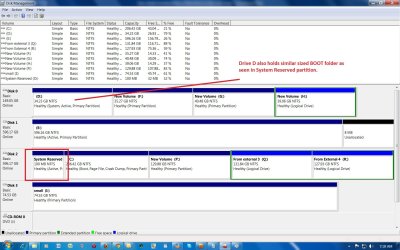
The 100 Mb partition is the System Reserved partition that holds the boot files.

To format drive D you need to remove its Active flag first, after which you can format or delete the partition.

Please have a look at this tutorial, which explains how to carry out disk management using Partition Wizard.

http://www.sevenforums.com/tutorials/93322-partition-wizard-use-bootable-cd.html

Have you any idea how you finished up with duplicate boot files?
 

My Computer My Computer

At a glance

Windows 7 Ultimate SP1 64-BitIntel Core i7 870 @ 2.93GHz8Gb Dual-Channel DDR3 @ 664MHznVidia GeForce GTX 460 1024MB dedicated RAM
Computer Manufacturer/Model Number
HP Pavilion Elite 495UK
OS
Windows 7 Ultimate SP1 64-Bit
CPU
Intel Core i7 870 @ 2.93GHz
Motherboard
MSI 2A9C (CPU1)
Memory
8Gb Dual-Channel DDR3 @ 664MHz
Graphics Card(s)
nVidia GeForce GTX 460 1024MB dedicated RAM
Sound Card
Realtek HD Audio
Monitor(s) Displays
HP2310i
Screen Resolution
1920 x 1080
Hard Drives
1x1954GB Hitachi HDS22020ALA 330 (RAID), 1x1954GB Hitachi External for backup and storage
PSU
460W
Case
HP Elite
Cooling
Air cooled
Keyboard
Logitech K750 solar-powered keyboard
Mouse
Logitech Wireless M180 mouse
Internet Speed
2Mb
Other Info
Pure Avanti Flow Internet Radio with iPod Dock, 64Gb iPod, HP USB Speakers, Sony MDR-V500 Headphones, Sony Vaio F-Series Laptop
Ideally, we need to see a screenshot of your fully-expanded disk management layout.

http://www.sevenforums.com/tutorials/9733-screenshots-files-upload-post-seven-forums.html

The 100 Mb partition is the System Reserved partition that holds the boot files.

To format drive D you need to remove its Active flag first, after which you can format or delete the partition.

Please have a look at this tutorial, which explains how to carry out disk management using Partition Wizard.

http://www.sevenforums.com/tutorials/93322-partition-wizard-use-bootable-cd.html

Have you any idea how you finished up with duplicate boot files?

Thanks seavixen32

Here is the screenshot. Please advise if it safe to format drive D where additional BOOT folder is residing.
 

Attachments

  • disk-management.jpg
    disk-management.jpg
    186 KB · Views: 18

My Computer My Computer

At a glance

win7 Home Premium 64 bitcore2quad q82008GBZOTAC ZT-60403-10L GeForce GT 630 2GB 128-bit...
Computer type
PC/Desktop
Computer Manufacturer/Model Number
custom
OS
win7 Home Premium 64 bit
CPU
core2quad q8200
Motherboard
Gigabyte EP45-UD3P
Memory
8GB
Graphics Card(s)
ZOTAC ZT-60403-10L GeForce GT 630 2GB 128-bit DDR3 PCI
Hard Drives
Hard Disk 4 numbers
You say you have carried out a clean install of Windows 7, which now resides on Disk 2.

Generally speaking, it is good practice to have your operating system on Disk 0.

For some reason, Disk 1 also holds an Active flag.

The choice is yours, but if it were me, I'd be inclined to carry out another clean install, but this time to Disk 0.

Providing your personal data is backed up you can wipe all your drives and repartition them to suit.

You can either boot into your Partition Wizard CD and repartition your drives from there, or you can use your Windows DVD when you boot into it and choose Custem Install.

Just remember that you can have up to four primary partitions on each drive. If you need more you would need to create logical partitions as part of an extended primary partition.

http://www.sevenforums.com/tutorials/1649-clean-install-windows-7-a.html
 

My Computer My Computer

At a glance

Windows 7 Ultimate SP1 64-BitIntel Core i7 870 @ 2.93GHz8Gb Dual-Channel DDR3 @ 664MHznVidia GeForce GTX 460 1024MB dedicated RAM
Computer Manufacturer/Model Number
HP Pavilion Elite 495UK
OS
Windows 7 Ultimate SP1 64-Bit
CPU
Intel Core i7 870 @ 2.93GHz
Motherboard
MSI 2A9C (CPU1)
Memory
8Gb Dual-Channel DDR3 @ 664MHz
Graphics Card(s)
nVidia GeForce GTX 460 1024MB dedicated RAM
Sound Card
Realtek HD Audio
Monitor(s) Displays
HP2310i
Screen Resolution
1920 x 1080
Hard Drives
1x1954GB Hitachi HDS22020ALA 330 (RAID), 1x1954GB Hitachi External for backup and storage
PSU
460W
Case
HP Elite
Cooling
Air cooled
Keyboard
Logitech K750 solar-powered keyboard
Mouse
Logitech Wireless M180 mouse
Internet Speed
2Mb
Other Info
Pure Avanti Flow Internet Radio with iPod Dock, 64Gb iPod, HP USB Speakers, Sony MDR-V500 Headphones, Sony Vaio F-Series Laptop
You say you have carried out a clean install of Windows 7, which now resides on Disk 2.

Generally speaking, it is good practice to have your operating system on Disk 0.

For some reason, Disk 1 also holds an Active flag.

The choice is yours, but if it were me, I'd be inclined to carry out another clean install, but this time to Disk 0.

Providing your personal data is backed up you can wipe all your drives and repartition them to suit.

You can either boot into your Partition Wizard CD and repartition your drives from there, or you can use your Windows DVD when you boot into it and choose Custem Install.

Just remember that you can have up to four primary partitions on each drive. If you need more you would need to create logical partitions as part of an extended primary partition.

http://www.sevenforums.com/tutorials/1649-clean-install-windows-7-a.html

I agree that Disk 0 should have been my choice but at this stage seeing how many applications are loaded I am not motivated, nevertheless, thanks for the suggestion.

My question is it safe to format partition D.

Thanks
 

My Computer My Computer

At a glance

win7 Home Premium 64 bitcore2quad q82008GBZOTAC ZT-60403-10L GeForce GT 630 2GB 128-bit...
Computer type
PC/Desktop
Computer Manufacturer/Model Number
custom
OS
win7 Home Premium 64 bit
CPU
core2quad q8200
Motherboard
Gigabyte EP45-UD3P
Memory
8GB
Graphics Card(s)
ZOTAC ZT-60403-10L GeForce GT 630 2GB 128-bit DDR3 PCI
Hard Drives
Hard Disk 4 numbers
At this stage I'm going to say yes, but it won't hurt to backup its contents as a precaution.

If you do experience problems after you have deleted it, you may want to run a Startup Repair.

http://www.sevenforums.com/tutorials/681-startup-repair.html

If you do have to use Startup Repair, you may need to run it three times with a reboot after each occurrence.
 

My Computer My Computer

At a glance

Windows 7 Ultimate SP1 64-BitIntel Core i7 870 @ 2.93GHz8Gb Dual-Channel DDR3 @ 664MHznVidia GeForce GTX 460 1024MB dedicated RAM
Computer Manufacturer/Model Number
HP Pavilion Elite 495UK
OS
Windows 7 Ultimate SP1 64-Bit
CPU
Intel Core i7 870 @ 2.93GHz
Motherboard
MSI 2A9C (CPU1)
Memory
8Gb Dual-Channel DDR3 @ 664MHz
Graphics Card(s)
nVidia GeForce GTX 460 1024MB dedicated RAM
Sound Card
Realtek HD Audio
Monitor(s) Displays
HP2310i
Screen Resolution
1920 x 1080
Hard Drives
1x1954GB Hitachi HDS22020ALA 330 (RAID), 1x1954GB Hitachi External for backup and storage
PSU
460W
Case
HP Elite
Cooling
Air cooled
Keyboard
Logitech K750 solar-powered keyboard
Mouse
Logitech Wireless M180 mouse
Internet Speed
2Mb
Other Info
Pure Avanti Flow Internet Radio with iPod Dock, 64Gb iPod, HP USB Speakers, Sony MDR-V500 Headphones, Sony Vaio F-Series Laptop

My Computer My Computer

At a glance

win7 Home Premium 64 bitcore2quad q82008GBZOTAC ZT-60403-10L GeForce GT 630 2GB 128-bit...
Computer type
PC/Desktop
Computer Manufacturer/Model Number
custom
OS
win7 Home Premium 64 bit
CPU
core2quad q8200
Motherboard
Gigabyte EP45-UD3P
Memory
8GB
Graphics Card(s)
ZOTAC ZT-60403-10L GeForce GT 630 2GB 128-bit DDR3 PCI
Hard Drives
Hard Disk 4 numbers
You're very welcome.

Do post back if you need further help.
 

My Computer My Computer

At a glance

Windows 7 Ultimate SP1 64-BitIntel Core i7 870 @ 2.93GHz8Gb Dual-Channel DDR3 @ 664MHznVidia GeForce GTX 460 1024MB dedicated RAM
Computer Manufacturer/Model Number
HP Pavilion Elite 495UK
OS
Windows 7 Ultimate SP1 64-Bit
CPU
Intel Core i7 870 @ 2.93GHz
Motherboard
MSI 2A9C (CPU1)
Memory
8Gb Dual-Channel DDR3 @ 664MHz
Graphics Card(s)
nVidia GeForce GTX 460 1024MB dedicated RAM
Sound Card
Realtek HD Audio
Monitor(s) Displays
HP2310i
Screen Resolution
1920 x 1080
Hard Drives
1x1954GB Hitachi HDS22020ALA 330 (RAID), 1x1954GB Hitachi External for backup and storage
PSU
460W
Case
HP Elite
Cooling
Air cooled
Keyboard
Logitech K750 solar-powered keyboard
Mouse
Logitech Wireless M180 mouse
Internet Speed
2Mb
Other Info
Pure Avanti Flow Internet Radio with iPod Dock, 64Gb iPod, HP USB Speakers, Sony MDR-V500 Headphones, Sony Vaio F-Series Laptop
You're very welcome.

Do post back if you need further help.


Seems I am stuck again.

I have a Partition Wizard CD, for unknow reasons when I try to boot with the CD I see a screen prompting me to go with Win 7. I don't see any other option. Yes I did set to BOOT from CD in bios.

I checked on the other PC it works fine.

Any suggestion ?
 

My Computer My Computer

At a glance

win7 Home Premium 64 bitcore2quad q82008GBZOTAC ZT-60403-10L GeForce GT 630 2GB 128-bit...
Computer type
PC/Desktop
Computer Manufacturer/Model Number
custom
OS
win7 Home Premium 64 bit
CPU
core2quad q8200
Motherboard
Gigabyte EP45-UD3P
Memory
8GB
Graphics Card(s)
ZOTAC ZT-60403-10L GeForce GT 630 2GB 128-bit DDR3 PCI
Hard Drives
Hard Disk 4 numbers
How are you using the PW disc?

You need to insert the disc, restart your computer then tap the one-time boot key repeatedly to bring up your boot options (typically F12, but you'd need to check your computer documentation for the correct key) and select the optical drive option.

Failing that, you could boot into your Windows DVD, choose Custom Install, and then delete the partition from there, after which you can close the Windows installer and start your system normally.
 

My Computer My Computer

At a glance

Windows 7 Ultimate SP1 64-BitIntel Core i7 870 @ 2.93GHz8Gb Dual-Channel DDR3 @ 664MHznVidia GeForce GTX 460 1024MB dedicated RAM
Computer Manufacturer/Model Number
HP Pavilion Elite 495UK
OS
Windows 7 Ultimate SP1 64-Bit
CPU
Intel Core i7 870 @ 2.93GHz
Motherboard
MSI 2A9C (CPU1)
Memory
8Gb Dual-Channel DDR3 @ 664MHz
Graphics Card(s)
nVidia GeForce GTX 460 1024MB dedicated RAM
Sound Card
Realtek HD Audio
Monitor(s) Displays
HP2310i
Screen Resolution
1920 x 1080
Hard Drives
1x1954GB Hitachi HDS22020ALA 330 (RAID), 1x1954GB Hitachi External for backup and storage
PSU
460W
Case
HP Elite
Cooling
Air cooled
Keyboard
Logitech K750 solar-powered keyboard
Mouse
Logitech Wireless M180 mouse
Internet Speed
2Mb
Other Info
Pure Avanti Flow Internet Radio with iPod Dock, 64Gb iPod, HP USB Speakers, Sony MDR-V500 Headphones, Sony Vaio F-Series Laptop
How are you using the PW disc?

You need to insert the disc, restart your computer then tap the one-time boot key repeatedly to bring up your boot options (typically F12, but you'd need to check your computer documentation for the correct key) and select the optical drive option.

Failing that, you could boot into your Windows DVD, choose Custom Install, and then delete the partition from there, after which you can close the Windows installer and start your system normally.

I tried both the methods 1) setting the boot sequence 2) calling with F12, same result. I will try with Win7 instal disk.

Thanks for quick response, I appreciate.
 

My Computer My Computer

At a glance

win7 Home Premium 64 bitcore2quad q82008GBZOTAC ZT-60403-10L GeForce GT 630 2GB 128-bit...
Computer type
PC/Desktop
Computer Manufacturer/Model Number
custom
OS
win7 Home Premium 64 bit
CPU
core2quad q8200
Motherboard
Gigabyte EP45-UD3P
Memory
8GB
Graphics Card(s)
ZOTAC ZT-60403-10L GeForce GT 630 2GB 128-bit DDR3 PCI
Hard Drives
Hard Disk 4 numbers
Back
Top