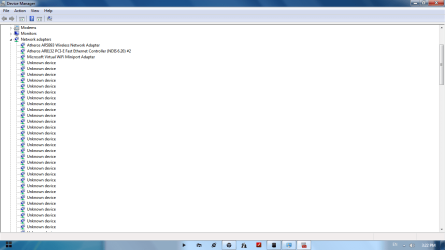
More than 100 unknown devices in network adapters

fazuvpk

New member
Local time
4:02 AM
Messages
3
When i Went through my device manager i notices that there is about 150 unknown devices in network adapters list i slows my computer so much
when i check out the details the hardware id was found to be eset_epfwndismp
So i thought it is becos of eset firewall security so i removed eset and check out wht hpned bt no way i still find those unknown devices still now
i searched for registry to check weather eset is fully removed or is there any reg file left ova thre i noticed
HKEY_LOCAL_MACHINE\SYSTEM\ControlSet001\Enum\Root\ESET_EPFWNDISMP
is stil thre.. and i try to delete the key and i am unable to delete i tried with changing permission alsooo
I am using windows 7 home premium 64bit
RAM 4gb
Hard disk 320
dual core processr 2.2 GHz, 800 MHz FSB
Thank you in advanced
 

Attachments

  • registry.png
    registry.png
    178.9 KB · Views: 207
  • device info.png
    device info.png
    36.9 KB · Views: 240
  • device list.png
    device list.png
    25.7 KB · Views: 171

My Computer My Computer

OS
Windows 7 Home Premium 64 bit
Hi, welcome to the forums :)

Have you tried removing the devices in Device Manager? You should be able to right-click and select 'Uninstall'

You may also need to remove the individual sub folders in regedit before removing the parent folder.


OS
 

My Computer My Computer

Computer Manufacturer/Model Number
Compaq Desktop
OS
Windows 7 Ultimate x64
CPU
AMD Sempron Dual Core
Memory
3GB
Graphics Card(s)
NVIDIA GeForce 6150SE nForce 430
Screen Resolution
1024x768
Hard Drives
150GB Sata
Did you try launching the registry editor with administrative credentials?

Open the registry editor by clicking :orb: and typing regedit.exe into the search box. Next, either right click on the program and click Run as administrator or simply press Ctrl + Shift + Enter/Return. Provide administrative credentials when prompted. This is because the key in question is in the HKLM branch, and to modify the contents of this area of the registry it needs to invoked with administrative privileges.

Now try deleting the key.
 

My Computer My Computer

Computer type
PC/Desktop
Computer Manufacturer/Model Number
Dwarf Dwf/11/2012 r09/2013
OS
Windows 8.1 Pro RTM x64
CPU
Intel Core-i5-3570K 4-core @ 3.4GHz (Ivy Bridge) (OC 4.4GHz)
Motherboard
ASRock Z77 Extreme4-M
Memory
4 x 4GB DDR3-1600 Corsair Vengeance CMZ8GX3M2A1600C9B (16GB)
Graphics Card(s)
MSI GeForce GTX770 Gaming OC 2GB
Sound Card
Realtek High Definition on board solution (ALC 898)
Monitor(s) Displays
ViewSonic VA1912w Widescreen (VGA)
Screen Resolution
1440x900
Hard Drives
OCZ Agility 3 SSD 120GB SATA III x2 (RAID 0)
Samsung HD501LJ 500GB SATA II x2
Hitachi HDS721010CLA332 1TB SATA II
Iomega 1.5TB Ext USB 2.0
WD 2.0TB Ext USB 3.0
PSU
XFX Pro Series 850W Semi-Modular
Case
Gigabyte IF233
Cooling
1 x 120mm Front Inlet 1 x 120mm Rear Exhaust
Keyboard
Microsoft Comfort Curve Keyboard 3000 (USB)
Mouse
Microsoft Comfort Mouse 3000 for Business (USB)
Internet Speed
NetGear DG834Gv3 ADSL Modem/Router (Ethernet) ~4.0 Mb/s (O2)
Antivirus
Avast! 8.0.1497
Browser
IE 11
Other Info
Optical Drive: HL-DT-ST BD-RE BH10LS30 SATA Bluray
Lexmark S305 Printer/Scanner/Copier (USB)
WEI Score: 8.1/8.1/8.5/8.5/8.25
Asus Eee PC 1011PX Netbook (Windows 7 x86 Starter)
i tried foth deleting 1 by 1 and also uninstalling driver bt thre is no use of it.....
ya i ran with adminstrtive prvlage and also no use f t..
i tried in safe mode alsooo nothn helped
 

My Computer My Computer

OS
Windows 7 Home Premium 64 bit
That "device" is the firewall from ESET Smart Security,

ESET Smart Security - Internet Security - Firewall, Antivirus, Antispam

Are you running the latest or an older version? In either case start with following the instructions here,

How do I manually uninstall my ESET security product? - ESET Knowledgebase

to uninstall the version you have installed. Once done then check in Device Manager and regedit for all those devices and entries. If they are still present manually delete them, then re-install with the latest version.
 

My Computer My Computer

Computer type
PC/Desktop
Computer Manufacturer/Model Number
Me
OS
Win 7 Ultimate x64
CPU
FX-8350 @ 4.6 GHz so far
Motherboard
Asus M5A97 EVO
Memory
ADATA XPG V1 Series Black 8GB DDR3 1600
Graphics Card(s)
Sapphire R9 270x Dual-X
Sound Card
Xonar DGX w/ Corsair Vengence 1300
Monitor(s) Displays
Acer S232HL Abid
Screen Resolution
1920x1080
Hard Drives
120 GB OCZ Vertex 3
500 GB Seagate 7200.12
PSU
Antec Earthwatts 650W Green
Case
Antec Three Hundred
Cooling
Cooler Master 212 EVO
Keyboard
Logitech G510
Mouse
Logitech G500s
Internet Speed
35000/3000
That "device" is the firewall from ESET Smart Security,

ESET Smart Security - Internet Security - Firewall, Antivirus, Antispam

Are you running the latest or an older version? In either case start with following the instructions here,

How do I manually uninstall my ESET security product? - ESET Knowledgebase

to uninstall the version you have installed. Once done then check in Device Manager and regedit for all those devices and entries. If they are still present manually delete them, then re-install with the latest version.


Thank you dude it helpeddd...... thank you so muchhh
 

My Computer My Computer

OS
Windows 7 Home Premium 64 bit
You're welcome. Glad to hear it worked.
 

My Computer My Computer

Computer type
PC/Desktop
Computer Manufacturer/Model Number
Me
OS
Win 7 Ultimate x64
CPU
FX-8350 @ 4.6 GHz so far
Motherboard
Asus M5A97 EVO
Memory
ADATA XPG V1 Series Black 8GB DDR3 1600
Graphics Card(s)
Sapphire R9 270x Dual-X
Sound Card
Xonar DGX w/ Corsair Vengence 1300
Monitor(s) Displays
Acer S232HL Abid
Screen Resolution
1920x1080
Hard Drives
120 GB OCZ Vertex 3
500 GB Seagate 7200.12
PSU
Antec Earthwatts 650W Green
Case
Antec Three Hundred
Cooling
Cooler Master 212 EVO
Keyboard
Logitech G510
Mouse
Logitech G500s
Internet Speed
35000/3000
100 of UNKNOWN DEVICE ADAPTER

Hai, I using HP Mini210-1000. I got problem with network adapter with Unknown device. I go to Unknown Device Properties. Detail: Hardware Ids - ms_abndismp. Can someone show me how to fix cause I'm not good on computer.
 

My Computer My Computer

Computer type
Laptop
Computer Manufacturer/Model Number
Hewlett-Packard, HP Mini 210-1000
OS
Windows 7 Professional Version 6.1.7601 Service Pack 1 Build 7601
CPU
Intel(R) Atom(TM) CPU N450 @ 1.66GHz
Motherboard
Intel(R) 82801G (ICH7 Family) PCI
Memory
1.00 GB
Graphics Card(s)
Intel(R) Graphics Media Accelerator 3150
Hard Drives
Hitachi HTS725025A9A364 ATA Device
Antivirus
no antivirus software
Browser
Google Chrome, Internet Explorer
Back
Top