More Than 3 Out of 4 Enthusiasts Reject Windows 8

Status
Not open for further replies.
@ Lady Fitzgerald

Great post, and one I agree with; except this....

I'll be long dead before tablets can store and quickly access terabytes of data, even when no internet is available.

Don't sell yourself short, I'm thinking we'll be there before that. The technology is moving too fast ;)

Anyway great post :thumbsup:
 

My Computer My Computer

At a glance

Windows 10 ProIntel Core i7-4770K (3.5Ghz)32 gig Corsair Dominator Platinum (4x8Gig)Sapphire Tri-X R9 Fury
Computer type
PC/Desktop
Computer Manufacturer/Model Number
Custom built by me.
OS
Windows 10 Pro
CPU
Intel Core i7-4770K (3.5Ghz)
Motherboard
Gigabyte G1 Sniper 5 (F10 Bios)
Memory
32 gig Corsair Dominator Platinum (4x8Gig)
Graphics Card(s)
Sapphire Tri-X R9 Fury
Sound Card
Soundblaster ZXR
Monitor(s) Displays
NEC PA242W 24" LCD Monitor
Screen Resolution
1920 x 1200
Hard Drives
Primary - Samsung 850 Pro (512gig), Samsung 840 Pro (256gig), 2TB WD Caviar Black.
PSU
EVGA Supernova 1000 G2
Case
Cooler Master HAF X
Cooling
Corsair H100i with Corsair Air Series SP120 Quiet Fans
Keyboard
Logitech Wireless Wave
Mouse
Logitech Performance MX
Internet Speed
High Speed Cable
Antivirus
Norton Security
Browser
IE11
Other Info
Memory Timings - 1866MHz @ 9-9-9-27-1T @ 1.5 volts
@ Lady Fitzgerald

Great post, and one I agree with; except this....

I'll be long dead before tablets can store and quickly access terabytes of data, even when no internet is available.

Don't sell yourself short, I'm thinking we'll be there before that. The technology is moving too fast ;)

Anyway great post :thumbsup:
Thanks! Apparently, you don't know that I'm pushing 64.
 

My Computer My Computer

At a glance

Win 7 Ultimate 64 bitIntel i7-3930KKingston HyperX Genesis 32GB Kit (8x4GB Modul...MSI R7850 Twin Frozr 2GD5/OC Radeon HD 7850 2...
Computer type
PC/Desktop
Computer Manufacturer/Model Number
Custom Build
OS
Win 7 Ultimate 64 bit
CPU
Intel i7-3930K
Motherboard
ASUS P9X79 WS
Memory
Kingston HyperX Genesis 32GB Kit (8x4GB Modules) 1600MHz DDR
Graphics Card(s)
MSI R7850 Twin Frozr 2GD5/OC Radeon HD 7850 2GB 256-bit GDDR
Sound Card
Asus Xonar Essence STX
Monitor(s) Displays
3x Asus VG248QE 24", Vizio 32" TV
Screen Resolution
1920 x 1080, ?
Hard Drives
Samsung 128GB 840 Pro SSD (1),
Samsung 4TB 850 EVO SSDs (4)
Samsung 4TB 850 EVO SSDs (16) external backup drives used in 2.5" hot swap bays in the computer.
PSU
Corsair HX750w
Case
Antec Two Hundred v2 (modified)
Cooling
Cooler Master GeminII S524 120mm (fan replaced with a 140mm)
Keyboard
Logitech G510s
Mouse
Logitech M525 (two in use)
Internet Speed
=< 32Mbps down, 8Mbps up
Antivirus
AVAST!, MBAM, SAS, Spybot S&D (all but MBAM free) Glary Util
Browser
IE11
Other Info
LSI 9211-8i HBA card (8 SATA III ports), 2.5" & 3.5" Hot Swap Bays, HooToo HT-CR001 PCI-E to USB 3.0 Internal Hub + 6 Slot Card Reader, and LG Model CH12LS28 BD-ROM Optical Drive. Also, ScanSnap S1500 ADF duplexing scanner, Canon 9000F flat bed scanner, Corsair SP2500 2.1 speakers, Samsung CLP 415nw laser color printer, Cyberpower PP2200SW UPS
LF, I wish I was your age. Things would be a lot easier. 12 years make a big difference.
 

My Computer My Computer

At a glance

Vista, Windows7, Mint Mate, Zorin, Windows 8from 1.6GHz Duo to i7
Computer Manufacturer/Model Number
HP, Dell, Gateway, Toshiba - 4 laptops and 2 desktops
OS
Vista, Windows7, Mint Mate, Zorin, Windows 8
CPU
from 1.6GHz Duo to i7
Monitor(s) Displays
2x HP w2207
Hard Drives
5x HDD, 7x SSD, 12x Externals
Keyboard
with trackball - no mices
Mouse
Trackball mice
Internet Speed
DSL 6000
@Jimbo,

The stock prices do not reflect what you imply.

If times are uncertain , companies that have guaranteed income - irrespective of current or near future sales, look attractive.

MS has that from it's existing tie ins. The price does not reflect any expectation that win8 or anything else MS is doing now will be a winner.

Apple does not have that level of lock ins which will continue to pay for years to come.

They rely mostly on sales. Uncle Tim needs to come up with another winner and the price will then reflect that.

It does not mean MS is doing better than Apple.
 

My Computers My Computers

  • At a glance

    7 X64i5 84002x8gb 3200mhz
    Computer type
    PC/Desktop
    OS
    7 X64
    CPU
    i5 8400
    Motherboard
    gigabyte b365m ds3h
    Memory
    2x8gb 3200mhz
    Hard Drives
    various
    PSU
    pure power 11 400w cm
    Case
    Coolermaster
    Cooling
    cryorig m9i
  • At a glance

    7x64g54008gb ddr4 2400
    Computer type
    PC/Desktop
    OS
    7x64
    CPU
    g5400
    Motherboard
    ga b365m ds3h
    Memory
    8gb ddr4 2400
    PSU
    xfx pro 450w
@ Lady Fitzgerald

Great post, and one I agree with; except this....

I'll be long dead before tablets can store and quickly access terabytes of data, even when no internet is available.

Don't sell yourself short, I'm thinking we'll be there before that. The technology is moving too fast ;)

Anyway great post :thumbsup:
Thanks! Apparently, you don't know that I'm pushing 64.

Well, I'm thinking in about ten years we'll be saying how we can't believe we have this and that. Who would have imagined the processing power and storage device we have today from just 2000 ;)

Anyway moving right along...

Both sides have merit, and honestly companies should be using both mobile and desktop devices. In fact, I can't see how any company in business today wouldn't be using tablets and other mobile devices. Heck even the military uses both.

The point is, the decision Microsoft took with the OS in forcing the tablet/mobile side on desktop users. The sign in for this and that, the tile look, and the missing start menu (no matter how trivial), is just a bit much. Then there's the "we won't be moving DX11.1 to Windows 7 so move to 8 if you want it" has people and developers saying go FYS. In short, it's the entire attitude Microsoft has taken with this "forced" approach.

And if the answer is no one is forcing you to use the OS, you're right.... and Microsoft is seeing this in slumped stale sales. We don't want it, and we ain't using it... no matter how many bells and whistles you try to keep from us.

Will that change on both sides... maybe, we'll see.
 

My Computer My Computer

At a glance

Windows 10 ProIntel Core i7-4770K (3.5Ghz)32 gig Corsair Dominator Platinum (4x8Gig)Sapphire Tri-X R9 Fury
Computer type
PC/Desktop
Computer Manufacturer/Model Number
Custom built by me.
OS
Windows 10 Pro
CPU
Intel Core i7-4770K (3.5Ghz)
Motherboard
Gigabyte G1 Sniper 5 (F10 Bios)
Memory
32 gig Corsair Dominator Platinum (4x8Gig)
Graphics Card(s)
Sapphire Tri-X R9 Fury
Sound Card
Soundblaster ZXR
Monitor(s) Displays
NEC PA242W 24" LCD Monitor
Screen Resolution
1920 x 1200
Hard Drives
Primary - Samsung 850 Pro (512gig), Samsung 840 Pro (256gig), 2TB WD Caviar Black.
PSU
EVGA Supernova 1000 G2
Case
Cooler Master HAF X
Cooling
Corsair H100i with Corsair Air Series SP120 Quiet Fans
Keyboard
Logitech Wireless Wave
Mouse
Logitech Performance MX
Internet Speed
High Speed Cable
Antivirus
Norton Security
Browser
IE11
Other Info
Memory Timings - 1866MHz @ 9-9-9-27-1T @ 1.5 volts
LF, I wish I was your age. Things would be a lot easier. 12 years make a big difference.

I wouldn't mind being 12 years younger and still know what I know now.
 

My Computer My Computer

At a glance

Win 7 Ultimate 64 bitIntel i7-3930KKingston HyperX Genesis 32GB Kit (8x4GB Modul...MSI R7850 Twin Frozr 2GD5/OC Radeon HD 7850 2...
Computer type
PC/Desktop
Computer Manufacturer/Model Number
Custom Build
OS
Win 7 Ultimate 64 bit
CPU
Intel i7-3930K
Motherboard
ASUS P9X79 WS
Memory
Kingston HyperX Genesis 32GB Kit (8x4GB Modules) 1600MHz DDR
Graphics Card(s)
MSI R7850 Twin Frozr 2GD5/OC Radeon HD 7850 2GB 256-bit GDDR
Sound Card
Asus Xonar Essence STX
Monitor(s) Displays
3x Asus VG248QE 24", Vizio 32" TV
Screen Resolution
1920 x 1080, ?
Hard Drives
Samsung 128GB 840 Pro SSD (1),
Samsung 4TB 850 EVO SSDs (4)
Samsung 4TB 850 EVO SSDs (16) external backup drives used in 2.5" hot swap bays in the computer.
PSU
Corsair HX750w
Case
Antec Two Hundred v2 (modified)
Cooling
Cooler Master GeminII S524 120mm (fan replaced with a 140mm)
Keyboard
Logitech G510s
Mouse
Logitech M525 (two in use)
Internet Speed
=< 32Mbps down, 8Mbps up
Antivirus
AVAST!, MBAM, SAS, Spybot S&D (all but MBAM free) Glary Util
Browser
IE11
Other Info
LSI 9211-8i HBA card (8 SATA III ports), 2.5" & 3.5" Hot Swap Bays, HooToo HT-CR001 PCI-E to USB 3.0 Internal Hub + 6 Slot Card Reader, and LG Model CH12LS28 BD-ROM Optical Drive. Also, ScanSnap S1500 ADF duplexing scanner, Canon 9000F flat bed scanner, Corsair SP2500 2.1 speakers, Samsung CLP 415nw laser color printer, Cyberpower PP2200SW UPS
Agreed

I can only recommend to start looking at Linux distros. Ubuntu Unity is a dog, but Mint Mate and Zorin are very good options for people that are used to Windows. Build up Linux skills now - it may come in handy soon.

I agree with your assessment of Unity and Linux Mint MATE (I haven't tried Zorin). :)

Linux is as easy to use as Windows, if all you do on your PC is surf the internet, use GIMP to edit pictures or type a document (click on a program icon).

About half the programs I have installed in Windows were originally written for Linux operating systems.
Apart from Office 2007, most of the Windows only programs I have installed are for backup or security purposes. :geek:
 

My Computer My Computer

At a glance

W7 Ultimate SP1, LM19.2 MATE, W10 Home 1703, ...AMD Phenom II x6 1100T, 3.3 GHz12GB DDR3 1333 G-Skill (4GB x 2), G-Skill (2G...NVIDIA GeForce GTX 660
Computer type
PC/Desktop
Computer Manufacturer/Model Number
n/a
OS
W7 Ultimate SP1, LM19.2 MATE, W10 Home 1703, W10 Pro 1703 VM, #All 64 bit
CPU
AMD Phenom II x6 1100T, 3.3 GHz
Motherboard
ASUS M4A88T-M/USB3 (AM3)
Memory
12GB DDR3 1333 G-Skill (4GB x 2), G-Skill (2GB x 2)
Graphics Card(s)
NVIDIA GeForce GTX 660
Sound Card
Realtek?
Monitor(s) Displays
Samsung S23B350
Screen Resolution
1920x1080
Hard Drives
WD Green 2TB (SATA), WD Green 3TB (SATA), WD Blue 4TB (SATA), WD Blue 6TB (SATA)
PSU
Cooler Master
Case
Antec GX300 Tower
Cooling
3x Antec TRICOOL 120mm Fans
Mouse
Wired Optical
Internet Speed
DSL
Antivirus
Avast
Browser
Pale Moon (64 bit)
Other Info
2018-12-27 Upgraded HDDs
2015-12-10 Upgraded case, graphics card, storage
2015-08-15 Upgraded motherboard & RAM
2015-07-15 Upgraded LM17.1 to LM17.2
The Linux program library (in Mint) contains over 60.000 programs. There is something for everybody. I have done video editing, Impress (like PowerPoint) presentations, etc. These programs are just as good as the Windows equivalents. You just have to get used to them.

Even the system oriented programs are similar. E.g. Bleachbit is very similar to CCleaner. Installing and uninstalling programs is even easier than in Windows. So there is very little to complain about - if anything, it is the complex Terminal (command prompt). That takes some time to fathom.

I run my Linux distros in virtual. So backup is simple - I just copy the VMware folder to a backup disk. Right now my host system is still Windows 7. But a Linux host is also supported by VMware Player.
 

My Computer My Computer

At a glance

Vista, Windows7, Mint Mate, Zorin, Windows 8from 1.6GHz Duo to i7
Computer Manufacturer/Model Number
HP, Dell, Gateway, Toshiba - 4 laptops and 2 desktops
OS
Vista, Windows7, Mint Mate, Zorin, Windows 8
CPU
from 1.6GHz Duo to i7
Monitor(s) Displays
2x HP w2207
Hard Drives
5x HDD, 7x SSD, 12x Externals
Keyboard
with trackball - no mices
Mouse
Trackball mice
Internet Speed
DSL 6000
Well... let's save some time ;)

Hi there
Businesses operate differently to private consumers - I'll bet these days in the few cases where old fashioned desktops are still used the hardware is LIGHT YEARS behind what people have at home.
I guess lot of people is aware of this, unfortunately, the great part of the market is fullfiled with unexperienced users that do minimal stuff on PC... "Light Years" by the other hand sounds a bit exaggerated, here I know poeple with more than 8 GB (the least) of RAM and Phenoms with 6 or more cores (if not Core i7 from Intel...), but average user has a standard 2 GB PC with a dual cored CPU... in most cases that is not too far from what bussines could have... A tablet can NEVER (at least by now) enter this contest, if you are talking about hardware power, just because they are relatevely new and their hardware need to be worked out more to support what a desktop does.

-- Upgrades etc are planned a long time in advance -- they just don't go out --buy a new OS and if it's no good just downgrade again.

W7 upgrades were in place long before W8 was "even thought of" -- and no business is going to go through TWO OS upgrades in a short time - so I don't think the XP===>W7 vs XP===>W8 was a valid point.
True, that's the reason why they refuse to install W8, not only of the short period between 7 and 8, but also about productivity, they need to think about new features tthat need to be learned, if the change is too radical, they need more time to teach users. W7 Incorporated inpressive tools and enhacements for the interface, when Vista came out, Aero was only an eye candy (very pretty but useless and resouce hog), when Windows 7 came, then Aero was tweaked, was faster, reliabe and incorporated neat features that enhaced productivity (Aero Snap, Aero Shake, Aero Peek, Live Clickable Previews...)
Windows 8 goes backwards, you can stay on desktop as long as you want, but needing to add a toolbar to get back Start Menu is silly, even worse, Start Menu in W7 has a search bar so you can even find control panel items without EVEN oing into it. W8 instead forces you to look for the start screen everytime, loosing time, adding more clicks and just being tile showoff instead of organizationaly better... Start menu sorts programs, yes, you need one more click in case of subfolders/subcategories, but is organized, Start Screen is just a mess, even with grouping tiles... Search bar is no longer there unless you click for it... there is more, but is just...

I still maintain that for a lot of people a tablet makes a better option IN THE NEW WORKPLACE - provided the tablet is a DECENT ONE, you have an external decent size monitor and you can connect it to a docking station --with a keyboard and / or mouse as well.
This defeats the entire purpose of buying one of those things... Laptops and netbooks don't need docking stations, and is not about hardware architecture, if it was so easy to use a single tiny screen with serius stuff like offimatic programs or digital painting, those devices would become useless...

Nobody says --least of all me -- that touch for some applications can replace a keyboard -- even with a "Stylus" people can type on a keyboard much faster than they can write and certainly enter via touch.

I don't think people understood what I'm saying here --- IMO a lot of the so called "Traditional" office apps don't really need a "Classical computer" any more -- and with more companies adopting a "BYOD" policy all the company will have to do is provide an infrastructure that a myriad of appropriate devices can connect to.

If 90% of your computer tasks at work are in using word, powerpoint, excel spread sheets, email, or working in such areas as HR, A/P, A/R, Purchasing, Procurement, Customer service etc all these tasks can be accomplished really easily with pretty well ANY front end device attached to a monitor keyboard and mouse.
But is not... you forget people that use specialized input devices (like a digital painting tablet or finger scanners...) The screen simply does not replace them, and having a touch screen along with this is just silly, its cheaper and reasonable that you get a Laptop or PC for this...

A corporate server will provide a decent RDP experience -- and a lot of "Production applications" are essentially "Logon to say an ERP system and choose the application". For example if you are running a SAP system then so long as you can connect to the SAPGUI it doesn't really matter what the front end OS is -- whether it's via an HTTP Portal, Linux or any flavour of Windows.

Developers etc have different needs as well as those administering servers and that type of work -- but I say it again --the basic "Stand alone" Workstation is essentially dead or certainly dying --even in the workplace.
True again, but this doesn't mean that tablets will ever replace this kind of harware... probably I'm just too old fashioned, but standalone servers are still and will be still needed, just because of backups and critical info storage... even the cloud needs this concept... hell... even the Matrix does... XD

I can probably say that in the last 3 years even I haven't actually SEEN anything other than Laptops in the large companies I've worked at -- and more recently plenty of Ipads / Samsung tablets as well -- and these type of devices are just brilliant when making presentations or or demos -- much easier than disconnecting a laptop, finding a LAN, connecting up again to the server, loading up Office from the network --then Bang the network goes down etc etc.
Laptops are portable in a reasonable way, also, allow users to take work at home.
I've also seen a growing usage of tablets for presentations, but never seen someone doing one on it...
And trying not to sound harsh, laptops don't need a LAN, all of them are equiped with a Wi-Fi Antenna device, you don't need cables to connect to the network...

I know the desktop won't disappear 100% -- but even today I'll bet it's around 80% GONE in workplaces and in fact the whole BYOD concept makes the whole procurement and installation of corporate OS'es much more simple -- so long as the server(s) provide the relevant GUI the I.T staff just have to fix the server(s) -- they don't have to deploy 2500 copies of Windows etc any more.
Then, Windows is useless here, even worse, Windows 8 is... they got their own corporative enviornment and this kind of companies hardly will ever make it into buying a copy of any version of Windows, unless they need it to run they layer software, which returns again to no Windows 8 here...

Small offices may even find it easier as there's usually no "established I.T dept --usually a GURU who messes around with a small server -- so providing a single GUI on the server should be a doddle also.
Even corporates need at least one server to get backups at least... it's not that easy to have data floating around without taking some precautions...

Final Note:
Not that I'm trying to defend the "W8 is s***" plot or something, but here are facts that really pissed off the community about this OS:

  1. Unnessesary change of the GUI for traditional computing. Traditional PC DOESN'T need tiles floating around, hidden options and improductive ways of working, instead you need a clear desktop experience, with all you need at hand and clearly easy to find.
  2. Forcing users to the new GUI, knowing is just a mere stetical change (for the worse) raher than a true improvement. And by this, I mean not having the option to choose from Traditional desktop experience, or the new Modern UI, Intermediates and advanced users could be pleased because all options are available just like it was on past. Newbies or not experiences got the option to use a simpler UI wich will let them to do ligh stuff (check emails, facebook, chatting...)
  3. Trying to fool experienced users with a marketing argument (Modern, new, changes...) and even taking Windows 95 into account, when is clearly not the same case. Windows 95 was a vast improvement, not just because the enhacement of 16 bit computing and start of 32 bit, but also Start Menu and task bar, programs organized and easily accesed by just one click ahead...
Personally, I liked Windows 8, Start Screen looks nice (until you install all you need and you discover is a whole sea of tiles) and Modern UI looks new enough... but trying to do serius bussiness on it is like assisting suicide...

Most people has the same issue, that's all, there is more than just complaining about an appereance, this is about workload and efficiency at it...

So, in short, Tablets and Smartphones = Windows 8, PC's = Windows 7, make your choice, be happy. MS forcing users to Windows 8 because is clearly not an improvement = Fail for them...

Just my two cents, and with all my respect and politeness, I don't mean to effend anybody.

See ya!! :D
 

My Computer My Computer

At a glance

Microsoft Windows 7 Home Premium SP1 64-bit B...AMD Athlon 64 X2 5200+ Dual Core CPU @ 2.7 Gh...2x2 GB DDR2 PC-5300 (667 Mhz) Kingston ValueRAMXFX ATI Radeon HD 4350 GPU (512 MB + 512 MB HM)
Computer type
PC/Desktop
Computer Manufacturer/Model Number
Assembled Desktop PC
OS
Microsoft Windows 7 Home Premium SP1 64-bit Build 7600
CPU
AMD Athlon 64 X2 5200+ Dual Core CPU @ 2.7 Ghz (Brisbane)
Motherboard
PCChips A13G+ v3.0
Memory
2x2 GB DDR2 PC-5300 (667 Mhz) Kingston ValueRAM
Graphics Card(s)
XFX ATI Radeon HD 4350 GPU (512 MB + 512 MB HM)
Sound Card
Realtek High Definition Audio Driver ALC660 @ MCP61S
Monitor(s) Displays
HP S2031 20" LED HD Widescreen Display Monitor
Screen Resolution
1600 x 900 px
Hard Drives
Maxtor Diamond Max 10 (160 GB, 7200 RPM, SATA-II Hard Disk)
Western Digital Scorpion Blue (250 GB, 5400 RPM, SATA-II External Hard Disk - Personal Data)
Toshiba MQ01ABD050 (500 GB, 5400 RPM, SATA-II External Hard Disk - Software & ISOs)
PSU
Pixxo Transformer 850W 80+ Certification PSU
Case
Compaq 5BW353 Case
Cooling
Many solutions, see other info...
Keyboard
Green Leaf (Mitzu) Standard Keyboard
Mouse
Microsoft USB Lasser Pointing Device
Internet Speed
10 MB
Antivirus
Avast Antivirus Free
Browser
Firefox, Chrome, Internet Explorer
Other Info
Windows Experience Index Result: 3.8 of 7.9.

Cooling solutions:
- AVC @ 2000/5000 RPM Copper Heatpipes (For Athlon 64 X2 6000+ CPU used in an Athlon 64 X2 5200+)
- Rear Fan 80 mm @ 2700 RPM for heat extraction
- Manhatan Chipset Cooler @ 4700/7200 RPM (For nVidia Chipset in MoBo)
- Foxconn @ 2500 RPM (Old Pentium III heatsink fan) in XFX ATI Radeon HD 4350
Hi there
As Windows 7 is still current then why not just keep it -- by reading the various Forums however it does seem that some people want W8 to be a "Clone" of W7" - which wasn't what the wretched thing was designed for........


Cheers
jimbo


"As Windows 7 is still current then why not just keep it"

I intend to. I have a brand new build with W7 for that very purpose.


"it does seem that some people want W8 to be a "Clone" of W7"

Wrong again! We weren't expecting a "clone", we were expecting an upgrade, but we didn't get it.
Instead we got a downgrade for desktops!


"which wasn't what the wretched thing was designed for"

You got one right. Yes it's a "wretched thing", and no it was not designed to be a W7 clone, we weren't expecting a clone.
It was designed and optimized for phones and tablets with a touch interface.
NOT FOR DESKTOPS.

All desktop users got out of W8 was a backseat on the bus.
 
Last edited:

My Computer My Computer

At a glance

Windows 7 Pro x64Intel I7 6700 3.40 GHz8GB
Computer type
PC/Desktop
Computer Manufacturer/Model Number
HP ProDesk 400 G3
OS
Windows 7 Pro x64
CPU
Intel I7 6700 3.40 GHz
Memory
8GB
Monitor(s) Displays
Samsung 21.5" LED
Hard Drives
1 TB
Keyboard
Ducky mechanical with PBT double shot keycaps.
Sure one can tweak Win8 to restore some of the features lost from Win7 (but not all) but why bother? Just continue to use Win7.

a tablet UI just isn't going to cut it on a desktop used for serious productivity, not just playing around like the song and dance commercials have been showing.

I never expected Win 8 to look like Win 7. I expected it to be able to do the same as Win 7 better and do more.

You may be tired of people complaining about Win8 but I'm tired of people putting down people with valid reasons for not liking Win8.


Lady Fitzgerald, my answer to each of these statements you made: EXACTLY!!
 

My Computer My Computer

At a glance

Windows 7 Pro x64Intel I7 6700 3.40 GHz8GB
Computer type
PC/Desktop
Computer Manufacturer/Model Number
HP ProDesk 400 G3
OS
Windows 7 Pro x64
CPU
Intel I7 6700 3.40 GHz
Memory
8GB
Monitor(s) Displays
Samsung 21.5" LED
Hard Drives
1 TB
Keyboard
Ducky mechanical with PBT double shot keycaps.
Scary CLI

So there is very little to complain about - if anything, it is the complex Terminal (command prompt). That takes some time to fathom.

All CLI interactions are scary.
The potential to totally "screw up your" system, with a simple typo, is very high.

I run my Linux distros in virtual. So backup is simple - I just copy the VMware folder to a backup disk. Right now my host system is still Windows 7. But a Linux host is also supported by VMware Player.

Good old VMs are indeed easy to back up (I have a stack). :)

Macrium Reflect has never failed to back up my physical Linux OS installs (run from Windows obviously). :geek:

I have VMware Workstation 7.1.6 installed in Windows
I can't install it in Linux Mint 14 (no updates for the newer kernel).
I have to use VMware Player 5.
It's not really a problem though, as I don't use most of the features in Workstation anyway.
 
Last edited:

My Computer My Computer

At a glance

W7 Ultimate SP1, LM19.2 MATE, W10 Home 1703, ...AMD Phenom II x6 1100T, 3.3 GHz12GB DDR3 1333 G-Skill (4GB x 2), G-Skill (2G...NVIDIA GeForce GTX 660
Computer type
PC/Desktop
Computer Manufacturer/Model Number
n/a
OS
W7 Ultimate SP1, LM19.2 MATE, W10 Home 1703, W10 Pro 1703 VM, #All 64 bit
CPU
AMD Phenom II x6 1100T, 3.3 GHz
Motherboard
ASUS M4A88T-M/USB3 (AM3)
Memory
12GB DDR3 1333 G-Skill (4GB x 2), G-Skill (2GB x 2)
Graphics Card(s)
NVIDIA GeForce GTX 660
Sound Card
Realtek?
Monitor(s) Displays
Samsung S23B350
Screen Resolution
1920x1080
Hard Drives
WD Green 2TB (SATA), WD Green 3TB (SATA), WD Blue 4TB (SATA), WD Blue 6TB (SATA)
PSU
Cooler Master
Case
Antec GX300 Tower
Cooling
3x Antec TRICOOL 120mm Fans
Mouse
Wired Optical
Internet Speed
DSL
Antivirus
Avast
Browser
Pale Moon (64 bit)
Other Info
2018-12-27 Upgraded HDDs
2015-12-10 Upgraded case, graphics card, storage
2015-08-15 Upgraded motherboard & RAM
2015-07-15 Upgraded LM17.1 to LM17.2
@Jimbo,

The stock prices do not reflect what you imply.

If times are uncertain , companies that have guaranteed income - irrespective of current or near future sales, look attractive.

MS has that from it's existing tie ins. The price does not reflect any expectation that win8 or anything else MS is doing now will be a winner.

Apple does not have that level of lock ins which will continue to pay for years to come.

They rely mostly on sales. Uncle Tim needs to come up with another winner and the price will then reflect that.

It does not mean MS is doing better than Apple.

Hi there

If I were an investor in AAPL I would be 50% down on my investment on Buy and Hold. On Call and PUTS I'd be HUGELY out of capital as the PUTS in a falling market would be worthless and CALLS mean you have to OWN the shares which were dropping like a stone.

If I'd traded Call and Put options on MSFT in the same period I'd be UP a staggering 3.25% A WEEK !!!!
(I DO do some trading - not a "Day trader" but only deal in Options -- and as a part timer / hobbyist in trading I ONLY got 0.75% a WEEK :cry: Not too bad for a company supposedly going nowhere).

By comparison in a Bank you are lucky if you get 1.25% A YEAR these days and your money just sits there doing nothing while the Banks make all sort of profits USING YOUR MONEY doing all sorts of deals with people you have ZERO control over.

AAPL's problem is that what's their next product -- the Iphone isn't perceived as "Cool" anymore, Macs while really great and top end are EXPENSIVE and a niche product, and Ipods are really redundant as portable music devices since most smart phones have decent music apps in them and with up to 64 GB available on micro SD cards storing enough music for your needs on a phone isn't an issue.

Even the once mighty Ipad tablet is being challenged on all sides by the likes of Samsung --and even the Ms Surface PRO which as a first into this type of activity for Ms isn't at all bad --although I'd prefer it with a 256 GB SSD and a decent size memory.

As for phones -- the Windows 8 phones are doing very well -- the new Windows 8 Nokia Lumia's are flying off the shelves in Europe -- and in a mature market this is no mean feat.

I used to be a real tablet hater -- but even in the workplace it's amazing how useful they can be --note IN SOME SITUATIONS.

AAPL without Steve Jobs is like having the traditional British "Fish 'n Chips" without the Chips. They are totally floundering and don't seem to know what to do next. With the reasonably successful iTunes model I'm amazed they still haven't got their APPLE TV off the ground --now a lot of the potential market has been captured by NETFLIX -- much better than I expected it to be. Smart TV's now don't even need computers / tablets to access Internet services like Netflix directly and can also play media from your own networked disks -- so another area where desktop type computers are becoming redundant.

One final point about AAPL -- even iTunes isn't immune to changes in business or consumer fashions / tastes -- these days the growth area is in services like Spotify for people who enjoy that type of music rather than purchase from iTunes.

Cheers
jimbo
 

My Computer My Computer

At a glance

Linux CENTOS 7 / various Windows OS'es and se...Intel i7 Intel i58GB, 16GBOn Motherboard
Computer type
PC/Desktop
Computer Manufacturer/Model Number
Custom built, several laptops HP/ASUS
OS
Linux CENTOS 7 / various Windows OS'es and servers
CPU
Intel i7 Intel i5
Memory
8GB, 16GB
Graphics Card(s)
On Motherboard
Sound Card
Realtek HD audio
Monitor(s) Displays
Apple Cinema display, Samsung LCD
Screen Resolution
1920 X 1080
Hard Drives
4 X 1TB SATA
Mouse
Toshiba wireless laser
Internet Speed
> 20MB up
if anything, it is the complex Terminal (command prompt). That takes some time to fathom.

Code:
$sudo apt -agree && haha
 

My Computer My Computer

At a glance

Windows 10 Pro x64 ; Xubuntu x64Intel i7 860 @ 2.80 GHz O/C'ed to 4.0GHz16GB Corsair Vengance DDR3 @ 661 MHz Dual Cha...EVGA NVidia GTX 560 1024MB
Computer type
PC/Desktop
Computer Manufacturer/Model Number
Golden Mk. I.4
OS
Windows 10 Pro x64 ; Xubuntu x64
CPU
Intel i7 860 @ 2.80 GHz O/C'ed to 4.0GHz
Motherboard
Gigabyte P55A-UD3R Rev.1. Award BIOS F13
Memory
16GB Corsair Vengance DDR3 @ 661 MHz Dual Channel (9-9-9-24)
Graphics Card(s)
EVGA NVidia GTX 560 1024MB
Sound Card
Realtek Integrated
Monitor(s) Displays
Dual Samsung SyncMaster 2494HS
Screen Resolution
1920*1080 and 1920*1080
Hard Drives
1*Samsung 840 EVO 120GB SSD;
1*OCZ Vertex 2 60GB SSD;
2*Samsung F3 SpinPoint 1TB in RAID0;
1*Samsung F1 SpinPoint 1TB;
2*Western Digital 1TB External USB 3.0
1*Western Digital 500GB External USB 3.0
1*Seagate 500GB External USB 2.0
PSU
Thermaltake ToughPower QFan 750W
Case
Thermaltake Element S VK60001W2Z
Cooling
Corsair H60 Water Cooling, 2*230mm and 2*80mm case fans
Keyboard
Logitech G110
Mouse
Logitech MX518
/\ :thumbsup:
 

My Computer My Computer

At a glance

Windows 10x64 Build 1709Intel i7 7700HQ Kaby Lake16 GB DDR4 @2400Nvidia Geforce GTX 1060
Computer type
Laptop
Computer Manufacturer/Model Number
MSI GE72VR Apache Pro-416
OS
Windows 10x64 Build 1709
CPU
Intel i7 7700HQ Kaby Lake
Motherboard
Micro-Star Intl. MS-179B (U3C1)
Memory
16 GB DDR4 @2400
Graphics Card(s)
Nvidia Geforce GTX 1060
Screen Resolution
1920x1080 120Hz
Hard Drives
256 GB Nvme M.2 SSD

1TB HDD@7200
Cooling
Cooler Blast 4
Keyboard
Steel Series
Antivirus
Bit Defender Free
Browser
Edge
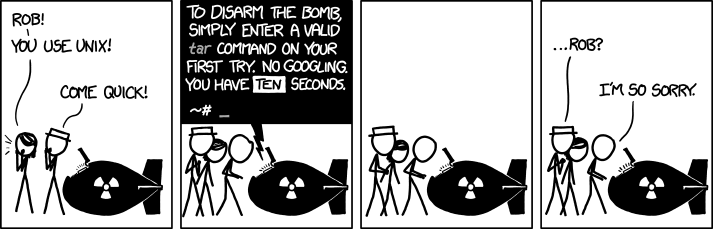
tar.png

xkcd: tar
 

My Computer My Computer

At a glance

Windows 7 Ultimate x64 SP1Intel Core i7 2700K @ 3.5GHz (TurboBoost disa...16GB (4x4GB) Kingston HyperX DDR3 1600MHz @ 1...Nvidia EVGA GeForce GTX 1060 6GB
Computer type
PC/Desktop
Computer Manufacturer/Model Number
N/A (custom-built)
OS
Windows 7 Ultimate x64 SP1
CPU
Intel Core i7 2700K @ 3.5GHz (TurboBoost disabled)
Motherboard
ASUS P8Z68-V/GEN3
Memory
16GB (4x4GB) Kingston HyperX DDR3 1600MHz @ 1333MHz
Graphics Card(s)
Nvidia EVGA GeForce GTX 1060 6GB
Sound Card
Realtek High Definition Audio (motherboard integrated)
Monitor(s) Displays
NEC Multisync EX231W
Screen Resolution
1920x1080 @ 60Hz via DVI-D
Hard Drives
2x Western Digital 1TB SATA3 Caviar Black Internal HDD // 1x WD 500GB USB 3.0 "My Passport Essential" External HDD // 1x WD 1TB USB 3.0 "My Passport Essential" External HDD // 2x WD 2TB USB 3.0 "My Passport Essential" External HDD
PSU
Corsair Professional Series Gold AX850
Case
Antec 300
Cooling
Air-cooling
Keyboard
Steelseries 6Gv2
Mouse
Steelseries Sensei RAW Glossy, Logitech M500
Internet Speed
DSL (AT&T)
Antivirus
Microsoft Security Essentials
Browser
Pale Moon, Mozilla Firefox 12, Opera 12, Chromium, IE9
Other Info
Virtual Machines (VirtualBox):
* Japanese Windows XP Professional SP3
* Japanese Windows 7 Professional SP1

My Computer My Computer

At a glance

Vista, Windows7, Mint Mate, Zorin, Windows 8from 1.6GHz Duo to i7
Computer Manufacturer/Model Number
HP, Dell, Gateway, Toshiba - 4 laptops and 2 desktops
OS
Vista, Windows7, Mint Mate, Zorin, Windows 8
CPU
from 1.6GHz Duo to i7
Monitor(s) Displays
2x HP w2207
Hard Drives
5x HDD, 7x SSD, 12x Externals
Keyboard
with trackball - no mices
Mouse
Trackball mice
Internet Speed
DSL 6000

tar has horrible syntax.

My friend says that's because it dates back to the days of tape archives.
He also says that the modern version is actually the old version with extra functions/programs merged into it. :)

if anything, it is the complex Terminal (command prompt). That takes some time to fathom.

Code:
$sudo apt -agree && haha
LOL, you forgot SU - so it will have no effect.

You get temporary "super powers" using sudo in Ubuntu or Linux Mint.

I think that you forgot to include the haha version.
Did you want the latest version? :D
 

My Computer My Computer

At a glance

W7 Ultimate SP1, LM19.2 MATE, W10 Home 1703, ...AMD Phenom II x6 1100T, 3.3 GHz12GB DDR3 1333 G-Skill (4GB x 2), G-Skill (2G...NVIDIA GeForce GTX 660
Computer type
PC/Desktop
Computer Manufacturer/Model Number
n/a
OS
W7 Ultimate SP1, LM19.2 MATE, W10 Home 1703, W10 Pro 1703 VM, #All 64 bit
CPU
AMD Phenom II x6 1100T, 3.3 GHz
Motherboard
ASUS M4A88T-M/USB3 (AM3)
Memory
12GB DDR3 1333 G-Skill (4GB x 2), G-Skill (2GB x 2)
Graphics Card(s)
NVIDIA GeForce GTX 660
Sound Card
Realtek?
Monitor(s) Displays
Samsung S23B350
Screen Resolution
1920x1080
Hard Drives
WD Green 2TB (SATA), WD Green 3TB (SATA), WD Blue 4TB (SATA), WD Blue 6TB (SATA)
PSU
Cooler Master
Case
Antec GX300 Tower
Cooling
3x Antec TRICOOL 120mm Fans
Mouse
Wired Optical
Internet Speed
DSL
Antivirus
Avast
Browser
Pale Moon (64 bit)
Other Info
2018-12-27 Upgraded HDDs
2015-12-10 Upgraded case, graphics card, storage
2015-08-15 Upgraded motherboard & RAM
2015-07-15 Upgraded LM17.1 to LM17.2
By making it "Look like W7" in a way is almost tantamount to saying -- I'll buy a Ferrari but I want it to "look and feel" just like a Chevy or a pick up.
Hey Jimbo - love your posts. But I don't think this is an apt metaphor for Windows 7 versus Windows 8.

I see it more as a Ferrari in both cases. But in the upscale model, they've taken away all of the dashboard and console controls and put some of them in the center of steering wheel and the rest are hidden in the ashtray. Then they declared the users should like this much better because it's less cluttered. ;)
 

My Computer My Computer

At a glance

Windows 7 Pro 64-bitIntel i5-m5204GB
Computer Manufacturer/Model Number
Lenovo T510
OS
Windows 7 Pro 64-bit
CPU
Intel i5-m520
Memory
4GB
Hard Drives
250G
Status
Not open for further replies.
Back
Top