more than 8GB RAM?

Bob246

New member
Local time
11:43 AM
Messages
13
Hi, running an 8GB laptop with SSD, tbh it's not bad (it was pretty terrible with a regular 2.5" HDD), I'm considering upping to 16GB ram.

I have some folders with over 5,000 images (up to 20,000) in them (all sorts of jpg's), sometimes the computer is slow (10 seconds) to index/thumbnail display them all, and also slightly annoying and occasionally (and inconsistently?), saving new images to these folders can take a few seconds to bring up the 'save as' dialogue box. would increasing to 16GB make this indexing any faster? or is that a cpu thing (an i5). reducing the number of files per dir isn't a preferable solution. The intel HD3000 graphics takes up 1.7GB, so that is effectively 6GB of ram. I don't "power use" but I often have 30+ tabs open in chrome, and firefox open at the same time, plus word and excel.

many thanks
 

My Computer

Computer type
Laptop
Computer Manufacturer/Model Number
Fujitsu
OS
Windows 7 Ultimate x64
CPU
i5
Memory
8GB
Graphics Card(s)
Intel HD3000
Sound Card
Realtek HD
Monitor(s) Displays
VX912
Hard Drives
SSD

My Computer

Computer type
PC/Desktop
Computer Manufacturer/Model Number
HP Desktop & Compaq Laptop
OS
Win 10 x64, Linux Lite, Win 7 x64, BlackArch, & Kali
Hard Drives
Samsung 850 Pro 256Gb,
Hitachi HDD 1Tb,
Crucial MX SSD 250Gb
Segate 3Tb USB 3.0 Ext. Backup HDD
Internet Speed
150Mbps dn, 20Mbps up
Antivirus
Avast Free, Malwarebytes Anti-Exploit & Anti-Ransomware
Browser
Firefox, Chrome, Opera, & VPN
I don't think you will ever use more than 8G. How many memory sticks you have (2x4 or 1x8)?
To find out how much you're using install open_hardware_monitor
402593d1517403227-matching-new-ram-monitor.jpg


Download openhardwaremonitor-v0.8.0
Extract the folder under C:\Program Files (x86)
Open C:\Program Files (x86)\Openhardwaremonitor\OpenHardwareMonitor.exe
Under options set to Run on Windows Start.
My configuration file is attached - hardwaremonitor.config
Rename to OpenHardwareMonitor.config and replace the original one.
 

My Computers

System One System Two

  • Computer type
    PC/Desktop
    Computer Manufacturer/Model Number
    custom build
    OS
    Windows 7 HP 64
    CPU
    i5 6600K - 800MHz to 4200MHz
    Motherboard
    GA-Z170-HD3P
    Memory
    4+4G GSkill DDR4 3000
    Graphics Card(s)
    IG - Intel 530
    Monitor(s) Displays
    Samsung 226BW
    Screen Resolution
    1680x1050
    Hard Drives
    (1) -1 SM951 – 128GB M.2 AHCI PCIe SSD drive for Windows 7 and Lubuntu
    (2) -1 WD SATA 3 - 1T for Data
    (3) -1 WD SATA 3 - 1T for backup
    PSU
    Thermaltake 450W TR2 gold
    Keyboard
    Old and good Chicony mechanical keyboard
    Mouse
    Logitech mX performance - 9 buttons (had to disable some)
    Internet Speed
    500Mb/s
    Browser
    Firefox 64
    Other Info
    TinyWall firewall
  • Computer type
    Laptop
    System Manufacturer/Model Number
    Asus Q550LF
    OS
    Windows 7 Pro
    CPU
    i7-4500U 800MHz to 3.0GHz
    Motherboard
    Asus Q550LF
    Memory
    (4+4)G DDR3 1600
    Graphics Card(s)
    IG intel 4400 + NVIDIA GeForce GT 745M
    Sound Card
    Realtek
    Monitor(s) Displays
    LG Display LP156WF4-SPH1
    Screen Resolution
    1920 x 1080
    Hard Drives
    BX500 120G SSD for Windows and programs +
    1T HDD for data
    Internet Speed
    500 Mb/s
    Browser
    Firefox
    Other Info
    TinyWall firewall
hi, thanks

right now I have this

Number Of SPD Modules 2
Slot #1
Type DDR3
Size 4096 MBytes
Manufacturer Crucial Technology
Max Bandwidth PC3-10700H (667 MHz)
Slot #2
Type DDR3
Size 4096 MBytes
Manufacturer Samsung
Max Bandwidth PC3-10700 (667 MHz)

Task manager brings up that I'm regularly using approx 7-7.8GB out of 8GB

right now under "low-medium" use (actually 45 tabs), I'm using 7.3GB. I've got an extension called 'the great suspender' installed for chrome, which blanks out tabs that haven't been active for a while, so probably actually 25 tabs active
 

My Computer

Computer type
Laptop
Computer Manufacturer/Model Number
Fujitsu
OS
Windows 7 Ultimate x64
CPU
i5
Memory
8GB
Graphics Card(s)
Intel HD3000
Sound Card
Realtek HD
Monitor(s) Displays
VX912
Hard Drives
SSD
I have 16GB of RAM in my system and the only way I've found to utilize more than 8GB is by running multiple Virtual Machines simultaneously.
 

My Computer

Computer type
PC/Desktop
Computer Manufacturer/Model Number
Home Built desktop, Dell G15 5511 Gaming laptop,MS Surface Pro 7 tablet
OS
W10 Pro desktop, W11 laptop, W11 Pro tablet (all 64-bit)
CPU
3.7Ghz 8700K i7, i7-11800H, i7-1065G7
Motherboard
ASUS TUF Z370-Pro Gaming in desktop
Memory
16G desktop, 16G laptop, 4G tablet
Graphics Card(s)
AMD Radeon RX580, RTX 3060, Intel Iris Plus
Sound Card
High Definition Audio (Built-in to mobo)
Monitor(s) Displays
Samsung U32J59 32" (2x), 15.6", 12"
Screen Resolution
3840x2160, 3840x2160, 1920x1080, 2160x1440
Hard Drives
500G SSD for OS; 2T, 10T & 15T HDDs for Data on Desktop, 1TB SSD laptop, 128G SSD tablet.
PSU
Corsair CX 750M
Case
Antec 100
Cooling
CM 212+
Keyboard
IBM Model M - used continuously since 1986
Mouse
Microsoft Pro IntelliMouse
Internet Speed
400M down 8M up
Antivirus
Windows Defender
Browser
FireFox
Other Info
Built my first computer (8Mhz 8088cpu, 640K RAM, 20MB HDD, 2 360K floppy drives) in 1985 and have been building them for myself, relatives and friends ever since.
To install 16G you'll have to replace your existing memory.

Open task manager on processes tab and, with the snipping tool take a snapshot and save the image file to your disk.
Click on the paper clip on the answer window - browse to the saved the image file - upload.
 

My Computers

System One System Two

  • Computer type
    PC/Desktop
    Computer Manufacturer/Model Number
    custom build
    OS
    Windows 7 HP 64
    CPU
    i5 6600K - 800MHz to 4200MHz
    Motherboard
    GA-Z170-HD3P
    Memory
    4+4G GSkill DDR4 3000
    Graphics Card(s)
    IG - Intel 530
    Monitor(s) Displays
    Samsung 226BW
    Screen Resolution
    1680x1050
    Hard Drives
    (1) -1 SM951 – 128GB M.2 AHCI PCIe SSD drive for Windows 7 and Lubuntu
    (2) -1 WD SATA 3 - 1T for Data
    (3) -1 WD SATA 3 - 1T for backup
    PSU
    Thermaltake 450W TR2 gold
    Keyboard
    Old and good Chicony mechanical keyboard
    Mouse
    Logitech mX performance - 9 buttons (had to disable some)
    Internet Speed
    500Mb/s
    Browser
    Firefox 64
    Other Info
    TinyWall firewall
  • Computer type
    Laptop
    System Manufacturer/Model Number
    Asus Q550LF
    OS
    Windows 7 Pro
    CPU
    i7-4500U 800MHz to 3.0GHz
    Motherboard
    Asus Q550LF
    Memory
    (4+4)G DDR3 1600
    Graphics Card(s)
    IG intel 4400 + NVIDIA GeForce GT 745M
    Sound Card
    Realtek
    Monitor(s) Displays
    LG Display LP156WF4-SPH1
    Screen Resolution
    1920 x 1080
    Hard Drives
    BX500 120G SSD for Windows and programs +
    1T HDD for data
    Internet Speed
    500 Mb/s
    Browser
    Firefox
    Other Info
    TinyWall firewall
hi thanks

yeah there is 16GB (2x 8GB) of samsung memory on ebay for around £50, which is a reasonable price

my memory usage now is at 7.6GB, cpu usage at about 5-10% although spikes occasionally
 

Attachments

  • mem.gif
    mem.gif
    42.2 KB · Views: 76

My Computer

Computer type
Laptop
Computer Manufacturer/Model Number
Fujitsu
OS
Windows 7 Ultimate x64
CPU
i5
Memory
8GB
Graphics Card(s)
Intel HD3000
Sound Card
Realtek HD
Monitor(s) Displays
VX912
Hard Drives
SSD
Your CPU usage is also high.

I asked for task manager processes tab image, not performance tab.
Sort by memory usage.
 

My Computers

System One System Two

  • Computer type
    PC/Desktop
    Computer Manufacturer/Model Number
    custom build
    OS
    Windows 7 HP 64
    CPU
    i5 6600K - 800MHz to 4200MHz
    Motherboard
    GA-Z170-HD3P
    Memory
    4+4G GSkill DDR4 3000
    Graphics Card(s)
    IG - Intel 530
    Monitor(s) Displays
    Samsung 226BW
    Screen Resolution
    1680x1050
    Hard Drives
    (1) -1 SM951 – 128GB M.2 AHCI PCIe SSD drive for Windows 7 and Lubuntu
    (2) -1 WD SATA 3 - 1T for Data
    (3) -1 WD SATA 3 - 1T for backup
    PSU
    Thermaltake 450W TR2 gold
    Keyboard
    Old and good Chicony mechanical keyboard
    Mouse
    Logitech mX performance - 9 buttons (had to disable some)
    Internet Speed
    500Mb/s
    Browser
    Firefox 64
    Other Info
    TinyWall firewall
  • Computer type
    Laptop
    System Manufacturer/Model Number
    Asus Q550LF
    OS
    Windows 7 Pro
    CPU
    i7-4500U 800MHz to 3.0GHz
    Motherboard
    Asus Q550LF
    Memory
    (4+4)G DDR3 1600
    Graphics Card(s)
    IG intel 4400 + NVIDIA GeForce GT 745M
    Sound Card
    Realtek
    Monitor(s) Displays
    LG Display LP156WF4-SPH1
    Screen Resolution
    1920 x 1080
    Hard Drives
    BX500 120G SSD for Windows and programs +
    1T HDD for data
    Internet Speed
    500 Mb/s
    Browser
    Firefox
    Other Info
    TinyWall firewall
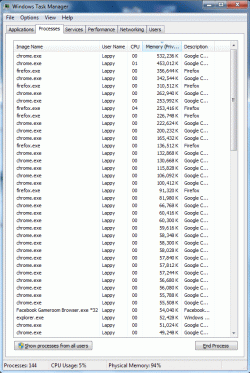
task manager processes looks like-
 

Attachments

  • taskman-process.gif
    taskman-process.gif
    72.2 KB · Views: 0

My Computer

Computer type
Laptop
Computer Manufacturer/Model Number
Fujitsu
OS
Windows 7 Ultimate x64
CPU
i5
Memory
8GB
Graphics Card(s)
Intel HD3000
Sound Card
Realtek HD
Monitor(s) Displays
VX912
Hard Drives
SSD
RAM may not make much of a difference in the speed it takes to open images. But since you're close to the limit in the RAM department, more RAM wouldn't hurt.

I think the biggest factor on the images is the CPU capability. Then again, Windows handles images in like the most asinine way. My mom stuffs a lot of images on her computer and it also takes a few seconds to load them all. I even upgraded the RAM, but that didn't do much.
 

My Computer

Computer type
PC/Desktop
OS
Windows 7 Ultimate x64
What happens if you close Firefox and Chrome?
 

My Computers

System One System Two

  • Computer type
    PC/Desktop
    Computer Manufacturer/Model Number
    custom build
    OS
    Windows 7 HP 64
    CPU
    i5 6600K - 800MHz to 4200MHz
    Motherboard
    GA-Z170-HD3P
    Memory
    4+4G GSkill DDR4 3000
    Graphics Card(s)
    IG - Intel 530
    Monitor(s) Displays
    Samsung 226BW
    Screen Resolution
    1680x1050
    Hard Drives
    (1) -1 SM951 – 128GB M.2 AHCI PCIe SSD drive for Windows 7 and Lubuntu
    (2) -1 WD SATA 3 - 1T for Data
    (3) -1 WD SATA 3 - 1T for backup
    PSU
    Thermaltake 450W TR2 gold
    Keyboard
    Old and good Chicony mechanical keyboard
    Mouse
    Logitech mX performance - 9 buttons (had to disable some)
    Internet Speed
    500Mb/s
    Browser
    Firefox 64
    Other Info
    TinyWall firewall
  • Computer type
    Laptop
    System Manufacturer/Model Number
    Asus Q550LF
    OS
    Windows 7 Pro
    CPU
    i7-4500U 800MHz to 3.0GHz
    Motherboard
    Asus Q550LF
    Memory
    (4+4)G DDR3 1600
    Graphics Card(s)
    IG intel 4400 + NVIDIA GeForce GT 745M
    Sound Card
    Realtek
    Monitor(s) Displays
    LG Display LP156WF4-SPH1
    Screen Resolution
    1920 x 1080
    Hard Drives
    BX500 120G SSD for Windows and programs +
    1T HDD for data
    Internet Speed
    500 Mb/s
    Browser
    Firefox
    Other Info
    TinyWall firewall
I'll try that
 

My Computer

Computer type
Laptop
Computer Manufacturer/Model Number
Fujitsu
OS
Windows 7 Ultimate x64
CPU
i5
Memory
8GB
Graphics Card(s)
Intel HD3000
Sound Card
Realtek HD
Monitor(s) Displays
VX912
Hard Drives
SSD

My Computers

System One System Two

  • Computer type
    PC/Desktop
    Computer Manufacturer/Model Number
    custom build
    OS
    Windows 7 HP 64
    CPU
    i5 6600K - 800MHz to 4200MHz
    Motherboard
    GA-Z170-HD3P
    Memory
    4+4G GSkill DDR4 3000
    Graphics Card(s)
    IG - Intel 530
    Monitor(s) Displays
    Samsung 226BW
    Screen Resolution
    1680x1050
    Hard Drives
    (1) -1 SM951 – 128GB M.2 AHCI PCIe SSD drive for Windows 7 and Lubuntu
    (2) -1 WD SATA 3 - 1T for Data
    (3) -1 WD SATA 3 - 1T for backup
    PSU
    Thermaltake 450W TR2 gold
    Keyboard
    Old and good Chicony mechanical keyboard
    Mouse
    Logitech mX performance - 9 buttons (had to disable some)
    Internet Speed
    500Mb/s
    Browser
    Firefox 64
    Other Info
    TinyWall firewall
  • Computer type
    Laptop
    System Manufacturer/Model Number
    Asus Q550LF
    OS
    Windows 7 Pro
    CPU
    i7-4500U 800MHz to 3.0GHz
    Motherboard
    Asus Q550LF
    Memory
    (4+4)G DDR3 1600
    Graphics Card(s)
    IG intel 4400 + NVIDIA GeForce GT 745M
    Sound Card
    Realtek
    Monitor(s) Displays
    LG Display LP156WF4-SPH1
    Screen Resolution
    1920 x 1080
    Hard Drives
    BX500 120G SSD for Windows and programs +
    1T HDD for data
    Internet Speed
    500 Mb/s
    Browser
    Firefox
    Other Info
    TinyWall firewall
Do you have to have so many tabs open at once? Perhaps if you get in the habit of closing them you will save yourself some ram. Lots of it.
 

My Computers

System One System Two

In addition to Megahertz07, hyperlink regarding Firefox, if you use Firefox Quantum you can tweak about:config to make FF give up RAM when minimized.

To do so:

Enter about:config in your url, confirm you'll be careful.
Copy and paste config.trim_on_minimize into the search bar.
You should now have a blank area.
Right-click in that area & choose> New > Boolean
Enter config.trim_on_minimize > click OK
Click True
Exit about:config
 

My Computer

Computer type
PC/Desktop
Computer Manufacturer/Model Number
HP Desktop & Compaq Laptop
OS
Win 10 x64, Linux Lite, Win 7 x64, BlackArch, & Kali
Hard Drives
Samsung 850 Pro 256Gb,
Hitachi HDD 1Tb,
Crucial MX SSD 250Gb
Segate 3Tb USB 3.0 Ext. Backup HDD
Internet Speed
150Mbps dn, 20Mbps up
Antivirus
Avast Free, Malwarebytes Anti-Exploit & Anti-Ransomware
Browser
Firefox, Chrome, Opera, & VPN
If the user is using 6GB and the graphics chip is using just under 2GB of RAM, then I would think that is good enough reason to upgrade to 12 or 16 GB of RAM.
 

My Computer

Computer type
PC/Desktop
OS
Windows 7 x64, Vista x64, 8.1 smartphone
CPU
Intel E8400 65W 64-bit
Motherboard
Gigabyte EP45-UD3LR
Memory
DDR2 2 x 2GB, 1GB x 2
Graphics Card(s)
XFX Radeon HD5750
Sound Card
AMD High Definition Audio; Realtek High Definition Audio
Monitor(s) Displays
iiyama prolite X2377HDS
Screen Resolution
1920 x 1080
Hard Drives
500GB 7200 rpm Seagate ST3500413AS 16MB, 500GB 5400 rpm Toshiba MQ02ABF050H 32MB, 200GB 7200 rpm Seagate ST3200820AS 8MB, 2TB 7200 rpm Western Digital WD20EZRX 64MB
PSU
Enermax Liberty Modular
Case
Antec P193 Midi Tower
Keyboard
Mionix ZIBAL 60
Mouse
Razer USB 2.0 Diamondback Mouse or Huion Graphics Tablet
Browser
Internet Explorer, Lunascape, Firefox, Opera, Avast Safezone
townsbg - generally yes, but that doesn't seem to be the culprit here. the addon 'the great suspender' does seem to do it's job (like 'auto tab discard' for firefox, only much easier to use). it seems like the main culprit is files per dir. the performance of the laptop really isn't bad, generally. upgrading my ram isn't a big deal to be honest. but going by replies, more ram might not be the solution

I've found a program called XYplorer which can display all files in subdirectories, but one of the problems is I don't want to up/download the same filename twice, saving to the same directory is the only way I know to prevent overwriting the same file (because it give a "filename already exists" box). there's an addon for chrome called "have I downloaded this before", which...sometimes works.
 

My Computer

Computer type
Laptop
Computer Manufacturer/Model Number
Fujitsu
OS
Windows 7 Ultimate x64
CPU
i5
Memory
8GB
Graphics Card(s)
Intel HD3000
Sound Card
Realtek HD
Monitor(s) Displays
VX912
Hard Drives
SSD
I disagree. Once you run out of memory your computer starts using virtual memory which really means loading some of your running programs and files on your hard drive which has proven to be slower than memory even if you are using an SSD. I'm sure that if you started using less tabs, say only 3-4 at a time you'll gain at least 3-4 gb. On just that section of task manager on your screen shot firefox and chrome are taking up over 5 gb of memory. I'm sure that you will save most of that if you minimize tabs. Why don't you at least try it?
 

My Computers

System One System Two

Try the about:config tweak for Firefox, when you minimize to taskbar FF gives up RAM.
I agree with townsbg's RAM description, which is in fact what occurs.

My Mobo has 8gb RAM installed, max permitted. Slot #1 has become inoperative reducing my RAM to 4gb. I cannot run VMWare right now. Programs will load & run, however, they crawl. Task manager shows constant cache (virtual memory) activity and free RAM is close to zero.
 

My Computer

Computer type
PC/Desktop
Computer Manufacturer/Model Number
HP Desktop & Compaq Laptop
OS
Win 10 x64, Linux Lite, Win 7 x64, BlackArch, & Kali
Hard Drives
Samsung 850 Pro 256Gb,
Hitachi HDD 1Tb,
Crucial MX SSD 250Gb
Segate 3Tb USB 3.0 Ext. Backup HDD
Internet Speed
150Mbps dn, 20Mbps up
Antivirus
Avast Free, Malwarebytes Anti-Exploit & Anti-Ransomware
Browser
Firefox, Chrome, Opera, & VPN
I've put in the firefox tweak, will see how it goes

At some point I'll...probably,,try closing some tabs down and see if that affects it. normal running use is 30+ tabs going though (the 'great suspender' means about 2/3 of them are active), apart from the occasional filesave dialogue, performance really isn't that bad (until something else comes up). I don't normally have things like Photoshop running, that might be an extra test
 

My Computer

Computer type
Laptop
Computer Manufacturer/Model Number
Fujitsu
OS
Windows 7 Ultimate x64
CPU
i5
Memory
8GB
Graphics Card(s)
Intel HD3000
Sound Card
Realtek HD
Monitor(s) Displays
VX912
Hard Drives
SSD
Back
Top