Most efficent remote computing software

Duckling

New member
Local time
6:24 PM
Messages
56
The software I've used so far is really horrible and laggy.

Does anyone have a recommendation for software to access computers remotely that doesn't have much lag.
 

My Computer

Computer Manufacturer/Model Number
HP Pavillion dv7-2078ca
OS
Windows 7
CPU
2.00 GHz Intel Core2 Quad Processor Q9000
Memory
8192MB
Graphics Card(s)
ATI Mobility Radeon HD 4650
Sound Card
Altec Lansing with SRS Premium Sound and Sub-Woofer
Monitor(s) Displays
17.3”Diagonal HD+ HD HP LED BrightView Widescreen (1600x900)
Hard Drives
OS: (C:) 453 GB
Data: (D:) 465 GB
RECOVERY: (E:) 12.2 GB
A little more information would be helpful. For example, where are you connecting from an to? What type of internet connection to you have at both ends of the connection, are you going through a firewall, going over a VPN, etc?
 

My Computer

Computer Manufacturer/Model Number
Self-Built in July 2009
OS
Windows 7 Ultimate x64
CPU
Intel Q9550 2.83Ghz OC'd to 3.40Ghz
Motherboard
Gigabyte GA-EP45-UD3R rev. 1.1, F12 BIOS
Memory
8GB G.Skill PI DDR2-800, 4-4-4-12 timings
Graphics Card(s)
EVGA 1280MB Nvidia GeForce GTX570
Sound Card
Realtek ALC899A 8 channel onboard audio
Monitor(s) Displays
23" Acer x233H
Screen Resolution
1920x1080
Hard Drives
Intel X25-M 80GB Gen 2 SSD
Western Digital 1TB Caviar Black, 32MB cache. WD1001FALS
PSU
Corsair 620HX modular
Case
Antec P182
Cooling
stock
Keyboard
ABS M1 Mechanical
Mouse
Logitech G9 Laser Mouse
Internet Speed
15/2 cable modem
Other Info
Windows and Linux enthusiast. Logitech G35 Headset.
Have you ever heard of TeamViewer ?

I have used it many times since Oct. 2008.

Works even with firewalls.

Best part, it is Free for Non-Commercial use.

" Doc " :geek:
 

Attachments

  • TeamViewer.JPG
    TeamViewer.JPG
    27.5 KB · Views: 40

My Computer

Computer type
PC/Desktop
Computer Manufacturer/Model Number
Built them myself, Science Experiments !
OS
Win7 Enterprise, Win7 x86 (Ult 7600), Win7 x64 Ult 7600, TechNet RTM on AMD x64 (2.8Ghz)
CPU
AMD fx8350 4ghz, AMD-32 2400mhz, AMD-64 3200mhz, AMDx64 2.8G
Motherboard
SIS 755, ECS-K8M890M-M (Ult 7600), GigaByte & others
Memory
2gb, 4gb on the Ult 7600, 4gb on Technet RTM, 32gb on FX8350
Graphics Card(s)
Draw my own Graphics, several nVidia cards
Sound Card
on motherboard
Monitor(s) Displays
19" flat scr, 28" I-Inc widescr,22" Emprex Widescr, 23" Acer
Screen Resolution
1280 x 1024, 1440 x 900, 1920 x 1080
Hard Drives
6 pata Ide HD's & 2 Sata HD's
added 80gb external on Ult 7600 computer,
numerous extra 1tb, 2TB, 3Tb SATA HD's
A collection of ext HD Docks w/ HDs
PSU
430w, 550w, 600w, 700, 800, etc
Case
All Generic Full Towers
Cooling
Open Air & a few fans, some w/ colored LEDs
Keyboard
Compaq & Dell recycled from GoodWill
Mouse
Made in China Optical Wired Mouse
Internet Speed
Fast Cable InterNet
Antivirus
AVG Free on 24 different Desktops, NO Problems!
Browser
IE 8 is preferred, but use FireFox sometimes
Other Info
Linksys Routers, switches, & Hubs
Too Many USB Flash Drives to count, Biggest is 64GB !
Eight computers in my home network.
Sixteen computers at my business network.
Linked via TeamViewer !
Lots of old used spare computer parts everywhere!
A little more information would be helpful. For example, where are you connecting from an to? What type of internet connection to you have at both ends of the connection, are you going through a firewall, going over a VPN, etc?
These questions are important, because they impact the quality of your connection, and also will help us to recommend the right tool for you. Do you want a free one, or are you willing to pay. I logmein. But my fav is gotoassist.
 

My Computer

Computer Manufacturer/Model Number
Gigabyte
OS
Windows 7 Ultimate
CPU
Intel Core(TM)2 Quad- Q9550, 2.83GHz
Motherboard
G31M-ES2L
Memory
4GB
Graphics Card(s)
ATI Radeon HD4600
Sound Card
On Board:
Monitor(s) Displays
Acer AL2223W, Acer AL1916
Screen Resolution
1680 x 1050, 1280 x 1024
Hard Drives
160GB
350GB
250GB
250GB
PSU
600W
Case
Cooler Master
Keyboard
Microsoft Laser 6000
Mouse
Logitech Optical Trackman
Internet Speed
1.5MB
Other Info
I am also running a quasar gamatron flux capacitor with twin pulse tronic phasers......jk, I have no such stuff.
I'm willing to pay.
My connection is via teksavvy. Which offers a 5 M DSL connection.
I'm connecting to my house in Ontario from Montreal.
The home in Ontario has Rogers Cable Internet (Which is a 10 M connection, though it seems to be very slow when running on older computers)

I use Norton Firewill on my computer in montreal.
There is no firewall on the computer in ontario that I want to connect to. But I plan to eventually put one up.
 

My Computer

Computer Manufacturer/Model Number
HP Pavillion dv7-2078ca
OS
Windows 7
CPU
2.00 GHz Intel Core2 Quad Processor Q9000
Memory
8192MB
Graphics Card(s)
ATI Mobility Radeon HD 4650
Sound Card
Altec Lansing with SRS Premium Sound and Sub-Woofer
Monitor(s) Displays
17.3”Diagonal HD+ HD HP LED BrightView Widescreen (1600x900)
Hard Drives
OS: (C:) 453 GB
Data: (D:) 465 GB
RECOVERY: (E:) 12.2 GB
@ Duckling,

Try TeamViewer for Free, just Google for the Free download. I have used it from work to home & from home to work. Even set up a saved password on both ends.

It is pretty simple to setup & use. even transfer files back & forth.


" Doc "
:geek:
 

My Computer

Computer type
PC/Desktop
Computer Manufacturer/Model Number
Built them myself, Science Experiments !
OS
Win7 Enterprise, Win7 x86 (Ult 7600), Win7 x64 Ult 7600, TechNet RTM on AMD x64 (2.8Ghz)
CPU
AMD fx8350 4ghz, AMD-32 2400mhz, AMD-64 3200mhz, AMDx64 2.8G
Motherboard
SIS 755, ECS-K8M890M-M (Ult 7600), GigaByte & others
Memory
2gb, 4gb on the Ult 7600, 4gb on Technet RTM, 32gb on FX8350
Graphics Card(s)
Draw my own Graphics, several nVidia cards
Sound Card
on motherboard
Monitor(s) Displays
19" flat scr, 28" I-Inc widescr,22" Emprex Widescr, 23" Acer
Screen Resolution
1280 x 1024, 1440 x 900, 1920 x 1080
Hard Drives
6 pata Ide HD's & 2 Sata HD's
added 80gb external on Ult 7600 computer,
numerous extra 1tb, 2TB, 3Tb SATA HD's
A collection of ext HD Docks w/ HDs
PSU
430w, 550w, 600w, 700, 800, etc
Case
All Generic Full Towers
Cooling
Open Air & a few fans, some w/ colored LEDs
Keyboard
Compaq & Dell recycled from GoodWill
Mouse
Made in China Optical Wired Mouse
Internet Speed
Fast Cable InterNet
Antivirus
AVG Free on 24 different Desktops, NO Problems!
Browser
IE 8 is preferred, but use FireFox sometimes
Other Info
Linksys Routers, switches, & Hubs
Too Many USB Flash Drives to count, Biggest is 64GB !
Eight computers in my home network.
Sixteen computers at my business network.
Linked via TeamViewer !
Lots of old used spare computer parts everywhere!
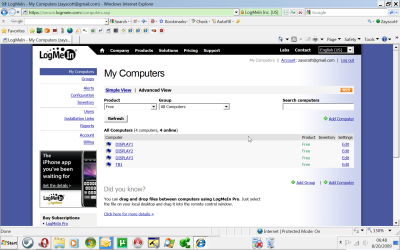
The only trouble with using team viewer free is that someone has to be their on the receiving computer to give the id and password. Seems he needs something that does not require input from the anyone at the computer he is trying to connect to. You can use logmein free, you do not need input from anyone to connect. You just need to add the computer you want to connect to your logmein list. Go to www.logmein.com, and use the logmein free, and install the logmein svc to the computers you want to connect to. Then once you are away, you just sign into your logmein account, click on the "My computers" link, and you will see all the computers you want to connect to. I use it all the time for my clients. I have a paid and a free logmein account. Let me know if you need more help. The screenshot shows some of my computers that I can connect to at ANY TIME without the need for any other persons presence at the computer. This is the free version of logmein.
 

Attachments

  • ScreenShot005.png
    ScreenShot005.png
    122.5 KB · Views: 43

My Computer

Computer Manufacturer/Model Number
Gigabyte
OS
Windows 7 Ultimate
CPU
Intel Core(TM)2 Quad- Q9550, 2.83GHz
Motherboard
G31M-ES2L
Memory
4GB
Graphics Card(s)
ATI Radeon HD4600
Sound Card
On Board:
Monitor(s) Displays
Acer AL2223W, Acer AL1916
Screen Resolution
1680 x 1050, 1280 x 1024
Hard Drives
160GB
350GB
250GB
250GB
PSU
600W
Case
Cooler Master
Keyboard
Microsoft Laser 6000
Mouse
Logitech Optical Trackman
Internet Speed
1.5MB
Other Info
I am also running a quasar gamatron flux capacitor with twin pulse tronic phasers......jk, I have no such stuff.

My Computer

OS
Windows 7 Ultimate x64 build 7600
Hi there

One of the problems with ANY remote software is that the bottleneck - particularly from a HOME computer that you are acessing remotely is usually the UPLOAD speed.

Most ISP's make big noises in their commercials about "How FAST" their Internet connection is - but that's only 1/2 the truth (or maybe lower than 40%).

Most ADSL (aka Broadband) lines are just that ASSYMETRIC. I.E different connection speeds in each direction.


You can get pretty good download speeds but uploads are usually atrocious -- like as slow as 330 / 440 kbs even if your download speed is reasonably fast like 3 or 4 Mb/s -- torrent users might have noticed when trying to SEED apps that the SEED speed is pretty horrible compared with download.

A futher(usually unadvertised) problem is "Contention". The "advertised" speeds are usually the maximum. If there are a lot of users on the connection to the ISP server near where you live then the speeds will degrade -- especially as there is this huge demand now for "Video streaming" all over the place -- until the whole infrastructure is updated don't expect any great improvements -- and unfortunately the costs will go up too.

Even if the remote software compresses the terminal data a typical windows session will need to send a lot of data per screen even if you try and limit the remote sending to 15 bit colour only.

If you can get a FAST upload link then pretty well any piece of decent remote software - RDP / VPN / Tightvnc etc will perform fine.

Even if you are connecting from one LAN to another LAN in different commercial workplaces (not uncommon if you are connecting to a remote clients computer) 10 Gb/s on the whole line for ALL the computers is still quite common so your response from the remote computer won't be lightning fast either especially if for part of the connection between the two lans the "public Internet" has to be used.

Cheers
jimbo
 

My Computer

Computer type
PC/Desktop
Computer Manufacturer/Model Number
Custom built, several laptops HP/ASUS
OS
Linux CENTOS 7 / various Windows OS'es and servers
CPU
Intel i7 Intel i5
Memory
8GB, 16GB
Graphics Card(s)
On Motherboard
Sound Card
Realtek HD audio
Monitor(s) Displays
Apple Cinema display, Samsung LCD
Screen Resolution
1920 X 1080
Hard Drives
4 X 1TB SATA
Mouse
Toshiba wireless laser
Internet Speed
> 20MB up
The only trouble with using team viewer free is that someone has to be their on the receiving computer to give the id and password.

not true, teamviewer can be setup to start as a system service with a predefined password. Just check the options.

Mike
 

My Computer

OS
Windows 7 x64
CPU
Core i7 920 oc'd to (working on this)
Motherboard
eVGA X58 SLI
Memory
DDR3-1600 OCZ Platinum 7-7-7-24
Graphics Card(s)
(2) 9600GT's
Sound Card
On-board
Monitor(s) Displays
(3) Acer 22's
Screen Resolution
1680x1050
Hard Drives
3Ware 9690SA PCIe w/512MB
(4) Patriot 32GB MLC SSD's, RAID 0
(2) WD Black 750GB, RAID 1
PSU
Corsair 750W
Case
CM Stacker 830
Cooling
CM V8 HSF
Keyboard
Logitech wireless
Mouse
Logitech MX wireless
Internet Speed
Redundant, load-balanced DSL+Cable, plus 100mbit seedbox
Other Info
I'm a day trader. You'd be amazed how much CPU power is required to backtest. This is just one of several machines in my home office. I don't play games with PC's, I have a PS3 for that.
Dameware Mini Remote Control is awesome. It is standalone or part of NT Utilities.

You can edit the compression level for quicker response if needed, but I recommend trying at its default. Always been good for me.

http://www.dameware.com/
 

My Computer

Computer Manufacturer/Model Number
self built
OS
7600.20510 x86
CPU
P4 550 3.4 GHz HT running at 3.5 GHz
Motherboard
MSI PM8M3-V (MS-7211 v1.x) Micro-ATX mainboard
Memory
OCZ 2 GB(2x1GB) DDR400mHz running @ 414 mHz
Graphics Card(s)
HIS Radeon HD 3850 IceQ 3 Turbo HDMI Dual DL-DVI AGP
Sound Card
MOTU Traveler firewire studio interface 192 kHz 24 bit
Monitor(s) Displays
22" widescreen Acer X223W LCD, 17" Compaq P75 CRT
Screen Resolution
1680x1050 and 1280x1024
Hard Drives
SATA I x2 WD, 400 GB and 120 GB, SATA 2 WD Caviar Black 1 TB
PSU
350W generic
Case
Cybertronpc, it glows blue
Cooling
stock cpu fan, Ice-Q 3 gpu and system, many case fans
Keyboard
Logitch Classical Keyboard 200
Mouse
Logitech Mediaplay cordless
Internet Speed
1792/448 kbits/sec
Other Info
SATA II PCI fake RAID adapter, 1 GB Readyboost, original ATI Remote Wonder (even works with WMC perfectly), Logitech Rumblepad 2 game controller x2
Have you ever heard of TeamViewer ?

I have used it many times since Oct. 2008.

Works even with firewalls.

Best part, it is Free for Non-Commercial use.

" Doc " :geek:

LISTEN TO THE DOC!

i have been using teamviewer for about 2-3 months now and its awesome!!
 

My Computer

OS
Windows 7 64-bit
CPU
Intel Quad Q8800
Memory
4gb
Graphics Card(s)
GeForce
Hard Drives
800gb
Cooling
3 x Ultra silent 100mm + fan controller
Internet Speed
Sky Max
Teamviewer always drops the connection for me.
 

My Computer

Computer Manufacturer/Model Number
HP Pavillion dv7-2078ca
OS
Windows 7
CPU
2.00 GHz Intel Core2 Quad Processor Q9000
Memory
8192MB
Graphics Card(s)
ATI Mobility Radeon HD 4650
Sound Card
Altec Lansing with SRS Premium Sound and Sub-Woofer
Monitor(s) Displays
17.3”Diagonal HD+ HD HP LED BrightView Widescreen (1600x900)
Hard Drives
OS: (C:) 453 GB
Data: (D:) 465 GB
RECOVERY: (E:) 12.2 GB
Teamviewer always drops the connection for me.


Yes, I have had connection drops, also. But I am sure it was my internet provider's poor quallity service & not teamviewer. My last connection lasted 5 days without interruption until we had a wind storm & lost all electrical power to our area. Therefore connection drop :mad: You might complain to you internet provider to test the service to your locations for weak signal, etc. ;)


" Doc "
 

My Computer

Computer type
PC/Desktop
Computer Manufacturer/Model Number
Built them myself, Science Experiments !
OS
Win7 Enterprise, Win7 x86 (Ult 7600), Win7 x64 Ult 7600, TechNet RTM on AMD x64 (2.8Ghz)
CPU
AMD fx8350 4ghz, AMD-32 2400mhz, AMD-64 3200mhz, AMDx64 2.8G
Motherboard
SIS 755, ECS-K8M890M-M (Ult 7600), GigaByte & others
Memory
2gb, 4gb on the Ult 7600, 4gb on Technet RTM, 32gb on FX8350
Graphics Card(s)
Draw my own Graphics, several nVidia cards
Sound Card
on motherboard
Monitor(s) Displays
19" flat scr, 28" I-Inc widescr,22" Emprex Widescr, 23" Acer
Screen Resolution
1280 x 1024, 1440 x 900, 1920 x 1080
Hard Drives
6 pata Ide HD's & 2 Sata HD's
added 80gb external on Ult 7600 computer,
numerous extra 1tb, 2TB, 3Tb SATA HD's
A collection of ext HD Docks w/ HDs
PSU
430w, 550w, 600w, 700, 800, etc
Case
All Generic Full Towers
Cooling
Open Air & a few fans, some w/ colored LEDs
Keyboard
Compaq & Dell recycled from GoodWill
Mouse
Made in China Optical Wired Mouse
Internet Speed
Fast Cable InterNet
Antivirus
AVG Free on 24 different Desktops, NO Problems!
Browser
IE 8 is preferred, but use FireFox sometimes
Other Info
Linksys Routers, switches, & Hubs
Too Many USB Flash Drives to count, Biggest is 64GB !
Eight computers in my home network.
Sixteen computers at my business network.
Linked via TeamViewer !
Lots of old used spare computer parts everywhere!
Back
Top