Motu Ultralite mk3 Hybrib USB. Causing all sorts of issues and BSOD

bartak101

New member
Local time
3:33 PM
Messages
10
Hi there people.

I plumped for the Ultralite a couple of months ago, mainly because of it's i/o options/price point. When it works it's just what I need. I was aware of Windows driver issues before buying but as my studio/live laptop is kept reletivly stripped back I thought it was worth a stab.

However, it's just not playing nicely. Here's a quick run down of my system:
PC Specialist/Clevo W150HRM
Intel i7 2670QM @ 2.2GHz
8GB RAM
Windows 7 Home Premium 64bit (6.1, Build 7601)
Motu driver version: 4.0.5.5333
Running at 96/24

And a run down of the porblem/s

The laptop has 2x USB3 and 2x USB2, I always (or used to) have NI's Maschine plugged into one of the USB2 slots as it will not work on USB3, the Motu goes in the other USB2 because that won't work in USB3 either. The USB3 slots are used for a Roland A-300 MIDI keyboard, and a hub that has a mouse and a bus power lead for an eSATA drive that is always plugged into the eSATA port.

Problem #1
The Motu and Maschine don't dig each other's company. If I power up, with everything connected, there is no output, no audio runs. I worked thorugh different power up procedures until I came to the working solution of only plugging in the Maschine hardware once the software is running, or a VST instance of it. If i then close the software, with Maschine hardware plgged in, audio stops. This is of course not ideal.

Problem #2
Often, when powering up, without Maschine connected, I will have lots of audio glitching. Opening up Motu's Audio Console, and changing buffer rates a couple of times sorts this. However, playback often starts glitching/DC spiking while running windows audio/Sonar X1 without anything seemingly being changed.

Problem #3
I use Sound Forge pro 10 as my main audo editor, however it now does not work. It crashes if I open it while Sonar or any other audio application is running. I gather this is because it is still set to 44.1 in audio prefrences. When I open the program it changes the Motu's sample rate. If i try to change the sample rate in Soundforge it pretty much flips me off and stays the same. While doin this the other day, Sound Forge hung then I got my first BSOD (mini dump link at bottom).

Basically, the Motu is rather hit or miss. I hate having to dick about unplugging/replugging hardware all the time, and I know how good it would be if it just got along. I'm very close to doing a clean install of the OS and starting again. I've updated (or think I have) the drivers for my Laptop, but it's quite hard to work out from the Clevo site just what I need.

I'm in all day and it would be great if someone could have a look over the mini dump and help me identify what is causing all the grief. Let me know if you need any other info.

Many thanks.
 

My Computer My Computer

At a glance

Windows 7 Home Premium 64bitIntel Core 17-2670QM8GB DDR3Intel HD 3000/nVIDIA® GeForce® GT 555M
Computer Manufacturer/Model Number
Clevo W150HRM
OS
Windows 7 Home Premium 64bit
CPU
Intel Core 17-2670QM
Motherboard
Clevo W150HRM
Memory
8GB DDR3
Graphics Card(s)
Intel HD 3000/nVIDIA® GeForce® GT 555M
Sound Card
Motu Ultralite mk3 Hybrid
Monitor(s) Displays
n/a
Hard Drives
80GB INTEL® 320 SERIES SSD
PSU
n/a
Case
n/a
Cooling
n/a
Welcome aboard.
Code:
*******************************************************************************
*                                                                             *
*                        Bugcheck Analysis                                    *
*                                                                             *
*******************************************************************************

Use !analyze -v to get detailed debugging information.

[COLOR=Red]BugCheck 19[/COLOR], {3, fffff80002e6caa0, fffaf80002e1caa0, fff9f80002e1caa0}

[COLOR=Red]Probably caused by : Pool_Corruption[/COLOR] ( nt!ExDeferredFreePool+a53 )

Followup: Pool_corruption
---------

4: kd> !analyze -v
*******************************************************************************
*                                                                             *
*                        Bugcheck Analysis                                    *
*                                                                             *
*******************************************************************************

BAD_POOL_HEADER (19)
The pool is already corrupt at the time of the current request.
This may or may not be due to the caller.
The internal pool links must be walked to figure out a possible cause of
the problem, and then [B][COLOR=Red]special pool applied to the suspect tags or the driver
verifier to a suspect driver[/COLOR][/B].
In such a situation, it is better to enable Driver Verifier to monitor the drivers.

Driver Verifier - Enable and Disable
Run Driver Verifier for 24 hours or the occurrence of the next crash, whichever is earlier.

Let us know the results, with the subsequent crash dumps, if any.
 

My Computer My Computer

At a glance

Microsoft Windows 10 Pro Insider Preview 64-bitIntel(R) Core(TM) i3-4130 CPU @ 3.40GHzCorsair Vengence 4GB x2 (8.00GB Dual-Channel ...2047MB GeForce GTS 450 (ZOTAC International)
Computer type
PC/Desktop
Computer Manufacturer/Model Number
Self Assembled
OS
Microsoft Windows 10 Pro Insider Preview 64-bit
CPU
Intel(R) Core(TM) i3-4130 CPU @ 3.40GHz
Motherboard
Gigabyte Technology Co., Ltd. B85M-D3H
Memory
Corsair Vengence 4GB x2 (8.00GB Dual-Channel DDR3 @ 798MHz)
Graphics Card(s)
2047MB GeForce GTS 450 (ZOTAC International)
Sound Card
Onboard (Realtek High Definition Audio)
Monitor(s) Displays
LG Flatron E2040T
Screen Resolution
1600x900
Hard Drives
Western Digital 1 TB
Seagate 500 GB
PSU
Corsair VS550
Case
Cooler Master K380
Cooling
Cooler Master Seidon 120V Plus
Keyboard
Logitech MK260r
Mouse
Logitech MK260r
Internet Speed
PMPL Broadband
Antivirus
Windows Defender + MBAM
Browser
Firefox
Other Info
Dell Studio 15" Laptop
Ok, will do. Cheers for the reply.
 

My Computer My Computer

At a glance

Windows 7 Home Premium 64bitIntel Core 17-2670QM8GB DDR3Intel HD 3000/nVIDIA® GeForce® GT 555M
Computer Manufacturer/Model Number
Clevo W150HRM
OS
Windows 7 Home Premium 64bit
CPU
Intel Core 17-2670QM
Motherboard
Clevo W150HRM
Memory
8GB DDR3
Graphics Card(s)
Intel HD 3000/nVIDIA® GeForce® GT 555M
Sound Card
Motu Ultralite mk3 Hybrid
Monitor(s) Displays
n/a
Hard Drives
80GB INTEL® 320 SERIES SSD
PSU
n/a
Case
n/a
Cooling
n/a
Ok, just had a BSOD. Audio had been a bit hit and miss after enabling Driver Verifier, and the compuer was failing to shut down fully. The BSOD occured when powering up the Motu, once the computer was up and running and signed in.

Here's the new dump.

Cheers.
 

My Computer My Computer

At a glance

Windows 7 Home Premium 64bitIntel Core 17-2670QM8GB DDR3Intel HD 3000/nVIDIA® GeForce® GT 555M
Computer Manufacturer/Model Number
Clevo W150HRM
OS
Windows 7 Home Premium 64bit
CPU
Intel Core 17-2670QM
Motherboard
Clevo W150HRM
Memory
8GB DDR3
Graphics Card(s)
Intel HD 3000/nVIDIA® GeForce® GT 555M
Sound Card
Motu Ultralite mk3 Hybrid
Monitor(s) Displays
n/a
Hard Drives
80GB INTEL® 320 SERIES SSD
PSU
n/a
Case
n/a
Cooling
n/a
Yes, it is caused on Motu :)
Code:
fffff880`03368c08  fffff880`0637b323Unable to load image \SystemRoot\system32\drivers\Motufwa64.sys, Win32 error 0n2
[COLOR=Red]*** WARNING: Unable to verify timestamp for Motufwa64.sys
*** ERROR: Module load completed but symbols could not be loaded for Motufwa64.sys
 Motufwa64+0x38323[/COLOR]
Uninstall the FireWire, and see if it is crashing anymore or not.
 

My Computer My Computer

At a glance

Microsoft Windows 10 Pro Insider Preview 64-bitIntel(R) Core(TM) i3-4130 CPU @ 3.40GHzCorsair Vengence 4GB x2 (8.00GB Dual-Channel ...2047MB GeForce GTS 450 (ZOTAC International)
Computer type
PC/Desktop
Computer Manufacturer/Model Number
Self Assembled
OS
Microsoft Windows 10 Pro Insider Preview 64-bit
CPU
Intel(R) Core(TM) i3-4130 CPU @ 3.40GHz
Motherboard
Gigabyte Technology Co., Ltd. B85M-D3H
Memory
Corsair Vengence 4GB x2 (8.00GB Dual-Channel DDR3 @ 798MHz)
Graphics Card(s)
2047MB GeForce GTS 450 (ZOTAC International)
Sound Card
Onboard (Realtek High Definition Audio)
Monitor(s) Displays
LG Flatron E2040T
Screen Resolution
1600x900
Hard Drives
Western Digital 1 TB
Seagate 500 GB
PSU
Corsair VS550
Case
Cooler Master K380
Cooling
Cooler Master Seidon 120V Plus
Keyboard
Logitech MK260r
Mouse
Logitech MK260r
Internet Speed
PMPL Broadband
Antivirus
Windows Defender + MBAM
Browser
Firefox
Other Info
Dell Studio 15" Laptop
Do you mean uninstall just the FW componant and leave the USB driver? Uninstall Program only gives me the single 'Motu Hardware' option.

I've located the file in System 32, tho the file contains more uppercase letters eg. MotuFWA64.sys.

Just to clarify, my system doesn't have FW.
 

My Computer My Computer

At a glance

Windows 7 Home Premium 64bitIntel Core 17-2670QM8GB DDR3Intel HD 3000/nVIDIA® GeForce® GT 555M
Computer Manufacturer/Model Number
Clevo W150HRM
OS
Windows 7 Home Premium 64bit
CPU
Intel Core 17-2670QM
Motherboard
Clevo W150HRM
Memory
8GB DDR3
Graphics Card(s)
Intel HD 3000/nVIDIA® GeForce® GT 555M
Sound Card
Motu Ultralite mk3 Hybrid
Monitor(s) Displays
n/a
Hard Drives
80GB INTEL® 320 SERIES SSD
PSU
n/a
Case
n/a
Cooling
n/a
bartak101, Motufwa64 means Motu firewire. Please have a check ...
Driver Reference Table - Motufwa64.sys

You uninstall whatever is there under Motu.

If USB devices cause any problem, it will not be a big toruble later. OK?
 

My Computer My Computer

At a glance

Microsoft Windows 10 Pro Insider Preview 64-bitIntel(R) Core(TM) i3-4130 CPU @ 3.40GHzCorsair Vengence 4GB x2 (8.00GB Dual-Channel ...2047MB GeForce GTS 450 (ZOTAC International)
Computer type
PC/Desktop
Computer Manufacturer/Model Number
Self Assembled
OS
Microsoft Windows 10 Pro Insider Preview 64-bit
CPU
Intel(R) Core(TM) i3-4130 CPU @ 3.40GHz
Motherboard
Gigabyte Technology Co., Ltd. B85M-D3H
Memory
Corsair Vengence 4GB x2 (8.00GB Dual-Channel DDR3 @ 798MHz)
Graphics Card(s)
2047MB GeForce GTS 450 (ZOTAC International)
Sound Card
Onboard (Realtek High Definition Audio)
Monitor(s) Displays
LG Flatron E2040T
Screen Resolution
1600x900
Hard Drives
Western Digital 1 TB
Seagate 500 GB
PSU
Corsair VS550
Case
Cooler Master K380
Cooling
Cooler Master Seidon 120V Plus
Keyboard
Logitech MK260r
Mouse
Logitech MK260r
Internet Speed
PMPL Broadband
Antivirus
Windows Defender + MBAM
Browser
Firefox
Other Info
Dell Studio 15" Laptop
Ok, think I'm with you. I'll uninstall the entire soundcard run the system with Driver Verifier running and see if there's any more crashes.
 

My Computer My Computer

At a glance

Windows 7 Home Premium 64bitIntel Core 17-2670QM8GB DDR3Intel HD 3000/nVIDIA® GeForce® GT 555M
Computer Manufacturer/Model Number
Clevo W150HRM
OS
Windows 7 Home Premium 64bit
CPU
Intel Core 17-2670QM
Motherboard
Clevo W150HRM
Memory
8GB DDR3
Graphics Card(s)
Intel HD 3000/nVIDIA® GeForce® GT 555M
Sound Card
Motu Ultralite mk3 Hybrid
Monitor(s) Displays
n/a
Hard Drives
80GB INTEL® 320 SERIES SSD
PSU
n/a
Case
n/a
Cooling
n/a
Ok, just bluescreened while uninstalling Motu Hardware though Control Panel/Uninstall a program.

'Motu Hardware' is no longer on the list.
 

My Computer My Computer

At a glance

Windows 7 Home Premium 64bitIntel Core 17-2670QM8GB DDR3Intel HD 3000/nVIDIA® GeForce® GT 555M
Computer Manufacturer/Model Number
Clevo W150HRM
OS
Windows 7 Home Premium 64bit
CPU
Intel Core 17-2670QM
Motherboard
Clevo W150HRM
Memory
8GB DDR3
Graphics Card(s)
Intel HD 3000/nVIDIA® GeForce® GT 555M
Sound Card
Motu Ultralite mk3 Hybrid
Monitor(s) Displays
n/a
Hard Drives
80GB INTEL® 320 SERIES SSD
PSU
n/a
Case
n/a
Cooling
n/a
the last one happened during uninstallation only?

It is not showing any cause though.

Noe wait and see the situation. If it crashes again, we may need to enable verifier once again.
 

My Computer My Computer

At a glance

Microsoft Windows 10 Pro Insider Preview 64-bitIntel(R) Core(TM) i3-4130 CPU @ 3.40GHzCorsair Vengence 4GB x2 (8.00GB Dual-Channel ...2047MB GeForce GTS 450 (ZOTAC International)
Computer type
PC/Desktop
Computer Manufacturer/Model Number
Self Assembled
OS
Microsoft Windows 10 Pro Insider Preview 64-bit
CPU
Intel(R) Core(TM) i3-4130 CPU @ 3.40GHz
Motherboard
Gigabyte Technology Co., Ltd. B85M-D3H
Memory
Corsair Vengence 4GB x2 (8.00GB Dual-Channel DDR3 @ 798MHz)
Graphics Card(s)
2047MB GeForce GTS 450 (ZOTAC International)
Sound Card
Onboard (Realtek High Definition Audio)
Monitor(s) Displays
LG Flatron E2040T
Screen Resolution
1600x900
Hard Drives
Western Digital 1 TB
Seagate 500 GB
PSU
Corsair VS550
Case
Cooler Master K380
Cooling
Cooler Master Seidon 120V Plus
Keyboard
Logitech MK260r
Mouse
Logitech MK260r
Internet Speed
PMPL Broadband
Antivirus
Windows Defender + MBAM
Browser
Firefox
Other Info
Dell Studio 15" Laptop
Yeah, the uninstillation was still running, and it bluescreened.

So I currently have Verifier off, the soundcard uninstalled and not showing up in device manager. There are no Motu .dlls in system32/drivers tho there are in system32/DriverStore.

Are we just testing if anything other than Motu software is playing up?

Thanks again Arc for all your help on this.
 

My Computer My Computer

At a glance

Windows 7 Home Premium 64bitIntel Core 17-2670QM8GB DDR3Intel HD 3000/nVIDIA® GeForce® GT 555M
Computer Manufacturer/Model Number
Clevo W150HRM
OS
Windows 7 Home Premium 64bit
CPU
Intel Core 17-2670QM
Motherboard
Clevo W150HRM
Memory
8GB DDR3
Graphics Card(s)
Intel HD 3000/nVIDIA® GeForce® GT 555M
Sound Card
Motu Ultralite mk3 Hybrid
Monitor(s) Displays
n/a
Hard Drives
80GB INTEL® 320 SERIES SSD
PSU
n/a
Case
n/a
Cooling
n/a
Are we just testing if anything other than Motu software is playing up?
Exactly :) As Motu is the prima facie reason.

Without Motu, if the crashes are still there, we will search for the causes. But if there is no further crashes, then, Motu is the culprit here, unfortunately :confused:
 

My Computer My Computer

At a glance

Microsoft Windows 10 Pro Insider Preview 64-bitIntel(R) Core(TM) i3-4130 CPU @ 3.40GHzCorsair Vengence 4GB x2 (8.00GB Dual-Channel ...2047MB GeForce GTS 450 (ZOTAC International)
Computer type
PC/Desktop
Computer Manufacturer/Model Number
Self Assembled
OS
Microsoft Windows 10 Pro Insider Preview 64-bit
CPU
Intel(R) Core(TM) i3-4130 CPU @ 3.40GHz
Motherboard
Gigabyte Technology Co., Ltd. B85M-D3H
Memory
Corsair Vengence 4GB x2 (8.00GB Dual-Channel DDR3 @ 798MHz)
Graphics Card(s)
2047MB GeForce GTS 450 (ZOTAC International)
Sound Card
Onboard (Realtek High Definition Audio)
Monitor(s) Displays
LG Flatron E2040T
Screen Resolution
1600x900
Hard Drives
Western Digital 1 TB
Seagate 500 GB
PSU
Corsair VS550
Case
Cooler Master K380
Cooling
Cooler Master Seidon 120V Plus
Keyboard
Logitech MK260r
Mouse
Logitech MK260r
Internet Speed
PMPL Broadband
Antivirus
Windows Defender + MBAM
Browser
Firefox
Other Info
Dell Studio 15" Laptop
Been fine so far. Will continue to use it this evening and report in the morning.

Thanks for your help today.
 

My Computer My Computer

At a glance

Windows 7 Home Premium 64bitIntel Core 17-2670QM8GB DDR3Intel HD 3000/nVIDIA® GeForce® GT 555M
Computer Manufacturer/Model Number
Clevo W150HRM
OS
Windows 7 Home Premium 64bit
CPU
Intel Core 17-2670QM
Motherboard
Clevo W150HRM
Memory
8GB DDR3
Graphics Card(s)
Intel HD 3000/nVIDIA® GeForce® GT 555M
Sound Card
Motu Ultralite mk3 Hybrid
Monitor(s) Displays
n/a
Hard Drives
80GB INTEL® 320 SERIES SSD
PSU
n/a
Case
n/a
Cooling
n/a
Hey Arc, here's an update regarding the issue

It seemed clear that it was the Motu driver and other bloat causing issues so I decided to do a clean install of Windows.

After a suggestion on the Motu forums I finally tracked down the updated BIOS and EC. Clevo make this difficult for fair reason. Anyone interested should check out notebookreview.com forums. After double checking to make sure they were the right ones, the update went fine.

I had already made sure I had the latest drivers for my system. Most were installed before the BIOS update, but appear to still be working.

I also noticed Motu put up a firmware update v1.06 two days ago. It's in the downloads section on the Ultralite's page on the Motu site. So that's been installed, plus the latest drivers for the soundcard v.4.0.5.533.

I also noticed on the Native Instruments forum a post buy one of their gurus ew, about having to install the first Maschine controller driver off the cd in order for new drivers to work. Seems obvious, but maybe that's something i missed on the last OS install. So that was included on the new install of Maschine, which was then updated to v1.8.1, with the separate Maschine controller driver v3.0.1, and the latest NI controller driver. Think it's v.1.5.1.

They are both currently working being plugged in, the Motu powered up, on startup. The audio is also continuing to run when the Maschine software is closed. These are two things that wouldn't work before.

I have noticed that I need to open the Motu Audio Console straight after startup and before running any audio. This isn't too much bother.

So I've just installed Sonar X1 and will continue to get the system back up to speed. Will get back if anything goes wrong, or if it stays stable.

Thanks for all your help so far.
 

My Computer My Computer

At a glance

Windows 7 Home Premium 64bitIntel Core 17-2670QM8GB DDR3Intel HD 3000/nVIDIA® GeForce® GT 555M
Computer Manufacturer/Model Number
Clevo W150HRM
OS
Windows 7 Home Premium 64bit
CPU
Intel Core 17-2670QM
Motherboard
Clevo W150HRM
Memory
8GB DDR3
Graphics Card(s)
Intel HD 3000/nVIDIA® GeForce® GT 555M
Sound Card
Motu Ultralite mk3 Hybrid
Monitor(s) Displays
n/a
Hard Drives
80GB INTEL® 320 SERIES SSD
PSU
n/a
Case
n/a
Cooling
n/a
You are welcome, and best of luck.

Frankly speaking, you have done a job well done.
 

My Computer My Computer

At a glance

Microsoft Windows 10 Pro Insider Preview 64-bitIntel(R) Core(TM) i3-4130 CPU @ 3.40GHzCorsair Vengence 4GB x2 (8.00GB Dual-Channel ...2047MB GeForce GTS 450 (ZOTAC International)
Computer type
PC/Desktop
Computer Manufacturer/Model Number
Self Assembled
OS
Microsoft Windows 10 Pro Insider Preview 64-bit
CPU
Intel(R) Core(TM) i3-4130 CPU @ 3.40GHz
Motherboard
Gigabyte Technology Co., Ltd. B85M-D3H
Memory
Corsair Vengence 4GB x2 (8.00GB Dual-Channel DDR3 @ 798MHz)
Graphics Card(s)
2047MB GeForce GTS 450 (ZOTAC International)
Sound Card
Onboard (Realtek High Definition Audio)
Monitor(s) Displays
LG Flatron E2040T
Screen Resolution
1600x900
Hard Drives
Western Digital 1 TB
Seagate 500 GB
PSU
Corsair VS550
Case
Cooler Master K380
Cooling
Cooler Master Seidon 120V Plus
Keyboard
Logitech MK260r
Mouse
Logitech MK260r
Internet Speed
PMPL Broadband
Antivirus
Windows Defender + MBAM
Browser
Firefox
Other Info
Dell Studio 15" Laptop
Hi there, me again.

Ok, so just had my first BSOD since the last update. Let me get you up to speed.

So, Maschine and the Motu seem to still be working ok together tho I am having to observe a few rituals in order to get them to play.

On startup of each program I have to open up the driver panel (I'm using ASIO at the moment, more on that in a bit) and wait for a few seconds until the dialog shifts position on the screen a touch. Seemingly 'shaking hands' with the audio driver. I usually have to do this more than once in order to get audio playback. However, it seems that once a link has been established the programs work fine. This is annoying, but I recall having to do the same with NI's Audio Kontrol 1 before they sorted out the drivers.

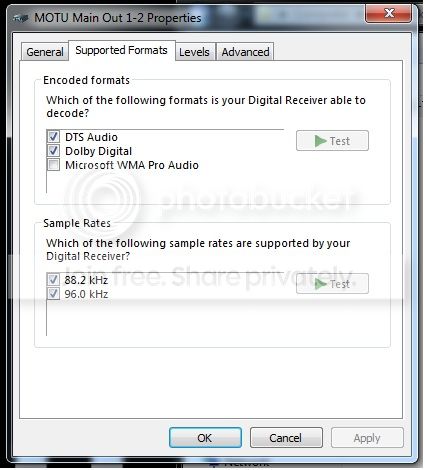
My main issue now is regarding sample rates and Windows audio. I would prefer to work in 96kHz 24bit, and as a result choose that sample rate in the Motu Audio Console. As I already stated Sonar and Maschine don't seem to mind this too much. However, if I try to play windows audio or a youtube video etc I more often than not get silence. At first my internet browser would try to change the rate to 44.1, so I assumed there must be an option in windows audio to choose 96k. I was right.

motu_01.jpg


After I first encountered Windows audio issues I checked these properties. 88 and 96 weren't checked, 'A ha' I thought, this must be it, simple. No change, indeed, sometimes they decide to un-check themselves. They now seem to remain checked.

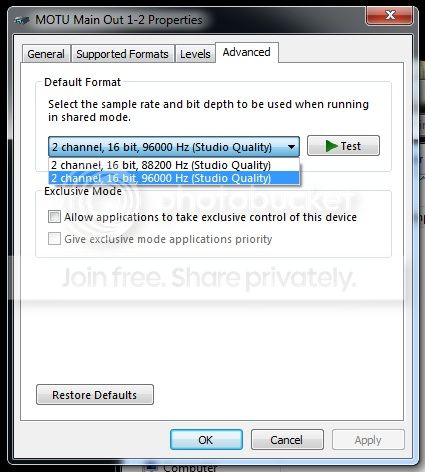
motu_02.jpg


After reading yet more posts by people having issues with this card I found out about the advanced tab. This only appears when 'Use Wave RT for Windows audio' is checked in the audio console. This only gives me two options when the Motu is set to 96k, see above. The fact that it's only offering 16bit is the only issue I've found that may be the key, although there seems no way to change this. Coincidentally, if the motu is set to 44.1 it offers me 24 bit 44.1 and 48kHz options. Also, the Advanced tab now remains available whether Wave RT is enabled or not.

Just to clarify, I have tried seemingly all the various setups for this card. Wave RT on/off, using that in conjunction with Sonar's WDM and ASIO drivers, various sample rates the list seems pretty vast.

There really doesn't seem to be a pattern to all this, sometimes audio works in Firefox, more often it doesn't. Sometimes a 96k audio clip will play through Media Player, sometimes without conversion and more often silence and a stuck playback marker. This is massively frustrating because it's making finding a working solution really difficult.

You know you're getting tired of this when a BSOD occurs and you consider it a break through. 'Finally, some info'. The SC was set to 96k, I opened Google Chrome and chose a video on the BBC website. The Motu's LCD flashed over to 44, a quiet, high pitched sequel and the BSOD.

111412-7160-01.dmp

I'm quite certain that it's sample rates causing the grief, but I'm at a loss. Is there another check box lurking somewhere I've missed?

Thanks again.
 

My Computer My Computer

At a glance

Windows 7 Home Premium 64bitIntel Core 17-2670QM8GB DDR3Intel HD 3000/nVIDIA® GeForce® GT 555M
Computer Manufacturer/Model Number
Clevo W150HRM
OS
Windows 7 Home Premium 64bit
CPU
Intel Core 17-2670QM
Motherboard
Clevo W150HRM
Memory
8GB DDR3
Graphics Card(s)
Intel HD 3000/nVIDIA® GeForce® GT 555M
Sound Card
Motu Ultralite mk3 Hybrid
Monitor(s) Displays
n/a
Hard Drives
80GB INTEL® 320 SERIES SSD
PSU
n/a
Case
n/a
Cooling
n/a
Code:
*******************************************************************************
*                                                                             *
*                        Bugcheck Analysis                                    *
*                                                                             *
*******************************************************************************

Use !analyze -v to get detailed debugging information.

BugCheck D1, {fffffa8015e00020, 2, 0, fffff88004f3bb5c}

Probably caused by : usbehci.sys ( usbehci!EHCI_InternalPollHsIsoEndpoint+5d8 )

Followup: MachineOwner
---------

0: kd> !analyze -v
*******************************************************************************
*                                                                             *
*                        Bugcheck Analysis                                    *
*                                                                             *
*******************************************************************************

DRIVER_IRQL_NOT_LESS_OR_EQUAL (d1)
An attempt was made to access a pageable (or completely invalid) address at an
interrupt request level (IRQL) that is too high.  This is usually
caused by drivers using improper addresses.
If kernel debugger is available get stack backtrace.
Arguments:
Arg1: fffffa8015e00020, memory referenced
Arg2: 0000000000000002, IRQL
Arg3: 0000000000000000, value 0 = read operation, 1 = write operation
Arg4: fffff88004f3bb5c, address which referenced memory

Debugging Details:
------------------


READ_ADDRESS: GetPointerFromAddress: unable to read from fffff80002f0a100
GetUlongFromAddress: unable to read from fffff80002f0a1c0
 fffffa8015e00020 Nonpaged pool

CURRENT_IRQL:  2

FAULTING_IP: 
usbehci!EHCI_InternalPollHsIsoEndpoint+5d8
fffff880`04f3bb5c 837f10ff        cmp     dword ptr [rdi+10h],0FFFFFFFFh

CUSTOMER_CRASH_COUNT:  1

DEFAULT_BUCKET_ID:  WIN7_DRIVER_FAULT

BUGCHECK_STR:  0xD1

PROCESS_NAME:  System

TAG_NOT_DEFINED_c000000f:  FFFFF80000BA2FB0

TRAP_FRAME:  fffff80000b9c7f0 -- (.trap 0xfffff80000b9c7f0)
NOTE: The trap frame does not contain all registers.
Some register values may be zeroed or incorrect.
rax=fffffa8015e00010 rbx=0000000000000000 rcx=fffffa8007d79440
rdx=000000004f444648 rsi=0000000000000000 rdi=0000000000000000
rip=fffff88004f3bb5c rsp=fffff80000b9c980 rbp=fffffa8007347928
 r8=000000004f444648  r9=fffffa8007340718 r10=0000000000000000
r11=fffffa8007218350 r12=0000000000000000 r13=0000000000000000
r14=0000000000000000 r15=0000000000000000
iopl=0         nv up ei ng nz na pe nc
usbehci!EHCI_InternalPollHsIsoEndpoint+0x5d8:
fffff880`04f3bb5c 837f10ff        cmp     dword ptr [rdi+10h],0FFFFFFFFh ds:00000000`00000010=????????
Resetting default scope

LAST_CONTROL_TRANSFER:  from fffff80002cda569 to fffff80002cdafc0

STACK_TEXT:  
fffff800`00b9c6a8 fffff800`02cda569 : 00000000`0000000a fffffa80`15e00020 00000000`00000002 00000000`00000000 : nt!KeBugCheckEx
fffff800`00b9c6b0 fffff800`02cd91e0 : 00000000`64407d0d fffffa80`07aed1a0 00000000`4f444648 fffffa80`07340718 : nt!KiBugCheckDispatch+0x69
fffff800`00b9c7f0 fffff880`04f3bb5c : fffffa80`07340718 fffffa80`07aee6a0 fffffa80`0a2a5da0 fffffa80`08f74140 : nt!KiPageFault+0x260
fffff800`00b9c980 fffff880`04f43e08 : fffffa80`07218258 fffffa80`07218258 fffffa80`06d03701 00000000`00000000 : usbehci!EHCI_InternalPollHsIsoEndpoint+0x5d8
fffff800`00b9ca30 fffff880`04f4be8b : 00000000`00000002 fffffa80`07aed1a0 00000000`00000000 00000000`00000000 : usbehci!EHCI_PollEndpoint+0xb8
fffff800`00b9ca70 fffff880`04f509d1 : 00000000`00000000 00000000`00000004 fffffa80`07218010 fffffa80`07aed050 : USBPORT!MPf_PollEndpoint+0x9b
fffff800`00b9caa0 fffff880`04f5c077 : fffffa80`07aed1a0 00000000`00000000 fffffa80`0000000e 00000000`00000000 : USBPORT!USBPORT_iSetGlobalEndpointStateTx+0x7c1
fffff800`00b9cb00 fffff880`04f4cf89 : fffffa80`07aed050 00000000`00000000 fffffa80`07aeda02 fffffa80`07aeda18 : USBPORT!USBPORT_Core_UsbHcIntDpc_Worker+0x1c3
fffff800`00b9cb60 fffff800`02ce56ec : fffff800`02e4de80 fffffa80`07aeda18 fffffa80`07aeda30 00000000`00000000 : USBPORT!USBPORT_Xdpc_Worker+0x1d9
fffff800`00b9cb90 fffff800`02cd2cca : fffff800`02e4de80 fffff800`02e5bcc0 00000000`00000000 fffff880`04f4cdb0 : nt!KiRetireDpcList+0x1bc
fffff800`00b9cc40 00000000`00000000 : fffff800`00b9d000 fffff800`00b97000 fffff800`00b9cc00 00000000`00000000 : nt!KiIdleLoop+0x5a


STACK_COMMAND:  kb

FOLLOWUP_IP: 
usbehci!EHCI_InternalPollHsIsoEndpoint+5d8
fffff880`04f3bb5c 837f10ff        cmp     dword ptr [rdi+10h],0FFFFFFFFh

SYMBOL_STACK_INDEX:  3

SYMBOL_NAME:  usbehci!EHCI_InternalPollHsIsoEndpoint+5d8

FOLLOWUP_NAME:  MachineOwner

MODULE_NAME: usbehci

IMAGE_NAME:  usbehci.sys

DEBUG_FLR_IMAGE_TIMESTAMP:  4d8c0c00

FAILURE_BUCKET_ID:  X64_0xD1_usbehci!EHCI_InternalPollHsIsoEndpoint+5d8

BUCKET_ID:  X64_0xD1_usbehci!EHCI_InternalPollHsIsoEndpoint+5d8

Followup: MachineOwner
---------

0: kd> lmvm usbehci
start             end                 module name
fffff880`04f39000 fffff880`04f4a000   usbehci    (pdb symbols)          c:\symcache\usbehci.pdb\C17DE2202F204C9A842E60915B27E0CB1\usbehci.pdb
    Loaded symbol image file: usbehci.sys
    Mapped memory image file: c:\symcache\usbehci.sys\4D8C0C0011000\usbehci.sys
    Image path: \SystemRoot\system32\drivers\usbehci.sys
    Image name: usbehci.sys
    Timestamp:        Fri Mar 25 08:59:04 2011 (4D8C0C00)
    CheckSum:         0000DE59
    ImageSize:        00011000
    File version:     6.1.7601.17586
    Product version:  6.1.7601.17586
    File flags:       0 (Mask 3F)
    File OS:          40004 NT Win32
    File type:        2.0 Dll
    File date:        00000000.00000000
    Translations:     0409.04b0
    CompanyName:      Microsoft Corporation
    ProductName:      Microsoft® Windows® Operating System
    InternalName:     USBEHCI.sys
    OriginalFilename: USBEHCI.sys
    ProductVersion:   6.1.7601.17586
    FileVersion:      6.1.7601.17586 (win7sp1_gdr.110324-1501)
    FileDescription:  EHCI eUSB Miniport Driver
    LegalCopyright:   © Microsoft Corporation. All rights reserved.
For the port, first, uninstall and reinstall the USB ports drivers.

  1. Right click on Computer icon > manage. It will open the computer management window.
  2. Click on "Device Manager" in the left pane, it will list all installed devices up.
  3. Expand "USB Serial Bus Controllers" by clicking on the triangle in front of it.
  4. Click on one item to select, then right click and uninstall.
  5. Do the same for all.
  6. Restart the computer.
  7. At restart, windows will auto configure the appropriate drivers.
And, Disable USB Selective Suspense too.
USB Selective Suspend - Turn On or Off


For the devices, first, detach all the USB devices other than the keyboard and mouse.
Then, Update the drivers for them all, including the keyboard and mouse, if any third party drivers are installed for them.

You may post a thread in Music, Pictures & Video - Windows 7 Forums for the other stuff, I am not very familiar with those ones.
 

My Computer My Computer

At a glance

Microsoft Windows 10 Pro Insider Preview 64-bitIntel(R) Core(TM) i3-4130 CPU @ 3.40GHzCorsair Vengence 4GB x2 (8.00GB Dual-Channel ...2047MB GeForce GTS 450 (ZOTAC International)
Computer type
PC/Desktop
Computer Manufacturer/Model Number
Self Assembled
OS
Microsoft Windows 10 Pro Insider Preview 64-bit
CPU
Intel(R) Core(TM) i3-4130 CPU @ 3.40GHz
Motherboard
Gigabyte Technology Co., Ltd. B85M-D3H
Memory
Corsair Vengence 4GB x2 (8.00GB Dual-Channel DDR3 @ 798MHz)
Graphics Card(s)
2047MB GeForce GTS 450 (ZOTAC International)
Sound Card
Onboard (Realtek High Definition Audio)
Monitor(s) Displays
LG Flatron E2040T
Screen Resolution
1600x900
Hard Drives
Western Digital 1 TB
Seagate 500 GB
PSU
Corsair VS550
Case
Cooler Master K380
Cooling
Cooler Master Seidon 120V Plus
Keyboard
Logitech MK260r
Mouse
Logitech MK260r
Internet Speed
PMPL Broadband
Antivirus
Windows Defender + MBAM
Browser
Firefox
Other Info
Dell Studio 15" Laptop
Back
Top