Mouse Cursor woes Win 7 Pro

nugs187

New member
Local time
6:34 PM
Messages
8
Hello everyone. I encountered a very strange issue with my mouse cursor today and can't seem to find a similar thread. I recently upgraded to using a 50" 4K Samsung TV as my primary display for my PC. All was well until I decided I wanted to make my mouse cursor larger.

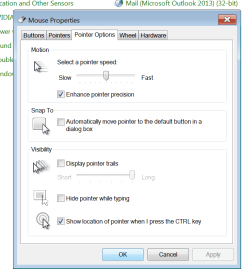
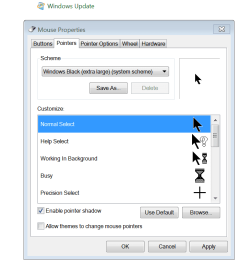
I went into the ease of access and tried to enlarge the pointer, but as soon as I applied the setting the black outline around my mouse vanished making it invisible on a white background. I attempted to change it back to default and then to the extra large black one. The black one now displays as only a white outline. I went into the mouse settings and tried to change it there but had the same results. I will attach pics of my mouse settings in the control panel.

The outline returns when I set the resolution down to 1080p, but it doesnt make sense that the cursor worked on 4k resolution for several days then stopped when I changed the settings in "ease of access"

Any help would be greatly appreciated!
 

Attachments
  • Pointers.png
    Pointers.png
    16.4 KB · Views: 2
  • pointers2.png
    pointers2.png
    19 KB · Views: 0
Last edited:

My Computer

Computer type
PC/Desktop
Computer Manufacturer/Model Number
Custom Build
OS
Windows 7 Pro 64 bit
CPU
i7 4790K
Motherboard
MSI Gaming 7 Z97
Memory
12 Gb kingston 1600 Mhz
Graphics Card(s)
EVGA GTX 770 SC ACX SLI
Monitor(s) Displays
Samsung 6900 50" UHD
Screen Resolution
4096x2160
Hard Drives
2x Seagate Barracuda 2Tb HDD
PSU
EVGA 1300 watt
Antivirus
N/A
Browser
Chrome
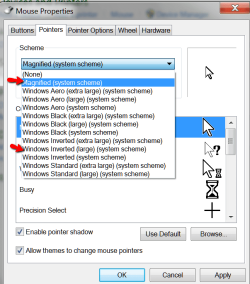
Try the System Scheme one or the Inverted ones which are also pretty handy.
 

Attachments

  • 2015-03-12_2155.png
    2015-03-12_2155.png
    25.1 KB · Views: 9

My Computer

Computer Manufacturer/Model Number
HP, Dell, Gateway, Toshiba - 4 laptops and 2 desktops
OS
Vista, Windows7, Mint Mate, Zorin, Windows 8
CPU
from 1.6GHz Duo to i7
Monitor(s) Displays
2x HP w2207
Hard Drives
5x HDD, 7x SSD, 12x Externals
Keyboard
with trackball - no mices
Mouse
Trackball mice
Internet Speed
DSL 6000
Hey thanks for the reply. I went ahead and tried both but the issue with an all white cursor remains. When I switched it to inverted large the cursor became elongated and purple with half a hour glass attached to it...

I have no idea what is happening to this thing!
 

My Computer

Computer type
PC/Desktop
Computer Manufacturer/Model Number
Custom Build
OS
Windows 7 Pro 64 bit
CPU
i7 4790K
Motherboard
MSI Gaming 7 Z97
Memory
12 Gb kingston 1600 Mhz
Graphics Card(s)
EVGA GTX 770 SC ACX SLI
Monitor(s) Displays
Samsung 6900 50" UHD
Screen Resolution
4096x2160
Hard Drives
2x Seagate Barracuda 2Tb HDD
PSU
EVGA 1300 watt
Antivirus
N/A
Browser
Chrome
There should be no hour glass if you select it from where I have shown in the snip.
 

My Computer

Computer Manufacturer/Model Number
HP, Dell, Gateway, Toshiba - 4 laptops and 2 desktops
OS
Vista, Windows7, Mint Mate, Zorin, Windows 8
CPU
from 1.6GHz Duo to i7
Monitor(s) Displays
2x HP w2207
Hard Drives
5x HDD, 7x SSD, 12x Externals
Keyboard
with trackball - no mices
Mouse
Trackball mice
Internet Speed
DSL 6000
Yeah that's exactly what I did, something is going haywire with my cursor and I have no idea what is happening to it. I cant find a single link relating my problem anywhere. Does windows 7 have difficulty at very high resolutions? The hourglass sort of vanished, now there is just a little white blob next to a long purple opaque arrow.
 

My Computer

Computer type
PC/Desktop
Computer Manufacturer/Model Number
Custom Build
OS
Windows 7 Pro 64 bit
CPU
i7 4790K
Motherboard
MSI Gaming 7 Z97
Memory
12 Gb kingston 1600 Mhz
Graphics Card(s)
EVGA GTX 770 SC ACX SLI
Monitor(s) Displays
Samsung 6900 50" UHD
Screen Resolution
4096x2160
Hard Drives
2x Seagate Barracuda 2Tb HDD
PSU
EVGA 1300 watt
Antivirus
N/A
Browser
Chrome
It should be only purple on a greyish background. On white it should be black and on black it should be white.
 

My Computer

Computer Manufacturer/Model Number
HP, Dell, Gateway, Toshiba - 4 laptops and 2 desktops
OS
Vista, Windows7, Mint Mate, Zorin, Windows 8
CPU
from 1.6GHz Duo to i7
Monitor(s) Displays
2x HP w2207
Hard Drives
5x HDD, 7x SSD, 12x Externals
Keyboard
with trackball - no mices
Mouse
Trackball mice
Internet Speed
DSL 6000
It just stays purple all the time, none of the mouse settings are working correctly after I tried to change them. before I enlarged the cursor all worked perfect, now none of the profiles function correctly. I have all of the windows updates.
 

My Computer

Computer type
PC/Desktop
Computer Manufacturer/Model Number
Custom Build
OS
Windows 7 Pro 64 bit
CPU
i7 4790K
Motherboard
MSI Gaming 7 Z97
Memory
12 Gb kingston 1600 Mhz
Graphics Card(s)
EVGA GTX 770 SC ACX SLI
Monitor(s) Displays
Samsung 6900 50" UHD
Screen Resolution
4096x2160
Hard Drives
2x Seagate Barracuda 2Tb HDD
PSU
EVGA 1300 watt
Antivirus
N/A
Browser
Chrome
Maybe something you installed recently is interfering. Can you think of a recent install that could do that.
 

My Computer

Computer Manufacturer/Model Number
HP, Dell, Gateway, Toshiba - 4 laptops and 2 desktops
OS
Vista, Windows7, Mint Mate, Zorin, Windows 8
CPU
from 1.6GHz Duo to i7
Monitor(s) Displays
2x HP w2207
Hard Drives
5x HDD, 7x SSD, 12x Externals
Keyboard
with trackball - no mices
Mouse
Trackball mice
Internet Speed
DSL 6000
I haven't installed anything new in awhile, I did change my monitor but it worked fine until I tried to make my mouse cursor larger. I have tried to restart my computer multiple times also and restore the defaults to no avail. and like I said I am using 4K res, when I switch to 1080 it becomes normal again, but it worked on 4k until I enlarged the cursor, but as I said above restoring defaults does not correct the issue.
 

My Computer

Computer type
PC/Desktop
Computer Manufacturer/Model Number
Custom Build
OS
Windows 7 Pro 64 bit
CPU
i7 4790K
Motherboard
MSI Gaming 7 Z97
Memory
12 Gb kingston 1600 Mhz
Graphics Card(s)
EVGA GTX 770 SC ACX SLI
Monitor(s) Displays
Samsung 6900 50" UHD
Screen Resolution
4096x2160
Hard Drives
2x Seagate Barracuda 2Tb HDD
PSU
EVGA 1300 watt
Antivirus
N/A
Browser
Chrome
Do you have a gaming mouse that might have some software that could interfere with MS Mouse settings ?
Do you have another mouse you could try at least temporarily ?
 

My Computer

Computer type
PC/Desktop
Computer Manufacturer/Model Number
home built
OS
Multi-Boot W7_Pro_x64 W8.1_Pro_x64 W10_Pro_x64 +Linux_VMs +Chromium_VM
CPU
AMD Athlon II x4 620
Motherboard
Gigabyte GA-MA785G-UD3H
Memory
6GB GSkill DDR2 800
Graphics Card(s)
AMD 4670 GPU + AMD 4200 IGP
Sound Card
on board Realtek ALC889A
Monitor(s) Displays
RCA 40" LCD TV, Insignia 32" LCD TV, HP 15" LCD monitor
Screen Resolution
1680 x 1050
Hard Drives
OCZ Vertex 3 120GB,
Samsung F3 1TB (3),
Several others - WD, Seagate, Hitachi, ...
PSU
Corsair 500 W
Case
Rosewill mid tower
Cooling
CM 90mm rifle
Keyboard
Gyration wireless, Logitech wireless, Dell USB wired
Mouse
Gyration wireless, Logitech wireless, V7 USB wired
Internet Speed
Spectrum - 100Mbps D / 10Mbps U
Antivirus
Avast, MBAM3, EMET, WinPatrol
Browser
Pale Moon, Firefox, IE
Other Info
2 multi-boot PC's
Mainly HTPC/Office/Gen purpose (no gaming).
Trendnet USB KVM.
LG DVD burner/Blue Ray Player.
Tray system for removable SATA backup drives.

Not currently OCd, under-volted.
I use Hybrid sleep, rarely re-boot or shutdown.

Hauppauge HD-PVR, Avermedia PCIe TV Tuner, Hauppauge PCI TV Tuner.
I am just using a logitech wireless, used it for about 2-3 years now. I just plugged in an official Microsoft wired mouse and the problem still persists.
 

My Computer

Computer type
PC/Desktop
Computer Manufacturer/Model Number
Custom Build
OS
Windows 7 Pro 64 bit
CPU
i7 4790K
Motherboard
MSI Gaming 7 Z97
Memory
12 Gb kingston 1600 Mhz
Graphics Card(s)
EVGA GTX 770 SC ACX SLI
Monitor(s) Displays
Samsung 6900 50" UHD
Screen Resolution
4096x2160
Hard Drives
2x Seagate Barracuda 2Tb HDD
PSU
EVGA 1300 watt
Antivirus
N/A
Browser
Chrome
Just something to try.

Uncheck Enhance Pointer Precision
 

My Computer

Computer type
PC/Desktop
Computer Manufacturer/Model Number
Home made Desktop
OS
Windows 10 Pro. 64/ version 1709 Windows 7 Pro/64
CPU
Intel i7-6800K @ 4.3
Motherboard
ASUS X-99 Deluxe II
Memory
Corsair Platinum 16 gig @2400
Graphics Card(s)
EVGA GTX 1070 OC
Monitor(s) Displays
Asus 27" LED LCD/VE278Q
Screen Resolution
1920-1080 or 1280-720 HDMI
Hard Drives
INTEL SSD 730-240 Gb Sata 3.0/
PSU
EVGA Platium 1200W
Case
Phanteks Luxe Tempered Glass 8 fans/ one radiator
Cooling
XSPC/ Water Cooled CPU
Keyboard
Das 4 Professional
Mouse
Logitech M705/MX Anywhere 2-S
Internet Speed
100 mbits
Antivirus
Microsoft Security Essentials/ Malwarebytes Premium 3.0/ SAS
Browser
I.E. 11 default/Firefox/ ISP Time Warner Cable/Spectrum
Other Info
LG BluRay Burner/
Sound system-KLipsch-THX/
Icy Dock ssd Hot Swap bays.
yes I tried that as well.. I think im just going to have to have a purple cursor from now on haha.
 

My Computer

Computer type
PC/Desktop
Computer Manufacturer/Model Number
Custom Build
OS
Windows 7 Pro 64 bit
CPU
i7 4790K
Motherboard
MSI Gaming 7 Z97
Memory
12 Gb kingston 1600 Mhz
Graphics Card(s)
EVGA GTX 770 SC ACX SLI
Monitor(s) Displays
Samsung 6900 50" UHD
Screen Resolution
4096x2160
Hard Drives
2x Seagate Barracuda 2Tb HDD
PSU
EVGA 1300 watt
Antivirus
N/A
Browser
Chrome
Do you have another user account you can log in with and see if that user also has the same problem ?

If you don't have another account and don't want to create another account, you could temporarily enable the built in Administrator or Guest account to test with.
I just tested different settings in my different accounts, and the different settings stick for each user.
This would test if there is some "corruption" in your user account.

If that doesn't help, maybe uninstall the mouse and reboot to reinstall it ?
 

My Computer

Computer type
PC/Desktop
Computer Manufacturer/Model Number
home built
OS
Multi-Boot W7_Pro_x64 W8.1_Pro_x64 W10_Pro_x64 +Linux_VMs +Chromium_VM
CPU
AMD Athlon II x4 620
Motherboard
Gigabyte GA-MA785G-UD3H
Memory
6GB GSkill DDR2 800
Graphics Card(s)
AMD 4670 GPU + AMD 4200 IGP
Sound Card
on board Realtek ALC889A
Monitor(s) Displays
RCA 40" LCD TV, Insignia 32" LCD TV, HP 15" LCD monitor
Screen Resolution
1680 x 1050
Hard Drives
OCZ Vertex 3 120GB,
Samsung F3 1TB (3),
Several others - WD, Seagate, Hitachi, ...
PSU
Corsair 500 W
Case
Rosewill mid tower
Cooling
CM 90mm rifle
Keyboard
Gyration wireless, Logitech wireless, Dell USB wired
Mouse
Gyration wireless, Logitech wireless, V7 USB wired
Internet Speed
Spectrum - 100Mbps D / 10Mbps U
Antivirus
Avast, MBAM3, EMET, WinPatrol
Browser
Pale Moon, Firefox, IE
Other Info
2 multi-boot PC's
Mainly HTPC/Office/Gen purpose (no gaming).
Trendnet USB KVM.
LG DVD burner/Blue Ray Player.
Tray system for removable SATA backup drives.

Not currently OCd, under-volted.
I use Hybrid sleep, rarely re-boot or shutdown.

Hauppauge HD-PVR, Avermedia PCIe TV Tuner, Hauppauge PCI TV Tuner.
I still had this problem until a few moments ago. I was messing with the settings to see if I could get the mouse cursor to return to normal. I enabled mouse trails and now all of the mouse options have normalized. Disabling this returns it to his dysfunctional state. So for now I am just leaving mouse cursor trails enabled. It's not exactly a fix but its a work around if you dont mind the trails.
 

My Computer

Computer type
PC/Desktop
Computer Manufacturer/Model Number
Custom Build
OS
Windows 7 Pro 64 bit
CPU
i7 4790K
Motherboard
MSI Gaming 7 Z97
Memory
12 Gb kingston 1600 Mhz
Graphics Card(s)
EVGA GTX 770 SC ACX SLI
Monitor(s) Displays
Samsung 6900 50" UHD
Screen Resolution
4096x2160
Hard Drives
2x Seagate Barracuda 2Tb HDD
PSU
EVGA 1300 watt
Antivirus
N/A
Browser
Chrome
Back
Top