Mouse - Disable Drag

LAUBO

New member
Member
Local time
10:26 PM
Messages
35
Hey people,

My grandmother has recently started using a computer and has trouble working the mouse. Whenever she tries to click, she is unable to hold her hand still and moves the mouse while clicking, otherwise known as dragging. Therefore, opening files, clicking on images etc. is impossible as she only drags them to another position...

Is it possible to disable dragging on a mouse? Or probably more accurate, is it possible to change the settings such that the click-action happens 'on-release' instead of 'on-click', which would result in the same disabling of dragging.

Thanks!
Laurens
 

My Computer

OS
Vista and Seven
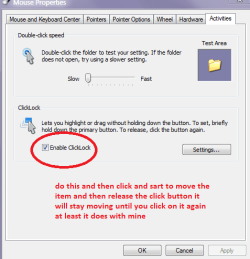
Hello Laurens one possibility mate is to enable as in my pic. Control Panel > Mouse > see pic

If you click on say a file and then start to move it and release the click button the object will carry on moving until you click on it again as and where you want it.

It works with my machine but it does need that initial tiny bit of movement to keep it locked. I hope this might be of some use to you both.
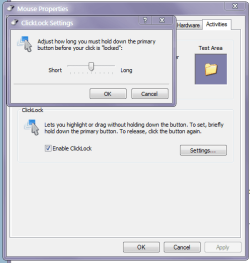
Sorry missed a second pic you can adjust the length of time to hold the click down see pic 2
 

Attachments

  • CLICK.PNG
    CLICK.PNG
    12.5 KB · Views: 2
  • CLICK2.PNG
    CLICK2.PNG
    14.4 KB · Views: 2

My Computer

Computer type
PC/Desktop
Computer Manufacturer/Model Number
Own build (new) Desk1 / Asus ROG Win 7 / Desk2 1st build
OS
Desk1 7 Home Prem / Desk2 10 Pro / Main lap Asus ROG 10 Pro 2 laptop Toshiba 7 Pro Asus P2520 7 & 10
CPU
Desk1 i5 3750K / Laptop i7 GTX 860M / Desk2 i5 2500
Motherboard
Desk1 Asus P877-V / Desk2 Gigabyte H67 UD3H / Laptop ?
Memory
Desk1 8GB (1866) / Desk2 16GB (1333) / Laptop 8Gb DDR3
Graphics Card(s)
Desk 1& 2NVidia GTX 650 & Laptops on board Intel
Sound Card
Desk 1 & 2 -XONAR DG Realtek High Def audio Laptop
Monitor(s) Displays
Desk 1 Benq HD 2450 / Desk2 Philips 24" / Laptop 17.5"
Screen Resolution
1920x1080 D1 & D2 & Laptop 1
Hard Drives
Desk1 Samsung 120GB 830 SSD
Asus ROG 256GB 850 Pro SSD
Desk2 Samsung 840 256 SSD
Toshiba 120GB EVO
PSU
Desk 1 Corsair HX 1050/ Laptop ? / Desk 2 Corsair HX 650
Case
Desk 1 Cooler HAF XM ? Toshiba laptop / Desk2 Coolermaster
Cooling
Fans on all Desk1 -2 Desk2 - all Coolermasters 5 Laptop ?
Keyboard
Desk 1 MS Sidewinder X6 Desk 2 MS Sidewinder X 4
Mouse
Desk 1&2 - Gigabyte MS 900 gamer - laptop - Logitec wireless
Internet Speed
ADSL2+
Other Info
One other Desktop (tester) and spare Toshba laptop both with SSD's
Running Kaspersky 2016 ISS on all machines config'd identically
Logitec audio stereo systems on each machine (x3)
Canon MG5250MFC
Router/modem TP-Link running WPA2SK
Hello Laurens one possibility mate is to enable as in my pic. Control Panel > Mouse > see pic

If you click on say a file and then start to move it and release the click button the object will carry on moving until you click on it again as and where you want it.

It works with my machine but it does need that initial tiny bit of movement to keep it locked. I hope this might be of some use to you both.
Sorry missed a second pic you can adjust the length of time to hold the click down see pic 2


Hey dude,

Thanks a lot for your explanation and for adding the pictures. However, this wasn't exactly what I was looking for. I wish to 'disable' the entire concept of dragging. The story above of my grandmother should explain why.

Thanks to anyone with tips!
 

My Computer

OS
Vista and Seven

Ah I thought perhaps it was problem with keeping the click down whiledragging. Well afraid I am not aware of anyway to do that - sorry.

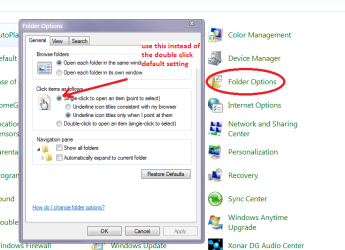
The only thing I can suggest is to use the quick click as in my pic. Thatwould just allow the click to last for the shortest amount of time. Perhapseven use the option in Folder options for a one click use.
See pic
 

Attachments

  • CLICK4.PNG
    CLICK4.PNG
    28.3 KB · Views: 3

My Computer

Computer type
PC/Desktop
Computer Manufacturer/Model Number
Own build (new) Desk1 / Asus ROG Win 7 / Desk2 1st build
OS
Desk1 7 Home Prem / Desk2 10 Pro / Main lap Asus ROG 10 Pro 2 laptop Toshiba 7 Pro Asus P2520 7 & 10
CPU
Desk1 i5 3750K / Laptop i7 GTX 860M / Desk2 i5 2500
Motherboard
Desk1 Asus P877-V / Desk2 Gigabyte H67 UD3H / Laptop ?
Memory
Desk1 8GB (1866) / Desk2 16GB (1333) / Laptop 8Gb DDR3
Graphics Card(s)
Desk 1& 2NVidia GTX 650 & Laptops on board Intel
Sound Card
Desk 1 & 2 -XONAR DG Realtek High Def audio Laptop
Monitor(s) Displays
Desk 1 Benq HD 2450 / Desk2 Philips 24" / Laptop 17.5"
Screen Resolution
1920x1080 D1 & D2 & Laptop 1
Hard Drives
Desk1 Samsung 120GB 830 SSD
Asus ROG 256GB 850 Pro SSD
Desk2 Samsung 840 256 SSD
Toshiba 120GB EVO
PSU
Desk 1 Corsair HX 1050/ Laptop ? / Desk 2 Corsair HX 650
Case
Desk 1 Cooler HAF XM ? Toshiba laptop / Desk2 Coolermaster
Cooling
Fans on all Desk1 -2 Desk2 - all Coolermasters 5 Laptop ?
Keyboard
Desk 1 MS Sidewinder X6 Desk 2 MS Sidewinder X 4
Mouse
Desk 1&2 - Gigabyte MS 900 gamer - laptop - Logitec wireless
Internet Speed
ADSL2+
Other Info
One other Desktop (tester) and spare Toshba laptop both with SSD's
Running Kaspersky 2016 ISS on all machines config'd identically
Logitec audio stereo systems on each machine (x3)
Canon MG5250MFC
Router/modem TP-Link running WPA2SK
Back
Top