Mouse Hover Makes Window Active - Enable

How to Activate a Window by Hovering Over it with the Mouse Pointer

   Information
This will allow you to Activate a window by hovering over it with the mouse pointer for a second to make it easier to switch between open windows.


hello all.
I've been reading this great forum passively for a short while now, its quite the wonderful resource.
what i could not find, though, was information on how to focus on windows by simply hovering over them with the mouse.

Back in XP, you could enable this with Tweak UI, which called it X-mouse.
It was great, i didn't have to click on a window to work in it.
but how to enable this in 7?


OPTION #1
As this article points out, you can switch windows by hovering if you enable it through:
Control Panel> Ease of Access> Change How Your Mouse Works
scroll down, check box "Activate a window by hovering over it with the mouse"
this method raises windows to the front when you hover over them.
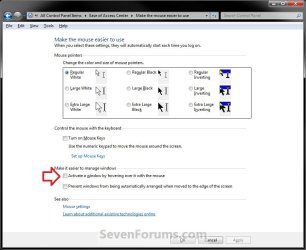
EAC.jpg
OPTION #2
For a true X-mouse experience, you could use this third party software TXMouse:
True X-Mouse Gizmo for Windows
if you are familiar with Linux x-mouse behaviour, you might appreciate its other functions.


OPTION #3
If you don't need those extra functions, you can make a couple swift changes in the registry and achieve the same effect:
[Thanks to original commenter unpaidbill for this particular option]
Step #1:
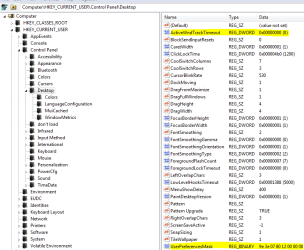
Open regedit, go to HKEY_CURRENT_USER\Control Panel\Desktop
Edit UserPreferenceMask value to be 9F 3E 07 80 12 00 00 00
[You should only have to modify the first pair]
NOTE: Default value is 98 12 07 80 12 00 00 00.

Step #2:
Also in HKEY_CURRENT_USER\Control Panel\Desktop
Edit ActiveWndTrkTimeout, change 'Base' to Decimal and put in 150 as the 'Value Data'
NOTE: Default value is 500.

[this value is time in milliseconds that it takes for the focus to change.
to avoid some issues with the taskbar I recommended using a value like 150 or so,
but if you'd like to have a different delay before the window loses focus, set it to whatever you like.]

Step #3:
Log off and log back in
   Information
(Added by John Galt)

Here is the registry key to do that if you don't want to edit the registry yourself. View attachment Hover window select.reg

Here is the registry key to restore the default values. View attachment Default Windows hover.reg


This results in windows being active (but not being raised) when you hover over them.


Last edited by a moderator:
TXMouse causes random programs to crash when closing TXMouse.
 

My Computer

Computer type
PC/Desktop
Computer Manufacturer/Model Number
Made by Dixon Butz
OS
Win7 Win 10, Win 8.1
CPU
AMD FX-8350, Corsair H100i
Motherboard
ASUS Crosshair V Formula-Z
Memory
16GB G.SKILL Ripjaws DDR3
Graphics Card(s)
EVGA GTX 980, EVGA GTX 860
Sound Card
Denon x4200 Dolby AMOS!
Monitor(s) Displays
65" Samsung 4K, +3 27inch
Screen Resolution
4K, 1080x3
Hard Drives
2TB Samsung hd204ui

1X Samsung 850 SSD
PSU
1000w EVGA, 2000VA UPS, 1000VA UPS and many others
Case
Lian Li
Cooling
Corsair H100i
Keyboard
Logitech K800
Mouse
Logitech Couch Mouse
Internet Speed
Gigabit!
Antivirus
Defender
Browser
Slimjet Chrome
Hi, I like what you're working on and I wonder if you might be able to help out with an annoying quirk I can't find a solution for.

I have set the Taskbar to 'always combine', which gives me the preview thumbnails for applications when you hover over them, but you still have to click on them to switch to the window you want, like this-

http://www.davidaddington.ca/desktop.jpg

Is there any way to set the Taskbar up so that when you move your mouse over the thumbnail, after a set period of time the focus just selects that window? It'd save me the extra click ;)

Thanks in advance, gents!

Guy Crawford
 

My Computer

OS
Windows 7
yes, i noticed that as well with the right-click menu on the pinned programs on the taskbar.

If you set ActiveWndTrkTimeout to decimal 150 or so, it sets a delay that allows enough time to reach past that little gap.

Yeah I tried a whole heap of different values but it didn't make a difference. :(
I'm having the same issue. Also happens with other programs that open a popup window or have a detached context menu. :cry:
 

My Computer

OS
Windows 7 Home Premium
Here you go, they are both in Reg files. By the way I really like option 3, it now works just how I always thought it should, good job. :D

View attachment 10005

View attachment 10006

Don't use these. The two contain also a bunch of crappy settings.

If it's too late for you, nothing biggie but sure it's messy.

Sir I don't thank you for that. You made me rage a little. And you're called a "Guru"...
 
Last edited by a moderator:

My Computer

OS
Seven 64
Um, care to qualify that statement?

NM, I see what you mean now. Grimmy exported the entire key instead of just that one setting.

I'll fix it in a second.
 

My Computers

System One System Two

  • Computer type
    PC/Desktop
    Computer Manufacturer/Model Number
    The Beast Model A (homebrew)
    OS
    Windows 11 21H2 Current build
    CPU
    AMD Ryzen 9 3950X
    Motherboard
    MSI MEG X570 GODLIKE
    Memory
    4 * 32 GB - Corsair Vengeance 3600 MHz
    Graphics Card(s)
    EVGA GeForce RTX 3080 Ti XC3 ULTRA GAMING (12G-P5-3955-KR)
    Sound Card
    Realtek® ALC1220 Codec
    Monitor(s) Displays
    2x Eve Spectrum ES07D03 4K Gaming Monitor (Matte) | Eve Spec
    Screen Resolution
    3x 3840 x 2160
    Hard Drives
    3x Samsung 980 Pro NVMe PCIe 4 M.2 2 TB SSD (MZ-V8P2T0B/AM) } 3x Sabrent Rocket NVMe 4.0 1 TB SSD
    PSU
    PC Power & Cooling’s Silencer Series 1050 Watt, 80 Plus Plat
    Case
    Fractal Design Define 7 XL Dark ATX Full Tower Case
    Cooling
    SteelSeries Apex Pro Wired Gaming Keyboard
    Keyboard
    SteelSeries Apex Pro
    Mouse
    Logitech MX Master 3S | MX Master 3 for business
    Internet Speed
    AT&T LightSpeed Gigabit Duplex Ftth
    Antivirus
    Windows Defender + MB 3
    Browser
    Nightly (default) + Firefox (stable),Chrome, Edge
  • Computer type
    PC/Desktop
    System Manufacturer/Model Number
    Dell Latitude E5470
    OS
    ChromeOS Flex Dev Channel (current)
    CPU
    Intel(R) Core(TM) i5-6300U CPU @ 2.40GHz, 2501 Mhz, 2 Core(s), 4 Logical Processor(s)
    Motherboard
    Dell
    Memory
    16 GB
    Graphics Card(s)
    Intel(R) HD Graphics 520
    Sound Card
    Intel(R) HD Graphics 520 + RealTek Audio
    Monitor(s) Displays
    Dell laptop display 15"
    Screen Resolution
    1920 * 1080
    Hard Drives
    Toshiba 128GB M.2 22300 drive
    INTEL Cherryville 520 Series SSDSC2CW180A 180 GB SATA III SSD
    PSU
    Dell
    Case
    Dell
    Cooling
    Dell
    Keyboard
    Dell
    Mouse
    Logitech MX Master 3S (shared w. Sys 1) | Dell TouchPad
    Internet Speed
    AT&T LightSpeed Gigabit Duplex Ftth
Step #1:
Open regedit, go to HKEY_CURRENT_USER\Control Panel\Desktop
Edit UserPreferenceMask value to be 9F 3E 07 80 12 00 00 00
Step #2:
Also in HKEY_CURRENT_USER\Control Panel\Desktop
Edit ActiveWndTrkTimeout, change 'Base' to Decimal and put in 150 as the 'Value Data'
Anyone have the default value ?

Cause it wasn't exactly that for me :
"UserPreferencesMask"=hex:9e,3e,07,80,12,00,00,00
The 3e wasn't a 3e.
 

My Computer

OS
Seven 64
OK, Mr. Grim's post has been fixed. The new reg codes, that I uplodaded, only change those two keys as referenced by gabeforprez - everything else will not be changed as it exists on your system.
 

My Computers

System One System Two

  • Computer type
    PC/Desktop
    Computer Manufacturer/Model Number
    The Beast Model A (homebrew)
    OS
    Windows 11 21H2 Current build
    CPU
    AMD Ryzen 9 3950X
    Motherboard
    MSI MEG X570 GODLIKE
    Memory
    4 * 32 GB - Corsair Vengeance 3600 MHz
    Graphics Card(s)
    EVGA GeForce RTX 3080 Ti XC3 ULTRA GAMING (12G-P5-3955-KR)
    Sound Card
    Realtek® ALC1220 Codec
    Monitor(s) Displays
    2x Eve Spectrum ES07D03 4K Gaming Monitor (Matte) | Eve Spec
    Screen Resolution
    3x 3840 x 2160
    Hard Drives
    3x Samsung 980 Pro NVMe PCIe 4 M.2 2 TB SSD (MZ-V8P2T0B/AM) } 3x Sabrent Rocket NVMe 4.0 1 TB SSD
    PSU
    PC Power & Cooling’s Silencer Series 1050 Watt, 80 Plus Plat
    Case
    Fractal Design Define 7 XL Dark ATX Full Tower Case
    Cooling
    SteelSeries Apex Pro Wired Gaming Keyboard
    Keyboard
    SteelSeries Apex Pro
    Mouse
    Logitech MX Master 3S | MX Master 3 for business
    Internet Speed
    AT&T LightSpeed Gigabit Duplex Ftth
    Antivirus
    Windows Defender + MB 3
    Browser
    Nightly (default) + Firefox (stable),Chrome, Edge
  • Computer type
    PC/Desktop
    System Manufacturer/Model Number
    Dell Latitude E5470
    OS
    ChromeOS Flex Dev Channel (current)
    CPU
    Intel(R) Core(TM) i5-6300U CPU @ 2.40GHz, 2501 Mhz, 2 Core(s), 4 Logical Processor(s)
    Motherboard
    Dell
    Memory
    16 GB
    Graphics Card(s)
    Intel(R) HD Graphics 520
    Sound Card
    Intel(R) HD Graphics 520 + RealTek Audio
    Monitor(s) Displays
    Dell laptop display 15"
    Screen Resolution
    1920 * 1080
    Hard Drives
    Toshiba 128GB M.2 22300 drive
    INTEL Cherryville 520 Series SSDSC2CW180A 180 GB SATA III SSD
    PSU
    Dell
    Case
    Dell
    Cooling
    Dell
    Keyboard
    Dell
    Mouse
    Logitech MX Master 3S (shared w. Sys 1) | Dell TouchPad
    Internet Speed
    AT&T LightSpeed Gigabit Duplex Ftth
The issue I'm having is that when in Explorer, I can't use the scroll wheel when moving from the folder pane to the file pane without FIRST clicking somewhere in the file pane. Years ago I had a mouse driver that allows that and haven't seen that functionality for quite a while now. If anyone knows how to get the scroll wheel to work by placing the cursor within the pane (without having to click inside of that pane), please share how it's done. I miss that functionality!

FYI, the functionality I'm looking for in Explorer does work in Thunderbird. Clicking on a folder, I can hover over the emails list pane and begin scrolling that window with the wheel without having to click somewhere within it first.
 

My Computer

OS
Win7
Step #1:
Open regedit, go to HKEY_CURRENT_USER\Control Panel\Desktop
Edit UserPreferenceMask value to be 9F 3E 07 80 12 00 00 00
Step #2:
Also in HKEY_CURRENT_USER\Control Panel\Desktop
Edit ActiveWndTrkTimeout, change 'Base' to Decimal and put in 150 as the 'Value Data'
Anyone have the default value ?

Cause it wasn't exactly that for me :
"UserPreferencesMask"=hex:9e,3e,07,80,12,00,00,00
The 3e wasn't a 3e.

I just checked - I haven't done this as I prefer not to use X-mouse, so my settings are default - and that is exactly what I have for UserPreferenceMask: 9e 3e 07 80 12 00 00 00

X-mouse settings.PNG

Thank you.

You're welcome. Next time, though, try to be a little nicer about your post - saying it "contains a bunch of crappy settings", while accurate from your POV, may not be for others' POV - it would have been easier to say that they changed a lot of other settings that you didn't want changed....
 

My Computers

System One System Two

  • Computer type
    PC/Desktop
    Computer Manufacturer/Model Number
    The Beast Model A (homebrew)
    OS
    Windows 11 21H2 Current build
    CPU
    AMD Ryzen 9 3950X
    Motherboard
    MSI MEG X570 GODLIKE
    Memory
    4 * 32 GB - Corsair Vengeance 3600 MHz
    Graphics Card(s)
    EVGA GeForce RTX 3080 Ti XC3 ULTRA GAMING (12G-P5-3955-KR)
    Sound Card
    Realtek® ALC1220 Codec
    Monitor(s) Displays
    2x Eve Spectrum ES07D03 4K Gaming Monitor (Matte) | Eve Spec
    Screen Resolution
    3x 3840 x 2160
    Hard Drives
    3x Samsung 980 Pro NVMe PCIe 4 M.2 2 TB SSD (MZ-V8P2T0B/AM) } 3x Sabrent Rocket NVMe 4.0 1 TB SSD
    PSU
    PC Power & Cooling’s Silencer Series 1050 Watt, 80 Plus Plat
    Case
    Fractal Design Define 7 XL Dark ATX Full Tower Case
    Cooling
    SteelSeries Apex Pro Wired Gaming Keyboard
    Keyboard
    SteelSeries Apex Pro
    Mouse
    Logitech MX Master 3S | MX Master 3 for business
    Internet Speed
    AT&T LightSpeed Gigabit Duplex Ftth
    Antivirus
    Windows Defender + MB 3
    Browser
    Nightly (default) + Firefox (stable),Chrome, Edge
  • Computer type
    PC/Desktop
    System Manufacturer/Model Number
    Dell Latitude E5470
    OS
    ChromeOS Flex Dev Channel (current)
    CPU
    Intel(R) Core(TM) i5-6300U CPU @ 2.40GHz, 2501 Mhz, 2 Core(s), 4 Logical Processor(s)
    Motherboard
    Dell
    Memory
    16 GB
    Graphics Card(s)
    Intel(R) HD Graphics 520
    Sound Card
    Intel(R) HD Graphics 520 + RealTek Audio
    Monitor(s) Displays
    Dell laptop display 15"
    Screen Resolution
    1920 * 1080
    Hard Drives
    Toshiba 128GB M.2 22300 drive
    INTEL Cherryville 520 Series SSDSC2CW180A 180 GB SATA III SSD
    PSU
    Dell
    Case
    Dell
    Cooling
    Dell
    Keyboard
    Dell
    Mouse
    Logitech MX Master 3S (shared w. Sys 1) | Dell TouchPad
    Internet Speed
    AT&T LightSpeed Gigabit Duplex Ftth
Anyone have the default value ?

I just checked - I haven't done this as I prefer not to use X-mouse, so my settings are default - and that is exactly what I have for UserPreferenceMask: 9e 3e 07 80 12 00 00 00

View attachment 38981

Thank you.

You're welcome. Next time, though, try to be a little nicer about your post - saying it "contains a bunch of crappy settings", while accurate from your POV, may not be for others' POV - it would have been easier to say that they changed a lot of other settings that you didn't want changed....

I'm certain I changed that part, i used his settings just for reverting to defaut (to try xmouse gizmo). May not be really important but i don"t know what is it doing.

The problem is that i trusted the work of a guy with all these "administrator" and "guru" things. But THAT is not guru at all. On my point of view, guru do clean work !
And yes it's accurate for everyone, no one want his window configuration, mouse, wallpaper, screensaver, and what else I don't know changed.

edit : And I don"t care of your rules, you can ban me if you like "crappy settings".
 
Last edited:

My Computer

OS
Seven 64
Or, it could be that he made a mistake. At the time of the posting (May 7, 2009, a full 6 months ago) he was neither - but since you are seeing this post now you think he is and always has been a guru.

Besides, if it was a major issue, don't you think someone would have already complained about it? Since no one had, it was obviously not a major issue for others.

Again, whether you trusted it or whatever, you can be nice. Oh, and btw - that is a part of the rules here too.
 

My Computers

System One System Two

  • Computer type
    PC/Desktop
    Computer Manufacturer/Model Number
    The Beast Model A (homebrew)
    OS
    Windows 11 21H2 Current build
    CPU
    AMD Ryzen 9 3950X
    Motherboard
    MSI MEG X570 GODLIKE
    Memory
    4 * 32 GB - Corsair Vengeance 3600 MHz
    Graphics Card(s)
    EVGA GeForce RTX 3080 Ti XC3 ULTRA GAMING (12G-P5-3955-KR)
    Sound Card
    Realtek® ALC1220 Codec
    Monitor(s) Displays
    2x Eve Spectrum ES07D03 4K Gaming Monitor (Matte) | Eve Spec
    Screen Resolution
    3x 3840 x 2160
    Hard Drives
    3x Samsung 980 Pro NVMe PCIe 4 M.2 2 TB SSD (MZ-V8P2T0B/AM) } 3x Sabrent Rocket NVMe 4.0 1 TB SSD
    PSU
    PC Power & Cooling’s Silencer Series 1050 Watt, 80 Plus Plat
    Case
    Fractal Design Define 7 XL Dark ATX Full Tower Case
    Cooling
    SteelSeries Apex Pro Wired Gaming Keyboard
    Keyboard
    SteelSeries Apex Pro
    Mouse
    Logitech MX Master 3S | MX Master 3 for business
    Internet Speed
    AT&T LightSpeed Gigabit Duplex Ftth
    Antivirus
    Windows Defender + MB 3
    Browser
    Nightly (default) + Firefox (stable),Chrome, Edge
  • Computer type
    PC/Desktop
    System Manufacturer/Model Number
    Dell Latitude E5470
    OS
    ChromeOS Flex Dev Channel (current)
    CPU
    Intel(R) Core(TM) i5-6300U CPU @ 2.40GHz, 2501 Mhz, 2 Core(s), 4 Logical Processor(s)
    Motherboard
    Dell
    Memory
    16 GB
    Graphics Card(s)
    Intel(R) HD Graphics 520
    Sound Card
    Intel(R) HD Graphics 520 + RealTek Audio
    Monitor(s) Displays
    Dell laptop display 15"
    Screen Resolution
    1920 * 1080
    Hard Drives
    Toshiba 128GB M.2 22300 drive
    INTEL Cherryville 520 Series SSDSC2CW180A 180 GB SATA III SSD
    PSU
    Dell
    Case
    Dell
    Cooling
    Dell
    Keyboard
    Dell
    Mouse
    Logitech MX Master 3S (shared w. Sys 1) | Dell TouchPad
    Internet Speed
    AT&T LightSpeed Gigabit Duplex Ftth
I think I found out the problem everyone is having with setting the delay...

After I re-read the original post and also googled this setting a bit I found out that the reg file you provided has a typo. Your key uses the word "Track" and it should be the letters "Trk"
(note bold text in keys below)

Your Key: "ActiveWndTrackTimeout"=dword:00000096
Correct Key: "ActiveWndTrkTimeout"=dword:00000096

Now what I don't know is are both keys original registry keys?
Or was your key added to the registry by merging your file?
If it is the latter then the key with the word "Track" can be deleted
Could someone verify if in fact both keys are part of the default registry?

I found that setting the delay to 150 was to fast for me so I changed it to 500 for comparison that was to slow... so know I'm using 250 which seams about right for me anyway...
 

My Computer

OS
XP and Win7
Thank you for reminding me where I made this change a few weeks ago (using another tip).

As it has turned out, this great idea has become one of the most annoying features I've experienced yet. I can't focus on a page because to move my mouse will change the focus to another page/app nearby.

Yesterday I had the calculator open doing addition from spreadsheet. So I would click on the calc to make it active window for keypad and the spreadsheet I'm copying from would disappear. Then I would go back to the spreadsheet and the calc would disappear. So I click on calc in taskbar but before I can get back to calc, just by traveling over the spreadsheet the calc disappears again. There was no way to get to calc without it disappearing until I parked it on the taskbar.

I finally had gotten so fed up with this, and with myself because I have learned the hard way over a year that Win7 is so perfectly proportioned it needs no tweaks, that I decided if I couldn't find the path back to get out of this tweak that I would repair install or clean install soon.

So thanks for bringing this tweak up again so I can take it off! I'm sure someone will find it useful, but that someone is not me.
 
OTOH I really this tweak and it was one of the first things I looked for! You just need to set the delay appropriately so the focus change isn't instant and you can scoot your cursor over to the right window before you trigger the underlying one. Out of the box, 7 is too slow for me.
 

My Computer

Computer type
PC/Desktop
Computer Manufacturer/Model Number
Custom
OS
7 x64 Ultimate
CPU
AMD Ryzen 5
Motherboard
Gigabyte GA-AB350-Gaming
Memory
16GB DDR4
Graphics Card(s)
Radeon R7 360
Monitor(s) Displays
2 x Dell U2518D
Screen Resolution
2560x1440 2560x1440
Hard Drives
WD 500GB x2
Samsung SSD 128MB (OS)
XPG SX8200 Pro M.2 2280 1TB
PSU
Antec 500
Cooling
Hyper 212 EVO
Keyboard
Logitech cordless K800
Mouse
Logitech M510
Antivirus
Avira
OTOH I really this tweak and it was one of the first things I looked for! You just need to set the delay appropriately so the focus change isn't instant and you can scoot your cursor over to the right window before you trigger the underlying one. Out of the box, 7 is too slow for me.

If I wanna move my mouse over here to this window behind you, all I gotta do is click on it to cover up our dialogue with that window..

What's better about having it do it on a timer without having to click?

Unsure of the concept.
 
As it has turned out, this great idea has become one of the most annoying features I've experienced yet. I can't focus on a page because to move my mouse will change the focus to another page/app nearby.
What you want is alt-tab. Stop clicking the taskbar so much.

What's better about having it do it on a timer without having to click?

Unsure of the concept.
The point of this tweak is to move the input focus quickly and repeatedly between two windows, without changing which one is on top or below. Having to go back and forth, clicking each time, is a huge waste of time and effort. It's also impossible to prevent the windows from "popping up" when you click.
 

My Computer

OS
Windows 7 Home Premium
The point of this tweak is to move the input focus quickly and repeatedly between two windows, without changing which one is on top or below. Having to go back and forth, clicking each time, is a huge waste of time and effort. It's also impossible to prevent the windows from "popping up" when you click.

I still have it set so that the focus/selected window comes to to the top. IMHO I just find it is more convenient to change windows with one less click and if the delay is just right it is minutely faster

I think I found out the problem everyone is having with setting the delay...

After I re-read the original post and also googled this setting a bit I found out that the reg file you provided has a typo. Your key uses the word "Track" and it should be the letters "Trk"
(note bold text in keys below)

Your Key: "ActiveWndTrackTimeout"=dword:00000096
Correct Key: "ActiveWndTrkTimeout"=dword:00000096

Now what I don't know is are both keys original registry keys?
Or was your key added to the registry by merging your file?
If it is the latter then the key with the word "Track" can be deleted
Could someone verify if in fact both keys are part of the default registry?

I found that setting the delay to 150 was to fast for me so I changed it to 500 for comparison that was to slow... so know I'm using 250 which seams about right for me anyway...

Has anyone been able to corroborate/confirm the above from my original post #34
EDIT: BTW my original post was referring to Windows 7
 
Last edited:

My Computer

OS
XP and Win7
I think I found out the problem everyone is having with setting the delay...

After I re-read the original post and also googled this setting a bit I found out that the reg file you provided has a typo. Your key uses the word "Track" and it should be the letters "Trk"
(note bold text in keys below)

Your Key: "ActiveWndTrackTimeout"=dword:00000096
Correct Key: "ActiveWndTrkTimeout"=dword:00000096

Now what I don't know is are both keys original registry keys?
Or was your key added to the registry by merging your file?
If it is the latter then the key with the word "Track" can be deleted
Could someone verify if in fact both keys are part of the default registry?

I found that setting the delay to 150 was to fast for me so I changed it to 500 for comparison that was to slow... so know I'm using 250 which seams about right for me anyway...
Has anyone been able to corroborate/confirm the above from my original post #34
EDIT: BTW my original post was referring to Windows 7

I just tried it in Windows 7 Pro. I needed to set the DWORD to "ActiveWndTrkTimeout" to get that to work. I changed the DWORD back to "ActiveWndTrackTimeout" and the delay didn't occur. I checked by clicking on the uparrow thingy in the systray to see more info. Also, I can now see a small (but noticeable delay when hovering over another window.
 

My Computer

OS
Windows 7 Professional 64 bit
CPU
Core2Duo 6750
Motherboard
ASUS P5B
Memory
4 gb
Graphics Card(s)
XFX 4890
Sound Card
X-Fi
Monitor(s) Displays
hp 2475
Back
Top