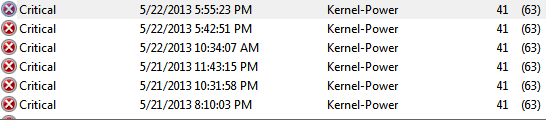
Mouse/Keyboard freezes.

Justrae

New member
Local time
9:21 AM
Messages
22
So what happens is my keyboard/mouse freezes but my browser still loads and I can still hear music.
What makes me think that my browser loads? I can see my friends pm me and hear the *boop* sound in Facebook.

My mouse is wired while my keyboard is wireless.

Things I've tried
-Updating driver for Mouse and Keyboard
-Sfc /scannow
-Unplug and plug the Mouse and Keyboard

What I think seem to be the issue,
Itunes
League of Legends

I've had iTunes on every time this happens. Even without LoL running, it even freezes on the desktop/browser only.
And most of the time I've been playing League of Legends and it freezes in game.

I've done sfc /scannow nothing seems to be the problem.

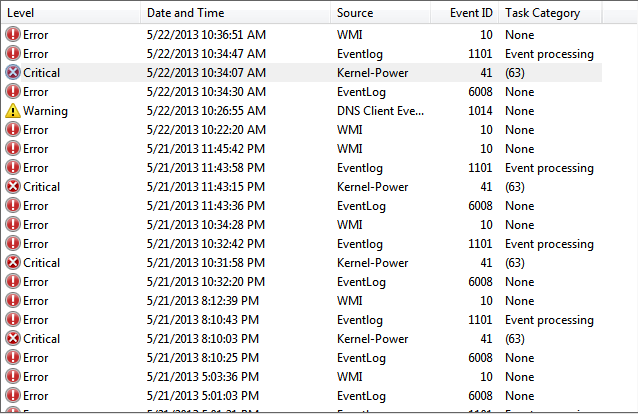
But I've checked Event Viewer and I've seen this.
4616b9de7aa1d64ed018e4bc73abdfd9.png

I was pretty sure at 10:30pm onwards until 11:45pm I was playing League of Legends with iTunes open.

Hope you guys can help me out!
 

My Computer

Computer type
PC/Desktop
Computer Manufacturer/Model Number
Custom Build
OS
Windows 7 Professional 64-bit.
CPU
Intel Celeron G540 2.50GHZ
Motherboard
Biostar H61MLV
Memory
4GB
Graphics Card(s)
Nvidia GeForce 210 512mb
Antivirus
AVG Internet Security 2012
Browser
Google Chrome
Hiyya and welcome Justrae the mouse and KB what brand are they? I find for the most part that getting the drivers from the manufacturer's site better than through the Device Manager.
 

My Computer

Computer type
PC/Desktop
Computer Manufacturer/Model Number
Own build (new) Desk1 / Asus ROG Win 7 / Desk2 1st build
OS
Desk1 7 Home Prem / Desk2 10 Pro / Main lap Asus ROG 10 Pro 2 laptop Toshiba 7 Pro Asus P2520 7 & 10
CPU
Desk1 i5 3750K / Laptop i7 GTX 860M / Desk2 i5 2500
Motherboard
Desk1 Asus P877-V / Desk2 Gigabyte H67 UD3H / Laptop ?
Memory
Desk1 8GB (1866) / Desk2 16GB (1333) / Laptop 8Gb DDR3
Graphics Card(s)
Desk 1& 2NVidia GTX 650 & Laptops on board Intel
Sound Card
Desk 1 & 2 -XONAR DG Realtek High Def audio Laptop
Monitor(s) Displays
Desk 1 Benq HD 2450 / Desk2 Philips 24" / Laptop 17.5"
Screen Resolution
1920x1080 D1 & D2 & Laptop 1
Hard Drives
Desk1 Samsung 120GB 830 SSD
Asus ROG 256GB 850 Pro SSD
Desk2 Samsung 840 256 SSD
Toshiba 120GB EVO
PSU
Desk 1 Corsair HX 1050/ Laptop ? / Desk 2 Corsair HX 650
Case
Desk 1 Cooler HAF XM ? Toshiba laptop / Desk2 Coolermaster
Cooling
Fans on all Desk1 -2 Desk2 - all Coolermasters 5 Laptop ?
Keyboard
Desk 1 MS Sidewinder X6 Desk 2 MS Sidewinder X 4
Mouse
Desk 1&2 - Gigabyte MS 900 gamer - laptop - Logitec wireless
Internet Speed
ADSL2+
Other Info
One other Desktop (tester) and spare Toshba laptop both with SSD's
Running Kaspersky 2016 ISS on all machines config'd identically
Logitec audio stereo systems on each machine (x3)
Canon MG5250MFC
Router/modem TP-Link running WPA2SK
It's a generic Samsung mouse and a Logitech Wireless Keyboard
 

My Computer

Computer type
PC/Desktop
Computer Manufacturer/Model Number
Custom Build
OS
Windows 7 Professional 64-bit.
CPU
Intel Celeron G540 2.50GHZ
Motherboard
Biostar H61MLV
Memory
4GB
Graphics Card(s)
Nvidia GeForce 210 512mb
Antivirus
AVG Internet Security 2012
Browser
Google Chrome
Well, it just froze again today, while playing Torchlight 2 -_-.
d9cf2f9fff91ed149a2405099d3a3b1a.png
 

My Computer

Computer type
PC/Desktop
Computer Manufacturer/Model Number
Custom Build
OS
Windows 7 Professional 64-bit.
CPU
Intel Celeron G540 2.50GHZ
Motherboard
Biostar H61MLV
Memory
4GB
Graphics Card(s)
Nvidia GeForce 210 512mb
Antivirus
AVG Internet Security 2012
Browser
Google Chrome
Okay now it froze a few seconds later after Skype updated.
7451fd031ed09da0131249685d1564c1.png
 

My Computer

Computer type
PC/Desktop
Computer Manufacturer/Model Number
Custom Build
OS
Windows 7 Professional 64-bit.
CPU
Intel Celeron G540 2.50GHZ
Motherboard
Biostar H61MLV
Memory
4GB
Graphics Card(s)
Nvidia GeForce 210 512mb
Antivirus
AVG Internet Security 2012
Browser
Google Chrome

My Computer

Computer type
PC/Desktop
Computer Manufacturer/Model Number
Own build (new) Desk1 / Asus ROG Win 7 / Desk2 1st build
OS
Desk1 7 Home Prem / Desk2 10 Pro / Main lap Asus ROG 10 Pro 2 laptop Toshiba 7 Pro Asus P2520 7 & 10
CPU
Desk1 i5 3750K / Laptop i7 GTX 860M / Desk2 i5 2500
Motherboard
Desk1 Asus P877-V / Desk2 Gigabyte H67 UD3H / Laptop ?
Memory
Desk1 8GB (1866) / Desk2 16GB (1333) / Laptop 8Gb DDR3
Graphics Card(s)
Desk 1& 2NVidia GTX 650 & Laptops on board Intel
Sound Card
Desk 1 & 2 -XONAR DG Realtek High Def audio Laptop
Monitor(s) Displays
Desk 1 Benq HD 2450 / Desk2 Philips 24" / Laptop 17.5"
Screen Resolution
1920x1080 D1 & D2 & Laptop 1
Hard Drives
Desk1 Samsung 120GB 830 SSD
Asus ROG 256GB 850 Pro SSD
Desk2 Samsung 840 256 SSD
Toshiba 120GB EVO
PSU
Desk 1 Corsair HX 1050/ Laptop ? / Desk 2 Corsair HX 650
Case
Desk 1 Cooler HAF XM ? Toshiba laptop / Desk2 Coolermaster
Cooling
Fans on all Desk1 -2 Desk2 - all Coolermasters 5 Laptop ?
Keyboard
Desk 1 MS Sidewinder X6 Desk 2 MS Sidewinder X 4
Mouse
Desk 1&2 - Gigabyte MS 900 gamer - laptop - Logitec wireless
Internet Speed
ADSL2+
Other Info
One other Desktop (tester) and spare Toshba laptop both with SSD's
Running Kaspersky 2016 ISS on all machines config'd identically
Logitec audio stereo systems on each machine (x3)
Canon MG5250MFC
Router/modem TP-Link running WPA2SK
No errors there too.
 

My Computer

Computer type
PC/Desktop
Computer Manufacturer/Model Number
Custom Build
OS
Windows 7 Professional 64-bit.
CPU
Intel Celeron G540 2.50GHZ
Motherboard
Biostar H61MLV
Memory
4GB
Graphics Card(s)
Nvidia GeForce 210 512mb
Antivirus
AVG Internet Security 2012
Browser
Google Chrome
Okay so I just crashed after generating a system health report. My mouse and keyboard just froze while it was still generating the report.
Also what should I do if this happens again? Should I restart immediately or what?
 

My Computer

Computer type
PC/Desktop
Computer Manufacturer/Model Number
Custom Build
OS
Windows 7 Professional 64-bit.
CPU
Intel Celeron G540 2.50GHZ
Motherboard
Biostar H61MLV
Memory
4GB
Graphics Card(s)
Nvidia GeForce 210 512mb
Antivirus
AVG Internet Security 2012
Browser
Google Chrome

My Computer

Computer type
PC/Desktop
Computer Manufacturer/Model Number
Own build (new) Desk1 / Asus ROG Win 7 / Desk2 1st build
OS
Desk1 7 Home Prem / Desk2 10 Pro / Main lap Asus ROG 10 Pro 2 laptop Toshiba 7 Pro Asus P2520 7 & 10
CPU
Desk1 i5 3750K / Laptop i7 GTX 860M / Desk2 i5 2500
Motherboard
Desk1 Asus P877-V / Desk2 Gigabyte H67 UD3H / Laptop ?
Memory
Desk1 8GB (1866) / Desk2 16GB (1333) / Laptop 8Gb DDR3
Graphics Card(s)
Desk 1& 2NVidia GTX 650 & Laptops on board Intel
Sound Card
Desk 1 & 2 -XONAR DG Realtek High Def audio Laptop
Monitor(s) Displays
Desk 1 Benq HD 2450 / Desk2 Philips 24" / Laptop 17.5"
Screen Resolution
1920x1080 D1 & D2 & Laptop 1
Hard Drives
Desk1 Samsung 120GB 830 SSD
Asus ROG 256GB 850 Pro SSD
Desk2 Samsung 840 256 SSD
Toshiba 120GB EVO
PSU
Desk 1 Corsair HX 1050/ Laptop ? / Desk 2 Corsair HX 650
Case
Desk 1 Cooler HAF XM ? Toshiba laptop / Desk2 Coolermaster
Cooling
Fans on all Desk1 -2 Desk2 - all Coolermasters 5 Laptop ?
Keyboard
Desk 1 MS Sidewinder X6 Desk 2 MS Sidewinder X 4
Mouse
Desk 1&2 - Gigabyte MS 900 gamer - laptop - Logitec wireless
Internet Speed
ADSL2+
Other Info
One other Desktop (tester) and spare Toshba laptop both with SSD's
Running Kaspersky 2016 ISS on all machines config'd identically
Logitec audio stereo systems on each machine (x3)
Canon MG5250MFC
Router/modem TP-Link running WPA2SK
I haven't froze yet. I've plugged the mouse in the front port.
 

My Computer

Computer type
PC/Desktop
Computer Manufacturer/Model Number
Custom Build
OS
Windows 7 Professional 64-bit.
CPU
Intel Celeron G540 2.50GHZ
Motherboard
Biostar H61MLV
Memory
4GB
Graphics Card(s)
Nvidia GeForce 210 512mb
Antivirus
AVG Internet Security 2012
Browser
Google Chrome
Ok maybe then time to check out the drivers in Device Manager to make are they are up to date.

Personally I like to do mine from the manufacturers site but try Windows first.

Your board drivers are at H61MLV :: Motherboard :: BIOSTAR if the Windows doesn't fix the problem.

If neither does then it maybe time to check out another keyboard and mouse.
 

My Computer

Computer type
PC/Desktop
Computer Manufacturer/Model Number
Own build (new) Desk1 / Asus ROG Win 7 / Desk2 1st build
OS
Desk1 7 Home Prem / Desk2 10 Pro / Main lap Asus ROG 10 Pro 2 laptop Toshiba 7 Pro Asus P2520 7 & 10
CPU
Desk1 i5 3750K / Laptop i7 GTX 860M / Desk2 i5 2500
Motherboard
Desk1 Asus P877-V / Desk2 Gigabyte H67 UD3H / Laptop ?
Memory
Desk1 8GB (1866) / Desk2 16GB (1333) / Laptop 8Gb DDR3
Graphics Card(s)
Desk 1& 2NVidia GTX 650 & Laptops on board Intel
Sound Card
Desk 1 & 2 -XONAR DG Realtek High Def audio Laptop
Monitor(s) Displays
Desk 1 Benq HD 2450 / Desk2 Philips 24" / Laptop 17.5"
Screen Resolution
1920x1080 D1 & D2 & Laptop 1
Hard Drives
Desk1 Samsung 120GB 830 SSD
Asus ROG 256GB 850 Pro SSD
Desk2 Samsung 840 256 SSD
Toshiba 120GB EVO
PSU
Desk 1 Corsair HX 1050/ Laptop ? / Desk 2 Corsair HX 650
Case
Desk 1 Cooler HAF XM ? Toshiba laptop / Desk2 Coolermaster
Cooling
Fans on all Desk1 -2 Desk2 - all Coolermasters 5 Laptop ?
Keyboard
Desk 1 MS Sidewinder X6 Desk 2 MS Sidewinder X 4
Mouse
Desk 1&2 - Gigabyte MS 900 gamer - laptop - Logitec wireless
Internet Speed
ADSL2+
Other Info
One other Desktop (tester) and spare Toshba laptop both with SSD's
Running Kaspersky 2016 ISS on all machines config'd identically
Logitec audio stereo systems on each machine (x3)
Canon MG5250MFC
Router/modem TP-Link running WPA2SK
Ok maybe then time to check out the drivers in Device Manager to make are they are up to date.

Personally I like to do mine from the manufacturers site but try Windows first.

Your board drivers are at H61MLV :: Motherboard :: BIOSTAR if the Windows doesn't fix the problem.

If neither does then it maybe time to check out another keyboard and mouse.
How come they're 2 versions?
 

My Computer

Computer type
PC/Desktop
Computer Manufacturer/Model Number
Custom Build
OS
Windows 7 Professional 64-bit.
CPU
Intel Celeron G540 2.50GHZ
Motherboard
Biostar H61MLV
Memory
4GB
Graphics Card(s)
Nvidia GeForce 210 512mb
Antivirus
AVG Internet Security 2012
Browser
Google Chrome
Back
Top