Mouse Keys still playing sound when turned on/off

BlindPixel

New member
Local time
10:36 PM
Messages
33
I had set up mouse keys a while ago. After using them for a while, I got tired of hearing the beeping when turning them on and off. I had gone into the settings and unchecked the box 'Make a sound when turning a setting on or off'.

I believed this would solve the problem. I was wrong. When I press Num Lock, I still here the beeping when turning mouse keys on and off. Is there a way to get the sound to stop playing?
 

My Computer My Computer

At a glance

Windows 7 Home Premium x64AMD Phenon(tm) II X2 511 Processor 3.40 GHz5.00 GB (4.75 GB usable)ATI Radeon HD 4200
Computer type
PC/Desktop
Computer Manufacturer/Model Number
HP
OS
Windows 7 Home Premium x64
CPU
AMD Phenon(tm) II X2 511 Processor 3.40 GHz
Motherboard
N-Alvorix-RS880-uATX (Alvorix)
Memory
5.00 GB (4.75 GB usable)
Graphics Card(s)
ATI Radeon HD 4200
Sound Card
Envy24 Family Audio Controller WDM
Hard Drives
698.64 GB Harddrive
Antivirus
Microsoft Security Essentials
Browser
Google Chrome
There are various sound options and you may have missed one.

Go back and check to see that you have all you want disabled.

Control Panel/Hardware and Sound and finally the Sound Panel, Sounds Tab section.
 

My Computer My Computer

At a glance

Windows 10 64 bitIntel i7 6700K16GB Corsair DominatorIntel CPU Graphics
Computer type
PC/Desktop
Computer Manufacturer/Model Number
My Own Build
OS
Windows 10 64 bit
CPU
Intel i7 6700K
Motherboard
ASUS ROG Maximus VIII Hero
Memory
16GB Corsair Dominator
Graphics Card(s)
Intel CPU Graphics
Sound Card
RealTek
Monitor(s) Displays
27" Dell S2719dgf
Screen Resolution
2560X1440
Hard Drives
1 TB Samsung 850 EVO SSD for Win 10 Pro
500GB Samsung 850 EVO SSD for Win 10 Insider
2 TB drive for backup
PSU
EVGA Supernova 750G2
Case
BeQuiet Silent Base 600
Cooling
Deepcool Captain 120EX
Keyboard
Microsoft Wireless 2000
Mouse
Microsoft wireless
Internet Speed
100 MB/sec (Cable)
Antivirus
Microsoft Defender and Malwarebytes
Browser
Edge/Firefox
Other Info
Cakewalk (Sonar) by BandLab and Studio One 4.1 Pro recording studio software. MOTU 896Mk3 Hybrid recording interface, Frontier Tranzport wireless control unit, Behringer X-Touch Control Surface.
Five USB connected optical drives for CD Audio production using Nero BurningROM
I had looked at all the sound options in the Sound Panel, Sounds Tab. None of them are the same sound used when the Num Lock is turned on and off. I had looked on Google, but there was no help there. Most of them were about not being able to turn Mouse Keys off or on.
 

My Computer My Computer

At a glance

Windows 7 Home Premium x64AMD Phenon(tm) II X2 511 Processor 3.40 GHz5.00 GB (4.75 GB usable)ATI Radeon HD 4200
Computer type
PC/Desktop
Computer Manufacturer/Model Number
HP
OS
Windows 7 Home Premium x64
CPU
AMD Phenon(tm) II X2 511 Processor 3.40 GHz
Motherboard
N-Alvorix-RS880-uATX (Alvorix)
Memory
5.00 GB (4.75 GB usable)
Graphics Card(s)
ATI Radeon HD 4200
Sound Card
Envy24 Family Audio Controller WDM
Hard Drives
698.64 GB Harddrive
Antivirus
Microsoft Security Essentials
Browser
Google Chrome
There's an old non-plug and plug entry named Beep in Device Manager (DevMgr)
Launch DevMgr and show hidden devices in the View menu
expand the non Plug and Play category
if there is a Beep listed, try disabling it.

I had something that beeped a long time ago and disabling BEEP did the trick
If it's not in DevMgr, look in Services for Beep - disable it

I said it was a long time ago :)
 

My Computer My Computer

At a glance

x64 (6.3.9600) Win8.1 Pro & soon dual boot x6...AMD A6-3420M APU with Radeon(tm) HD Graphics6.00 GBAMD Radeon(TM) HD 6520G
Computer type
Laptop
Computer Manufacturer/Model Number
HP Pavilion dv6-6c10us
OS
x64 (6.3.9600) Win8.1 Pro & soon dual boot x64 (6.1.7601) Win7_SP1 HomePrem
CPU
AMD A6-3420M APU with Radeon(tm) HD Graphics
Motherboard
Hewlett-Packard 1805
Memory
6.00 GB
Graphics Card(s)
AMD Radeon(TM) HD 6520G
Sound Card
(1) AMD High Definition Audio Device (2) IDT High Definiti
Monitor(s) Displays
HP W2072a 20" LCD (1600 x 900) @ 60 Hz
Screen Resolution
1366 x 768 x 32 bits (4294967296 colors) @ 60 Hz
Hard Drives
ST640LM0 00 HM641JI SATA Disk Device
Keyboard
Logitech k520 wireless KB
Mouse
Logitech m320 wireless mouse (bundled with KB)
Internet Speed
15/5 | 54 MB Wireless 'n'
Antivirus
Realtime: Defender or Avast | On-demand: Malwarebytes, ESET
Browser
IE 11 on Win8, IE 10 on win 7
Other Info
Media: [Gimp, Audacity, VLC] || Comm: [WEmail 2012, Skype] || Productivity: [OpenOffice,| Textpad] || Utils: [Sysinternals, cCleaner, Speccy, Defraggler]
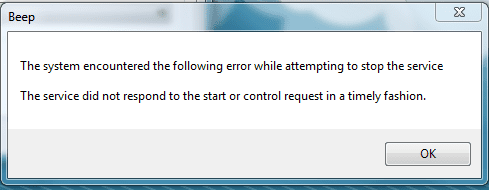
I did find the Beep feature where you said it was in the Device Manager. However, after I pressed Stop, an error message came up. Right now the status shows Stopping and can't select Stop or Start. It didn't fix the problem.

I looked at the volume mixer and it shows the beep is coming from System Sounds. When I click on it, it goes to the Sound Tab in the Sound settings through control panel. I can select different sounds and select None for the sound. However, I am not even sure which one I should be turning off in the first place.
 

My Computer My Computer

At a glance

Windows 7 Home Premium x64AMD Phenon(tm) II X2 511 Processor 3.40 GHz5.00 GB (4.75 GB usable)ATI Radeon HD 4200
Computer type
PC/Desktop
Computer Manufacturer/Model Number
HP
OS
Windows 7 Home Premium x64
CPU
AMD Phenon(tm) II X2 511 Processor 3.40 GHz
Motherboard
N-Alvorix-RS880-uATX (Alvorix)
Memory
5.00 GB (4.75 GB usable)
Graphics Card(s)
ATI Radeon HD 4200
Sound Card
Envy24 Family Audio Controller WDM
Hard Drives
698.64 GB Harddrive
Antivirus
Microsoft Security Essentials
Browser
Google Chrome
Your description confuses me a bit.

Device Manager options: details, update, roll back, disable, and uninstall

Services
Status options: Start, Stop, Pause, resume
Startup type: Automatic, Manual, Disabled

Your description might be fine
You found Beep in Device Manager
and
You found Beep in Services

When you tried to stop the Beep service, the status showed Stopping and you can't press stop or start

There was a communication break down. I suggested disabling the service
and you tried to stop the service.

If the Beep service has not stopped, restart your machine to resolve the Beep service = Stopping
that will start the service with it's defined startup type.

Let me back up to Device Manager. Did you make any change to Beep there?

Please post a screen shot of what you see in Sound settings
See: http://www.sevenforums.com/tutorials/9733-screenshots-files-upload-post-seven-forums.html

Since I can't see what you see, maybe it's a better plan to post screen shots for each step that you're taking.
Launch Device Manager and scroll down to where you saw beep, then post a screen shot of that window

Open service and open the properties of the Beep service, then post a screen shot of the general tab (that's the one that opens first)

I'm on Windows 8 and can't create screen shots for you to use as a reference, so we'll do it the other way.
Once I see your screen shots, I can better advise you.

Thanks,

Bill
.
 

My Computer My Computer

At a glance

x64 (6.3.9600) Win8.1 Pro & soon dual boot x6...AMD A6-3420M APU with Radeon(tm) HD Graphics6.00 GBAMD Radeon(TM) HD 6520G
Computer type
Laptop
Computer Manufacturer/Model Number
HP Pavilion dv6-6c10us
OS
x64 (6.3.9600) Win8.1 Pro & soon dual boot x64 (6.1.7601) Win7_SP1 HomePrem
CPU
AMD A6-3420M APU with Radeon(tm) HD Graphics
Motherboard
Hewlett-Packard 1805
Memory
6.00 GB
Graphics Card(s)
AMD Radeon(TM) HD 6520G
Sound Card
(1) AMD High Definition Audio Device (2) IDT High Definiti
Monitor(s) Displays
HP W2072a 20" LCD (1600 x 900) @ 60 Hz
Screen Resolution
1366 x 768 x 32 bits (4294967296 colors) @ 60 Hz
Hard Drives
ST640LM0 00 HM641JI SATA Disk Device
Keyboard
Logitech k520 wireless KB
Mouse
Logitech m320 wireless mouse (bundled with KB)
Internet Speed
15/5 | 54 MB Wireless 'n'
Antivirus
Realtime: Defender or Avast | On-demand: Malwarebytes, ESET
Browser
IE 11 on Win8, IE 10 on win 7
Other Info
Media: [Gimp, Audacity, VLC] || Comm: [WEmail 2012, Skype] || Productivity: [OpenOffice,| Textpad] || Utils: [Sysinternals, cCleaner, Speccy, Defraggler]
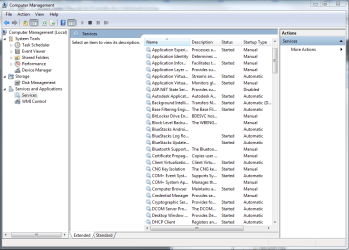
I want through what I did yesterday to show what is going on. First I went to the Services to find the Beep Service, turns out there isn't one.

Image I: Services with no Beep
Services with no Beep.png

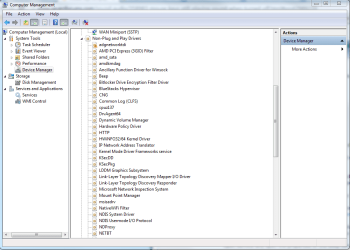
Next I checked the Device Manger. After I had the hidden devices shown, I found the Beep Service under Non-Plug and Play Drivers.

Image II: Device Manager
Device Manager.png

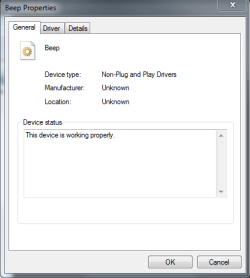
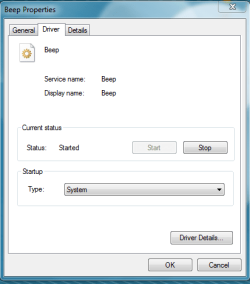
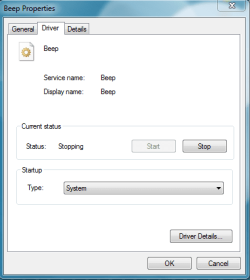
Here is the Beep Properties, both General and Driver Tabs.

Image III: Beep General Tab and Image IV: Beep Driver Tab
Beep Properties - General Tab.png
Beep Properties - Driver Tab.png

There was no selection to disable the Service, so I clicked Stop. After that I got an error message. When I clicked OK on the error message, the Current Status changed from Started to Stopping.

Image V: Error Message and Image VI: Beep Driver Tab
Error Message on Stop.png
Beep Properties - Driver Tab Stopping Status.png

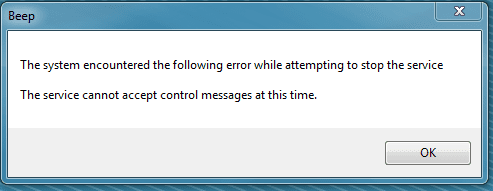
I decided to see what would happen if I clicked Stop again. Nothing else happened besides getting another error message.

Image VII: Second Error Message
Error Message on Clicking Stop Again.png

I would attach pictures of the Sound Tab in the Sound Panel, but not sure what exactly you are looking want. Thanks for any help you can give me.
 

My Computer My Computer

At a glance

Windows 7 Home Premium x64AMD Phenon(tm) II X2 511 Processor 3.40 GHz5.00 GB (4.75 GB usable)ATI Radeon HD 4200
Computer type
PC/Desktop
Computer Manufacturer/Model Number
HP
OS
Windows 7 Home Premium x64
CPU
AMD Phenon(tm) II X2 511 Processor 3.40 GHz
Motherboard
N-Alvorix-RS880-uATX (Alvorix)
Memory
5.00 GB (4.75 GB usable)
Graphics Card(s)
ATI Radeon HD 4200
Sound Card
Envy24 Family Audio Controller WDM
Hard Drives
698.64 GB Harddrive
Antivirus
Microsoft Security Essentials
Browser
Google Chrome
Thanks for the screen shots.

I see my confusion and am embarrassed (3rd time today :(). I haven't been in DevMgr / Non Plug and Play for a long time and as I mentioned, I'm on Win8 right now. I do have a Win7 machine - I should have checked.

Please take a look at the Startup type: (image VI - Beep Properties)

if there is a disabled, select that and restart - don't try to stop Beep, just change the startup type and restart the machine.

If there is no disabled, let me know what other types are presented.

Thanks
 

My Computer My Computer

At a glance

x64 (6.3.9600) Win8.1 Pro & soon dual boot x6...AMD A6-3420M APU with Radeon(tm) HD Graphics6.00 GBAMD Radeon(TM) HD 6520G
Computer type
Laptop
Computer Manufacturer/Model Number
HP Pavilion dv6-6c10us
OS
x64 (6.3.9600) Win8.1 Pro & soon dual boot x64 (6.1.7601) Win7_SP1 HomePrem
CPU
AMD A6-3420M APU with Radeon(tm) HD Graphics
Motherboard
Hewlett-Packard 1805
Memory
6.00 GB
Graphics Card(s)
AMD Radeon(TM) HD 6520G
Sound Card
(1) AMD High Definition Audio Device (2) IDT High Definiti
Monitor(s) Displays
HP W2072a 20" LCD (1600 x 900) @ 60 Hz
Screen Resolution
1366 x 768 x 32 bits (4294967296 colors) @ 60 Hz
Hard Drives
ST640LM0 00 HM641JI SATA Disk Device
Keyboard
Logitech k520 wireless KB
Mouse
Logitech m320 wireless mouse (bundled with KB)
Internet Speed
15/5 | 54 MB Wireless 'n'
Antivirus
Realtime: Defender or Avast | On-demand: Malwarebytes, ESET
Browser
IE 11 on Win8, IE 10 on win 7
Other Info
Media: [Gimp, Audacity, VLC] || Comm: [WEmail 2012, Skype] || Productivity: [OpenOffice,| Textpad] || Utils: [Sysinternals, cCleaner, Speccy, Defraggler]
I had to restart the computer in order to allow the Startup type to be changed. After that I changed the Statup Type to Disabled. After restarting the computer, I went back and checked to see if it was stopped. It currently is.

Image: Beep Driver Tab
Beep Properties - Driver Tab Stopped Status.png

After confirming this, I went and used the mouse keys to see if the beep sounds. I start pressing it and I am hit with frustration. The annoying Beep when I turn mouse keys on and off still sounds. Not sure what else to do besides muting System Sounds to not hear the beep.
 

My Computer My Computer

At a glance

Windows 7 Home Premium x64AMD Phenon(tm) II X2 511 Processor 3.40 GHz5.00 GB (4.75 GB usable)ATI Radeon HD 4200
Computer type
PC/Desktop
Computer Manufacturer/Model Number
HP
OS
Windows 7 Home Premium x64
CPU
AMD Phenon(tm) II X2 511 Processor 3.40 GHz
Motherboard
N-Alvorix-RS880-uATX (Alvorix)
Memory
5.00 GB (4.75 GB usable)
Graphics Card(s)
ATI Radeon HD 4200
Sound Card
Envy24 Family Audio Controller WDM
Hard Drives
698.64 GB Harddrive
Antivirus
Microsoft Security Essentials
Browser
Google Chrome
Thanks,

Let me think on this for a while - in the meantime, download Windows Sysinternals Autoruns. The first tab shows everything automatically run when Windows starts. The other tabs show Autoruns for specific applications / services. This is another thing I haven't used in quite a while, I'll download it and refresh my hands on.

Look though the tabs and if you see anything that looks related to the mouse sound or beep - post a screen shot.

Changing the wrong run item might negatively impact your system. The nice thing about Autoruns is that you can undo the change IF you remember what you did.

Download Autoruns from here. There are some reference materials at the bottom of the page. Some of this is fairly deep, but Autoruns is one of the easier internals.

I don't want you to change anything yet - just look

Bill
.
 

My Computer My Computer

At a glance

x64 (6.3.9600) Win8.1 Pro & soon dual boot x6...AMD A6-3420M APU with Radeon(tm) HD Graphics6.00 GBAMD Radeon(TM) HD 6520G
Computer type
Laptop
Computer Manufacturer/Model Number
HP Pavilion dv6-6c10us
OS
x64 (6.3.9600) Win8.1 Pro & soon dual boot x64 (6.1.7601) Win7_SP1 HomePrem
CPU
AMD A6-3420M APU with Radeon(tm) HD Graphics
Motherboard
Hewlett-Packard 1805
Memory
6.00 GB
Graphics Card(s)
AMD Radeon(TM) HD 6520G
Sound Card
(1) AMD High Definition Audio Device (2) IDT High Definiti
Monitor(s) Displays
HP W2072a 20" LCD (1600 x 900) @ 60 Hz
Screen Resolution
1366 x 768 x 32 bits (4294967296 colors) @ 60 Hz
Hard Drives
ST640LM0 00 HM641JI SATA Disk Device
Keyboard
Logitech k520 wireless KB
Mouse
Logitech m320 wireless mouse (bundled with KB)
Internet Speed
15/5 | 54 MB Wireless 'n'
Antivirus
Realtime: Defender or Avast | On-demand: Malwarebytes, ESET
Browser
IE 11 on Win8, IE 10 on win 7
Other Info
Media: [Gimp, Audacity, VLC] || Comm: [WEmail 2012, Skype] || Productivity: [OpenOffice,| Textpad] || Utils: [Sysinternals, cCleaner, Speccy, Defraggler]
It took a while for this to bubble up. You might have tried this, but please check.

I recalled how things are not exactly intuitive in
Control Panel\All Control Panel Items\Ease of Access Center\ (accessibility in Win7 ?)

Look in Make the keyboard easier to use and see how Turn on toggle keys is configured.
- If it is ticked, try clearing it ... if it is NOT ticked, try selecting it.

I'm not sure if a restart is required to make it stick. Toggle it and restart.

Also look in Setup Filter keys
- scroll down and near the bottom should be a check box that controls Beep when keys are pressed or accepted

It's all coming back - sort of ;)

You can leave Beep in DevMgr disabled or put it back the way it was since that wasn't the solution.
Image from post# 7 that shows how it was originally set IV: Beep Driver Tab image
- I don't think it's important and ran my Vista or Win7 system without it.
 

My Computer My Computer

At a glance

x64 (6.3.9600) Win8.1 Pro & soon dual boot x6...AMD A6-3420M APU with Radeon(tm) HD Graphics6.00 GBAMD Radeon(TM) HD 6520G
Computer type
Laptop
Computer Manufacturer/Model Number
HP Pavilion dv6-6c10us
OS
x64 (6.3.9600) Win8.1 Pro & soon dual boot x64 (6.1.7601) Win7_SP1 HomePrem
CPU
AMD A6-3420M APU with Radeon(tm) HD Graphics
Motherboard
Hewlett-Packard 1805
Memory
6.00 GB
Graphics Card(s)
AMD Radeon(TM) HD 6520G
Sound Card
(1) AMD High Definition Audio Device (2) IDT High Definiti
Monitor(s) Displays
HP W2072a 20" LCD (1600 x 900) @ 60 Hz
Screen Resolution
1366 x 768 x 32 bits (4294967296 colors) @ 60 Hz
Hard Drives
ST640LM0 00 HM641JI SATA Disk Device
Keyboard
Logitech k520 wireless KB
Mouse
Logitech m320 wireless mouse (bundled with KB)
Internet Speed
15/5 | 54 MB Wireless 'n'
Antivirus
Realtime: Defender or Avast | On-demand: Malwarebytes, ESET
Browser
IE 11 on Win8, IE 10 on win 7
Other Info
Media: [Gimp, Audacity, VLC] || Comm: [WEmail 2012, Skype] || Productivity: [OpenOffice,| Textpad] || Utils: [Sysinternals, cCleaner, Speccy, Defraggler]
I had tried what you suggested. I looked under Make the keyboard easier to use and the Turn on toggle keys setting was turned off. I turned this on, no restart was required. I also looked in Setup Filter Keys and I had to clear the box lebeled Beep when keys are pressed or accepted.

After I did all this and selected the Apply button, I tested the Num Lock. It still produced the beep. I had turned off toggle keys again, still a beep. I think there is some setting that is making it where the settings that normally would turn sound on/off are being bypassed.
 

My Computer My Computer

At a glance

Windows 7 Home Premium x64AMD Phenon(tm) II X2 511 Processor 3.40 GHz5.00 GB (4.75 GB usable)ATI Radeon HD 4200
Computer type
PC/Desktop
Computer Manufacturer/Model Number
HP
OS
Windows 7 Home Premium x64
CPU
AMD Phenon(tm) II X2 511 Processor 3.40 GHz
Motherboard
N-Alvorix-RS880-uATX (Alvorix)
Memory
5.00 GB (4.75 GB usable)
Graphics Card(s)
ATI Radeon HD 4200
Sound Card
Envy24 Family Audio Controller WDM
Hard Drives
698.64 GB Harddrive
Antivirus
Microsoft Security Essentials
Browser
Google Chrome
I'll think about it some more, maybe another idea will percolate up from the recesses.

Sometimes a solution eludes us because of a sequence or combination.

settings before changes
picture.php
ToggleKeys
picture.php
FilterKeys-beepWhen​
settings after changes
picture.php
ToggleKeys
picture.php
FilterKeys-beepWhen​
the only combination that remains is
picture.php
ToggleKeys
picture.php
FilterKeys-beepWhen​
You say that no restart was required - did you restart the machine?

There might not have been a message, but the change might not take effect until a restart.
Please restart the machine.
 

My Computer My Computer

At a glance

x64 (6.3.9600) Win8.1 Pro & soon dual boot x6...AMD A6-3420M APU with Radeon(tm) HD Graphics6.00 GBAMD Radeon(TM) HD 6520G
Computer type
Laptop
Computer Manufacturer/Model Number
HP Pavilion dv6-6c10us
OS
x64 (6.3.9600) Win8.1 Pro & soon dual boot x64 (6.1.7601) Win7_SP1 HomePrem
CPU
AMD A6-3420M APU with Radeon(tm) HD Graphics
Motherboard
Hewlett-Packard 1805
Memory
6.00 GB
Graphics Card(s)
AMD Radeon(TM) HD 6520G
Sound Card
(1) AMD High Definition Audio Device (2) IDT High Definiti
Monitor(s) Displays
HP W2072a 20" LCD (1600 x 900) @ 60 Hz
Screen Resolution
1366 x 768 x 32 bits (4294967296 colors) @ 60 Hz
Hard Drives
ST640LM0 00 HM641JI SATA Disk Device
Keyboard
Logitech k520 wireless KB
Mouse
Logitech m320 wireless mouse (bundled with KB)
Internet Speed
15/5 | 54 MB Wireless 'n'
Antivirus
Realtime: Defender or Avast | On-demand: Malwarebytes, ESET
Browser
IE 11 on Win8, IE 10 on win 7
Other Info
Media: [Gimp, Audacity, VLC] || Comm: [WEmail 2012, Skype] || Productivity: [OpenOffice,| Textpad] || Utils: [Sysinternals, cCleaner, Speccy, Defraggler]
Same problem here, Windows sounds are disabled, and still hear annoying BEEP whenever turning mousekeys on/off, my system is used for audio and Volume is WAY UP, so it's a shame this can't be disabled.
 

My Computer My Computer

At a glance

Windows XP 32bitCeleron G18408GbIntel Haswell HD
Computer type
PC/Desktop
Computer Manufacturer/Model Number
custom
OS
Windows XP 32bit
CPU
Celeron G1840
Motherboard
Asrock B85M Pro4
Memory
8Gb
Graphics Card(s)
Intel Haswell HD
Hard Drives
2Tb + 4Tb
Antivirus
Microsoft
Browser
Firefox
Back
Top