Mouse Lag

alanswartwood

New member
Local time
1:40 PM
Messages
6
Just got a new computer at work and it's got Windows 7. Im having to teach myself how to use it, as I am the first to get it. I have noticed a considerable lag with my mouse whenever I am trying to drag something, but only when im dragging. Whether its dragging a file into the Recycle Bin or dropping a pdf file into Acrobat, the mouse will only travel an inch or two and hold. Its not the kind of lag you find on video games (where the object will continue to travel in a direction until the lag goes away)...its more like the icon just stops even though I am still dragging, and when the lag ends, the icon just picks up where it left off. It doesnt jump from place to place. I dont know if i've explained this well, but if anyone has any ideas, I would appreciate them.
-Thx!
 

My Computer

OS
Windows 7 Pro 64-bit
CPU
HP Z200
Memory
8Gb
Monitor(s) Displays
Viewsonic
Can you tell us more about the mouse make and model.
 

My Computer

Computer type
PC/Desktop
Computer Manufacturer/Model Number
A blend of brains, brawn and dumb luck.
OS
Windows 7 Ultimate 64
CPU
i7 3770k OC'd 4.6 @ 1.17v, also FX 8120 & i5 miniITX
Motherboard
MSI P67A-GD80 b3
Memory
32 gb G.Skill Sniper DDR3 10-12-12-31 @ 2133
Graphics Card(s)
XFX Radeon 7870 2GB DDR5
Sound Card
Sound Blaster Z Series Card
Monitor(s) Displays
(2) LG LED 23" 1920 x 1080 2ms Monitors via mini d-port
Screen Resolution
1680 X 1050 p
Hard Drives
Samsung 256 gb 830 SSD sata III
(1) 1 tb WD Black
(2) 1 tb Hitachi deskmates/sata II
(2) 1 tb WD green/sata II
(2) 3 tb Seagate Barracuda
(1) 120 gb OCZ Vertex SS
(1) Drobo 5N w/5 Seagate 3tb
PSU
EVGA modular 1000G2 80% gold rating & APC 1200 RS
Case
CoolerMaster Storm Styker
Cooling
7 case fans 140mm & 120mm, NZXT Kraken X60
Keyboard
(2) Logitech Illuminated Keyboards (1) usb (1) wireless
Mouse
Logitech G700 & T-BC21 - nano nx for the laptop
Internet Speed
Basic 120mbps down
Antivirus
Trend Micro Titanium Max Security & Malwarebytes Premium
Browser
Chrome and IE 10
Other Info
5 Noctua case fans + 3 Noctua in p/p on NZXT cooler
Integrated hot swap drive bays for 2.5" Drives
(2) Lite-on dvd/cd/Blu Ray optical 22X
Integrated fan controller and led on/off
HP Officejet Pro 8630 all-n-one
Hot-swappable 3.5" hard drive bay
Netgear Nighthawk router
Asus USB 3 & sata 6 PCIe card
Vantec IDE to sata adptr./Ultra sata adptr
Lenovo L420 i5 lappy with m sata
Drobo 5N advanced NAS
I was thinking the same. Also can you test with another mouse?

If the other mouse doesn't work properly, you can try accessing the computer in safe mode and see if in safe mode the mouse works fine: http://www.sevenforums.com/tutorials/69585-safe-mode.html

If the mouse works fine in safe mode then you have a problem with the drivers for the mouse. We can assess that as well after we narrow it down.
 
Last edited:

My Computer

Computer type
Laptop
Computer Manufacturer/Model Number
ASUS G60-RBBX05
OS
Win7 Home Premium 64x
CPU
Intel Core 2 Duo P7450 / 2.13 GHz (2.29 with Extreme Turbo)
Memory
4 GB PC-6400 Hyundai (2X2) at 800Mhz
Graphics Card(s)
NVIDIA GeForce GTX 260M 1GB DDR3 VRAM
Monitor(s) Displays
16" LED Backlit
Screen Resolution
1366 x 768 on laptop 1600x1050 max res on 22" external mon
Hard Drives
OCZ Agility 3 60GB SSD / 320 GB - Serial ATA-150 - 7200 rpm
PSU
6-cell Lithium ion { lasts 1.5 hours }
Case
ASUS G60 Laptop
Keyboard
Chicklet type back-lit (white light) keyboard
Mouse
Logitech G9 Laser Mouse 3200dpi and 1000 reports per minute
Internet Speed
Comcast 8.60mb/s up - 3.11mb/s down
Antivirus
MSE
Browser
Firefox
Other Info
General mid-budget gaming Comp. Low batterylife - High FrameRates - currently overheating problems :(

2nd Rig: Case: Rosewill BLACKHAWK Gaming ATX Mid Tower Computer Case

Mobo: GIGABYTE GA-990FXA-UD3
CPU: AMD FX-6200 Zambezi 3.8GHz (4.1GHz Turbo)
Heatsink: COOLER MASTER V8 CPU Cooler
RAM: Patriot Viper 3 8GB (2 x 4GB) 240-Pin DDR3 SDRAM 1866 (PC3 15000)
GPU: SAPPHIRE Radeon HD 6850 1GB 2
Re

Its a standard Dell optical. I will try a different mouse and report back. Thx
 

My Computer

OS
Windows 7 Pro 64-bit
CPU
HP Z200
Memory
8Gb
Monitor(s) Displays
Viewsonic
Re

Ok...I plugged in the HP mouse that came with it and it seems to do better, but the lag shows up every now and again. Even with the Dell mouse, its not constant. Maybe happens 1 out of 5 times I drag something. With the HP it was more like 1 out of 10. Im reading up on the "safe mode" option. This is my work computer, will this have any effect on programs or permissions?
 

My Computer

OS
Windows 7 Pro 64-bit
CPU
HP Z200
Memory
8Gb
Monitor(s) Displays
Viewsonic
You say this is a new computer and I'm thinking it could be loaded with bloatware which should be removed. Also I wonder what your start menu looks like? You could have tons of apps waiting in the background taking up resources.
 

My Computer

Computer type
PC/Desktop
Computer Manufacturer/Model Number
A blend of brains, brawn and dumb luck.
OS
Windows 7 Ultimate 64
CPU
i7 3770k OC'd 4.6 @ 1.17v, also FX 8120 & i5 miniITX
Motherboard
MSI P67A-GD80 b3
Memory
32 gb G.Skill Sniper DDR3 10-12-12-31 @ 2133
Graphics Card(s)
XFX Radeon 7870 2GB DDR5
Sound Card
Sound Blaster Z Series Card
Monitor(s) Displays
(2) LG LED 23" 1920 x 1080 2ms Monitors via mini d-port
Screen Resolution
1680 X 1050 p
Hard Drives
Samsung 256 gb 830 SSD sata III
(1) 1 tb WD Black
(2) 1 tb Hitachi deskmates/sata II
(2) 1 tb WD green/sata II
(2) 3 tb Seagate Barracuda
(1) 120 gb OCZ Vertex SS
(1) Drobo 5N w/5 Seagate 3tb
PSU
EVGA modular 1000G2 80% gold rating & APC 1200 RS
Case
CoolerMaster Storm Styker
Cooling
7 case fans 140mm & 120mm, NZXT Kraken X60
Keyboard
(2) Logitech Illuminated Keyboards (1) usb (1) wireless
Mouse
Logitech G700 & T-BC21 - nano nx for the laptop
Internet Speed
Basic 120mbps down
Antivirus
Trend Micro Titanium Max Security & Malwarebytes Premium
Browser
Chrome and IE 10
Other Info
5 Noctua case fans + 3 Noctua in p/p on NZXT cooler
Integrated hot swap drive bays for 2.5" Drives
(2) Lite-on dvd/cd/Blu Ray optical 22X
Integrated fan controller and led on/off
HP Officejet Pro 8630 all-n-one
Hot-swappable 3.5" hard drive bay
Netgear Nighthawk router
Asus USB 3 & sata 6 PCIe card
Vantec IDE to sata adptr./Ultra sata adptr
Lenovo L420 i5 lappy with m sata
Drobo 5N advanced NAS
You say this is a new computer and I'm thinking it could be loaded with bloatware which should be removed. Also I wonder what your start menu looks like? You could have tons of apps waiting in the background taking up resources.

I dont know what bloatware is and start menu only has a few things on it. I checked my processes to make sure there wasnt anything running in the background and im fine there. Im in safe mode now and its hard to tell if this has worked because the interface is different and im not able to perform the same tasks here. Also, my Acrobat keeps getting a runtime error and closing. Im at a bit of a loss here. Like i said earlier, its not constant. Its only when i have something highlited and try to drag it somewhere else.
 

My Computer

OS
Windows 7 Pro 64-bit
CPU
HP Z200
Memory
8Gb
Monitor(s) Displays
Viewsonic
does this "lag" happen with no programs open? Also can you post your pc specs? You may have a new machine but if it is under spec'd for win7 you will have issues.
 

My Computer

Computer Manufacturer/Model Number
Custom
OS
Windows 8 Professional
CPU
AMD Phenom II X6
Motherboard
ASUS
Memory
8 GB
Graphics Card(s)
XFX ATI Radeon 4890
Monitor(s) Displays
Dual 22" LCD
Screen Resolution
1680x1050
Hard Drives
PC Drives

HD0 = Crucial SSD 128gb Sata III
HD1 = 300gb (Seagate Barracuda)

NAS

HD0 = 1.5TB (Maxtor) Raid1
HD1 = 1.5TB (Maxtor) Raid1
HD2 = 1TB (Segate) Raid5
HD3 = 1TB (Segate) Raid5
HD4 = 1TB (Segate) Raid5
HD5 = 1TB (Segate) Raid5
PSU
750 watt
Mouse
Razr Mamba
Internet Speed
50 down 35 up FIOS
I would contact HP regarding your new server and discuss these issues as you are well inside any warranty period. Bloatware FYI is all the free software that the major manufacturers place on their systems over and above the OS and drivers.
 

My Computer

Computer type
PC/Desktop
Computer Manufacturer/Model Number
A blend of brains, brawn and dumb luck.
OS
Windows 7 Ultimate 64
CPU
i7 3770k OC'd 4.6 @ 1.17v, also FX 8120 & i5 miniITX
Motherboard
MSI P67A-GD80 b3
Memory
32 gb G.Skill Sniper DDR3 10-12-12-31 @ 2133
Graphics Card(s)
XFX Radeon 7870 2GB DDR5
Sound Card
Sound Blaster Z Series Card
Monitor(s) Displays
(2) LG LED 23" 1920 x 1080 2ms Monitors via mini d-port
Screen Resolution
1680 X 1050 p
Hard Drives
Samsung 256 gb 830 SSD sata III
(1) 1 tb WD Black
(2) 1 tb Hitachi deskmates/sata II
(2) 1 tb WD green/sata II
(2) 3 tb Seagate Barracuda
(1) 120 gb OCZ Vertex SS
(1) Drobo 5N w/5 Seagate 3tb
PSU
EVGA modular 1000G2 80% gold rating & APC 1200 RS
Case
CoolerMaster Storm Styker
Cooling
7 case fans 140mm & 120mm, NZXT Kraken X60
Keyboard
(2) Logitech Illuminated Keyboards (1) usb (1) wireless
Mouse
Logitech G700 & T-BC21 - nano nx for the laptop
Internet Speed
Basic 120mbps down
Antivirus
Trend Micro Titanium Max Security & Malwarebytes Premium
Browser
Chrome and IE 10
Other Info
5 Noctua case fans + 3 Noctua in p/p on NZXT cooler
Integrated hot swap drive bays for 2.5" Drives
(2) Lite-on dvd/cd/Blu Ray optical 22X
Integrated fan controller and led on/off
HP Officejet Pro 8630 all-n-one
Hot-swappable 3.5" hard drive bay
Netgear Nighthawk router
Asus USB 3 & sata 6 PCIe card
Vantec IDE to sata adptr./Ultra sata adptr
Lenovo L420 i5 lappy with m sata
Drobo 5N advanced NAS
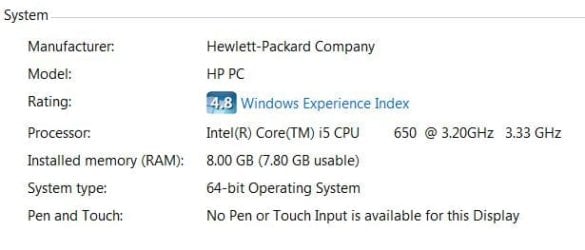
does this "lag" happen with no programs open? Also can you post your pc specs? You may have a new machine but if it is under spec'd for win7 you will have issues.

Yes (sometimes). All programs closed. Just moving icons around on my desktop and it happens.

I attached a capture of the specs.
 

Attachments

  • Capture.JPG
    Capture.JPG
    24.5 KB · Views: 19

My Computer

OS
Windows 7 Pro 64-bit
CPU
HP Z200
Memory
8Gb
Monitor(s) Displays
Viewsonic
You said this is a work computer, do you have an IT department? anyone at your work you could have look at it?

I am glad you could get into safe-mode. I was hoping to see whether or not it presented the same lag in there.

Also, is this a laptop? there might be an issue with the touchpad that is interferring with the mouse. You can disable the touchpad when the mouse is plugged in. Or try without mouse to see if touchpad presents same lag issue.
 

My Computer

Computer type
Laptop
Computer Manufacturer/Model Number
ASUS G60-RBBX05
OS
Win7 Home Premium 64x
CPU
Intel Core 2 Duo P7450 / 2.13 GHz (2.29 with Extreme Turbo)
Memory
4 GB PC-6400 Hyundai (2X2) at 800Mhz
Graphics Card(s)
NVIDIA GeForce GTX 260M 1GB DDR3 VRAM
Monitor(s) Displays
16" LED Backlit
Screen Resolution
1366 x 768 on laptop 1600x1050 max res on 22" external mon
Hard Drives
OCZ Agility 3 60GB SSD / 320 GB - Serial ATA-150 - 7200 rpm
PSU
6-cell Lithium ion { lasts 1.5 hours }
Case
ASUS G60 Laptop
Keyboard
Chicklet type back-lit (white light) keyboard
Mouse
Logitech G9 Laser Mouse 3200dpi and 1000 reports per minute
Internet Speed
Comcast 8.60mb/s up - 3.11mb/s down
Antivirus
MSE
Browser
Firefox
Other Info
General mid-budget gaming Comp. Low batterylife - High FrameRates - currently overheating problems :(

2nd Rig: Case: Rosewill BLACKHAWK Gaming ATX Mid Tower Computer Case

Mobo: GIGABYTE GA-990FXA-UD3
CPU: AMD FX-6200 Zambezi 3.8GHz (4.1GHz Turbo)
Heatsink: COOLER MASTER V8 CPU Cooler
RAM: Patriot Viper 3 8GB (2 x 4GB) 240-Pin DDR3 SDRAM 1866 (PC3 15000)
GPU: SAPPHIRE Radeon HD 6850 1GB 2
You said this is a work computer, do you have an IT department? anyone at your work you could have look at it?

I am glad you could get into safe-mode. I was hoping to see whether or not it presented the same lag in there.

Also, is this a laptop? there might be an issue with the touchpad that is interferring with the mouse. You can disable the touchpad when the mouse is plugged in. Or try without mouse to see if touchpad presents same lag issue.

Unfortunately no, we dont have an IT dept. We outsource all our IT and when they log on remotely, they dont experience the lag. It isnt a laptop.
 

My Computer

OS
Windows 7 Pro 64-bit
CPU
HP Z200
Memory
8Gb
Monitor(s) Displays
Viewsonic
Back
Top