Mouse Lagging

billy341

New member
Ran a search on google and here and although there are topics concerning mouse lagging, there isnt one with my problem.

Ive had Windows 7 for about 2 month now and this issue has plagued me from the start.

When i start my computer, browse the internet, anything like that everything is fine.

However, if i play a game, or use some 3d editing software like maye etc, after 30 mins to 1 hour, my mouse behaves very erraticly as tho it is lagging.

I use a Razer Lechessis, According to theyre site the drivers they give do not support windows 7 so i have removed them and just using the HID standard drivers from Windows.

I didnt have this issue in xp, just when i upgraded to Windows 7.

If i unplug the mouse from the usb and replace it, it loses all the acceleration etc from the settings and is even slower than it should be, only way i can fix it is by rebooting.

Anyone experiencing something similar? i sent a mail to the Razer Support but i never recieved anything in return, so im here looking for help.

Filled out system specs when registering but just in case:

AMD Athlon X2 6400Black Edition
MSI K9A2-Platinum Motherboard
Sapphire HD 4870 X2
Corsair TX650W PSU
3.5gb(4gb) DDR2 OCZ Reaper HCP Edition
Windows 7 Ultimate 32bit
 

My Computer

Computer Manufacturer/Model Number
Cyberpower.co.uk
OS
Windows 7
CPU
AMD Athlon 64 X2 6400 BE
Motherboard
MSI K9A2-Platinum
Memory
4GB OCZ HPC Reaper
Graphics Card(s)
ATI Radeon HD 4870X2
Sound Card
Creative Sounblaster Extreme Gamer
Monitor(s) Displays
Fujitsu Seimens Scaleoview L22-W-2DV
Hard Drives
Western Digital 320gb
PSU
Corsair TX650W
Cooling
2x System Fans, Zalman CPU Fan
I use a Razer Lechessis, According to theyre site the drivers they give do not support windows 7
Oh? Then what's this?
 

My Computer

Computer Manufacturer/Model Number
BrightWorks Systems B4
OS
Windows 7 Profession 64-bit
CPU
Intel Core i7-860 Quad
Motherboard
Gigabyte P55-UD4P
Memory
Mushkin 4x2Gb PC12800
Graphics Card(s)
Gigabyte GTX260 896Mb
Sound Card
Integrated 7.1 HD Dolby
Monitor(s) Displays
2 Samsung 2220wm-HAS 22"
Screen Resolution
1680 x 1050 | 1680 x 1050
Hard Drives
WD HE 1Tb
PSU
Corsair TX-750W
Case
Ultra M998
Cooling
OEM
Keyboard
MS Wireless Comfort 5000
Mouse
MS Wireless 5000
Internet Speed
Cable and pretty darn fast
Yes, i was mistaken, im using that driver, what they dont have a Firmware compatable with Windows 7, i still have the problem, noone can help shed any light?
 

My Computer

Computer Manufacturer/Model Number
Cyberpower.co.uk
OS
Windows 7
CPU
AMD Athlon 64 X2 6400 BE
Motherboard
MSI K9A2-Platinum
Memory
4GB OCZ HPC Reaper
Graphics Card(s)
ATI Radeon HD 4870X2
Sound Card
Creative Sounblaster Extreme Gamer
Monitor(s) Displays
Fujitsu Seimens Scaleoview L22-W-2DV
Hard Drives
Western Digital 320gb
PSU
Corsair TX650W
Cooling
2x System Fans, Zalman CPU Fan

My Computer

Computer Manufacturer/Model Number
BrightWorks Systems B4
OS
Windows 7 Profession 64-bit
CPU
Intel Core i7-860 Quad
Motherboard
Gigabyte P55-UD4P
Memory
Mushkin 4x2Gb PC12800
Graphics Card(s)
Gigabyte GTX260 896Mb
Sound Card
Integrated 7.1 HD Dolby
Monitor(s) Displays
2 Samsung 2220wm-HAS 22"
Screen Resolution
1680 x 1050 | 1680 x 1050
Hard Drives
WD HE 1Tb
PSU
Corsair TX-750W
Case
Ultra M998
Cooling
OEM
Keyboard
MS Wireless Comfort 5000
Mouse
MS Wireless 5000
Internet Speed
Cable and pretty darn fast
Indeed i tried, but it wouldnt let me install it, came up with an error warning "This Version does not support Windows 7"
 

My Computer

Computer Manufacturer/Model Number
Cyberpower.co.uk
OS
Windows 7
CPU
AMD Athlon 64 X2 6400 BE
Motherboard
MSI K9A2-Platinum
Memory
4GB OCZ HPC Reaper
Graphics Card(s)
ATI Radeon HD 4870X2
Sound Card
Creative Sounblaster Extreme Gamer
Monitor(s) Displays
Fujitsu Seimens Scaleoview L22-W-2DV
Hard Drives
Western Digital 320gb
PSU
Corsair TX650W
Cooling
2x System Fans, Zalman CPU Fan
Then I guess you need a new mouse - and should probably send a stern note to Razer telling them you are unhappy with their support and will be sure to tell your other Win7 friends who not to do business with. :(
 

My Computer

Computer Manufacturer/Model Number
BrightWorks Systems B4
OS
Windows 7 Profession 64-bit
CPU
Intel Core i7-860 Quad
Motherboard
Gigabyte P55-UD4P
Memory
Mushkin 4x2Gb PC12800
Graphics Card(s)
Gigabyte GTX260 896Mb
Sound Card
Integrated 7.1 HD Dolby
Monitor(s) Displays
2 Samsung 2220wm-HAS 22"
Screen Resolution
1680 x 1050 | 1680 x 1050
Hard Drives
WD HE 1Tb
PSU
Corsair TX-750W
Case
Ultra M998
Cooling
OEM
Keyboard
MS Wireless Comfort 5000
Mouse
MS Wireless 5000
Internet Speed
Cable and pretty darn fast
Then I guess you need a new mouse - and should probably send a stern note to Razer telling them you are unhappy with their support and will be sure to tell your other Windows 7 friends who not to do business with. :(

make sure you link to this thread to prove it also. :D
 

My Computer

Computer type
PC/Desktop
Computer Manufacturer/Model Number
HP Pavilion g7-1350dx
OS
Windows 7 Ultimate SP1 x64
CPU
AMD A6-3420M APU
Memory
4.0 Gb DDR3 838 MHz
Graphics Card(s)
AMD Radeon HD 6520G
Sound Card
IDT HD Audio
Screen Resolution
1600x 900
Hard Drives
500GB Hitachi HTS547550A9E384
Did you try doing it in compatibility mode? Right click the firmware update icon and click properties. Go to the compatibility tab. Tick the compatibility mode box and choose Vista 32bit or 64bit, depending on what version of 7 you have.
 

My Computer

Computer type
Laptop
Computer Manufacturer/Model Number
Toshiba P775-S7100
OS
Windows 7 Professional SP1 64-bit
CPU
Intel Core i5-2450M @2.5 GHz
Memory
6 GB DDR3 1333MHz
Graphics Card(s)
Intel HD 3000
Monitor(s) Displays
Built-in 17.3" LED; 22" Insignia NS-L22Q-10A
Screen Resolution
1600x900; 1360x768
Hard Drives
750 GB Hitachi
1TB Seagate FreeAgent External
Internet Speed
Verizon DSL Speed(Down/Up): 3360 Kbps / 800 Kbps
Antivirus
MSE and MBAM Pro
Browser
IE10
Indeed i tried, but it wouldnt let me install it, came up with an error warning "This Version does not support Windows 7"

I'm going to approach you problem differently. Let's assume that the problem is not caused by the mouse or its driver.

Be certain that you have the latest bios update for your motherboard.

Be certain that you have the latest driver for your video card.

If problem still exists after the updates, then
go to the Startup tab of MsConfig and uncheck EVERYTHING that is not from microsoft.

Problem go away? If yes, start rechecking until you find the culprit.

Oh yes, AV software can cause funny problems. For this, I recommend uninstalling your present AV and downloading and installing Microsoft Security Essentials which is free, excellent, and non-interfering.
 

My Computer

Computer Manufacturer/Model Number
Toshiba Satellite S875D-S7239 laptop
OS
MS Windows 7 Ultimate SP1 64-bit
CPU
AMD A10-4600M
Motherboard
AMD Pumori (Socket FT1)
Memory
6.00 GB Dual-Channel DDR3 @ 798MHz (11-11-12-28)
Graphics Card(s)
AMD Radeon HD 7660G
Sound Card
High Definition Audio Device
Monitor(s) Displays
Generic PnP Monitor (1600x900@60Hz)
Screen Resolution
1600x900@60Hz
Hard Drives
SSD 119GB Corsair CSSD-V128GB2 ATA Device
Keyboard
Standard PS/2 Keyboard
Mouse
HP Wireless Optical Mobile Mouse Model FHA-3410
Internet Speed
What the local pub, local coffee shop offers.
Other Info
Optical Drive:MATSHITA BD-CMB UJ160B ATA Device


Also have an Asus ha1002xp netbook with Win 7 Ultimate installed.
I decided to do a fresh install from the cd', This gave me the most up to date Firmware (v1.94), but i had to redownload the 1.10 Driver. Sadly the problem still persists.

Managed to get a dialog going with the Razer Support through emails but theyre just asking copy/paste questions regarding USB slots Motherboard updates/Bios etc, ive tested all of these and its not them at fault.

I fear you may be correct, a new mouse may be in order, one more suited to Windows 7. Kinda wish id stayed with XP till i got my new pc next year now. Atleast the only problems i am having is with one hardware device and not the rest of the pc :)

To reiterate, in the operating system its fine, as soon as anything involves 3d graphics, i screws up, could it be an issue with the graphics card at all?
 

My Computer

Computer Manufacturer/Model Number
Cyberpower.co.uk
OS
Windows 7
CPU
AMD Athlon 64 X2 6400 BE
Motherboard
MSI K9A2-Platinum
Memory
4GB OCZ HPC Reaper
Graphics Card(s)
ATI Radeon HD 4870X2
Sound Card
Creative Sounblaster Extreme Gamer
Monitor(s) Displays
Fujitsu Seimens Scaleoview L22-W-2DV
Hard Drives
Western Digital 320gb
PSU
Corsair TX650W
Cooling
2x System Fans, Zalman CPU Fan
I decided to do a fresh install from the cd', This gave me the most up to date Firmware (v1.94), but i had to redownload the 1.10 Driver. Sadly the problem still persists.

Managed to get a dialog going with the Razer Support through emails but theyre just asking copy/paste questions regarding USB slots Motherboard updates/Bios etc, ive tested all of these and its not them at fault.

I fear you may be correct, a new mouse may be in order, one more suited to Windows 7. Kinda wish id stayed with XP till i got my new pc next year now. Atleast the only problems i am having is with one hardware device and not the rest of the pc :)

To reiterate, in the operating system its fine, as soon as anything involves 3d graphics, i screws up, could it be an issue with the graphics card at all?

In answer to your question YES.
 

My Computer

Computer Manufacturer/Model Number
Toshiba Satellite S875D-S7239 laptop
OS
MS Windows 7 Ultimate SP1 64-bit
CPU
AMD A10-4600M
Motherboard
AMD Pumori (Socket FT1)
Memory
6.00 GB Dual-Channel DDR3 @ 798MHz (11-11-12-28)
Graphics Card(s)
AMD Radeon HD 7660G
Sound Card
High Definition Audio Device
Monitor(s) Displays
Generic PnP Monitor (1600x900@60Hz)
Screen Resolution
1600x900@60Hz
Hard Drives
SSD 119GB Corsair CSSD-V128GB2 ATA Device
Keyboard
Standard PS/2 Keyboard
Mouse
HP Wireless Optical Mobile Mouse Model FHA-3410
Internet Speed
What the local pub, local coffee shop offers.
Other Info
Optical Drive:MATSHITA BD-CMB UJ160B ATA Device


Also have an Asus ha1002xp netbook with Win 7 Ultimate installed.
I'm gonna check the compatibility of your graohics card with the rest of your hardware. In the mean time. Turn the computer off, take the video card out, then put it back in. Sometimes reseating hardware fixes problems.
 

My Computer

Computer type
Laptop
Computer Manufacturer/Model Number
Toshiba P775-S7100
OS
Windows 7 Professional SP1 64-bit
CPU
Intel Core i5-2450M @2.5 GHz
Memory
6 GB DDR3 1333MHz
Graphics Card(s)
Intel HD 3000
Monitor(s) Displays
Built-in 17.3" LED; 22" Insignia NS-L22Q-10A
Screen Resolution
1600x900; 1360x768
Hard Drives
750 GB Hitachi
1TB Seagate FreeAgent External
Internet Speed
Verizon DSL Speed(Down/Up): 3360 Kbps / 800 Kbps
Antivirus
MSE and MBAM Pro
Browser
IE10
The main thing I looked at was the PSU compatibility and that seems perfectly fine. I can't think of anything else to try or check at the moment but I'll get back to you if I do.
 

My Computer

Computer type
Laptop
Computer Manufacturer/Model Number
Toshiba P775-S7100
OS
Windows 7 Professional SP1 64-bit
CPU
Intel Core i5-2450M @2.5 GHz
Memory
6 GB DDR3 1333MHz
Graphics Card(s)
Intel HD 3000
Monitor(s) Displays
Built-in 17.3" LED; 22" Insignia NS-L22Q-10A
Screen Resolution
1600x900; 1360x768
Hard Drives
750 GB Hitachi
1TB Seagate FreeAgent External
Internet Speed
Verizon DSL Speed(Down/Up): 3360 Kbps / 800 Kbps
Antivirus
MSE and MBAM Pro
Browser
IE10
**before we jump to conclusions**
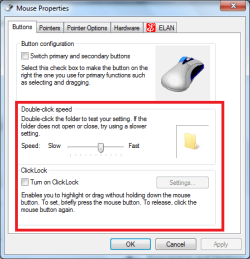
1) open controll panel
2) select mouse
panel.PNG
3) check to make sure that click lock off, and adjust the duble click speed to that you prefer.
mouse1.PNG
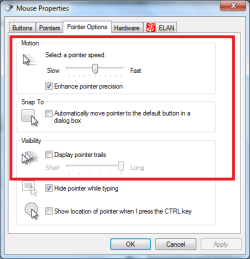
4) then go to the pointer options tab
5) select/update your pointer speed to that you prefer, make sure its not on slow!!
6) if you have pointer trail enabled, please disable it, this has coused problems for me in the past.
mouse.PNG
7) see if problems still ocur
 

My Computer

Computer type
PC/Desktop
Computer Manufacturer/Model Number
HP Pavilion g7-1350dx
OS
Windows 7 Ultimate SP1 x64
CPU
AMD A6-3420M APU
Memory
4.0 Gb DDR3 838 MHz
Graphics Card(s)
AMD Radeon HD 6520G
Sound Card
IDT HD Audio
Screen Resolution
1600x 900
Hard Drives
500GB Hitachi HTS547550A9E384
Done, Done and Done.

As soon as i reconnect the device and now that im working in the operating system (not playing a game) its fine. Only slows down after 30 mins or so playing a game, any game.

Had no problem like this in xp, only in windows 7.

PS: Thanks for the ongoing assistance, i can guess this isnt the most entrhralling issue out there :P
 

My Computer

Computer Manufacturer/Model Number
Cyberpower.co.uk
OS
Windows 7
CPU
AMD Athlon 64 X2 6400 BE
Motherboard
MSI K9A2-Platinum
Memory
4GB OCZ HPC Reaper
Graphics Card(s)
ATI Radeon HD 4870X2
Sound Card
Creative Sounblaster Extreme Gamer
Monitor(s) Displays
Fujitsu Seimens Scaleoview L22-W-2DV
Hard Drives
Western Digital 320gb
PSU
Corsair TX650W
Cooling
2x System Fans, Zalman CPU Fan
billy, for some reason when I search for your RAM and CPU I can't find anything on either of them. Could you check to make sure everything in your system specs is right. You might have just made a couple typos, which is easy to do.
 

My Computer

Computer type
Laptop
Computer Manufacturer/Model Number
Toshiba P775-S7100
OS
Windows 7 Professional SP1 64-bit
CPU
Intel Core i5-2450M @2.5 GHz
Memory
6 GB DDR3 1333MHz
Graphics Card(s)
Intel HD 3000
Monitor(s) Displays
Built-in 17.3" LED; 22" Insignia NS-L22Q-10A
Screen Resolution
1600x900; 1360x768
Hard Drives
750 GB Hitachi
1TB Seagate FreeAgent External
Internet Speed
Verizon DSL Speed(Down/Up): 3360 Kbps / 800 Kbps
Antivirus
MSE and MBAM Pro
Browser
IE10

My Computer

Computer Manufacturer/Model Number
Cyberpower.co.uk
OS
Windows 7
CPU
AMD Athlon 64 X2 6400 BE
Motherboard
MSI K9A2-Platinum
Memory
4GB OCZ HPC Reaper
Graphics Card(s)
ATI Radeon HD 4870X2
Sound Card
Creative Sounblaster Extreme Gamer
Monitor(s) Displays
Fujitsu Seimens Scaleoview L22-W-2DV
Hard Drives
Western Digital 320gb
PSU
Corsair TX650W
Cooling
2x System Fans, Zalman CPU Fan
Your system specs show 6300 for the CPU and HCD edition for the RAM.
 

My Computer

Computer type
Laptop
Computer Manufacturer/Model Number
Toshiba P775-S7100
OS
Windows 7 Professional SP1 64-bit
CPU
Intel Core i5-2450M @2.5 GHz
Memory
6 GB DDR3 1333MHz
Graphics Card(s)
Intel HD 3000
Monitor(s) Displays
Built-in 17.3" LED; 22" Insignia NS-L22Q-10A
Screen Resolution
1600x900; 1360x768
Hard Drives
750 GB Hitachi
1TB Seagate FreeAgent External
Internet Speed
Verizon DSL Speed(Down/Up): 3360 Kbps / 800 Kbps
Antivirus
MSE and MBAM Pro
Browser
IE10
Applogies and fixed, thanks for pointing it out :)
 

My Computer

Computer Manufacturer/Model Number
Cyberpower.co.uk
OS
Windows 7
CPU
AMD Athlon 64 X2 6400 BE
Motherboard
MSI K9A2-Platinum
Memory
4GB OCZ HPC Reaper
Graphics Card(s)
ATI Radeon HD 4870X2
Sound Card
Creative Sounblaster Extreme Gamer
Monitor(s) Displays
Fujitsu Seimens Scaleoview L22-W-2DV
Hard Drives
Western Digital 320gb
PSU
Corsair TX650W
Cooling
2x System Fans, Zalman CPU Fan
Back
Top